
AiCore
AiCore now includes a comprehensive observability module that helps you track, analyze, and visualize your LLM operations. Now with MCP support!
Documentation
AiCore Project






✨ AiCore is a comprehensive framework for integrating various language models and embedding providers with a unified interface. It supports both synchronous and asynchronous operations for generating text completions and embeddings, featuring:
🔌 Multi-provider support: OpenAI, Mistral, Groq, Gemini, NVIDIA, and more
🤖 Reasoning augmentation: Enhance traditional LLMs with reasoning capabilities
📊 Observability: Built-in monitoring and analytics
💰 Token tracking: Detailed usage metrics and cost tracking
⚡ Flexible deployment: Chainlit, FastAPI, and standalone script support
🛠️ MCP Integration: Connect to Model Control Protocol servers via tool calling
🖥️ Claude Code provider: Use your Claude subscription locally or remotely via the Claude Agents Python SDK — no API key required
Quickstart
pip install git+https://github.com/BrunoV21/AiCoreor
pip install git+https://github.com/BrunoV21/AiCore.git#egg=core-for-ai[all]or
pip install core-for-ai[all]Make your First Request
Sync
from aicore.llm import Llm
from aicore.llm.config import LlmConfig
import os

llm_config = LlmConfig(
  provider="openai",
  model="gpt-4o",
  api_key="super_secret_openai_key"
)

llm = Llm.from_config(llm_config)

# Generate completion
response = llm.complete("Hello, how are you?")
print(response)
Async
from aicore.llm import Llm
from aicore.llm.config import LlmConfig
import os

async def main():
  llm_config = LlmConfig(
    provider="openai",
    model="gpt-4o",
    api_key="super_secret_openai_key"
  )

  llm = Llm.from_config(llm_config)

  # Generate completion
  response = await llm.acomplete("Hello, how are you?")
  print(response)

if __name__ == "__main__":
  asyncio.run(main())
more examples available at examples/ and docs/exampes/
Key Features
Multi-provider Support
LLM Providers:
- Anthropic
- OpenAI
- Mistral
- Groq
- Gemini
- NVIDIA
- OpenRouter
- DeepSeek
- Claude Code *(local — via Claude Agents Python SDK, no API key required)*
- Remote Claude Code *(remote — connects to a `aicore-proxy-server` over HTTP)*
Embedding Providers:
- OpenAI
- Mistral
- Groq
- Gemini
- NVIDIA
Observability Tools:
- Operation tracking and metrics collection
- Interactive dashboard for visualization
- Token usage and latency monitoring
- Cost tracking
MCP Integration:
- Connect to multiple MCP servers simultaneously
- Automatic tool discovery and calling
- Support for WebSocket, SSE, and stdio transports
To configure the application for testing, you need to set up a `config.yml` file with the necessary API keys and model names for each provider you intend to use. The `CONFIG_PATH` environment variable should point to the location of this file. Here's an example of how to set up the `config.yml` file:
# config.yml
embeddings:
  provider: "openai" # or "mistral", "groq", "gemini", "nvidia"
  api_key: "your_openai_api_key"
  model: "text-embedding-3-small" # Optional

llm:
  provider: "openai" # or "mistral", "groq", "gemini", "nvidia"
  api_key: "your_openai_api_key"
  model: "gpt-o4" # Optional
  temperature: 0.1
  max_tokens: 1028
  reasonning_effort: "high"
  mcp_config: "./mcp_config.json" # Path to MCP configuration
  max_tool_calls_per_response: 3 # Optional limit on tool calls
config examples for the multiple providers are included in the config dir
MCP Integration Example
from aicore.llm import Llm
from aicore.config import Config
import asyncio

async def main():
    # Load configuration with MCP settings
    config = Config.from_yaml("./config/config_example_mcp.yml")

    # Initialize LLM with MCP capabilities
    llm = Llm.from_config(config.llm)

    # Make async request that can use MCP-connected tools
    response = await llm.acomplete(
        "Search for latest news about AI advancements",
        system_prompt="Use available tools to gather information"
    )
    print(response)

asyncio.run(main())
Example MCP configuration (`mcp_config.json`):
{
  "mcpServers": {
    "search-server": {
      "transport_type": "ws",
      "url": "ws://localhost:8080",
      "description": "WebSocket server for search functionality"
    },
    "data-server": {
      "transport_type": "stdio",
      "command": "python",
      "args": ["data_server.py"],
      "description": "Local data processing server"
    },
    "brave-search": {
      "command": "npx",
      "args": [
        "-y",
        "@modelcontextprotocol/server-brave-search"
      ],
      "env": {
        "BRAVE_API_KEY": "SUPER-SECRET-BRAVE-SEARCH-API-KEY"
      }
    }
  }
}
Claude Code Provider
AiCore supports routing completions through your Claude subscription via the Claude Agents Python SDK. No Anthropic API key is required — auth is handled entirely by the Claude Code CLI. This is exposed through two providers and an optional proxy server:
| Component | Description |
|---|---|
| `claude_code` | Local provider — runs the Claude Code CLI on the same machine as AiCore |
| `remote_claude_code` | Remote provider — connects over HTTP to a `aicore-proxy-server` instance |
| `aicore-proxy-server` | Proxy server — wraps the local CLI as a FastAPI SSE service, shareable over a network |
Both providers share the same `acomplete()` / `complete()` interface and emit identical tool-call streaming events — you can switch between them with a single config change.
Local Provider (`claude_code`)
Runs `claude-agent-sdk` directly on the machine where AiCore is executing.
Prerequisites
# 1. Install the Claude Code CLI (requires Node.js 18+)
npm install -g @anthropic-ai/claude-code

# 2. Authenticate once
claude login

# 3. Install AiCore (the Python SDK is included automatically)
pip install core-for-ai
Quickstart
from aicore.llm import Llm
from aicore.llm.config import LlmConfig

config = LlmConfig(
    provider="claude_code",
    model="claude-sonnet-4-5-20250929",
    # No api_key needed — auth is handled by the CLI
)

llm = Llm.from_config(config)
response = await llm.acomplete("List all Python files in this project")
print(response)
Config File
# config/config_example_claude_code.yml
llm:
  provider: "claude_code"
  model: "claude-sonnet-4-5-20250929"

  # Optional
  permission_mode: "bypassPermissions"   # default — all tools allowed
  cwd: "/path/to/your/project"           # working directory for the CLI
  max_turns: 10                           # limit agentic turns
  mcp_config: "./mcp_config.json"   # pass through an MCP config file
  cli_path: "/usr/local/bin/claude"      # override if CLI is not on PATH
  allowed_tools:
    - "Read"
    - "Write"
    - "Bash"
Proxy Server (`aicore-proxy-server`)
The proxy server wraps `claude-agent-sdk` in a FastAPI SSE service so Claude Code can be accessed remotely over HTTP. Useful when:
- The Claude Code CLI is authenticated on a different machine (e.g. a dev box, a server, or WSL)
- You want to share a single Claude subscription across multiple AiCore clients
- Your AiCore workload runs in a container or cloud environment that cannot run the CLI directly
Installation (server-side only)
# Install AiCore with the claude-server extras
pip install core-for-ai[claude-server]

# Also install the Claude Code CLI and authenticate
npm install -g @anthropic-ai/claude-code
claude login
The `[claude-server]` extra installs `fastapi`, `uvicorn[standard]`, and `python-dotenv`. `pyngrok` is optional and only needed for the ngrok tunnel mode.
Starting the Server
# Minimal — binds to 127.0.0.1:8080, prompts for tunnel choice interactively
aicore-proxy-server

# Fully configured
aicore-proxy-server \
  --host 0.0.0.0 \
  --port 8080 \
  --token my-secret-token \
  --tunnel none \
  --cwd /path/to/project \
  --log-level INFO

# Or via Python module
python -m aicore.scripts.claude_code_proxy_server --port 8080 --tunnel none
On first run the bearer token is auto-generated and printed. Set `CLAUDE_PROXY_TOKEN` in your environment or `.env` file to reuse it across restarts, or pass `--token` explicitly.
CLI Reference
| Flag | Default | Description |
|---|---|---|
| `--host` | `127.0.0.1` | Bind address |
| `--port` | `8080` | TCP port |
| `--token` | *(auto-generated)* | Bearer token; also reads `CLAUDE_PROXY_TOKEN` env var |
| `--tunnel` | *(prompt)* | `none` / `ngrok` / `cloudflare` / `ssh` |
| `--tunnel-port` | same as `--port` | Remote port for SSH tunnels |
| `--cwd` | *(unrestricted)* | Force a working directory for all Claude sessions |
| `--allowed-cwd-paths` | *(any)* | Whitelist of `cwd` values clients may request |
| `--log-level` | `INFO` | `DEBUG` / `INFO` / `WARNING` / `ERROR` |
| `--cors-origins` | `*` | Allowed CORS origins |
Tunnel Support
When `--tunnel` is omitted the server prompts interactively at startup.
| Mode | Requirement | Notes |
|---|---|---|
| `none` | — | Local network only |
| `ngrok` | `pip install pyngrok` | Auth token is stored in the OS credential store on first run and loaded automatically on subsequent runs |
| `cloudflare` | `cloudflared` binary on PATH | Quick tunnel, ephemeral URL |
| `ssh` | SSH access to a VPS | Prints the `ssh -R` command; no extra software needed |
API Endpoints
| Method | Path | Auth | Description |
|---|---|---|---|
| `GET` | `/health` | None | Server status, uptime, Claude CLI version, active stream count |
| `GET` | `/capabilities` | Bearer | Supported options and server-enforced defaults |
| `POST` | `/query` | Bearer | Stream a `claude-agent-sdk` query as SSE |
| `DELETE` | `/query/{session_id}` | Bearer | *(501 stub — reserved for future WebSocket-based cancellation)* |
Remote Provider (`remote_claude_code`)
Connects AiCore to a running `aicore-proxy-server` over HTTP SSE. The remote provider reconstructs the SDK message stream locally, giving the same `acomplete()` / `complete()` interface as the local provider — no Claude Code CLI needed on the client side.
Prerequisites (client-side)
pip install core-for-ai # no CLI or claude-server extras requiredThe proxy server must be running and reachable before instantiating the provider (a `GET /health` check is performed automatically at startup, controllable via `skip_health_check`).
Quickstart
from aicore.llm import Llm
from aicore.llm.config import LlmConfig

config = LlmConfig(
    provider="remote_claude_code",
    model="claude-sonnet-4-5-20250929",
    base_url="http://your-proxy-host:8080",   # or a tunnel URL
    api_key="your_proxy_token",               # CLAUDE_PROXY_TOKEN from server startup
)

llm = Llm.from_config(config)
response = await llm.acomplete("Summarise this codebase")
print(response)
Config File
# config/config_example_remote_claude_code.yml
llm:
  provider: "remote_claude_code"
  model: "claude-sonnet-4-5-20250929"
  base_url: "http://your-proxy-host:8080"   # or the ngrok / cloudflare tunnel URL
  api_key: "your_proxy_token"               # CLAUDE_PROXY_TOKEN printed at server startup

  # Optional — forwarded to the proxy server
  permission_mode: "bypassPermissions"
  cwd: "/path/to/project"                   # must be in server's --allowed-cwd-paths
  max_turns: 10
  allowed_tools:
    - "Bash"
    - "Read"
    - "Write"

  # Skip the GET /health connectivity check at startup
  skip_health_check: false
Tool Call Streaming & Callbacks
Both `claude_code` and `remote_claude_code` emit identical tool-call events:
def on_tool_event(event: dict):
    if event["stage"] == "started":
        print(f"→ Calling tool: {event['tool_name']}")
    elif event["stage"] == "concluded":
        status = "✗" if event["is_error"] else "✓"
        print(f"{status} Tool finished: {event['tool_name']}")

llm.tool_callback = on_tool_event

response = await llm.acomplete("Find all TODO comments in the codebase")
`TOOL_CALL_START_TOKEN` / `TOOL_CALL_END_TOKEN` are also emitted via `stream_handler`, so any existing stream consumer works without changes.
Supported Models
| Model | Max Tokens | Context Window |
|---|---|---|
| `claude-sonnet-4-5-20250929` | 64 000 | 200 000 |
| `claude-opus-4-6` | 32 000 | 200 000 |
| `claude-haiku-4-5-20251001` | 64 000 | 200 000 |
| `claude-3-7-sonnet-latest` | 64 000 | 200 000 |
| `claude-3-5-sonnet-latest` | 8 192 | 200 000 |
> Note: `temperature`, `max_tokens`, and `api_key` are ignored by both providers — the Claude Code CLI controls model parameters internally. Cost is reported from `ResultMessage.total_cost_usd` rather than computed from a pricing table.
Usage
Language Models
You can use the language models to generate text completions. Below is an example of how to use the `MistralLlm` provider:
from aicore.llm.config import LlmConfig
from aicore.llm.providers import MistralLlm

config = LlmConfig(
    api_key="your_api_key",
    model="your_model_name",
    temperature=0.7,
    max_tokens=100
)

mistral_llm = MistralLlm.from_config(config)
response = mistral_llm.complete(prompt="Hello, how are you?")
print(response)
Loading from a Config File
To load configurations from a YAML file, set the `CONFIG_PATH` environment variable and use the `Config` class to load the configurations. Here is an example:
from aicore.config import Config
from aicore.llm import Llm
import os

if __name__ == "__main__":
    os.environ["CONFIG_PATH"] = "./config/config.yml"
    config = Config.from_yaml()
    llm = Llm.from_config(config.llm)
    llm.complete("Once upon a time, there was a")
Make sure your `config.yml` file is properly set up with the necessary configurations.
Observability
AiCore includes a comprehensive observability module that tracks:
- Request/response metadata
- Token usage (prompt, completion, total)
- Latency metrics (response time, time-to-first-token)
- Cost estimates (based on provider pricing)
- Tool call statistics (for MCP integrations)
Dashboard Features
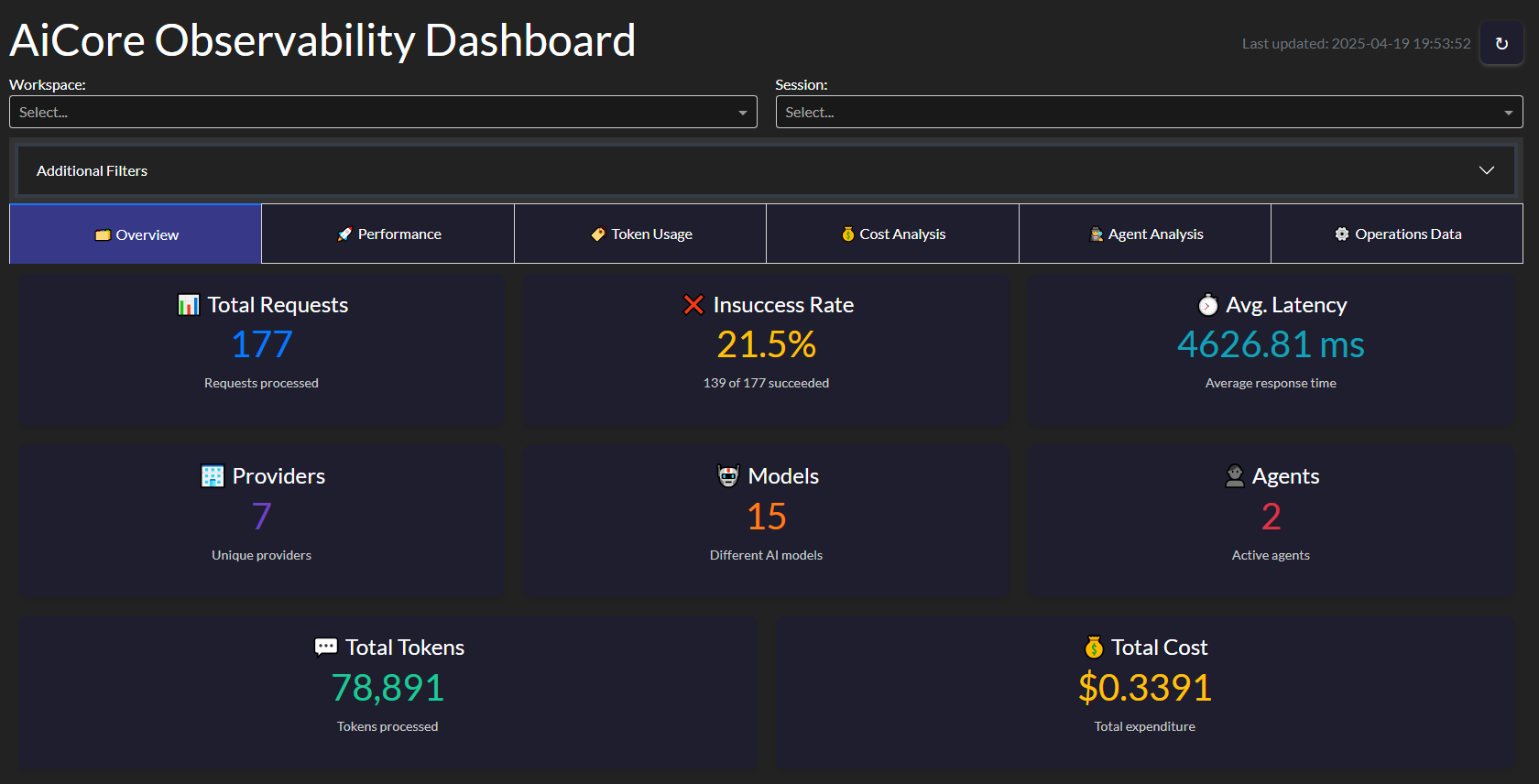
Key metrics tracked:
- Requests per minute
- Average response time
- Token usage trends
- Error rates
- Cost projections
from aicore.observability import ObservabilityDashboard

dashboard = ObservabilityDashboard(storage="observability_data.json")
dashboard.run_server(port=8050)
Advanced Usage
Reasoner Augmented Config
AiCore also contains native support to augment *traditional* Llms with *reasoning* capabilities by providing them with the thinking steps generated by an open-source reasoning capable model, allowing it to generate its answers in a Reasoning Augmented way.
This can be usefull in multiple scenarios, such as:
- ensure your agentic systems still work with the propmts you have crafted for your favourite llms while augmenting them with reasoning steps
- direct control for how long you want your reasoner to reason (via max_tokens param) and how creative it can be (reasoning temperature decoupled from generation temperature) without compromising generation settings
To leverage the reasoning augmentation just introduce one of the supported llm configs into the reasoner field and AiCore handles the rest
# config.yml
embeddings:
  provider: "openai" # or "mistral", "groq", "gemini", "nvidia"
  api_key: "your_openai_api_key"
  model: "your_openai_embedding_model" # Optional

llm:
  provider: "mistral" # or "openai", "groq", "gemini", "nvidia"
  api_key: "your_mistral_api_key"
  model: "mistral-small-latest" # Optional
  temperature: 0.6
  max_tokens: 2048
  reasoner:
    provider: "groq" # or openrouter or nvidia
    api_key: "your_groq_api_key"
    model: "deepseek-r1-distill-llama-70b" # or "deepseek/deepseek-r1:free" or "deepseek/deepseek-r1"
    temperature: 0.5
    max_tokens: 1024
Built with AiCore
Reasoner4All
A Hugging Face Space showcasing reasoning-augmented models

⏮ GitRecap
Instant summaries of Git activity
🌐 Live App
🌀 CodeTide & AgentTide Integration
CodeTide is a fully local, privacy-first tool for parsing and understanding Python codebases using symbolic, structural analysis—no LLMs, no embeddings, just fast and deterministic code intelligence. It enables developers and AI agents to retrieve precise code context, visualize project structure, and generate atomic code changes with confidence.
AgentTide is a next-generation, precision-driven software engineering agent built on top of CodeTide. AgentTide leverages CodeTide’s symbolic code understanding to plan, generate, and apply high-quality code patches—always with full context and requirements fidelity. You can interact with AgentTide via a conversational CLI or a beautiful web UI.
> Live Demo: Try AgentTide on Hugging Face Spaces: https://mclovinittt-agenttidedemo.hf.space/
AiCore was used to make LLM calls within AgentTide, enabling seamless integration between local code analysis and advanced language models. This combination empowers AgentTide to deliver context-aware, production-ready code changes—always under your control.
Future Plans
- Extended Provider Support: Additional LLM and embedding providers
- Add support for Speech: Integrate text2speech and speech to text objects with usage and observability4
Documentation
For complete documentation, including API references, advanced usage examples, and configuration guides, visit:
License
This project is licensed under the Apache 2.0 License.
Frequently asked questions
What is AiCore?
AiCore is AiCore now includes a comprehensive observability module that helps you track, analyze, and visualize your LLM operations. Now with MCP support!
How do I install AiCore?
Open the GitHub repository and follow its README. Most MCP servers are added to your client's MCP config, then called by your agent.
Is AiCore open source?
Yes — it is hosted on GitHub at https://github.com/BrunoV21/AiCore and has 24 stars.
Related MCP tools
 openhands
🙌 OpenHands: Code Less, Make More for the Model Context Protocol. Enhance AI assistants with powerful integrations. Python-based implementation.
 mem0
mem0Universal memory layer for AI Agents; Announcing OpenMemory MCP - local and secure memory management. Python-based implementation.
 chatgpt-on-wechat
基于大模型搭建的聊天机器人,同时支持 微信公众号、企业微信应用、飞书、钉钉 等接入,可选择ChatGPT/Claude/DeepSeek/文心一言/讯飞星火/通义千问/ Gemini/GLM-4/Kimi/LinkAI,能处理文本、语音和图片,访问操作系统和互联网,支持基于自有知识库进行定制企业智能客服。
 gpt-researcher
An LLM agent that conducts deep research (local and web) on any given topic and generates a long report with citations. Built for the Model Context Protocol to
 fastmcp
🚀 The fast, Pythonic way to build MCP servers and clients Trusted by 19900+ developers. Trusted by 19900+ developers. Trusted by 19900+ developers.
 maxkb
maxkb🔥 MaxKB is an open-source platform for building enterprise-grade agents. MaxKB 是强大易用的开源企业级智能体平台。 for the Model Context Protocol. Enhance AI assistants with po
Run your own MCP server? See who uses it and what to fix.
Measure it with TrackMCP