
ClaudeDesktopCommander
This is MCP server for Claude that gives it terminal control, file system search and diff file editing capabilities
Documentation
Desktop Commander MCP




Short version. Two key things. Terminal commands and diff based file editing.
Table of Contents
- Features
- Installation
- Usage
- Handling Long-Running Commands
- Work in Progress and TODOs
- Media links
- Testimonials
- Contributing
- License
This is server that allows Claude desktop app to execute long-running terminal commands on your computer and manage processes through Model Context Protocol (MCP) + Built on top of MCP Filesystem Server to provide additional search and replace file editing capabilities .
Features
- Execute terminal commands with output streaming
- Command timeout and background execution support
- Process management (list and kill processes)
- Session management for long-running commands
- Full filesystem operations:
- Read/write files
- Create/list directories
- Move files/directories
- Search files
- Get file metadata
- Code editing capabilities:
- Surgical text replacements for small changes
- Full file rewrites for major changes
- Multiple file support
- Pattern-based replacements
Installation
First, ensure you've downloaded and installed the Claude Desktop app and you have npm installed.
Option 1: Installing via Smithery
To install Desktop Commander for Claude Desktop automatically via Smithery:
npx -y @smithery/cli install @wonderwhy-er/desktop-commander --client claudeOption 2: Install trough npx
Just run this in terminal
npx @wonderwhy-er/desktop-commander setupRestart Claude if running
Option 3: Add to claude_desktop_config by hand
Add this entry to your claude_desktop_config.json (on Mac, found at ~/Library/Application\ Support/Claude/claude_desktop_config.json):
{
  "mcpServers": {
    "desktop-commander": {
      "command": "npx",
      "args": [
        "-y",
        "@wonderwhy-er/desktop-commander"
      ]
    }
  }
}
Restart Claude if running
Option 4: Checkout locally
1. Clone and build:
git clone https://github.com/wonderwhy-er/ClaudeComputerCommander.git
cd ClaudeComputerCommander
npm run setup
Restart Claude if running
The setup command will:
- Install dependencies
- Build the server
- Configure Claude's desktop app
- Add MCP servers to Claude's config if needed
Usage
The server provides these tool categories:
Terminal Tools
- `execute_command`: Run commands with configurable timeout
- `read_output`: Get output from long-running commands
- `force_terminate`: Stop running command sessions
- `list_sessions`: View active command sessions
- `list_processes`: View system processes
- `kill_process`: Terminate processes by PID
- `block_command`/`unblock_command`: Manage command blacklist
Filesystem Tools
- `read_file`/`write_file`: File operations
- `create_directory`/`list_directory`: Directory management
- `move_file`: Move/rename files
- `search_files`: Pattern-based file search
- `get_file_info`: File metadata
Edit Tools
- `edit_block`: Apply surgical text replacements (best for changes 20% or when edit_block fails)
Search/Replace Block Format:
filepath.ext
>>>>>> REPLACE
Example:
src/main.js
>>>>>> REPLACE
Handling Long-Running Commands
For commands that may take a while:
1. `execute_command` returns after timeout with initial output
2. Command continues in background
3. Use `read_output` with PID to get new output
4. Use `force_terminate` to stop if needed
Model Context Protocol Integration
This project extends the MCP Filesystem Server to enable:
- Local server support in Claude Desktop
- Full system command execution
- Process management
- File operations
- Code editing with search/replace blocks
Created as part of exploring Claude MCPs: https://youtube.com/live/TlbjFDbl5Us
Work in Progress and TODOs
The following features are currently being developed or planned:
- Better code search (in progress) - Enhanced code exploration with context-aware results
- Better configurations (in progress) - Improved settings for allowed paths, commands and shell environment
- Windows environment fixes (in progress) - Resolving issues specific to Windows platforms
- Linux improvements (in progress) - Enhancing compatibility with various Linux distributions
- Support for WSL - Windows Subsystem for Linux integration
- Support for SSH - Remote server command execution
- Installation troubleshooting guide - Comprehensive help for setup issues
Media
Learn more about this project through these resources:
Article
Claude with MCPs replaced Cursor & Windsurf. How did that happen? - A detailed exploration of how Claude with Model Context Protocol capabilities is changing developer workflows.
Video
Claude Desktop Commander Video Tutorial - Watch how to set up and use the Commander effectively.
Community
Join our Discord server to get help, share feedback, and connect with other users.
Testimonials

](https://www.youtube.com/watch?v=ly3bed99Dy8&lc=UgyyBt6_ShdDX_rIOad4AaABAg
)
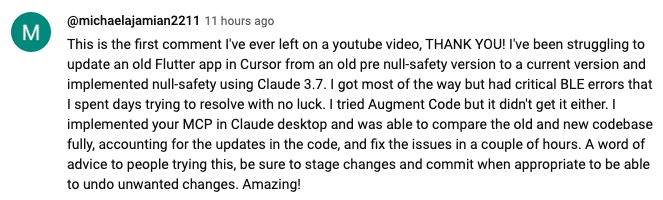
https://www.youtube.com/watch?v=ly3bed99Dy8&lc=UgztdHvDMqTb9jiqnf54AaABAg](https://www.youtube.com/watch?v=ly3bed99Dy8&lc=UgztdHvDMqTb9jiqnf54AaABAg
)
[
https://www.youtube.com/watch?v=ly3bed99Dy8&lc=UgyQFTmYLJ4VBwIlmql4AaABAg](https://www.youtube.com/watch?v=ly3bed99Dy8&lc=UgyQFTmYLJ4VBwIlmql4AaABAg)

https://www.youtube.com/watch?v=ly3bed99Dy8&lc=Ugy4-exy166_Ma7TH-h4AaABAg](https://www.youtube.com/watch?v=ly3bed99Dy8&lc=Ugy4-exy166_Ma7TH-h4AaABAg)
[
https://medium.com/@pharmx/you-sir-are-my-hero-62cff5836a3e](https://medium.com/@pharmx/you-sir-are-my-hero-62cff5836a3e)
Contributing
If you find this project useful, please consider giving it a ⭐ star on GitHub! This helps others discover the project and encourages further development.
We welcome contributions from the community! Whether you've found a bug, have a feature request, or want to contribute code, here's how you can help:
- Found a bug? Open an issue at github.com/wonderwhy-er/ClaudeComputerCommander/issues
- Have a feature idea? Submit a feature request in the issues section
- Want to contribute code? Fork the repository, create a branch, and submit a pull request
- Questions or discussions? Start a discussion in the GitHub Discussions tab
All contributions, big or small, are greatly appreciated!
If you find this tool valuable for your workflow, please consider supporting the project.
License
MIT
Frequently asked questions
What is ClaudeDesktopCommander?
ClaudeDesktopCommander is This is MCP server for Claude that gives it terminal control, file system search and diff file editing capabilities
How do I install ClaudeDesktopCommander?
Open the GitHub repository and follow its README. Most MCP servers are added to your client's MCP config, then called by your agent.
Is ClaudeDesktopCommander open source?
Yes — it is hosted on GitHub at https://github.com/mrgnss/claudedesktopcommander and has 6 stars.
Related MCP tools
 openhands
🙌 OpenHands: Code Less, Make More for the Model Context Protocol. Enhance AI assistants with powerful integrations. Python-based implementation.
 anything-llm
The all-in-one Desktop & Docker AI application with built-in RAG, AI agents, No-code agent builder, MCP compatibility, and more.
 mem0
mem0Universal memory layer for AI Agents; Announcing OpenMemory MCP - local and secure memory management. Python-based implementation.
 chatgpt-on-wechat
基于大模型搭建的聊天机器人,同时支持 微信公众号、企业微信应用、飞书、钉钉 等接入,可选择ChatGPT/Claude/DeepSeek/文心一言/讯飞星火/通义千问/ Gemini/GLM-4/Kimi/LinkAI,能处理文本、语音和图片,访问操作系统和互联网,支持基于自有知识库进行定制企业智能客服。
 localai
:robot: The free, Open Source alternative to OpenAI, Claude and others. Self-hosted and local-first. Drop-in replacement for OpenAI, running on consumer-gra...
 cherry-studio
🍒 Cherry Studio is a desktop client that supports for multiple LLM providers. Built for the Model Context Protocol to enhance AI capabilities.
Run your own MCP server? See who uses it and what to fix.
Measure it with TrackMCP