
mcp-man
Postman for MCP servers — inspect tools, test live, browse 150+ servers
Documentation



mcp-man
Postman for MCP. Search 156 servers, inspect their tools, test them live — all from the browser.
npm install -g @aaglexx/mcp-man
mcp-man ui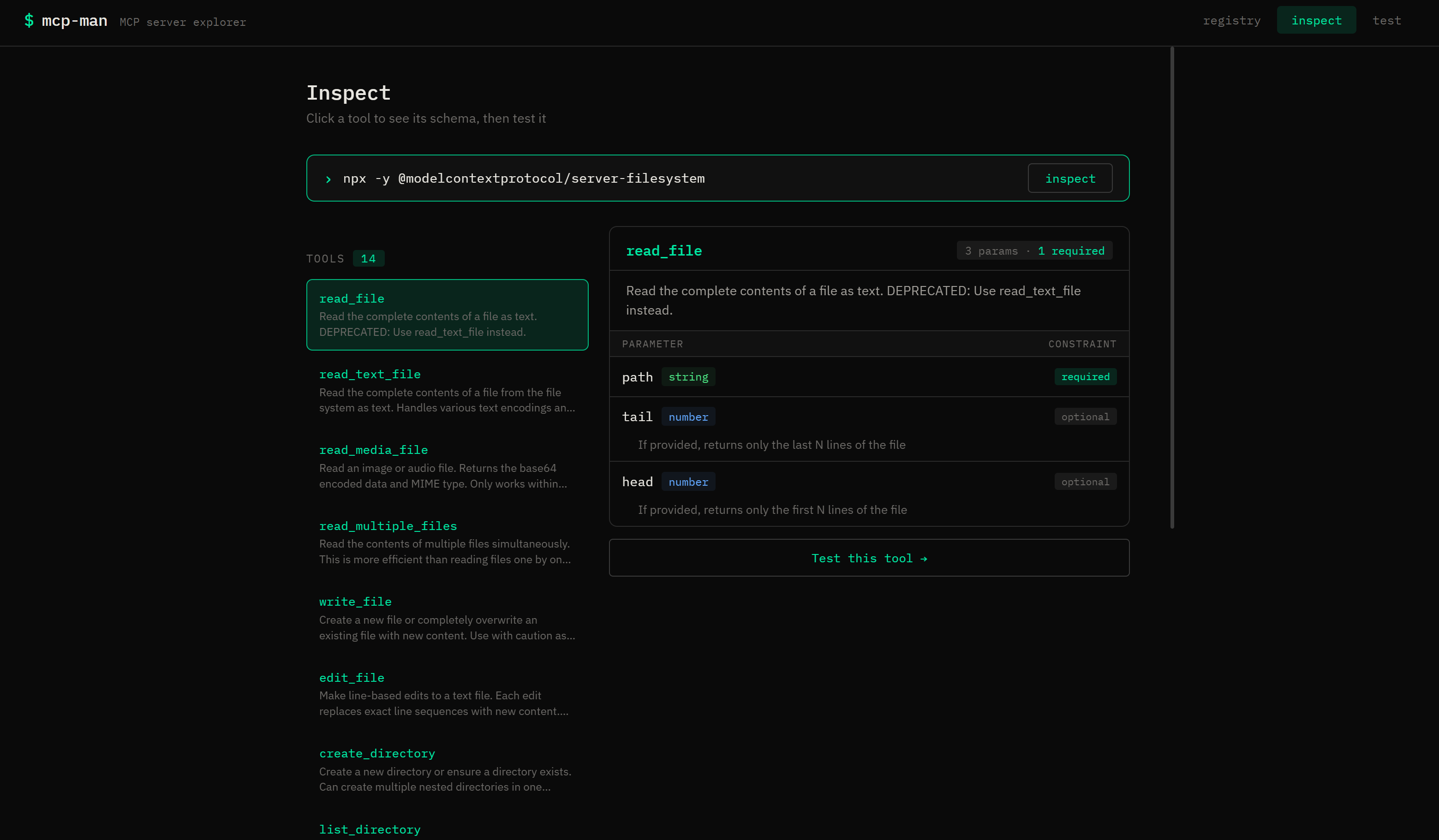
The problem
There are hundreds of MCP servers. But to know what any of them actually does, you have to dig through GitHub READMEs, guess at parameters, and figure out which env vars it needs. Every time.
`mcp-man` fixes that. Connect to any MCP server and instantly see every tool, its full schema, required params, and types. Then call it with one click.
What's inside
| Registry | 156 servers, searchable by name or tag |
|---|---|
| Inspect | Connect to any server, browse tools with full schema visualizer |
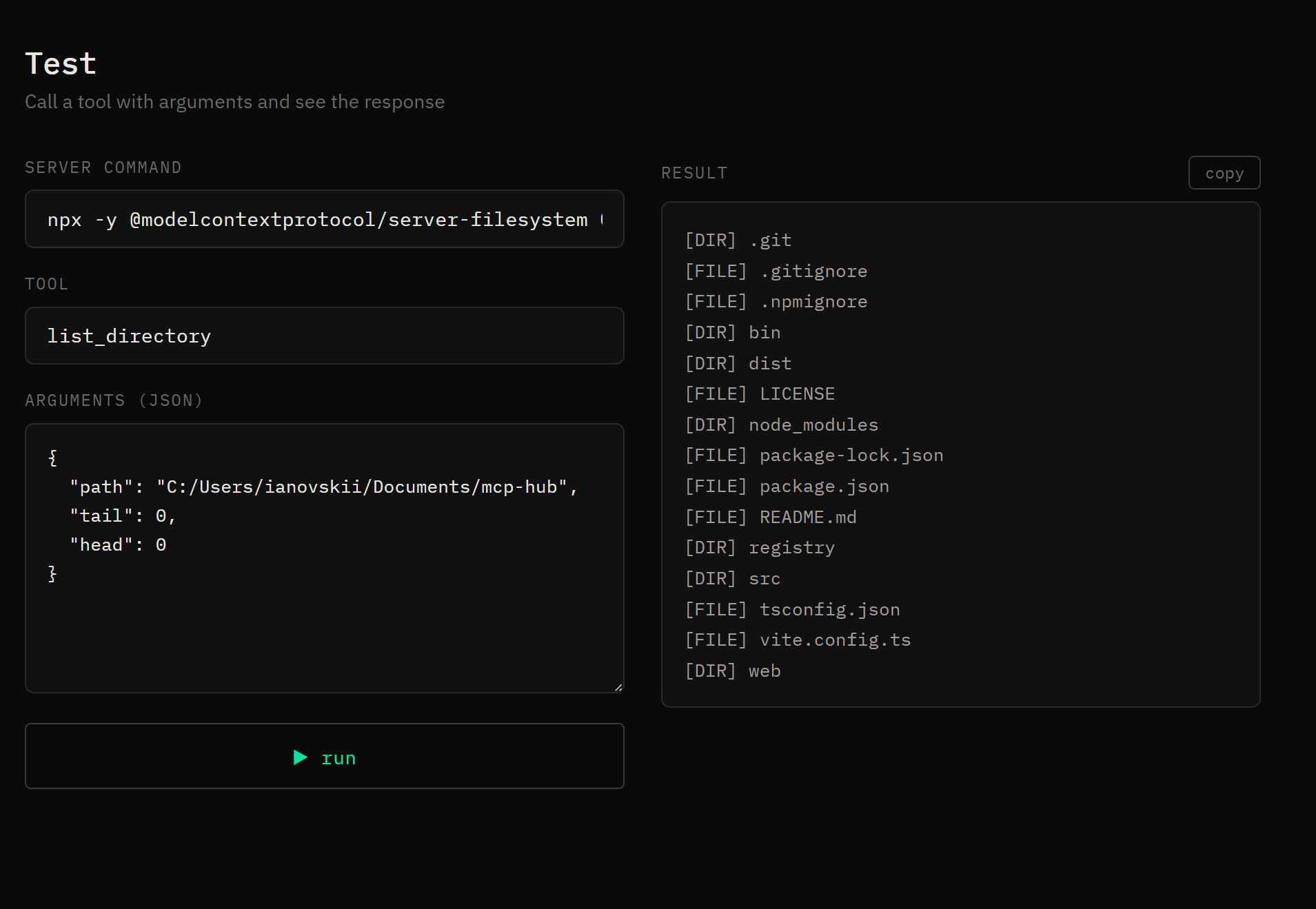
| Test | Call any tool live with JSON args, see the raw response |
| Auth wizard | Guided API key setup for 78 servers — with direct links to get each token |
| CLI | Everything available from the terminal too |
Get started
# No auth needed — works instantly
npx -y @modelcontextprotocol/server-memory
npx -y @modelcontextprotocol/server-filesystem /your/path

# Needs a token — wizard will guide you
github-mcp-server              → GITHUB_PERSONAL_ACCESS_TOKEN
@notionhq/notion-mcp-server    → Notion integration token
Just paste any command into the Inspect field and hit go.
CLI
mcp-man search github
mcp-man search --tag database
mcp-man inspect "npx -y @modelcontextprotocol/server-memory"
mcp-man test read_graph --server "npx -y @modelcontextprotocol/server-memory"
Add your server
Edit `registry/servers.json` and open a PR:
{
  "name": "@you/your-mcp-server",
  "description": "One line about what it does",
  "url": "https://github.com/you/your-server",
  "tags": ["your", "tags"],
  "author": "Your Name",
  "license": "MIT"
}
If your server needs credentials, add an `env` array — the auth wizard will pick it up automatically.
Dev setup
git clone https://github.com/aaglexx/mcp-man && cd mcp-man && npm install

# Terminal 1
npm run dev:cli -- ui --dev

# Terminal 2
npm run dev:web
Roadmap
- [x] Registry with 156 servers
- [x] Schema visualizer
- [x] Auth wizard for 78 servers
- [ ] Sandboxed runner — no local install needed
- [ ] Health badge per server
MIT
Frequently asked questions
What is mcp-man?
mcp-man is Postman for MCP servers — inspect tools, test live, browse 150+ servers
How do I install mcp-man?
Open the GitHub repository and follow its README. Most MCP servers are added to your client's MCP config, then called by your agent.
Is mcp-man open source?
Yes — it is hosted on GitHub at https://github.com/aaglexx/mcp-man and has 1 stars.
Related MCP tools
 wigolo
The go-to web for your AI coding agent — local-first search, fetch, crawl & research over MCP. No API keys, no cloud, $0/query. Public beta.
 metamcp
MCP Aggregator, Orchestrator, Middleware, Gateway in one docker
 gemini-mcp-tool
MCP server that enables AI assistants to interact with Google Gemini CLI, leveraging Gemini's massive token window for large file analysis and codebase understanding
metamcpMCP Aggregator, Orchestrator, Middleware, Gateway in one docker TypeScript-based implementation. Trusted by 1400+ developers.
 codesight
Universal AI context generator. Saves thousands of tokens per conversation in Claude Code, Cursor, Copilot, Codex, and more.
 awesome-mcp-zh
MCP 资源精选, MCP指南,Claude MCP,MCP Servers, MCP Clients Trusted by 4800+ developers. Trusted by 4800+ developers. Trusted by 4800+ developers.
Run your own MCP server? See who uses it and what to fix.
Measure it with TrackMCP