
mcp-dotnet-diagnostics
MCP server for .NET runtime diagnostics — memory, GC, threads, and more
Documentation


mcp-dotnet-diagnostics
Give your AI assistant real-time visibility into your .NET application's runtime health.
Connect this Model Context Protocol server to Claude Desktop
and ask plain questions about any running .NET process — memory leaks, GC pressure, thread
starvation, allocation hotspots. Claude calls the right tools, reads real runtime data, and
tells you what's actually wrong.
What this looks like in practice
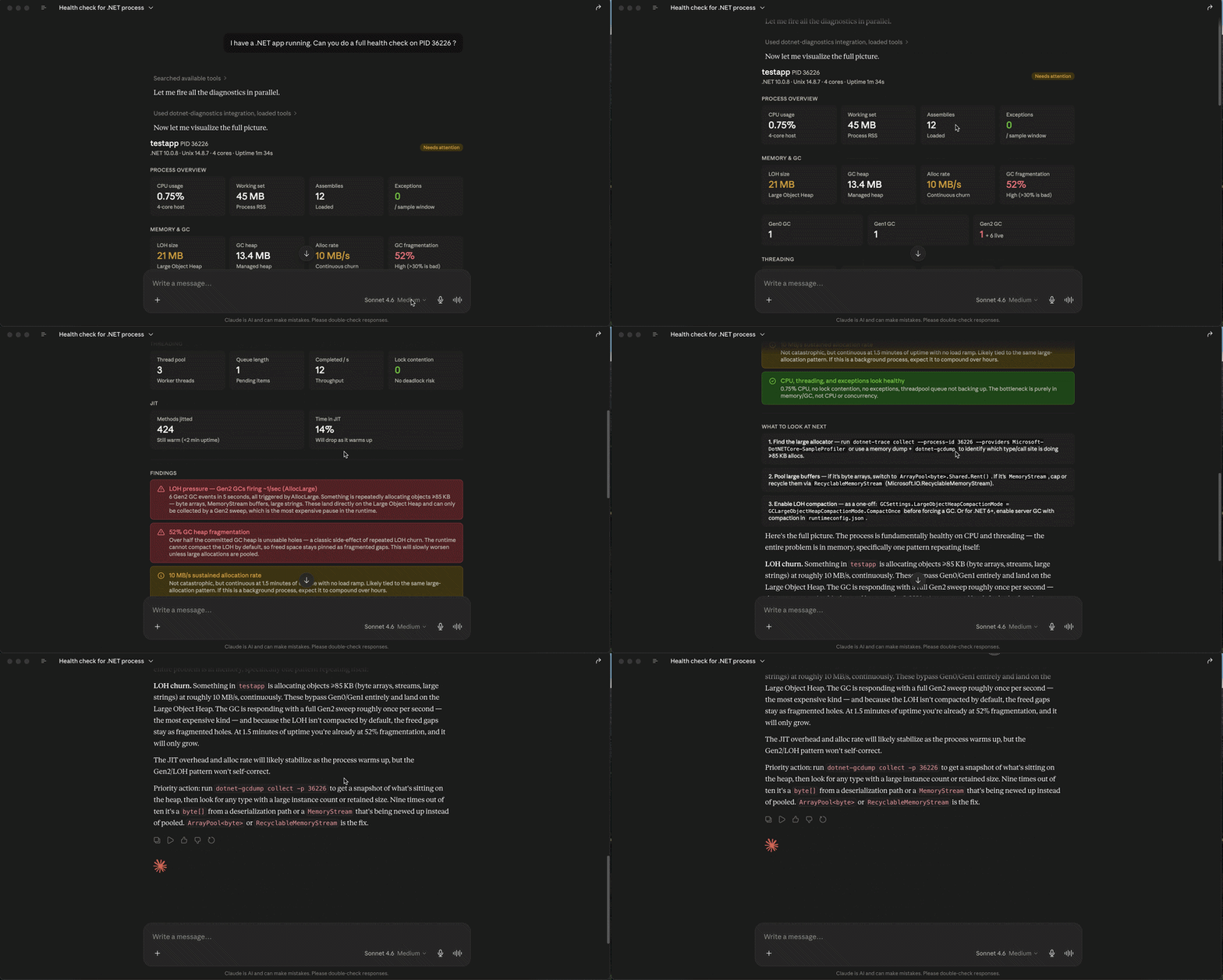
You ask:
> *"Why does my API have high memory usage? PID is 12345."*
Claude calls `get_process_info` to confirm connectivity, then `get_memory_stats`, then
`get_gc_events` — and responds:
> *"Every GC event in the last 5 seconds was a Gen2 collection triggered by `AllocLarge`.
> Something is continuously allocating objects above the 85KB LOH threshold at ~10.5 MB/s.
> LOH is never compacted by default — fragmentation is at 55% and growing. The fix is
> `ArrayPool.Shared`. Rent a buffer, use it, return it."*
You don't tell Claude which tools to call. It figures that out from your question.
Tools
| Tool | What it returns | Reach for it when... |
|---|---|---|
| `get_process_info` | Name, PID, uptime, .NET version, OS | Starting any investigation — confirms the process is reachable |
| `get_memory_stats` | GC heap, LOH size, alloc rate, Gen0/1/2 counts, fragmentation | Memory is high or growing |
| `get_gc_events` | Per-collection timeline — generation, reason, timestamp | GC pauses are affecting latency |
| `get_thread_stats` | ThreadPool count, queue depth, completed items, lock contention | Requests are slow or backing up |
| `get_event_counters` | All 27 `System.Runtime` metrics in one snapshot | You want a broad health overview |
| `get_environment_info` | Runtime config, filtered env vars (no secrets) | Debugging configuration issues |
| `list_counters` | Raw EventCounter names and current values | Discovering what's available on an unfamiliar process |
Installation
1. Install the tool
dotnet tool install -g mcp-dotnet-diagnosticsRequires .NET 8 SDK or later. Get it here if needed.
2. Add to Claude Desktop
Open `~/Library/Application Support/Claude/claude_desktop_config.json` while Claude Desktop
is fully quit (Cmd+Q — not just the window closed), then add:
{
  "mcpServers": {
    "dotnet-diagnostics": {
      "command": "mcp-dotnet-diagnostics",
      "env": {
        "TMPDIR": "/var/folders/xx/your-tmpdir/T/"
      }
    }
  }
}
3. Reopen Claude Desktop
The `dotnet-diagnostics` connector appears in the tools menu. Ask it about any .NET process.
> macOS: the `TMPDIR` step is not optional.
>
> The .NET diagnostics protocol finds processes through a Unix socket. On macOS, that socket
> lives under `$TMPDIR` — not `/tmp/` where the library looks by default. Without this,
> every tool call returns "process not found."
>
> Find yours with: `echo $TMPDIR`
> Want to contribute or build from source?
> See CONTRIBUTING.md for how to clone, build, and add new tools.
Usage
Find the PID of your target process:
dotnet-counters psThen ask Claude naturally:
"Do a full health check on PID 12345."
"Why is memory climbing on PID 12345?"
"Any thread starvation in PID 12345?"
"What's the GC situation on PID 12345?"
How it works
The server uses `Microsoft.Diagnostics.NETCore.Client` to attach to any running .NET process
by PID — the same library that powers `dotnet-counters`, `dotnet-trace`, and `dotnet-dump`.
It streams telemetry directly from the CLR over EventPipe, which means you get the same data
as the official .NET CLI tools, available to Claude as structured tool responses.
The tool descriptions are written to guide Claude's investigation sequence. When you report
high memory, Claude calls `get_process_info` first (connectivity), then `get_memory_stats`
(heap overview), then `get_gc_events` (collection details) — because the descriptions say to.
The chaining is implicit, not hardcoded.
Requirements
- .NET 8 SDK or later to build; .NET 10 recommended
- Claude Desktop or any MCP-compatible client
- A running .NET process to inspect (your app, an API, anything)
Tests
dotnet test src/McpDotnetDiagnostics.Tests34 tests across all 7 tools — unit tests against invalid PIDs, integration tests against the
live test runner process (`Environment.ProcessId`). Runs in ~17 seconds.
Design decisions
Three decisions shaped this project in ways that aren't obvious from the outside:
- ADR-001: C# over TypeScript — the diagnostics library is .NET-native; a TypeScript wrapper would mean shelling out
- ADR-002: Target process by PID, not self — the MCP server itself is uninteresting; your API is where the real data lives
- ADR-003: .NET 10 EventPipe payload extraction — undocumented payload structure change in .NET 10, discovered through runtime inspection
License
MIT
Frequently asked questions
What is mcp-dotnet-diagnostics?
mcp-dotnet-diagnostics is MCP server for .NET runtime diagnostics — memory, GC, threads, and more
How do I install mcp-dotnet-diagnostics?
Open the GitHub repository and follow its README. Most MCP servers are added to your client's MCP config, then called by your agent.
Is mcp-dotnet-diagnostics open source?
Yes — it is hosted on GitHub at https://github.com/aayushmdesai/mcp-dotnet-diagnostics and has 2 stars.
Related MCP tools
 Unity-MCP
AI Skills, MCP Tools, and CLI for Unity Engine. Full AI develop and test loop. Use cli for quick setup. Efficient token usage, advanced tools. Any C# method may be turned into a tool by a single line. Works with Claude Code, Gemini, Copilot, Cursor and any other absolutely for free.
 unity-mcp
Unity MCP acts as a bridge between AI assistants and your Unity Editor. Give your LLM tools to manage assets, control scenes, edit scripts, and automate tasks within Unity.
 google_workspace_mcp
Control Gmail, Google Calendar, Docs, Sheets, Slides, Chat, Forms, Tasks, Search & Drive with AI - Comprehensive Google Workspace MCP Server & CLI Tool
 unity-mcp
An MCP server that allows MCP clients like Claude Desktop or Cursor to perform actions in the Unity Editor C#-based implementation.
 firecrawl-mcp-server
🔥 Official Firecrawl MCP Server - Adds powerful web scraping and search to Cursor, Claude and any other LLM clients.
 wigolo
The go-to web for your AI coding agent — local-first search, fetch, crawl & research over MCP. No API keys, no cloud, $0/query. Public beta.
Run your own MCP server? See who uses it and what to fix.
Measure it with TrackMCP