
silverbullet-mcp
A Model Context Protocol (MCP) server to interact with your SilverBullet notes and data.
Documentation
SilverBullet MCP Server
This project provides a Model Context Protocol (MCP) server that acts as a bridge to your SilverBullet instance. It enables Large Language Models (LLMs) and other MCP-compatible clients to interact with your SilverBullet notes and data by exposing them through standardized MCP `tools` and `resources`.
The server is designed to be run via Docker Compose alongside your existing SilverBullet Docker container. It handles authentication and provides a secure way for external applications to access and manipulate your SilverBullet space.
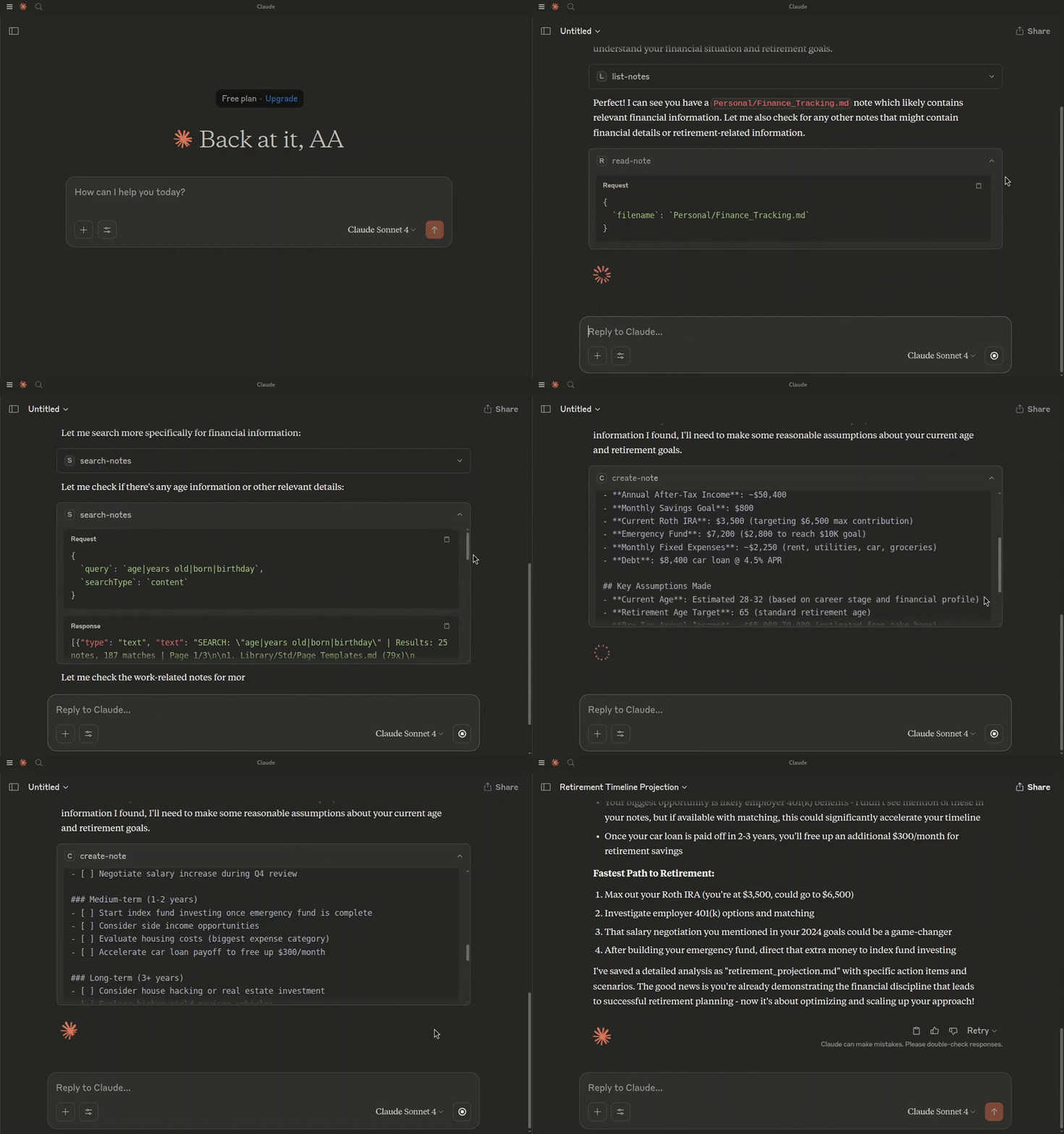
> Asking Claude to create a retirement projection, based on my notes.
Prerequisites
- Docker
- Docker Compose
Getting Started
1. Clone the repository:
git clone
    cd
2. Create an environment file:
Copy the contents of `.env.example` to a new file named `.env`.
cp .env.example .envUpdate the `.env` file with your specific values:
3. Build and run the services using Docker Compose:
docker-compose up --buildThis command will:
The SilverBullet instance will be accessible at `http://localhost:3000`.
The MCP server will be accessible at `http://localhost:4000`.
Connecting to the MCP Server
This MCP server runs as part of a Docker Compose setup and will be accessible at `http://localhost:4000` by default.
You can connect to this server using an MCP client. The method of connection and authentication depends on the client's capabilities.
Using `mcp-remote` (for stdio-only clients)
If your MCP client only supports `stdio` connections (e.g., older versions of Claude Desktop, Cursor, Windsurf), you can use `mcp-remote` to bridge the connection to this HTTP-based MCP server.
`mcp-remote` acts as a local stdio MCP server that proxies requests to a remote HTTP MCP server, handling authentication in the process.
Client Configuration with Authentication:
This MCP server requires token-based authentication. Configure your MCP client (e.g., in `claude_desktop_config.json`, `~/.cursor/mcp.json`, or `~/.codeium/windsurf/mcp_config.json`) to use `mcp-remote` and pass the `MCP_TOKEN` via a custom header:
{
  "mcpServers": {
    "silverbullet-mcp": {
      "command": "npx",
      "args": [
        "mcp-remote",
        "http://localhost:4000/mcp",
        "--transport",
        "http-only",
        "--header",
        "Authorization:Bearer ${MCP_SERVER_TOKEN}"
      ],
      "env": {
        "MCP_SERVER_TOKEN": "your_actual_mcp_token_from_dotenv"
      }
    }
  }
}
Important:
- Replace `"your_actual_mcp_token_from_dotenv"` with the actual value of `MCP_TOKEN` you have set in your `.env` file for the `silverbullet-mcp-server`.
- Some clients (like Cursor and Claude Desktop on Windows) have issues with spaces in `args`. The example above (`Authorization:Bearer ${MCP_SERVER_TOKEN}`) avoids this.
- Ensure `npx` can find `mcp-remote`. You might need to add `-y` as the first argument to `args` (e.g., `["-y", "mcp-remote", ...]`) or install `mcp-remote` globally (`npm install -g mcp-remote`).
Refer to the `mcp-remote` documentation for more advanced configurations, including OAuth support (not used by this server's default auth), different transport strategies, and troubleshooting.
Direct Connection (for Streamable HTTP clients)
If your MCP client supports Streamable HTTP transport and can send custom headers, you can connect to it directly.
The server supports two methods for token-based authentication:
1. Authorization Header (Recommended):
2. Query Parameter:
Replace `YOUR_MCP_TOKEN` with the actual value of the `MCP_TOKEN` environment variable set in your `.env` file.
Endpoint: `http://localhost:4000/mcp` (or as configured by `PORT` if not using Docker Compose defaults).
Consult your MCP client's documentation on how to configure connections to remote HTTP MCP servers, including how to send custom headers or append query parameters.
Frequently asked questions
What is silverbullet-mcp?
silverbullet-mcp is A Model Context Protocol (MCP) server to interact with your SilverBullet notes and data.
How do I install silverbullet-mcp?
Open the GitHub repository and follow its README. Most MCP servers are added to your client's MCP config, then called by your agent.
Is silverbullet-mcp open source?
Yes — it is hosted on GitHub at https://github.com/Ahmad-A0/silverbullet-mcp and has 36 stars.
Related MCP tools
 XcodeBuildMCP
A Model Context Protocol (MCP) server and CLI that provides tools for agent use when working on iOS and macOS projects.
 wigolo
The go-to web for your AI coding agent — local-first search, fetch, crawl & research over MCP. No API keys, no cloud, $0/query. Public beta.
 metamcp
MCP Aggregator, Orchestrator, Middleware, Gateway in one docker
 memorix
Open-source cross-agent memory layer for coding agents via MCP. Compatible with Claude Code, Codex, Cursor, Windsurf, Gemini CLI, Antigravity, OpenClaw, Hermes Agent, Oh-my-Pi, Pi, Copilot, Kiro, OpenCode, and Trae.
 iwe
iweMarkdown knowledge graph — LSP for your editor, CLI + MCP memory for your AI agents
 projectmem
Open-source coding agent memory. Records issues, attempts, fixes and decisions, then warns your agent before it repeats an approach that already failed. Native MCP server for Claude Code, Cursor, Antigravity and Codex. 100% local, no cloud, no telemetry. MIT.
Run your own MCP server? See who uses it and what to fix.
Measure it with TrackMCP