
aicode-toolkit
Toolkit for Coding Agents to work reliably with repo of any size.
Documentation
AI Code Toolkit


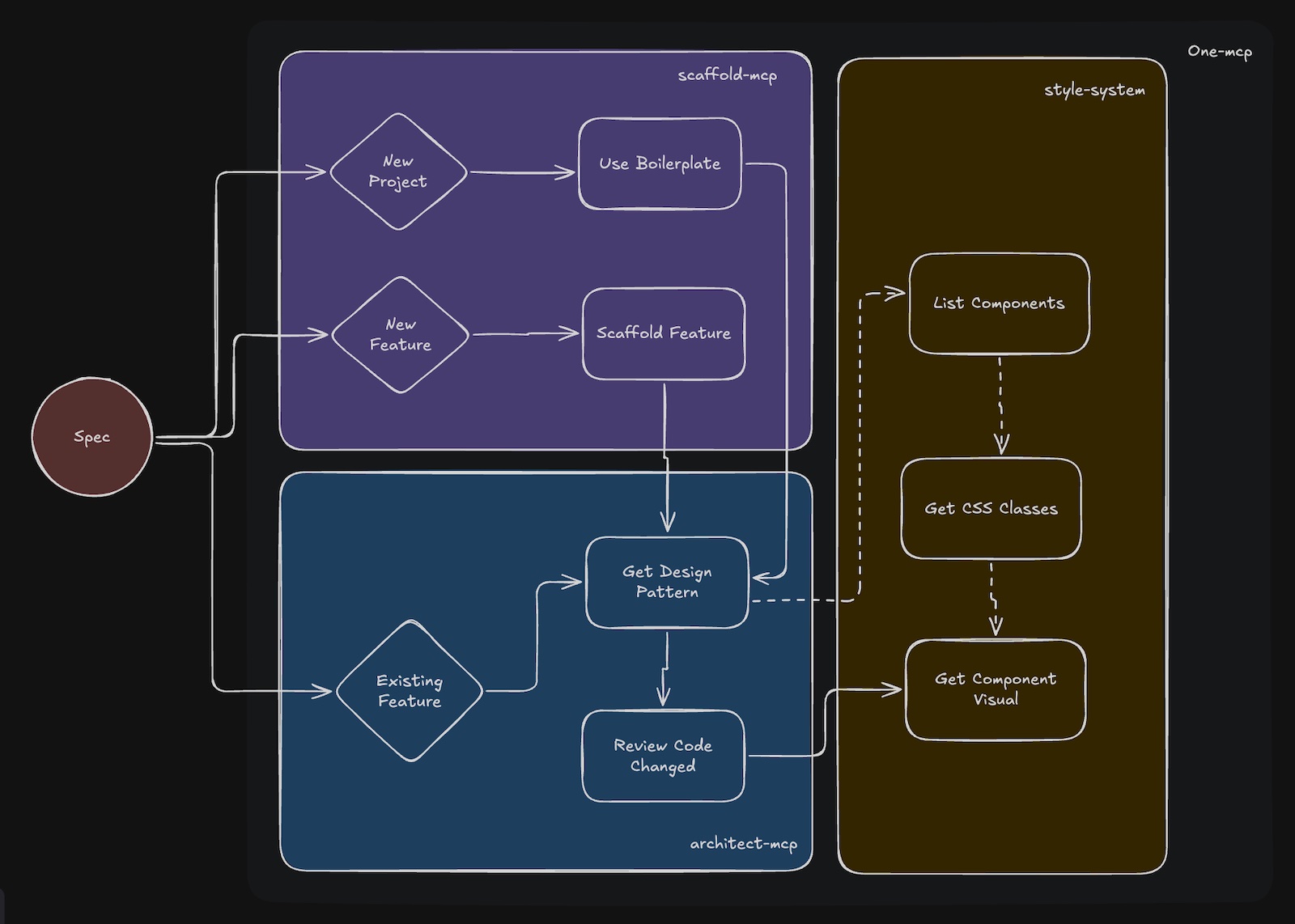
This repo provides:
- project and feature scaffolding via templates
- file-level design guidance before edits
- rule-based review after edits
- design-system discovery for frontend work
Why This Exists
As projects scale, conventions in docs like `CLAUDE.md`, `AGENTS.md`, and style guides become hard to keep concise and consistently applied by AI agents. This toolkit moves those conventions into reusable template configs (`scaffold.yaml`, `architect.yaml`, `RULES.yaml`) so agents can discover only the relevant guidance when needed.
Quick Start
Requirements:
- Node.js >= 18
- an MCP-compatible agent such as Claude Code, Cursor, or Gemini CLI
1. Initialize a Workspace
# Existing project
npx @agiflowai/aicode-toolkit init

# New project
npx @agiflowai/aicode-toolkit init --name my-app --project-type monolith
This creates `templates/` and `.toolkit/settings.yaml`. Projects reference templates through `sourceTemplate` in `project.json` or `.toolkit/settings.yaml`.
2. Configure MCP
`init` can configure MCP automatically. For manual setup, add the servers you need to your agent config.
Example for Claude Code:
{
  "mcpServers": {
    "scaffold-mcp": {
      "command": "npx",
      "args": ["-y", "@agiflowai/scaffold-mcp", "mcp-serve", "--admin-enable"]
    },
    "architect-mcp": {
      "command": "npx",
      "args": [
        "-y", "@agiflowai/architect-mcp", "mcp-serve",
        "--admin-enable",
        "--design-pattern-tool", "codex",
        "--review-tool", "gemini-cli"
      ]
    },
    "style-system": {
      "command": "npx",
      "args": ["-y", "@agiflowai/style-system", "mcp-serve"]
    }
  }
}
Useful flags:
- `--admin-enable`: enable admin/template-authoring tools
- `--design-pattern-tool `: use an LLM to filter design patterns
- `--review-tool `: use an LLM for review output
3. Verify
Ask the agent:
`What boilerplates are available?`
It should call `list-boilerplates`. If not, restart the agent.
Repo Layout
AI agent
  ├─ scaffold-mcp
  ├─ architect-mcp
  ├─ style-system
  └─ one-mcp
        ↓
     templates/
       ├─ scaffold.yaml
       ├─ architect.yaml
       └─ RULES.yaml
scaffold-mcp
Generates projects and feature boilerplate from templates.
Core tools:
- `list-boilerplates`
- `use-boilerplate`
- `list-scaffolding-methods`
- `use-scaffold-method`
Admin tools:
- `generate-boilerplate`
- `generate-feature-scaffold`
- `generate-boilerplate-file`
architect-mcp
Provides file-specific patterns before edits and reviews changes against `RULES.yaml`.
Core tools:
- `get-file-design-pattern`
- `review-code-change`
Admin tools:
- `add-design-pattern`
- `add-rule`
style-system
Provides theme, CSS class, and component discovery tools.
Core tools:
- `list_themes`
- `get_css_classes`
- `get_component_visual`
- `list_shared_components`
- `list_app_components`
one-mcp
Provides progressive tool discovery to reduce MCP prompt overhead.
Typical Workflow
Create a Project
User: "Create a Next.js app called dashboard"

Agent:
1. list-boilerplates
2. use-boilerplate
3. Project is generated
Add a Feature
User: "Add a products API route"

Agent:
1. list-scaffolding-methods
2. use-scaffold-method
3. Feature files are generated
Edit a File Safely
User: "Add a products page"

Agent:
1. get-file-design-pattern
2. edit the file using the returned patterns and rules
3. review-code-change
4. fix any violations
Style a Component
User: "Style the button with our theme colors"

Agent:
1. get_css_classes
2. list_shared_components
3. update the component
4. get_component_visual
Template Structure
templates/
└── nextjs-15/
    ├── scaffold.yaml
    ├── architect.yaml
    ├── RULES.yaml
    └── boilerplate/
`scaffold.yaml`
Defines boilerplates and feature scaffolds.
boilerplates:
  - name: nextjs-15-app
    description: "Next.js 15 with App Router"
    targetFolder: apps
    includes:
      - boilerplate/**/*

features:
  - name: add-route
    description: "Add route with page and layout"
    variables_schema:
      name: { type: string, required: true }
    includes:
      - features/route/**/*
`architect.yaml`
Defines file-level patterns that should be shown before edits.
patterns:
  - name: server-component
    description: "Default for page components"
    file_patterns:
      - "**/app/**/page.tsx"
    description: |
      - Use async/await for data fetching
      - Keep components focused on rendering
      - Move business logic to server actions
`RULES.yaml`
Defines review rules. Rules can be inherited from a global `templates/RULES.yaml`.
version: '1.0'
template: typescript-lib
rules:
  - pattern: src/services/**/*.ts
    description: Service Layer Implementation Standards
    must_do:
      - rule: Create class-based services with single responsibility
        codeExample: |-
          export class DataProcessorService {
            async processData(input: string): Promise {
              // Implementation
            }
          }
      - rule: Use dependency injection for composability
    must_not_do:
      - rule: Create static-only utility classes - use functions
        codeExample: |-
          // ❌ BAD
          export class Utils {
            static format(s: string) {}
          }

          // ✅ GOOD
          export function format(s: string): string {}
Project Types
Monorepo
Each project references its template in `project.json`.
my-workspace/
├── apps/
│   └── web-app/
│       └── project.json
├── packages/
│   └── shared-lib/
│       └── project.json
└── templates/
Monolith
Monoliths use `.toolkit/settings.yaml`.
version: "1.0"
projectType: monolith
sourceTemplate: nextjs-15
Built-in Templates
Included templates:
| Template | Stack | Includes |
|---|---|---|
| `nextjs-drizzle` | Next.js 15, App Router | TypeScript, Tailwind 4, Drizzle, Storybook |
| `typescript-lib` | TypeScript Library | ESM/CJS, Vitest, TSDoc |
| `typescript-mcp-package` | MCP Server | Commander, MCP SDK |
Custom Templates
For template authoring, start from an existing repo or template and use the admin prompts:
/generate-boilerplate
/generate-feature-scaffold
For design/rule authoring, use:
- `add-design-pattern`
- `add-rule`
Supported Agents
| Agent | Config Location | Status |
|---|---|---|
| Claude Code | `.mcp.json` | Supported |
| Cursor | `.cursor/mcp.json` | Supported |
| Gemini CLI | `.gemini/settings.json` | Supported |
| Codex CLI | `.codex/config.json` | Supported |
| GitHub Copilot | VS Code settings | Supported |
| Windsurf | - | Planned |
Packages
| Package | Description |
|---|---|
| @agiflowai/aicode-toolkit | CLI for init and config sync |
| @agiflowai/scaffold-mcp | Scaffolding server |
| @agiflowai/architect-mcp | Pattern and review server |
| @agiflowai/style-system | Design-system server |
| @agiflowai/one-mcp | MCP proxy for progressive discovery |
Contributing
See CONTRIBUTING.md.
License
Frequently asked questions
What is aicode-toolkit?
aicode-toolkit is Toolkit for Coding Agents to work reliably with repo of any size.
How do I install aicode-toolkit?
Open the GitHub repository and follow its README. Most MCP servers are added to your client's MCP config, then called by your agent.
Is aicode-toolkit open source?
Yes — it is hosted on GitHub at https://github.com/agiflow/aicode-toolkit and has 38 stars.
Related MCP tools
 interactive-mcp
Vibe coding should have human in the loop! interactive-mcp: Local, cross-platform MCP server for interact with your AI Agent
 activepieces
AI Agents & MCPs & AI Workflow Automation • (~400 MCP servers for AI agents) • AI Automation / AI Agent with MCPs • AI Workflows & AI Agents • MCPs for AI Ag...
 mcp-server-chart
🤖 A visualization mcp contains 25+ visual charts using @antvis. Using for chart generation and data analysis. TypeScript-based implementation.
 dive
diveDive is an open-source MCP Host Desktop Application that seamlessly integrates with any LLMs supporting function calling capabilities. ✨
 rednote-mcp
🚀MCP server for accessing RedNote(XiaoHongShu, xhs). TypeScript-based implementation. Trusted by 800+ developers. Trusted by 800+ developers.
 mcp-router
A Unified MCP Server Management App TypeScript-based implementation. Trusted by 800+ developers. Trusted by 800+ developers.
Run your own MCP server? See who uses it and what to fix.
Measure it with TrackMCP