
imprint-memory-layer
Self-installing MCP memory server using Qdrant Embedded DB. Zero-config setup for Claude Code, Codex, Cursor and more. Compatible with any MCP-capable client.
Documentation
Imprint
Persistent memory for AI coding tools. 100% local. Zero API cost.
Give Claude Code, Cursor, Codex CLI, Copilot, and Cline a long-term memory.
Stop re-explaining your codebase every session.
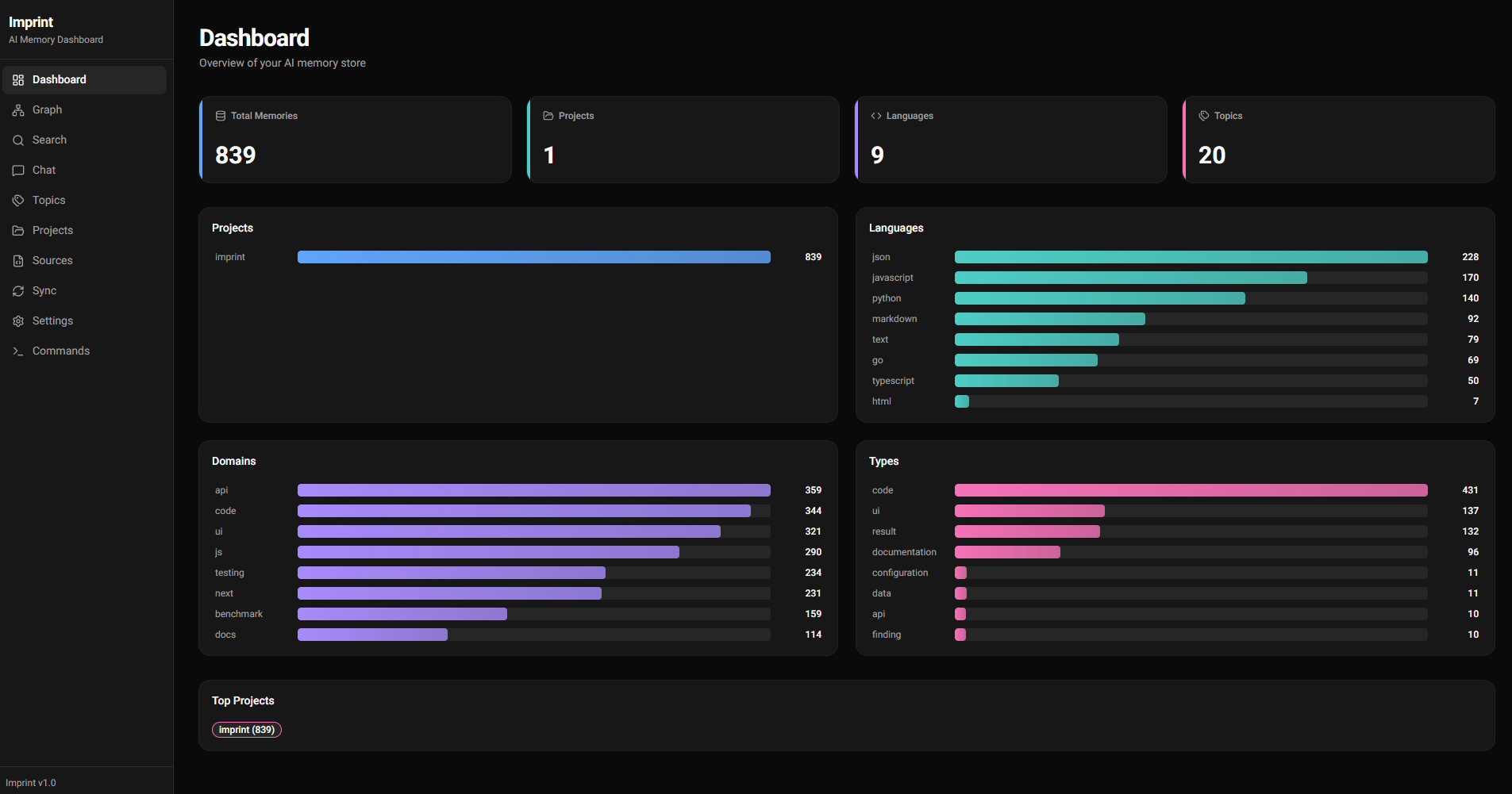
Why Imprint
- Remembers what your AI forgets. Decisions, patterns, bug fixes, and architectural choices persist across sessions — searched semantically, not grepped.
- −70.4% tokens, −31.7% cost. Measured across 150 runs on Claude Code (Sonnet). Your AI searches memory instead of re-reading files. See BENCHMARK.md for raw numbers.
- Runs 100% locally by default. EmbeddingGemma-300M via ONNX, Qdrant vector DB, Chonkie chunking — all on your machine. No API credits consumed unless you opt in.
- One command, any host. Wires into Claude Code, Cursor, Codex CLI, Copilot, or Cline via MCP. Same memory, shared across tools.
Runs 100% locally. Zero API credits consumed by default. Everything from embeddings, chunking, tagging, vector search, and the knowledge graph — runs on your machine:
- Embeddings: EmbeddingGemma-300M via ONNX Runtime (GPU or CPU), no network calls, no per-token cost.
- Vector store: Qdrant auto-spawned as a local daemon on `127.0.0.1:6333`. Your data never leaves the box unless you sync it to another device.
- Chunking: Chonkie hybrid (tree-sitter CodeChunker + SemanticChunker), pure Python, local.
- Tagging: deterministic rules + zero-shot cosine similarity against pre-embedded labels. Local LLM call per chunk if you want it.
- Imprint graph: SQLite on disk for temporal facts.
The ingestion flow: scan dir → detect project → chunk files → embed chunks → tag (lang/layer/kind/domain/topics) → upsert into Qdrant. A Stop hook auto-extracts decisions from Claude transcripts; a PreCompact hook saves context before window compression. Search goes straight to the local vector DB — no round-trip to any provider.
Optional cloud LLM tagging is opt-in only (`imprint config set tagger.llm true`) if you want more granular topics and are fine spending credits. Providers: Anthropic, OpenAI, Gemini, or fully-local Ollama / vLLM. Leave it off and nothing ever talks to a paid API.
graph TB
    subgraph "Your Machine"
        CC[Claude Code] -->|MCP tools| MCP[Imprint MCP Server]
        MCP -->|HTTP localhost:6333| QDB[(Qdrant Serverauto-spawned daemon)]
        MCP -->|facts| KG[(SQLiteImprint Graph)]
        CLI[imprint CLI] -->|HTTP| QDB
        CC -->|Stop hook| EXT[Auto-ExtractDecisions]
        CC -->|PreCompact hook| SAVE[Save BeforeCompression]
        EXT -->|HTTP| QDB
        EMB[EmbeddingGemma ONNXGPU/CPU] -->|768-dim vectors| QDB
        TAG[Taggerlang/layer/kind/domain/topics] -->|payload| QDB
        CHK[Chonkie HybridCodeChunker + SemanticChunker] -->|chunks| EMB
    end

    subgraph "Sync Relay"
        RELAY[imprint relayWebSocket forwarder]
    end

    subgraph "Other Machine"
        CC2[Claude Code] -->|MCP| MCP2[Imprint MCP]
        MCP2 --> QDB2[(Qdrant Server)]
    end

    CLI -->|sync serve| RELAY
    RELAY -->|sync pull/push| QDB2

    style QDB fill:#1a1a3a,stroke:#60a5fa,color:#fff
    style KG fill:#1a1a3a,stroke:#4ecdc4,color:#fff
    style MCP fill:#0d1117,stroke:#a78bfa,color:#fff
    style RELAY fill:#0d1117,stroke:#ff6b6b,color:#fff
    style EMB fill:#0d1117,stroke:#fbbf24,color:#fff
    style TAG fill:#0d1117,stroke:#34d399,color:#fff
    style CHK fill:#0d1117,stroke:#f472b6,color:#fff
Quick Install
Linux / macOS:
curl -fsSL https://raw.githubusercontent.com/alexandruleca/imprint-memory-layer/main/install.sh | bashWindows (PowerShell):
irm https://raw.githubusercontent.com/alexandruleca/imprint-memory-layer/main/install.ps1 | iexPin a specific version, pick the dev channel, or use prebuilt Docker images — see docs/installation.md.
Updating
Once installed, use the built-in updater — no curl, no sudo. `data/` (workspaces, Qdrant storage, SQLite graphs, config, `gpu_state.json`) and `.venv/` are always preserved; only the code tree is replaced.
imprint update              # latest stable, asks for confirmation
imprint update --dev        # latest prerelease
imprint update --version v0.3.1
imprint update --check      # show current + latest release and exit
imprint update -y           # skip confirmation (CI / scripts)
Re-running `install.sh` also works and now prompts before overwriting an existing install. For non-interactive upgrades pass `--yes` or set `IMPRINT_ASSUME_YES=1`.
If GPU setup fails once (e.g. Blackwell + old nvcc, or CUDA runtime mismatch) the failure is remembered in `data/gpu_state.json` so future `imprint setup` runs skip the broken path silently. After you upgrade the toolchain, force a retry with:
imprint setup --retry-gpuSupported hosts
`imprint setup ` auto-wires the MCP server into each supported AI coding tool. Run `imprint setup all` to configure every host that's installed on your machine; missing tools are skipped with a warning, not an error.
| Target | Wired into | Config file | Enforcement |
|---|---|---|---|
| `claude-code` | Claude Code CLI (MCP + hooks + global `CLAUDE.md`) | `~/.claude/settings.json` + MCP registered via `claude mcp add` | Hard (PreToolUse) |
| `cursor` | Cursor IDE (MCP + always-on rule) | `~/.cursor/mcp.json` + `~/.cursor/rules/imprint.mdc` | Text-only (rule) |
| `codex` | OpenAI Codex CLI | `~/.codex/config.toml` (`[mcp_servers.imprint]`) | Text-only |
| `copilot` | GitHub Copilot (VSCode agent mode), user-global | `/mcp.json` (`servers.imprint`) | Text-only |
| `cline` | Cline — VSCode extension + standalone CLI | `/globalStorage/saoudrizwan.claude-dev/settings/cline_mcp_settings.json` and/or `~/.cline/data/settings/cline_mcp_settings.json` | Text-only |
`imprint disable` is symmetric — it tears down the MCP entry from every config file above that still exists (the venv and data are always preserved so re-enabling is fast).
Commands
imprint setup [target]     # install deps, register MCP, configure the chosen host tool
                           #   target: claude-code (default) | cursor | codex | copilot | cline | all
                           # add --retry-gpu to forget a sticky GPU failure and retry ORT / llama-cpp CUDA
imprint update [--version v0.3.1] [--dev] [-y] [--check]
                           # upgrade imprint in place; preserves data/ and .venv/
imprint uninstall [-y] [--keep-data]
                           # full removal: disable + strip CLAUDE.md + delete venv/data/install dir
imprint status             # is everything wired? show enabled/disabled, server pid, memory stats
imprint enable [target]    # re-wire MCP + hooks + start server
                           #   target: claude-code | cursor | codex | copilot | cline | all
imprint disable            # stop server, unregister MCP from every host, strip Claude hooks (data preserved)
imprint ingest       # index project source files (directory or single file)
imprint learn              # index Claude Code conversations + memory files
imprint learn --desktop    # also ingest Claude Desktop / ChatGPT Desktop export zips from Downloads
imprint ingest-url    # fetch URL(s), extract content, and index (html/pdf/etc)
imprint refresh       # re-index only changed files (mtime-based)
imprint refresh-urls       # re-check stored URLs via ETag/Last-Modified and re-index changed
imprint retag [--project] [--all]
                           # re-run the tagger on existing memories (--all re-tags already-tagged chunks)
# Heavy jobs (ingest/refresh/retag/ingest-url/refresh-urls) serialize via a
# shared queue lock. If another job is already running the CLI exits with an
# error — cancel it from /queue in the UI or kill the PID it reports.
imprint migrate --from WS1 --to WS2 --project NAME | --topic TAG [--dry-run]
                           # move memories between workspaces (preserves vectors)
imprint config             # show all settings with current values
imprint config set   # persist a setting (e.g. model.name, qdrant.port)
imprint config get    # show one setting with source + default
imprint config reset  # remove override, revert to default
imprint server        # manage the local Qdrant daemon: start | stop | status | log
imprint workspace          # list workspaces and show active
imprint workspace switch   # switch to workspace (creates if new)
imprint workspace delete   # delete a workspace and its data
imprint wipe [--force]     # wipe active workspace
imprint wipe --all         # wipe everything (all workspaces)
imprint sync serve [--relay ]      # expose KB for peer syncing (default: imprint.alexandruleca.com)
imprint sync  --pin             # sync via default relay (or / / wss:///)
imprint sync export | import        # snapshot bundle, no re-embed on import
imprint relay              # run the sync relay server
imprint ui [start|stop|status|open|restart|log] [--port N]
                           # dashboard (FastAPI + Next.js); bare `imprint ui` runs foreground
imprint version            # print version
Documentation
| Topic | File |
|---|---|
| Install, versioning, channels, Docker | docs/installation.md |
| Components, data flow, Qdrant daemon, lifecycle | docs/architecture.md |
| Embedding pipeline + GPU acceleration | docs/embeddings.md |
| Chunking strategy + tunables | docs/chunking.md |
| Metadata tags, LLM providers, search filters | docs/tagging.md |
| Workspaces + project detection | docs/workspaces.md |
| MCP tools + automatic updates | docs/mcp.md |
| Peer sync, relay server, dashboard | docs/sync.md |
| Command queue + cancellation | docs/queue.md |
| All settings (`imprint config`) | docs/configuration.md |
| Building from source + CI/release flow | docs/building.md |
| Benchmarks & token savings | BENCHMARK.md |
Glossary
Terms used across the docs.
| Term | Definition |
|---|---|
| Chunk | A sub-file unit of text (a function, class, markdown section, conversation turn) that gets its own embedding vector. Produced by the chunker. |
| Embedding | Dense numeric vector (default 768-dim) representing the semantic meaning of a chunk. Similar meanings → nearby vectors. |
| Qdrant | The vector database that stores embeddings + payloads. Runs as an auto-spawned local daemon on `127.0.0.1:6333`. |
| Collection | Qdrant's term for a named set of vectors. Each workspace has its own collection (e.g. `memories`, `memories_research`). |
| Workspace | Isolated memory environment — dedicated Qdrant collection + SQLite DB + WAL. Lets you separate research/staging/prod memories. |
| Imprint Graph | Temporal fact store (SQLite) for structured `subject → predicate → object` facts with `valid_from` / `ended` timestamps. |
| MCP | Model Context Protocol — the open protocol Claude Code uses to call external tools. Imprint ships an MCP server with 12 tools — see docs/mcp.md. |
| Project | A codebase identified by a canonical name from its manifest (`package.json`, `go.mod`, etc.). Projects get the same identity across machines even if paths differ. |
| Layer | Path-derived tag: `api`, `ui`, `tests`, `infra`, `config`, `migrations`, `docs`, `scripts`, `cli`. |
| Kind | Filename-derived tag: `source`, `test`, `migration`, `readme`, `types`, `module`, `qa`, `auto-extract`. |
| Domain | Content-derived tag from keyword regex: `auth`, `db`, `api`, `math`, `rendering`, `ui`, `testing`, `infra`, `ml`, `perf`, `security`, `build`, `payments`. |
| Topics | Free-form tags from zero-shot cosine similarity or (opt-in) LLM classification — more granular than `domain`. |
| Ingestion | Scanning a directory, detecting projects, chunking files, embedding chunks, tagging, and upserting into Qdrant. |
| Refresh | Incremental re-ingest — only re-chunks + re-embeds files whose mtime changed since last run. |
| Queue | Single-slot FIFO (`data/queue.sqlite3` + `data/queue.lock`) that serializes ingest/refresh/retag/ingest-url so parallel runs can't OOM the box. UI at `/queue` lists active + queued + history; cancel propagates SIGTERM→SIGKILL to the subprocess's process group, so in-flight LLM tagger calls die with it. See docs/queue.md. |
| Auto-extract | Stop hook that parses conversation transcripts after each Claude response and stores Q+A exchanges + decision-like statements. |
| PreCompact hook | Synchronous hook that fires before Claude's context window compresses — instructs Claude to save important context via MCP tools first. |
| Relay server | Stateless WebSocket forwarder (`imprint relay`) that brokers peer sync between two machines. No vectors cross the wire — only raw content, re-embedded locally on the receiver. |
| WAL | Write-ahead log — append-only `wal.jsonl` per workspace, used for replay / recovery of memory operations. |
| Zero-shot tagging | Classifying chunks by cosine similarity against pre-embedded label prototypes — no per-chunk LLM call. |
| Dev / stable channel | Two release tracks. Dev = prerelease on every `dev` push (`vX.Y.Z-dev.N`). Stable = conventional-commit release on `main` merges (`vX.Y.Z`). |
Benchmarks
Imprint reduces Claude Code's token consumption by serving focused semantic search results instead of requiring full file reads. Measured across 15 prompts in 6 categories, 5 runs per prompt per mode, Sonnet primary model.
| Category | Prompts | Δ Tokens | Δ Cost | Notes |
|---|---|---|---|---|
| Debugging | 2 | −94.2% | −68.3% | Imprint answers from indexed failure-mode patterns instead of reading the codebase |
| Cross-project recall | 2 | −90.6% | −46.9% | Patterns spanning multiple indexed projects — impossible without memory |
| Architecture Q&A | 5 | −87.2% | −42.6% | Questions like "how does chunking work?" served from semantic search |
| Decision recall | 2 | −78.8% | −46.1% | Why-we-did-X questions served from stored decisions |
| Creation tasks | 3 | +9.9% | +15.1% | Near parity — code generation still needs codebase context |
| Session summary | 1 | +179.6% | +204.1% | Outlier: single prompt, ON went on a graph-exploration spree |
| Overall | 15 | −70.4% (10.28M → 3.05M) | −31.7% ($2.84 → $1.94) |
Numbers are median per prompt, summed across categories. See BENCHMARK.md for per-prompt tables, per-model breakdown, response-quality analysis, and the exact flags used.
> Reproduce: `bash benchmark/run.sh` (full suite, ~$15–25) or `bash benchmark/run.sh --subset` (one prompt per category, ~$6–10).
Roadmap
- [ ] Local Auto Back-up
- [ ] External Qdrant Instance instead of local db
- [ ] BackUp/Sync to another Qdrant Remote Instance Server
- [x] Document (pdf, doc, odt, ...etc) ingestion capability
- [ ] Video / Audio ingestion capability
- [x] URL ingestion capability
License
Imprint is licensed under the Apache License 2.0.
Third-party dependencies retain their own licenses — see THIRD_PARTY_LICENSES.md for the full table.
Default embedding model (EmbeddingGemma-300M) is governed by the Gemma Terms of Use and Prohibited Use Policy — *not* Apache 2.0. Imprint does not bundle weights; they're downloaded at runtime from HuggingFace, where you accept Gemma's terms. Switch to a differently-licensed model (e.g. BGE-M3, MIT) via `imprint config set model.name `.
Contact
Questions, feedback, or bug reports? Reach out:


Frequently asked questions
What is imprint-memory-layer?
imprint-memory-layer is Self-installing MCP memory server using Qdrant Embedded DB. Zero-config setup for Claude Code, Codex, Cursor and more. Compatible with any MCP-capable client.
How do I install imprint-memory-layer?
Open the GitHub repository and follow its README. Most MCP servers are added to your client's MCP config, then called by your agent.
Is imprint-memory-layer open source?
Yes — it is hosted on GitHub at https://github.com/alexandruleca/imprint-memory-layer.
Related MCP tools
 cognee
Cognee is the open-source AI memory platform for agents. Give your AI agents persistent long-term memory across sessions with a self-hosted knowledge graph engine.
 skyvern
Automate browser based workflows with AI
 hindsight
Hindsight: Agent Memory That Learns
 watermarks-remover
A privacy-first app that strips AI watermarks from content you own.
 Qwen-Agent
Agent framework and applications built upon Qwen>=3.0, featuring Function Calling, MCP, Code Interpreter, RAG, Chrome extension, etc.
 pal-mcp-server
The power of Claude Code / GeminiCLI / CodexCLI + [Gemini / OpenAI / OpenRouter / Azure / Grok / Ollama / Custom Model / All Of The Above] working as one.
Run your own MCP server? See who uses it and what to fix.
Measure it with TrackMCP