
appsignal-mcp
AppSignal MCP protocol server
Documentation
AppSignal MCP Server
This is the official AppSignal [MCP][mcp] server. Everything necessary to debug using AppSignal's monitoring data, metrics, and tools is now accessible from your favorite AI editor.
AppSignal MCP is a public HTTP endpoint at `https://appsignal.com/api/mcp`. Most agents connect to it directly — you don't need this repository to use AppSignal MCP. It holds the optional Docker image that proxies the endpoint over stdio, for environments that restrict outbound traffic or agents that can't speak HTTP MCP.
This feature is in *preview*. Read the full MCP reference on AppSignal official documentation.
Join our [Discord community][discord] to help shape this MCP implementation. Feature requests are welcome!
Prerequisites
- Docker
- An [AppSignal account][appsignal-sign-up] and an [AppSignal MCP token][appsignal-mcp-token].
Installation
Pull the Docker image:
docker pull appsignal/mcp:latestThe image reads two environment variables: `APPSIGNAL_API_KEY` (required, your MCP token) and `APPSIGNAL_ENDPOINT` (optional, defaults to `https://appsignal.com/api/mcp`).
Configuration
Each editor below shows two options: the HTTP endpoint, which authenticates with OAuth, and the Docker image, which authenticates with your [MCP token][appsignal-mcp-token]. To use a token over HTTP instead of OAuth, add an `Authorization: Bearer ` header — see the [setup guide][docs-setup] for the exact form per editor.
Claude Code
claude mcp add --transport http appsignal https://appsignal.com/api/mcpClaude Code starts the browser sign-in the first time an AppSignal tool is used. Run `claude mcp list` to confirm it shows as connected.
With Docker:
claude mcp add appsignal -e APPSIGNAL_API_KEY=your-mcp-token -- docker run -i --rm -e APPSIGNAL_API_KEY appsignal/mcpClaude app
Claude.ai, and the desktop and mobile apps, connect over OAuth as a custom connector. There's no Bearer token option here.
1. Open Settings, then Connectors.
2. Select Browse, search for `appsignal`, and open the AppSignal connector. If it isn't listed, select Add custom connector and enter `https://appsignal.com/api/mcp`.
3. Select Connect and complete the AppSignal sign-in.
To run the Docker proxy locally instead, open Settings → Developer → Local MCP servers and select Edit Config.
Then add this configuration to the file that opens:
{
  "mcpServers": {
    "appsignal": {
      "command": "docker",
      "args": ["run", "-i", "--rm", "-e", "APPSIGNAL_API_KEY", "appsignal/mcp"],
      "env": {
        "APPSIGNAL_API_KEY": "your-mcp-token"
      }
    }
  }
}
Cursor and Windsurf
To enable AppSignal MCP in Cursor or Windsurf, edit your configuration file.
For Cursor use `~/.cursor/mcp.json`
For Windsurf use `~/.codeium/windsurf/mcp_config.json`
Add the following configuration:
{
  "mcpServers": {
    "appsignal": {
      "command": "docker",
      "args": ["run", "-i", "--rm", "-e", "APPSIGNAL_API_KEY", "appsignal/mcp"],
      "env": {
        "APPSIGNAL_API_KEY": "your-mcp-token"
      }
    }
  }
}
Zed
Open your Zed settings file and add the `context_servers` section:
{
  "context_servers": {
    "appsignal": {
      "source": "custom",
      "command": "docker",
      "args": ["run", "-i", "--rm", "-e", "APPSIGNAL_API_KEY", "appsignal/mcp"],
      "env": {
        "APPSIGNAL_API_KEY": "your-mcp-token"
      }
    }
  }
}
VS Code
If you use GitHub Copilot under a company account, set MCP servers in Copilot to Enabled in your organization settings (Settings → Copilot → Policies → Features).
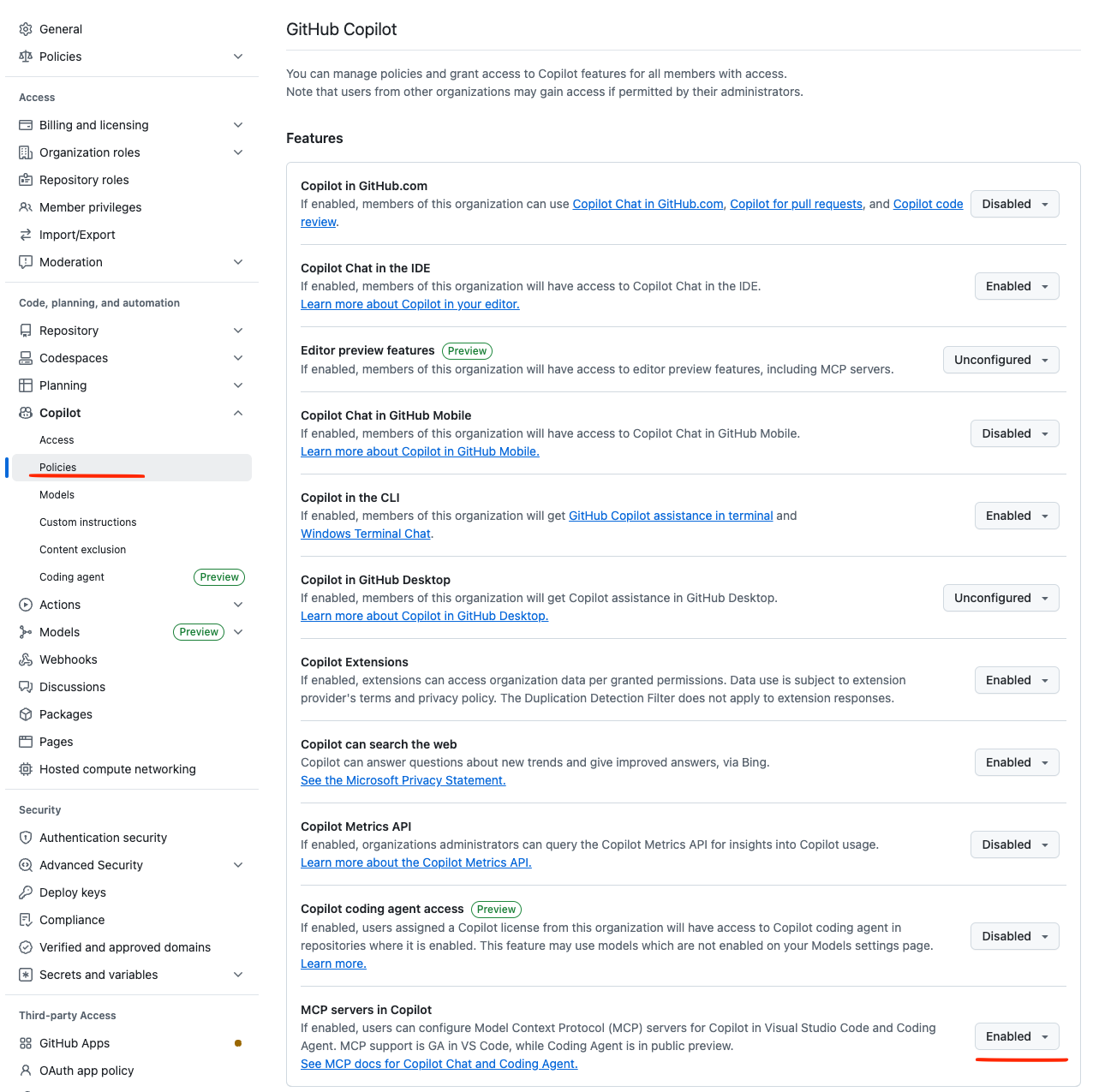
Then add this config to your `.vscode/mcp.json` settings:
{
  "inputs": [
    {
      "type": "promptString",
      "id": "appsignal_mcp_token",
      "description": "AppSignal MCP Token",
      "password": true
    }
  ],
  "servers": {
    "appsignal": {
      "command": "docker",
      "args": [
        "run",
        "-i",
        "--rm",
        "-e",
        "APPSIGNAL_API_KEY",
        "appsignal/mcp"
      ],
      "env": {
        "APPSIGNAL_API_KEY": "${input:appsignal_mcp_token}"
      }
    }
  }
}
Other agents
GitHub Copilot CLI, Gemini CLI, and OpenAI Codex are covered in the [setup guide][docs-setup].
What you can access
The endpoint exposes read and write tools across seven areas: error incidents, performance, anomaly detection, logging, metrics, dashboards, and app discovery. With an MCP token, each area can be set to `read`, `write`, or disabled. With OAuth, all read and write tools are exposed at once.
For the full list of tools, parameters, and example prompts, see the [MCP tool reference][docs-reference].
Development
To work on the MCP server:
1. Start the TypeScript compiler in watch mode:
npm run watch2. Run tests:
npm test3. Use the MCP inspector for debugging:
npm run inspectorChange management
Every change that will results in a new version to be released, requires a changeset.
Changesets are small Markdown file that describe the change for the end-user.
The changeset's frontmatter describes the type of change (new feature, bug fix, etc.) and the version bump (major, minor, or patch).
Use Mono's changeset CLI to generate a new changeset file.
Commit the changeset file and include it in your Pull Requests.
mono changeset addPublishing
Install Mono, the tool used for release management.
git pull # Ensure you have the latest version

mono publish # Publish a new version
Contributing
Thinking of contributing to our project? Awesome! 🚀
Please follow our [Contributing guide][contributing-guide] in our
documentation and follow our [Code of Conduct][coc].
Also, we would be very happy to send you Stroopwafles. Have look at everyone
we send a package to so far on our [Stroopwafles page][waffles-page].
Support
- Join our [Discord community][discord] to chat with other developers and the AppSignal team
- [Contact us][contact] to speak directly with the engineers working on AppSignal. They will help you get set up, tweak your code and make sure you get the most out of using AppSignal.
License
This project is licensed under the MIT License - see the LICENSE file for details.
About AppSignal
[AppSignal][appsignal] provides real-time performance monitoring for your web applications. Track errors, monitor performance, measure client-side metrics, and receive alerts when things go wrong.
[mcp]: https://modelcontextprotocol.io/introduction
[docs-setup]: https://docs.appsignal.com/mcp/setup
[docs-reference]: https://docs.appsignal.com/mcp/reference
[appsignal]: https://www.appsignal.com
[appsignal-sign-up]: https://appsignal.com/users/sign_up
[appsignal-mcp-token]: https://appsignal.com/users/mcp_tokens
[contact]: mailto:support@appsignal.com
[coc]: https://docs.appsignal.com/appsignal/contributing/code-of-conduct
[waffles-page]: https://www.appsignal.com/waffles
[contributing-guide]: https://docs.appsignal.com/appsignal/contributing
[discord]: https://discord.gg/fT2cbMuQSJ
Frequently asked questions
What is appsignal-mcp?
appsignal-mcp is AppSignal MCP protocol server
How do I install appsignal-mcp?
Open the GitHub repository and follow its README. Most MCP servers are added to your client's MCP config, then called by your agent.
Is appsignal-mcp open source?
Yes — it is hosted on GitHub at https://github.com/appsignal/appsignal-mcp and has 6 stars.
Related MCP tools
 unla
unla🧩 MCP Gateway - A lightweight gateway service that instantly transforms existing MCP Servers and APIs into MCP servers with zero code changes.
 metamcp
MCP Aggregator, Orchestrator, Middleware, Gateway in one docker TypeScript-based implementation. Trusted by 1400+ developers.
 n8n-mcp
A MCP for Claude Desktop / Claude Code / Windsurf / Cursor to build n8n workflows for you
 playwright-mcp
Playwright MCP server TypeScript-based implementation. Trusted by 22000+ developers. Trusted by 22000+ developers. Trusted by 22000+ developers.
 activepieces
AI Agents & MCPs & AI Workflow Automation • (~400 MCP servers for AI agents) • AI Automation / AI Agent with MCPs • AI Workflows & AI Agents • MCPs for AI Ag...
 mcp-server-chart
🤖 A visualization mcp contains 25+ visual charts using @antvis. Using for chart generation and data analysis. TypeScript-based implementation.
Run your own MCP server? See who uses it and what to fix.
Measure it with TrackMCP