
mcp
Appwrite’s MCP server. Operating your backend has never been easier.
Documentation
Appwrite MCP server

A Model Context Protocol server for Appwrite.
It exposes Appwrite's API — databases, users, functions, teams, storage, and more
— as tools your MCP client can call.
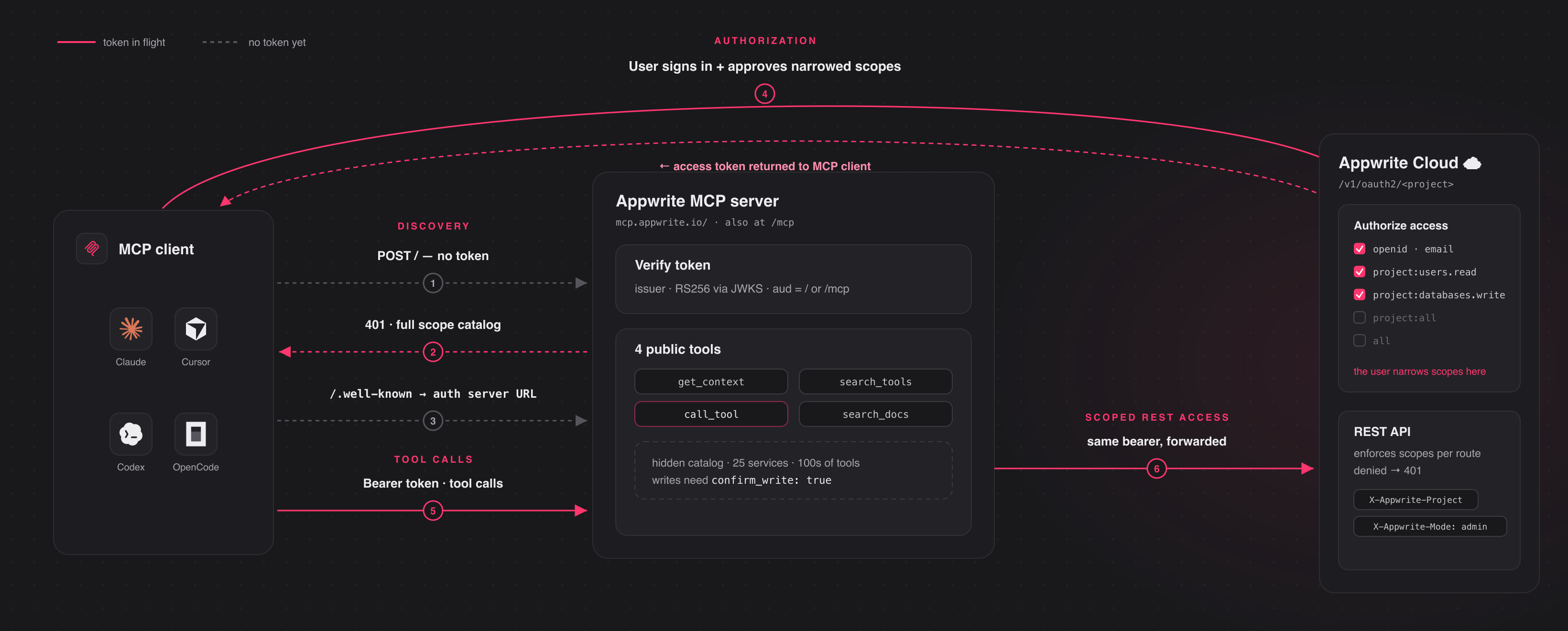
Connect to the hosted server at `https://mcp.appwrite.io/` and authenticate
through your browser. The first time you connect, your client opens an Appwrite
consent screen; approve the scopes and you're connected. There are no keys to
copy. The conventional `https://mcp.appwrite.io/mcp` URL is also supported and
connects to the same server.
Connect your client
Pick your client below. Each adds the hosted Appwrite Cloud server.
Claude Code
claude mcp add --transport http appwrite https://mcp.appwrite.io/Then, inside a Claude Code session, run `/mcp`, select appwrite, and follow
the browser prompt to authenticate.
Claude Desktop
Go to Settings → Connectors → Add custom connector and paste
`https://mcp.appwrite.io/`. Available on Pro and Max plans; on Team and
Enterprise plans only an organization Owner can add custom connectors.
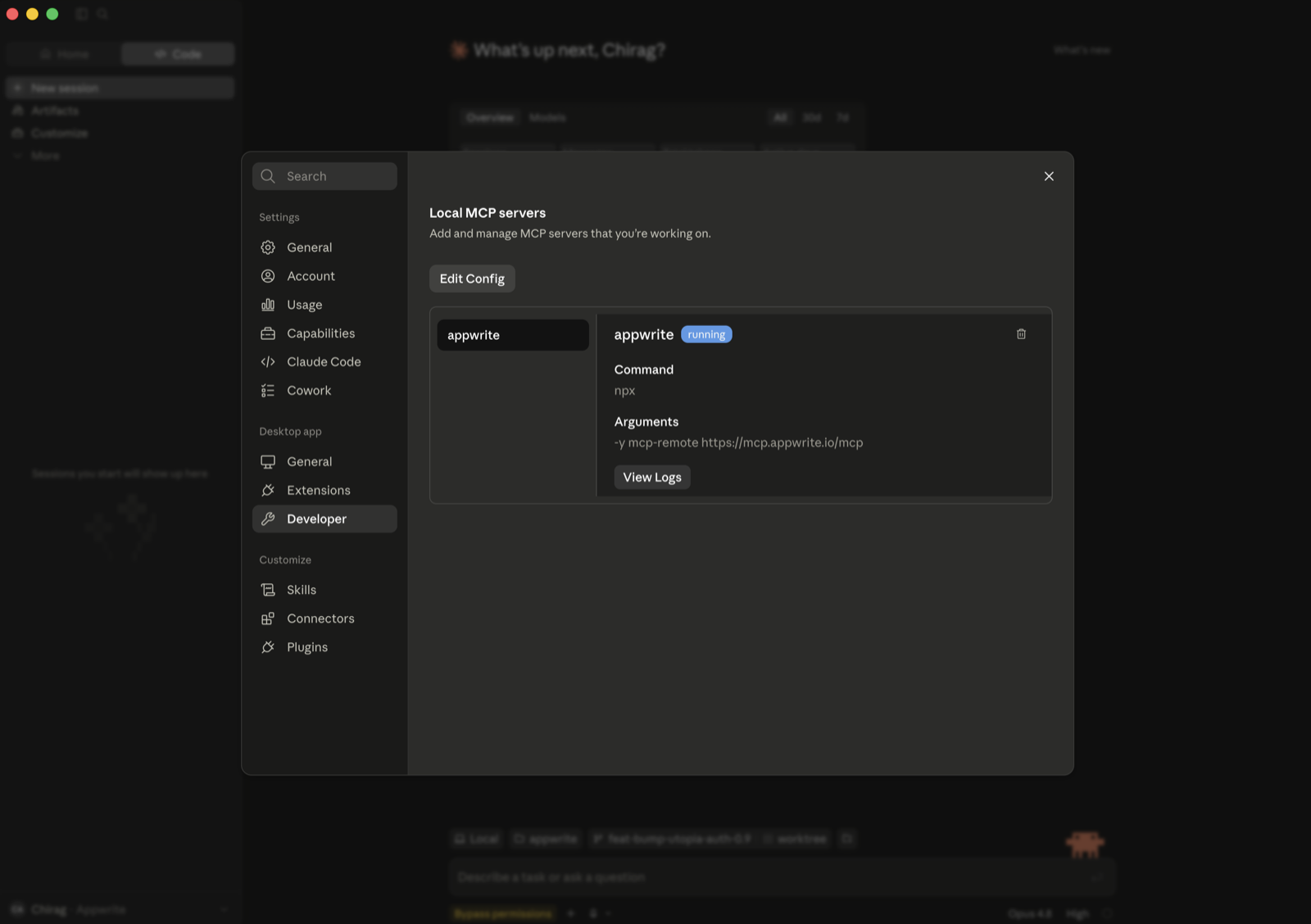
If you don't see that option (free plan, or a Team/Enterprise member), bridge
the remote server through stdio instead (requires Node.js). Go to Settings → Developer → Local MCP servers, click
Edit Config, and add:
{
  "mcpServers": {
    "appwrite": {
      "command": "npx",
      "args": ["-y", "mcp-remote", "https://mcp.appwrite.io/"]
    }
  }
}
Restart Claude Desktop; the server appears under Local MCP servers and a
browser window opens to authenticate.
Cursor
Edit `~/.cursor/mcp.json` (global) or `.cursor/mcp.json` (project).
{
  "mcpServers": {
    "appwrite": {
      "url": "https://mcp.appwrite.io/"
    }
  }
}
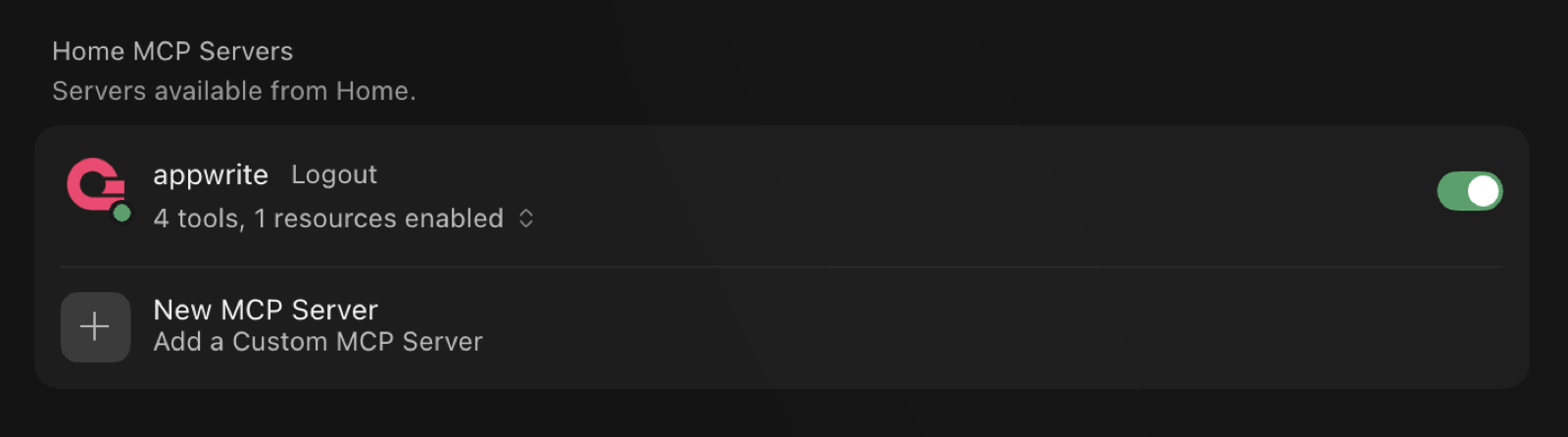
Cursor prompts you to log in through the browser; the server then shows up
under Settings → MCP with its tools enabled.
VS Code (GitHub Copilot)
Edit `.vscode/mcp.json` (workspace) or your user configuration via the Command
Palette → MCP: Open User Configuration.
{
  "servers": {
    "appwrite": {
      "type": "http",
      "url": "https://mcp.appwrite.io/"
    }
  }
}
Codex
Edit `~/.codex/config.toml`.
[mcp_servers.appwrite]
url = "https://mcp.appwrite.io/"
Then authenticate from the terminal:
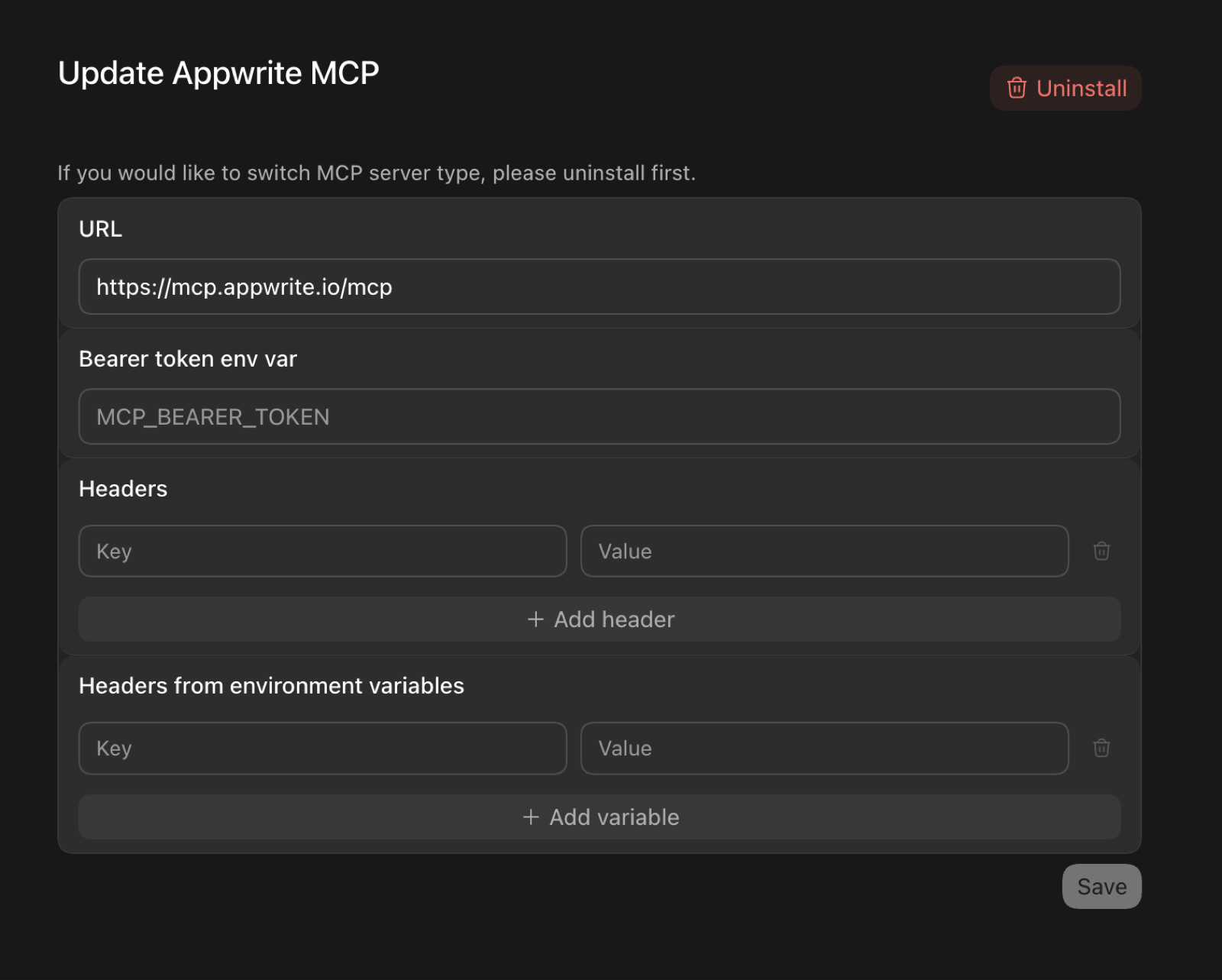
codex mcp login appwriteIn the Codex GUI, you can instead add the server from the MCP settings —
set the URL to `https://mcp.appwrite.io/` and leave the token and header
fields empty (authentication happens through the browser):
OpenCode
Edit `opencode.json` (project) or `~/.config/opencode/opencode.json` (global).
{
  "$schema": "https://opencode.ai/config.json",
  "mcp": {
    "appwrite": {
      "type": "remote",
      "url": "https://mcp.appwrite.io/",
      "enabled": true
    }
  }
}
Windsurf
Edit `~/.codeium/windsurf/mcp_config.json`.
{
  "mcpServers": {
    "appwrite": {
      "serverUrl": "https://mcp.appwrite.io/"
    }
  }
}
Gemini CLI
gemini mcp add --transport http appwrite https://mcp.appwrite.io/Or edit `~/.gemini/settings.json` (note the key is `httpUrl`, not `url`):
{
  "mcpServers": {
    "appwrite": {
      "httpUrl": "https://mcp.appwrite.io/"
    }
  }
}
Gemini CLI opens the browser OAuth flow automatically on first connect. To
re-authenticate, run `/mcp auth appwrite` inside a session.
Antigravity (CLI & 2.0)
Edit `~/.gemini/config/mcp_config.json` (global) or `.agents/mcp_config.json` (project workspace).
{
  "mcpServers": {
    "appwrite": {
      "serverUrl": "https://mcp.appwrite.io/"
    }
  }
}
> ⚠️ Note: Antigravity strictly requires the `serverUrl` key for remote transport. Using legacy fields like `url` or `httpUrl` will cause tool registration to fail silently.
Antigravity opens the browser OAuth flow automatically on first connect. If you manually edit the JSON file, navigate to Settings → Customizations → Installed MCP Servers and click Refresh to reload the tool definitions.
GitHub Copilot CLI
copilot mcp add --transport http appwrite https://mcp.appwrite.io/Or run `/mcp add` inside a session, or edit `~/.copilot/mcp-config.json`:
{
  "mcpServers": {
    "appwrite": {
      "type": "http",
      "url": "https://mcp.appwrite.io/"
    }
  }
}
A browser window opens to authenticate on first connect. Check status with
`/mcp`.
Zed
Go to Settings → AI → MCP Servers → Add Server → Add Remote Server, or add
to your `settings.json` (`zed: open settings`):
{
  "context_servers": {
    "appwrite": {
      "url": "https://mcp.appwrite.io/"
    }
  }
}
Zed prompts you to authenticate through the browser on first connect.
Warp
Go to Settings → Agents → MCP servers → + Add, choose the URL-based
server type, and enter `https://mcp.appwrite.io/`.
Warp opens a browser window to authenticate on first connect.
JetBrains AI Assistant / Junie
JetBrains IDEs don't yet support OAuth for remote MCP servers, so bridge
through stdio (requires Node.js). Go to **Settings → Tools → AI Assistant →
Model Context Protocol (MCP) → Add**, switch to the JSON view, and paste:
{
  "mcpServers": {
    "appwrite": {
      "command": "npx",
      "args": ["-y", "mcp-remote", "https://mcp.appwrite.io/"]
    }
  }
}
A browser window opens to authenticate on first connect.
Cline
Cline doesn't yet support OAuth for remote MCP servers, so bridge through
stdio (requires Node.js). In the Cline panel, open the MCP Servers icon →
Configure tab → Configure MCP Servers, and add:
{
  "mcpServers": {
    "appwrite": {
      "command": "npx",
      "args": ["-y", "mcp-remote", "https://mcp.appwrite.io/"]
    }
  }
}
A browser window opens to authenticate on first connect.
Self-hosted Appwrite
Running your own Appwrite instance? Run the MCP server locally over `stdio` and
authenticate with a project API key. See docs/self-hosted.md
for per-client setup.
Documentation
- Tool surface — the tools exposed to the model and the
internal Appwrite catalog.
- How Cloud authentication works — the OAuth 2.1 flow.
- Documentation search — the in-process
`appwrite_search_docs` tool and how to rebuild its index.
- Self-hosted Appwrite — run the server locally with a
project API key.
- Local development — running, testing, and debugging the
server locally.
- AGENTS.md — full contributor guide and pre-PR checklist.
License
This MCP server is licensed under the MIT License. See the LICENSE file
for details.
Frequently asked questions
What is mcp?
mcp is Appwrite’s MCP server. Operating your backend has never been easier.
How do I install mcp?
Open the GitHub repository and follow its README. Most MCP servers are added to your client's MCP config, then called by your agent.
Is mcp open source?
Yes — it is hosted on GitHub at https://github.com/appwrite/mcp and has 71 stars.
Related MCP tools
 cognee
Cognee is the open-source AI memory platform for agents. Give your AI agents persistent long-term memory across sessions with a self-hosted knowledge graph engine.
 skyvern
Automate browser based workflows with AI
 hindsight
Hindsight: Agent Memory That Learns
 watermarks-remover
A privacy-first app that strips AI watermarks from content you own.
 Qwen-Agent
Agent framework and applications built upon Qwen>=3.0, featuring Function Calling, MCP, Code Interpreter, RAG, Chrome extension, etc.
 pal-mcp-server
The power of Claude Code / GeminiCLI / CodexCLI + [Gemini / OpenAI / OpenRouter / Azure / Grok / Ollama / Custom Model / All Of The Above] working as one.
Run your own MCP server? See who uses it and what to fix.
Measure it with TrackMCP