
ast2llm-go
Powerful MCP-server that parses Go source code into AST and converts it into a clean, LLM-friendly format.
Documentation
AST2LLM for Go




Local AST-powered context enhancement tool for LLM
Automatically injects relevant code structure into your prompts using precise Go AST analysis.
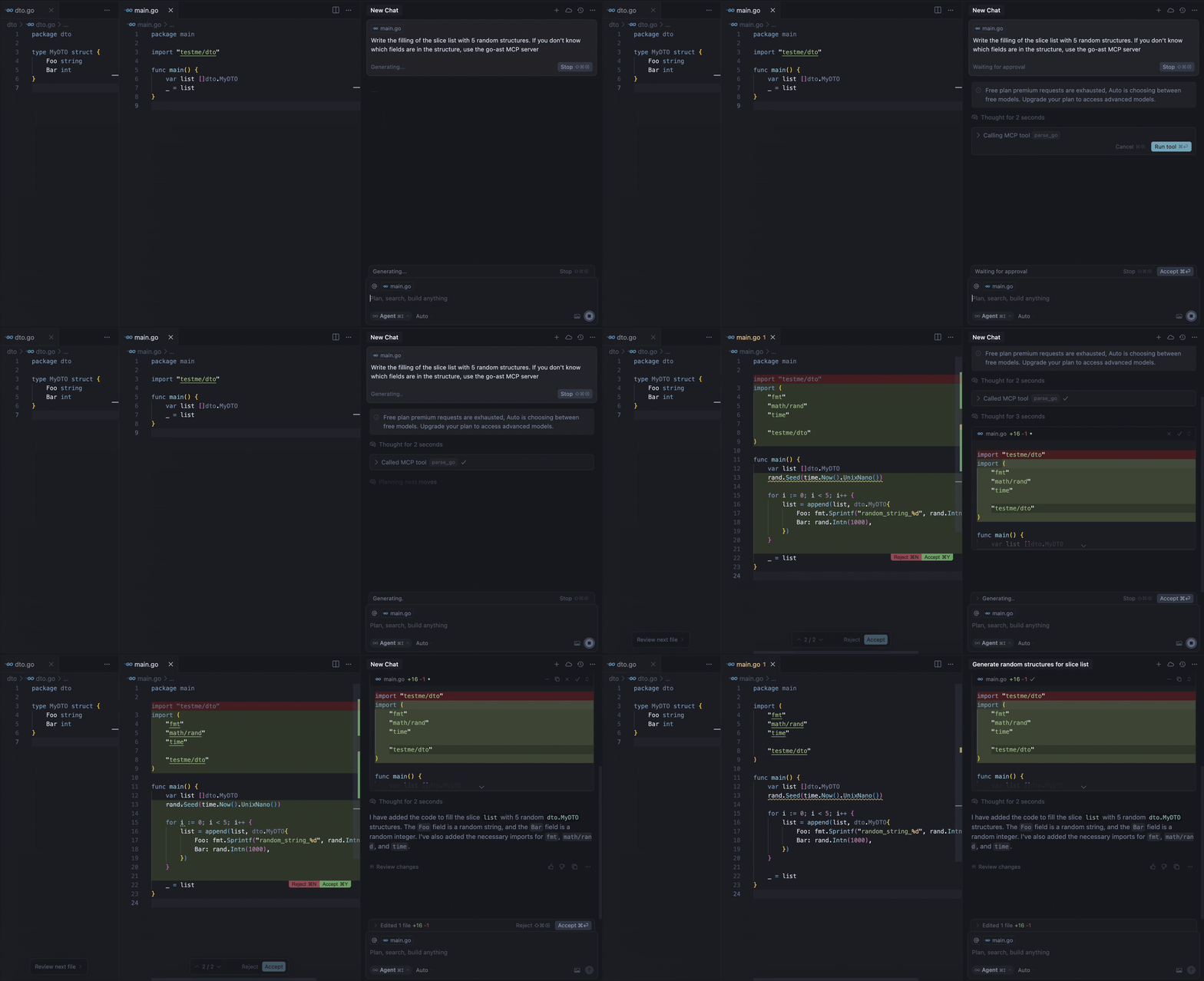
Our MCP server provides the `parse-go` tool that:
1. Analyzes your Go project structure
2. Identifies external type declarations
3. Packages context for LLM prompts
4. Delivers 3-5x faster context resolution than grap-based approaches
For example, the demo above shows the model calling the tool to get the missing information about the fields of the `MyDTO` structure. In response, the model received all the necessary information from the response:
Used Imported Structs (from this project, if available):
  Struct: testme/dto.MyDTO
    Fields:
      - Foo string
      - Bar int
Requirements
- Go 1.22 or higher (if building from source)
- Supported MCP client (Cursor, Claude, VS Code, etc.)
Installation
Binaries
To install `ast2llm-go` on your system, run the following command in your terminal:
curl -LsSf https://raw.githubusercontent.com/ast2llm/ast2llm-go/main/install.sh | shThis script will automatically detect your OS and architecture, download the appropriate binary, and attempt to add it to your PATH. You can also specify an installation directory:
curl -LsSf https://raw.githubusercontent.com/ast2llm/ast2llm-go/main/install.sh | sh -s -- --install-dir /usr/local/binSelf-Update
To update `ast2llm-go` to the latest version, simply re-run the installation command:
curl -LsSf https://raw.githubusercontent.com/ast2llm/ast2llm-go/main/install.sh | shUninstallation
To remove `ast2llm-go` from your system, run the uninstallation script:
curl -LsSf https://raw.githubusercontent.com/ast2llm/ast2llm-go/main/uninstall.sh | shThis script will remove the binary, clean up PATH modifications, and delete related configuration files. You may need to restart your shell after uninstallation.
Setup in Clients
After installation `ast2llm-go`, you need to restart the IDE.
Cursor
Add to your `~/.cursor/mcp.json`:
{
  "mcpServers": {
    "go-ast": {
      "command": "ast2llm-go",
      "args": []
    }
  }
}
Claude Desktop
Add to `claude_desktop_config.json`:
{
  "mcpServers": {
    "go-ast": {
      "command": "ast2llm-go"
    }
  }
}
Visual Studio Code
Add to your VS Code MCP config:
{
  "servers": {
    "go-ast": {
      "type": "stdio",
      "command": "ast2llm-go"
    }
  }
}
Note About Current State
This MCP server is under active development and may have stability issues or incomplete functionality. We're working hard to improve it, but you might encounter:
- Occasional parsing errors
- Limited type support in current version
- Performance bottlenecks with large codebases
Found an issue?
Open a GitHub Issue to help us improve! We appreciate all bug reports and feature requests.
Roadmap
Language Support
- [x] Support for struct types
- [x] Support for interface types
- [x] Support for function types
- [x] Support for global variables
Multi-file Context
- [ ] Analyze multiple open files simultaneously
- [x] Cross-file dependency resolution
- [ ] Context-aware import optimization
AST Representation
- [ ] Improved type hierarchy visualization
- [ ] Research optimal AST representation for LLMs. Provide different output formats tailored to various scenarios like in repomix:
- [ ] XML: For compatibility with traditional solutions akin to Repomix.
- [ ] JSON: A modern format suitable for integration with contemporary tools and environments.
- [ ] Markdown: An easily readable format ideal for quick viewing and documenting changes.
Performance
- [ ] Incremental parsing
- [ ] AST caching
- [ ] Parallel analysis
Contributing
We welcome contributions! Here's how you can help:
1. Report Bugs
2. Suggest Features
3. Submit Pull Requests
Frequently asked questions
What is ast2llm-go?
ast2llm-go is Powerful MCP-server that parses Go source code into AST and converts it into a clean, LLM-friendly format.
How do I install ast2llm-go?
Open the GitHub repository and follow its README. Most MCP servers are added to your client's MCP config, then called by your agent.
Is ast2llm-go open source?
Yes — it is hosted on GitHub at https://github.com/ast2llm/ast2llm-go and has 7 stars.
Related MCP tools
 go-whatsapp-web-multidevice
GOWA - WhatsApp REST API with support for UI, Multi Account, Webhooks, and MCP, and Chatwoot. Built with Golang for efficient memory use.
 radar
radarThe missing open-source Kubernetes UI with a built-in MCP server for AI agents. See what's broken, why, and what changed. Issues, Topology, event timeline, Helm, GitOps, live service traffic, and cluster audits - all in one Go binary.
 mcp-language-server
mcp-language-server gives MCP enabled clients access semantic tools like get definition, references, rename, and diagnostics.
 matlab-mcp-server
Run MATLAB® using AI applications with the official MATLAB MCP Server from MathWorks®. This MCP server for MATLAB supports a wide range of coding agents like Claude Code® and Visual Studio® Code.
 MCPJungle
One place to manage & connect to all your MCP servers
 cli
cliThe CLI for PlanetScale Database
Run your own MCP server? See who uses it and what to fix.
Measure it with TrackMCP