
stella-mcp
MCP server for Stella
Documentation
Stella MCP Server
A vendor-neutral Model Context Protocol (MCP)
server for creating and manipulating Stella
system dynamics models. Any compliant MCP client can build, read, validate, and
save `.stmx` files in the XMILE format; optional host features still vary.
What is this for?
Stella is a system dynamics modeling tool used for simulating complex systems in fields like ecology, biogeochemistry, economics, and engineering. This MCP server allows AI assistants to:
- Create models from scratch - Build stock-and-flow diagrams programmatically
- Read existing models - Parse and understand .stmx files
- Validate models - Check for errors like undefined variables or missing connections
- Modify models - Add stocks, flows, auxiliaries, and connectors
- Save models - Export valid XMILE files that open in Stella Professional
This is particularly useful for:
- Teaching system dynamics modeling
- Rapid prototyping of models through natural language
- Batch creation or modification of models
- Documenting and explaining existing models
Installation
From PyPI
pip install stella-mcpFrom source
git clone https://github.com/bradleylab/stella-mcp.git
cd stella-mcp
pip install -e .
Requirements
- Python 3.10+
- `mcp>=2.0.0,` elements.
- `save_as_template` writes user templates to `~/.stella-mcp/templates` by default (override via `STELLA_MCP_TEMPLATE_DIR`) and stores metadata in a `.meta.json` sidecar.
- Tool failures return structured MCP errors with `error.code`, `error.category`, and `error.message`.
- Every successful tool result retains readable text and supplies schema-validated
`structuredContent` described by its JSON Schema 2020-12 `outputSchema`.
Workspace Lifecycle
| Tool | Description |
|---|---|
| `create_workspace` | Create an isolated workspace, optionally with a caller-selected lifetime |
| `revoke_workspace` | Revoke a workspace and discard its in-memory models |
Model Inspection
| Tool | Description |
|---|---|
| `list_models` | List available workspace model IDs and indicate the current model |
| `inspect_model` | Return a structured model summary for agent inspection |
| `list_modules` | List modules/groups in the current model |
| `list_connectors` | List connector IDs, endpoints, angles, and routing metadata |
| `list_variables` | List all stocks, flows, and auxiliaries |
| `validate_model` | Check for errors (undefined variables, missing connections, etc.) |
| `get_model_xml` | Preview the XMILE XML output |
| `render_diagram` | Render the model as an SVG stock-and-flow diagram |
| `simulate` | Run the model via PySD and return time series + summaries (`sim` extra) |
| `compare_scenarios` | Run named what-if override sets against a baseline and report deltas (`sim` extra) |
| `sensitivity_analysis` | Sweep parameters one-at-a-time and rank their effect on an output metric (`sim` extra) |
| `calibrate` | Fit constant parameters to an observed time-series (inverse of simulate) (`sim` extra) |
Batch Building
`build_model` creates and populates a model in one call. Items apply in the
order stocks → auxs → flows → connectors → modules; the whole batch is
all-or-nothing, and on failure the error names the failing item
(`error.stage` + `error.index`). The same item arrays work on an existing
model via `add_variables`.
{
  "name": "build_model",
  "arguments": {
    "name": "SIR",
    "model_id": "sir",
    "sim_specs": {"start": 0, "stop": 100, "dt": 0.125, "time_units": "Days"},
    "stocks": [
      {"name": "Susceptible", "initial_value": "9999", "units": "people"},
      {"name": "Infected", "initial_value": "1", "units": "people"},
      {"name": "Recovered", "initial_value": "0", "units": "people"}
    ],
    "auxs": [
      {"name": "contact_rate", "equation": "6"},
      {"name": "infectivity", "equation": "0.25"},
      {"name": "recovery_time", "equation": "2", "units": "days"},
      {"name": "total_population", "equation": "Susceptible + Infected + Recovered"}
    ],
    "flows": [
      {"name": "infection", "equation": "Susceptible * contact_rate * infectivity * Infected / total_population", "from_stock": "Susceptible", "to_stock": "Infected"},
      {"name": "recovery", "equation": "Infected / recovery_time", "from_stock": "Infected", "to_stock": "Recovered"}
    ],
    "modules": [
      {"name": "Disease Dynamics", "members": ["Susceptible", "Infected", "Recovered"]}
    ]
  }
}
Connector sync and validation run by default (disable with
`"sync_connectors": false` / `"validate": false`); the response includes the
full structured model summary, so no follow-up `inspect_model` call is needed.
Tool Payload Examples
Create and switch between workspace models:
{"name":"create_model","arguments":{"name":"Population","model_id":"pop_v1"}}{"name":"create_model","arguments":{"name":"Carbon","model_id":"carbon_v1"}}{"name":"list_models","arguments":{}}{"name":"delete_model","arguments":{"model_id":"pop_v1"}}{"name":"inspect_model","arguments":{"model_id":"sir_baseline","include_validation":true}}List and load templates:
{"name":"list_templates","arguments":{}}{"name":"list_templates","arguments":{"source":"builtin","query":"epidem","tags":["epidemiology"]}}{"name":"get_template_info","arguments":{"template_name":"sir"}}{"name":"load_template","arguments":{"template_name":"sir","model_id":"sir_baseline"}}Save current model as a user template:
{"name":"save_as_template","arguments":{"model_id":"pop_v1","template_name":"my_population_template","description":"Baseline single-stock growth starter","tags":["intro","population"]}}Create and manage modules:
{"name":"create_module","arguments":{"model_id":"sir_baseline","name":"Disease Dynamics","members":["Susceptible","Infected","Recovered"]}}{"name":"add_to_module","arguments":{"model_id":"sir_baseline","module_name":"Disease Dynamics","members":["infection","recovery"]}}{"name":"list_modules","arguments":{"model_id":"sir_baseline"}}{"name":"remove_from_module","arguments":{"model_id":"sir_baseline","module_name":"Disease Dynamics","members":["recovery"]}}{"name":"rename_module","arguments":{"model_id":"sir_baseline","module_name":"Disease Dynamics","new_name":"Disease Core"}}{"name":"delete_module","arguments":{"model_id":"sir_baseline","module_name":"Disease Core"}}Rename and delete variables safely:
{"name":"rename_variable","arguments":{"model_id":"sir_baseline","old_name":"population_total","new_name":"total_population"}}{"name":"delete_variable","arguments":{"model_id":"sir_baseline","name":"recovery"}}{"name":"delete_variable","arguments":{"model_id":"sir_baseline","name":"Susceptible","force":true}}Update an existing variable:
{"name":"update_flow","arguments":{"model_id":"pop_v1","name":"growth","equation":"Population * growth_rate * stress_modifier"}}Infer missing connectors from equations:
{"name":"sync_connectors_from_equations","arguments":{"model_id":"pop_v1"}}Set module view geometry directly:
{"name":"set_module_view","arguments":{"model_id":"sir_baseline","module_name":"Disease Dynamics","x":420,"y":280,"width":420,"height":240}}Set module view style:
{"name":"set_module_style","arguments":{"model_id":"sir_baseline","module_name":"Disease Dynamics","border_color":"#666666","background":"#FFF7E6","font_color":"#333333","font_size":"10pt","label_side":"top"}}Auto-place module boxes from current member positions:
{"name":"auto_place_module_boxes","arguments":{"model_id":"sir_baseline","padding":40,"only_missing":true}}Target a specific model in later calls:
{"name":"add_stock","arguments":{"model_id":"pop_v1","name":"Population","initial_value":"100"}}Read with strict compatibility checks:
{"name":"read_model","arguments":{"filepath":"./external_model.stmx","model_id":"imported","compat_mode":"strict"}}Preview XML in permissive mode (default) and return compatibility warnings when present:
{"name":"get_model_xml","arguments":{"model_id":"imported","compat_mode":"permissive"}}Valid graphical function payload:
{
  "name": "add_aux",
  "arguments": {
    "model_id": "pop_v1",
    "name": "lookup_rate",
    "equation": "GRAPH(Time)",
    "graphical_function": {
      "xscale": {"min": 0, "max": 100},
      "ypts": [0.1, 0.2, 0.4, 0.6],
      "type": "continuous"
    }
  }
}
Invalid graphical function payload (rejected):
{
  "name": "add_aux",
  "arguments": {
    "name": "bad_lookup",
    "equation": "GRAPH(Time)",
    "graphical_function": {
      "xscale": {"min": 0, "max": 100},
      "xpts": [0, 10, 20, 30],
      "ypts": [0.1, 0.2, 0.4, 0.6]
    }
  }
}
Example Usage
Creating a simple population model
User: Create a simple exponential growth model with a population starting at 100
      and a growth rate of 0.1 per year

Claude: [Uses create_model, add_stock, add_aux, add_flow, add_connector, save_model]
        Creates population_growth.stmx with:
        - Stock: Population (initial=100)
        - Aux: growth_rate (0.1)
        - Flow: growth (Population * growth_rate) into Population
Reading and analyzing an existing model
User: Read the carbon cycle model and explain what it does

Claude: [Uses read_model, list_variables]
        This model has 3 stocks (Atmosphere, Land Biota, Soil) and 6 flows
        representing carbon exchange through photosynthesis, respiration...
Building a biogeochemical model
User: Create a two-box ocean model with surface and deep nutrients

Claude: [Uses create_model, add_stock (x4), add_aux (x8), add_flow (x6), save_model]
        Creates a model with nutrient cycling between surface and deep ocean
        including upwelling, downwelling, biological uptake, and remineralization
Diagram Preview
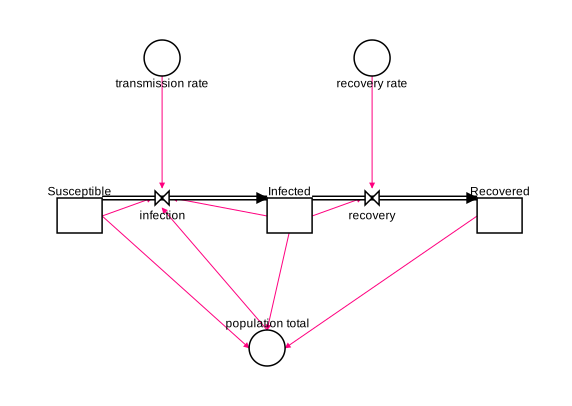
The `render_diagram` tool renders the model as an SVG stock-and-flow diagram
— stocks as rectangles, auxiliaries as circles, flows as valved pipes
(clouds mark sources/sinks), and dependency connectors as routed polylines. The SVG is
returned inline so an agent can inspect the layout, and optionally written
to a file you can open in any browser. It runs auto-layout first by default,
so a freshly built model renders without manual positioning.
{"name":"render_diagram","arguments":{"model_id":"sir_baseline","filepath":"./sir.svg"}}The diagram below is the built-in `sir` template rendered by `render_diagram`
(no manual positioning):
Simulation
The `simulate` tool runs the current model and returns downsampled time
series plus per-variable summaries (initial/final/min/max), closing the
build→verify loop without opening Stella. It requires the optional
PySD dependency:
pip install 'stella-mcp[sim]'{"name":"simulate","arguments":{"model_id":"pop_v1","overrides":{"growth_rate":0.05},"include":["Population"],"max_points":50}}Notes and caveats:
- PySD integrates with Euler only — models whose `method` is RK4 simulate
with Euler and the response carries a warning. Every PySD-backed response
identifies the installed PySD version, actual method, declared method,
unsupported-feature preflight, and warnings.
- Arrays, compositional module instances, and additional top-level models are
preserved-only in 0.14. They fail before PySD with a structured
`unsupported_model_feature` error rather than being silently scalarized or
flattened.
- PySD and Stella do not have identical output semantics in every supported
scalar case. In the retained Lotka-Volterra fixture, Stella caps an outflow
to enforce a non-negative stock while PySD reports the uncapped flow equation.
The stock trajectories still reach zero together at the next model time.
- `overrides` accepts variable names in display (`"growth rate"`) or
underscore (`growth_rate`) form and replaces the variable with a constant.
- `save_results_csv` writes the full-resolution results table with a `time`
column.
- The workspace model is never modified by simulation (the run uses a
throwaway copy).
Scenario Comparison
The `compare_scenarios` tool answers "what happens under these alternative
assumptions?" — it runs several named override sets against a baseline (the
unmodified model by default) and reports how each diverges. Also requires the
`sim` extra.
{"name":"compare_scenarios","arguments":{"model_id":"pop_v1","include":["Population"],"scenarios":[{"name":"low growth","overrides":{"growth_rate":0.02}},{"name":"high growth","overrides":{"growth_rate":0.08}}]}}Each scenario reports its own downsampled series plus `delta_vs_baseline` per
variable: `final_abs`, `final_pct` (percent change of the final value), and
`max_abs`. Notes:
- Every override name across all scenarios is validated before any run, so
a typo fails fast and atomically — no scenario runs half-applied.
- A scenario whose run produces NaN/inf reports the warning in that scenario's
`warnings` without aborting the others; `final_pct` is `null` when the
baseline final is zero (no divide-by-zero).
- `baseline` is optional — pass an override set to measure deltas against, or
omit it to compare against the unmodified model.
- `save_comparison_csv` writes a wide table with one column per
`variable__scenario` (and `variable__baseline`).
- The compiled model is reused across every scenario in one call, so a
comparison is roughly as cheap as a single simulation plus one run per
scenario.
Sensitivity Analysis
The `sensitivity_analysis` tool answers "which parameters actually move the
outcome?" — it sweeps each parameter one at a time across a range (holding the
others at their baseline) and reports how a single chosen output metric
responds. Also requires the `sim` extra.
{"name":"sensitivity_analysis","arguments":{"model_id":"pop_v1","parameters":[{"name":"growth_rate","start":0.02,"stop":0.08,"steps":7}],"output":{"variable":"Population","metric":"final"}}}For each parameter it returns the metric at every swept value, a
`range_sensitivity` (the metric's average slope across the swept range), and a
baseline-normalized `elasticity` (≈ Δoutput% / Δparam%) so parameters can be
ranked by influence. Notes:
- One-at-a-time only. `mode` accepts `"oat"`; full-factorial (`grid`) and
Monte-Carlo sampling are reserved for a future release.
- `metric` is one of `final`, `max`, `min`, `mean`, or `time_to_threshold`
(which needs an `output.threshold` and reports the first time the series
crosses it). max/min/mean cover finite values only; a non-finite or
never-crossing run reports `null` for that point with a warning.
- A parameter spec is either `start`/`stop`/`steps` (evenly spaced, `steps`
≥ 2) or an explicit `values` list (≥ 2 entries).
- `max_runs` (default 200) caps the total swept runs; an oversized sweep
errors rather than silently truncating. OAT runs are a sum across
parameters, not a product, so the cap only trips on genuinely large sweeps.
- `elasticity` is `null` when it cannot be defined (a non-constant parameter,
or a zero baseline metric/parameter); `range_sensitivity` is still reported.
- `save_sweep_csv` writes a long `parameter, value, metric` table.
- Like scenario comparison, the model is compiled once and reused across the
whole sweep.
Calibration
The `calibrate` tool is the inverse of `simulate`: given an observed
time-series, it fits constant parameters so the model reproduces the data. Also
requires the `sim` extra.
{"name":"calibrate","arguments":{"model_id":"pop_v1","observations":{"time":[0,2,4,6,8,10],"targets":{"Population":[100,122,149,182,222,271]}},"parameters":[{"name":"growth_rate","initial":0.05,"min":0,"max":0.3}]}}It returns the fitted parameters (each with its bounds, an `at_bound` flag, and
a linearized `std_error`), the weighted objective trajectory
(`initial`/`final` `weighted_sse` and `weighted_rmse`), native-unit error
metrics for each target, optimizer status/configuration, and warnings. Notes:
- Only constant auxiliaries and flows are calibratable. Stocks are
rejected: PySD's parameter override pins a stock to a constant for the whole
run rather than setting its initial value, which would silently flatten a
dynamic model. Fitting stock initial conditions is not supported.
- Two optimizers. `least_squares` (default) is local and fast and reports a
`std_error`; `differential_evolution` is global, stochastic, seeded for
reproducibility, and requires `min`/`max` bounds on every parameter. Its
`maxiter` generation cap defaults to 100.
- Each parameter's `initial` defaults to the model's current constant value.
Bounds are optional for `least_squares`, required for `differential_evolution`.
- `std_error` is a linearized approximation, not a posterior: it is the
covariance `σ²·(JᵀJ)⁻¹` and is reported only when there are more observations
than parameters, the Jacobian is well-conditioned, and no parameter sits on a
bound; otherwise it is `null` with a warning. `differential_evolution`
returns `null` (no Jacobian). Under non-default `weights`, the standard-error
interpretation holds only for inverse-σ weights.
- Alignment. The model runs over its native `[start, stop]` window and the
simulation is linearly interpolated onto the observation times. Observation
times outside the window are rejected (no extrapolation). All targets
share one strictly-increasing time grid; observations are loaded inline or
from a `csv_path` (first column time, the rest targets).
- Optional per-target `weights` are residual multipliers: the optimizer uses
`weight * (simulated - observed)`. Inverse measurement-standard-deviation
values give normalized residuals. Because weighted errors may mix units,
`target_metrics` reports an unweighted SSE and RMSE in each target's native
units; no aggregate native-unit RMSE is reported. `save_fit_csv` writes a long
`time, target, observed, fitted` table; `return_fit_series` attaches the
best-fit series. The model is compiled once and reused across the whole fit.
MCP Resources & Prompts
Beyond tools, the server exposes MCP-native affordances:
- Tool annotations. Every tool carries hints (`readOnlyHint`,
`destructiveHint`, `idempotentHint`) so clients can manage permissions and
parallelize read-only calls. Inspection tools (`inspect_model`,
`validate_model`, `list_*`, `get_model_xml`) are read-only; `delete_*` are
marked destructive.
- Resources. Templates and workspace models are readable as resources:
- `stella://templates/{name}` — a built-in or user template's `.stmx`
- `stella://workspaces/{workspace_id}/models/{model_id}` — an explicit
workspace model's current XMILE export
- Prompt. A `build-stella-model` prompt (argument: `description`) encodes
the recommended build → validate → simulate → render → save workflow, so it
is discoverable inside MCP clients.
Validation
The `validate_model` tool checks for:
- Undefined variables - References to variables that don't exist
- Mass balance issues - Stocks without flows, flows referencing non-existent stocks
- Missing connections - Equations using variables without connectors (warning)
- Connector endpoint integrity - Connectors pointing at missing variables (error)
- Orphan flows - Flows not connected to any stock
- Circular dependencies - Infinite loops in auxiliary calculations
- Module integrity - Empty modules (warning) and modules referencing missing members (error)
- Units present - A stock or flow missing units while others define them (warning)
- Units consistency - A flow whose units don't read as `stock-units/time-unit`
when every attached stock shares the same units (warning; conservative —
stays silent on conversion flows and anything it can't confidently parse)
- Unused auxiliaries - An auxiliary referenced by no equation or connector
(warning); stocks and flows are never flagged
XMILE Compatibility
- Output files use the XMILE standard
- Compatible with Stella Professional 1.9+ and Stella Architect
- `permissive` import/export preserves supported content and the selected
unsupported XML fragments where practical, while returning explicit warnings.
Editing supported variables does not guarantee references inside preserved-only
fragments are updated.
- `strict` import/export rejects arrays, compositional module instances,
additional top-level models, and confirmed Stella/XMILE reserved identifiers.
Arrays and nested models are not implemented features in 0.14.
- Reserved names such as `beta` and `gamma` are preserved with warnings in
permissive mode and rejected in strict mode. The built-in SIR template uses
`transmission_rate` and `recovery_rate` so Stella does not rename them on save.
- Auto-layout uses a deterministic directed stock-flow backbone, distinct stock
ports, obstacle-aware flow and connector routes, label collision checks, and
page-grid sizing from complete visual bounds.
- Authored coordinates, including coordinates supplied through update tools,
and locked route points remain fixed. Auto-generated coordinates are
recomputed on later exports so incrementally extended models can be ranked
again instead of freezing after their first save.
- Locked paths are reserved before unlocked routes, labels are selected in
normalized-name order, and imported view-font sizes control label geometry in
both analysis and SVG previews.
- Information connectors use direct boundary-to-boundary segments whenever the
complete diagram leaves them unobstructed and unshared. Stock-flow pipes stay
orthogonal because Stella rewrites diagonal flow segments on save.
- Clean planar benchmark layouts have no glyph, label, or route crossings. A
graph that cannot be drawn cleanly is still exported and reports a stable
`layout.*` warning; zero crossings are not promised for arbitrary non-planar
graphs.
- Variable names with spaces are converted to underscores internally
- Parser normalizes imported stock inflow/outflow and connector endpoint references
- Time-step export avoids lossy reciprocal rounding (non-exact reciprocals are exported as plain `dt`)
- Import/export preserves unknown attrs/elements on supported sections (header, sim_specs, variables, views/model extras) to reduce round-trip data loss
- Compatibility corpus regression tests live in `tests/fixtures/compat_corpus/`.
A pinned, attributed subset of SDXorg test-models lives in
`tests/fixtures/external_corpus/`; both run offline in CI.
- Maintainer helper: `python scripts/sync_compat_corpus_manifest.py --check` validates corpus manifest sync
Testing
The repository test suite covers the MCP stdio protocol, workspace isolation,
model construction, validation, SVG rendering, XMILE import/export, simulation,
scenario analysis, sensitivity analysis, calibration, and package installation.
Run it from a source checkout with:
uv sync --locked --extra dev --extra sim
uv run python -m pytest
Pinned Stella-saved and external XMILE fixtures live under `tests/fixtures/` and
run offline in CI. Generated reports, local planning files, and manual review
artifacts are intentionally not committed to the source tree.
Project Structure
See `docs/architecture.md` for dependency boundaries,
module ownership, workspace lifecycle, and compatibility contracts.
stella-mcp/
├── CHANGELOG.md
├── CITATION.cff
├── README.md
├── LICENSE
├── pyproject.toml
└── stella_mcp/
    ├── __init__.py
    ├── server.py         # MCP server lifecycle and protocol wiring
    ├── tool_handlers.py  # Compatibility facade for domain handlers
    ├── tool_schemas.py   # Compatibility facade for the tool catalog
    ├── tools/            # Domain schemas and handlers
    ├── mcp_resources.py  # MCP resources and prompts
    ├── session_store.py  # Explicit application workspace state
    ├── simulate.py       # PySD-backed simulation
    ├── analysis.py       # Scenario comparison and sensitivity analysis
    ├── calibrate.py      # Parameter fitting and native-unit error metrics
    ├── render_svg.py     # Stock-and-flow SVG rendering
    ├── model_types.py     # Model records and XMILE constants
    ├── model.py           # StellaModel lifecycle and compatibility delegates
    ├── model_layout.py    # Layout compatibility delegates and stock sizing
    ├── layout_graph.py    # Directed graph ranking and component packing
    ├── layout_router.py   # Boundary ports and obstacle-aware routing
    ├── layout_quality.py  # Geometry analysis, metrics, and warnings
    ├── layout_pipeline.py # Staged deterministic layout orchestration
    ├── xmile.py           # Public model compatibility facade
    ├── xmile_io.py        # XMILE I/O compatibility facade
    ├── xmile_features.py  # XMILE feature classification and typed errors
    ├── xmile_parse.py     # XMILE parser and compatibility warnings
    ├── xmile_export.py    # XMILE serialization and fragment retention
    └── validator.py      # Model validation logic
Contributing
Contributions are welcome! Please feel free to submit issues or pull requests.
Maintainer Release
PyPI publishing is handled by `.github/workflows/publish.yml` using PyPI Trusted
Publishing. To release a new version:
1. Synchronize the version in `pyproject.toml`, `stella_mcp/__init__.py`,
`CITATION.cff`, and `CHANGELOG.md`; keep the citation and changelog release
dates identical.
2. Run `uv lock --check`, the core and simulation test suites, the MCP-floor
suite, and the package job. Prepare the draft GitHub release notes from the
matching `CHANGELOG.md` entry.
3. Before pushing the release branch, verify the protected `main` and `v*` tag
rules, the `pypi` environment's protected-tag policy, and the configured
PyPI Trusted Publisher.
4. Open a draft pull request so every release-critical check runs, require those
exact checks, obtain review, and separately approve the merge.
5. Wait for a fresh `main` CI run at the exact merge commit. If the Chicago
release date has changed, correct the metadata through another reviewed pull
request before continuing.
6. With separate approval, create the lightweight version tag at that audited
merge commit. With another approval, create and inspect the draft GitHub
release from the matching notes file.
7. With final publication approval, publish the draft. The release event builds
and validates the source distribution and wheel without OIDC authority; the
`pypi` job's configured deployment policy accepts only tags matching the
protected `v*` release-tag policy before Trusted Publishing can upload the
verified artifacts.
Tagging, draft creation, and publication are distinct approval gates. Do not
move or replace a public tag or uploaded distribution to repair a release.
License
MIT License - see LICENSE for details.
Acknowledgments
- Model Context Protocol by Anthropic
- ISEE Systems for Stella and the XMILE format
Frequently asked questions
What is stella-mcp?
stella-mcp is MCP server for Stella
How do I install stella-mcp?
Open the GitHub repository and follow its README. Most MCP servers are added to your client's MCP config, then called by your agent.
Is stella-mcp open source?
Yes — it is hosted on GitHub at https://github.com/bradleylab/stella-mcp and has 3 stars.
Related MCP tools
 cognee
Cognee is the open-source AI memory platform for agents. Give your AI agents persistent long-term memory across sessions with a self-hosted knowledge graph engine.
 skyvern
Automate browser based workflows with AI
 hindsight
Hindsight: Agent Memory That Learns
 watermarks-remover
A privacy-first app that strips AI watermarks from content you own.
 Qwen-Agent
Agent framework and applications built upon Qwen>=3.0, featuring Function Calling, MCP, Code Interpreter, RAG, Chrome extension, etc.
 pal-mcp-server
The power of Claude Code / GeminiCLI / CodexCLI + [Gemini / OpenAI / OpenRouter / Azure / Grok / Ollama / Custom Model / All Of The Above] working as one.
Run your own MCP server? See who uses it and what to fix.
Measure it with TrackMCP