
bundler_mcp
A Model Context Protocol (MCP) server enabling AI agents to query information about gems in a Ruby project's Gemfile, including source code and metadata.
Documentation
BundlerMCP
A Model Context Protocol (MCP) server enabling AI agents to query information about dependencies in a Ruby project's `Gemfile`. Built with fast-mcp.


Installation
Install the gem and add to the application's Gemfile by executing:
bundle add bundler_mcp --group=developmentUsage
1. Generate the binstub:
bundle binstubs bundler_mcp2. Configure your client to execute the binstub. Here are examples that work for Claude and Cursor:
Basic Example (mcp.json)
{
  "mcpServers": {
    "bundler-mcp": {
      "command": "/Users/mike/my_project/bin/bundler_mcp"
    }
  }
}
Example with logging and explicit Gemfile
{
  "mcpServers": {
    "bundler-mcp": {
      "command": "/Users/mike/my_project/bin/bundler_mcp",

      "env": {
        "BUNDLER_MCP_LOG_FILE": "/Users/mike/my_project/log/mcp.log",
        "BUNDLE_GEMFILE": "/Users/mike/my_project/subdir/Gemfile"
      }
    }
  }
}
Documentation
Available Tools
The server provides two tools for AI agents:
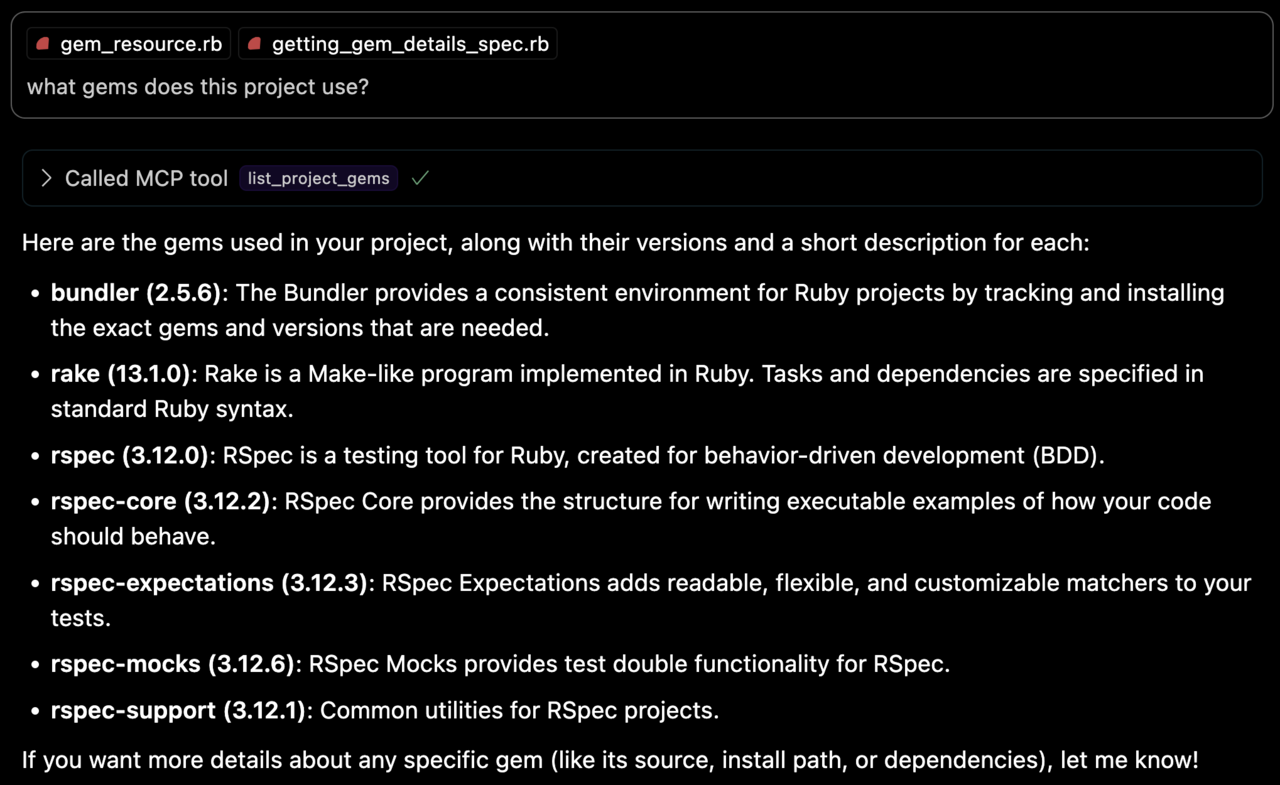
list_project_gems
Lists all bundled Ruby gems with their:
- Versions
- Descriptions
- Installation paths
- Top-level documentation locations (e.g. `README` and `CHANGELOG`)
get_gem_details
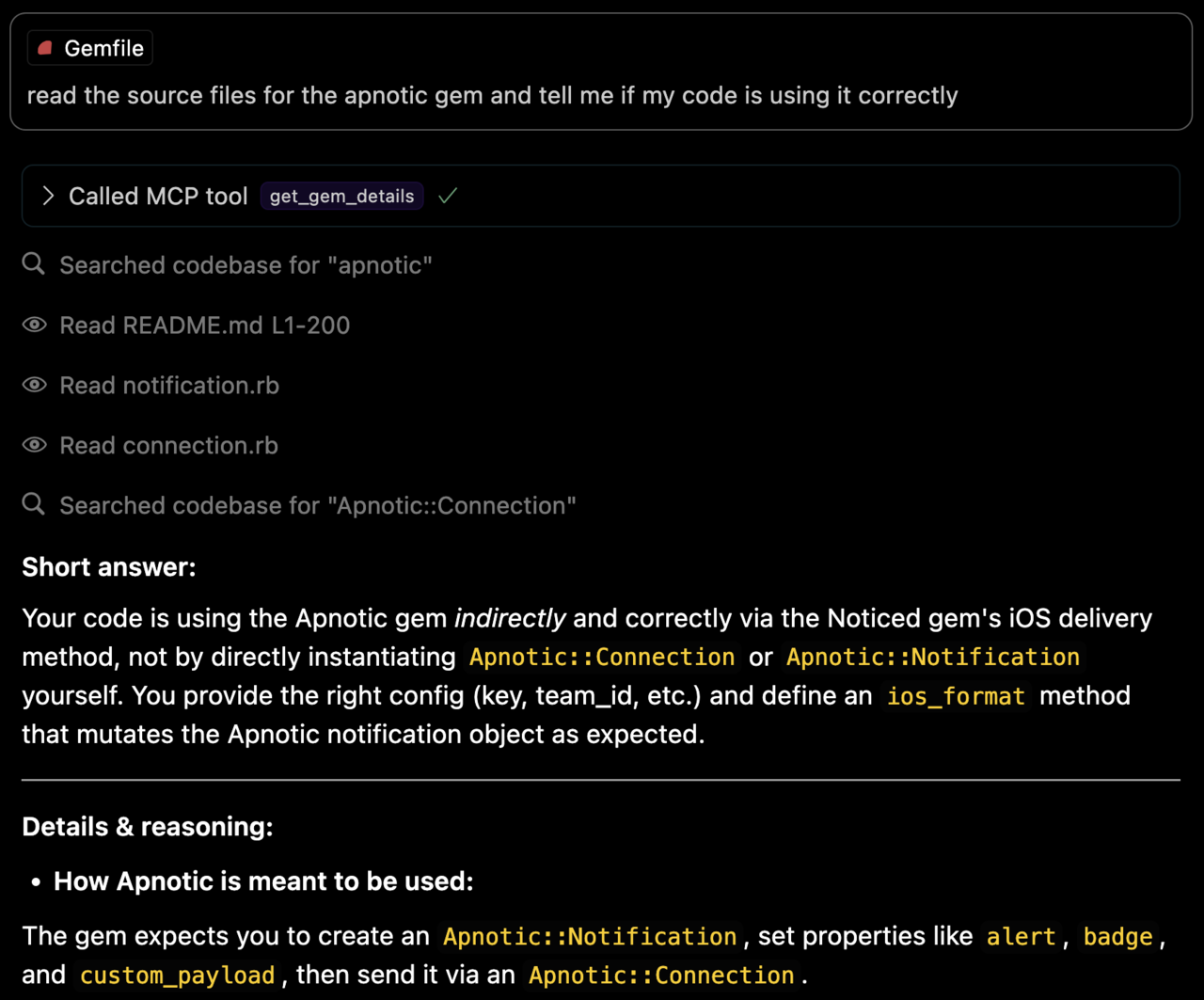
Retrieves detailed information about a specific gem, including:
- Version
- Description
- Installation path
- Top-level documentation locations
- Source code file locations
Environment Variables
- `BUNDLE_GEMFILE`: Used by Bundler to locate your Gemfile. If you use the binstub method described in the Usage section, this is usually not needed.
- `BUNDLER_MCP_LOG_FILE`: Path to log file. Useful for troubleshooting (defaults to no logging)
Development
After checking out the repo, run `bin/setup` to install dependencies and `bundle exec rspec` to run the tests. You can also run `bin/console` for an interactive prompt that will allow you to experiment.
Testing with the MCP Inspector
You can test the server directly using the MCP inspector:
# Basic usage
npx @modelcontextprotocol/inspector ./bin/bundler_mcp

# With logging enabled
BUNDLER_MCP_LOG_FILE=/tmp/log/mcp.log npx @modelcontextprotocol/inspector ./bin/bundler_mcp

# With custom Gemfile
BUNDLE_GEMFILE=./other/Gemfile npx @modelcontextprotocol/inspector ./bin/bundler_mcp
Release Process
To install this gem onto your local machine, run `bundle exec rake install`. To release a new version:
1. Update the version number in `version.rb`
2. Run `bundle exec rake release`
This will:
- Create a git tag for the version
- Push git commits and the created tag
- Push the `.gem` file to rubygems.org
Contributing
Bug reports and pull requests are welcome on GitHub at https://github.com/subelsky/bundler_mcp.
License
Open source under the terms of the MIT License.
Author
Frequently asked questions
What is bundler_mcp?
bundler_mcp is A Model Context Protocol (MCP) server enabling AI agents to query information about gems in a Ruby project's Gemfile, including source code and metadata.
How do I install bundler_mcp?
Open the GitHub repository and follow its README. Most MCP servers are added to your client's MCP config, then called by your agent.
Is bundler_mcp open source?
Yes — it is hosted on GitHub at https://github.com/subelsky/bundler_mcp and has 19 stars.
Related MCP tools
 ruby-sdk
The official Ruby SDK for the Model Context Protocol. Maintained in collaboration with Shopify. Trusted by 600+ developers.
 rails-mcp-server
A Ruby gem implementation of a Model Context Protocol (MCP) server for Rails projects. This server allows LLMs (Large Language Models) to interact with Rails...
 anything-llm
The all-in-one Desktop & Docker AI application with built-in RAG, AI agents, No-code agent builder, MCP compatibility, and more.
 chatgpt-on-wechat
基于大模型搭建的聊天机器人,同时支持 微信公众号、企业微信应用、飞书、钉钉 等接入,可选择ChatGPT/Claude/DeepSeek/文心一言/讯飞星火/通义千问/ Gemini/GLM-4/Kimi/LinkAI,能处理文本、语音和图片,访问操作系统和互联网,支持基于自有知识库进行定制企业智能客服。
 localai
:robot: The free, Open Source alternative to OpenAI, Claude and others. Self-hosted and local-first. Drop-in replacement for OpenAI, running on consumer-gra...
 librechat
Enhanced ChatGPT Clone: Features Agents, MCP, DeepSeek, Anthropic, AWS, OpenAI, Responses API, Azure, Groq, o1, GPT-5, Mistral, OpenRouter, Vertex AI, Gemini...
Run your own MCP server? See who uses it and what to fix.
Measure it with TrackMCP