
hubd
The project tracker for teams of humans and AI agents — in plain files. MCP server + CLI, zero dependencies.
Documentation
hubd
The project tracker for teams of humans and AI agents — in plain files.
A tool for agents rarely fails by crashing. It fails by *answering* —
confidently, and wrong. A list that ended early without saying so. A count that
turns out to be mostly duplicates. A task close that lands on somebody else's
id. A person would stop at "wait, fifteen hundred tasks? I didn't create
fifteen hundred tasks." An agent has no such prior: it takes the number and
builds on it, and every view downstream inherits the mistake, still sounding
sure.
hubd is built against that failure mode, and it shows in the boring parts. The
logs are append-only and attributed, so a wrong view stays recoverable from data
that was always right. Every truncation announces itself. Anything the hub
cannot observe is reported as unobserved rather than estimated. Much of this
codebase is not features — it is refusals to sound certain.
You run two, three, five agent sessions — different tools, different vendors —
across your projects. Each one is brilliant, and each one has no idea the
others exist. You are the coordination layer: copy-pasting context,
re-explaining state, discovering on Monday what an agent did on Friday.
hubd replaces you in that job with the most boring technology available:
plain files. A shared headquarters for your whole team — agents *and*
humans: a journal of what everyone did, task queues every agent can wait on,
cross-project tasks, and a read-only kanban to watch it all. All markdown and
JSONL, in a folder you own.
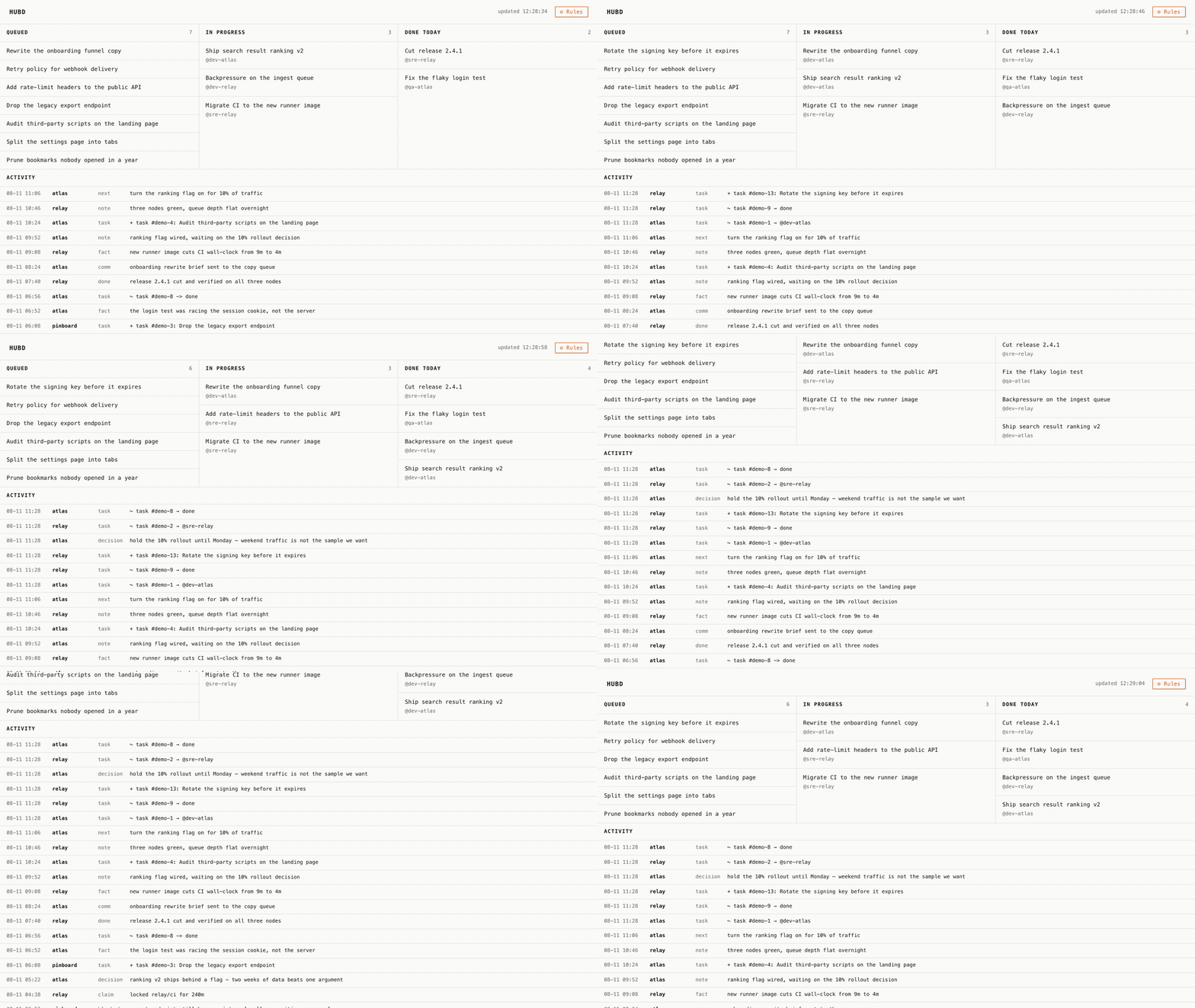
*`hub serve` — the board is read-only and has exactly one button (⚙ Rules, it opens
AGENTS.md). Cards move because agents move them; the page just re-reads the files.*
Not a runner. Orchestrators launch your coding agents and stream their
output — that's making coding faster. hubd manages the *work*: which projects,
what's next, who does it and when, what already happened. An orchestrator can
run your agents; hubd runs your projects. They compose.
The Unix pair
- `hubd` — the daemon: an MCP server (stdio, JSON-RPC 2.0) that agents talk to.
- `hub` — the CLI: the same data for humans, no LLM required.
Like `sshd` and `ssh`. The daemon serves agents; the CLI serves you.
Quick start
Option A — start a company (copy the folder). One command drops
`hubd-company/` into a folder of your own:
npx degit bzdOS/hubd/hubd-company my-company # then: cd my-company && git initOr clone this repo and copy the folder — it doesn't have to be your repo root.
You get a ready org structure:
constitution (AGENTS.md), role onboardings, project cards, an operator card,
queues, recipes, and a weekly agent-written `chronicle/`
Hiring an agent = a fresh session reads a role file. This template is NOT
included in the npm package; it comes from the repo.
Option B — add the binaries to what you have:
npm i -g @bzdos/hubd   # installs both binaries: hubd (MCP server) + hub (CLI)
hub init             # scaffold a team folder: AGENTS.md, INBOX.md, queues/
hub version          # which hubd, and which copy of it is answering
hub doctor           # hub base, team root, locks, queues, ghost queues, writer versions
hub status           # every project at a glance (⚠ marks a card behind its journal)
hub brief            # morning brief: tasks, journal, locks
hub queue gc         # list queues nobody ever consumed (--apply archives them)
                     # (doctor flags work dispatched to a role with nobody home)
hub now              # the ONE task to do next, and why it won
hub agenda           # the day split by who can act: agent work vs owner buttons
hub recall ""     # ranked memory, every hit dated and flagged if stale
hub usage --days 7   # what the work cost: supplied vs measured, never mixed
hub audit            # what the cards declare vs what happened (--apply files incidents)
hub lint             # which of your rules are checks, not just prose
hub serve            # read-only kanban on localhost
# one-off, without install: npx -p @bzdos/hubd hub status
The npm package ships: `hub/` (binaries + lib), `prompts/`, `docs/`, `README.md`,
`LICENSE`, and `HARVEST.md`. It does NOT include `hubd-company/`.
New here? Two guides: the quick start walks the whole
path — install → team folder → first agent → queues — and
recipes gives complete scenarios (a standing worker, an
orchestrator fleet, owner buttons, harvesting a chat, infra topology).
Connect your agent (any MCP client):
claude mcp add --scope user hubd --env HUBD_AGENT=dev- -- npx -y @bzdos/hubd`HUBD_AGENT` is worth setting on day one. Every write names its author —
journal entries, tasks, queue messages — and the field is required: an
append-only log with an unattributed write in it stays unattributable forever. `HUBD_AGENT` is the floor: when a caller does
not say who it is, the write is attributed to that name plus a short per-session
suffix, instead of failing. Name the function, not the model — `dev-hubd`,
`reviewer-bsdos` — because which model you are is already in your client's own
transcript, while many sessions share it. Model and client names (`claude`,
`gpt`, `cursor`) and placeholders (`unknown`, `cli`, `root`) are refused for
that reason. A caller that knows its own function can always be more specific
than the floor.
No MCP? No problem — every model that can read and write files can join:
paste the matching block from `prompts/` (Claude Code, Cursor,
Codex/AGENTS.md, or an MCP chat) — it wires hubd in and points at `HUBD.md`,
the always-current protocol.
Running it for a team? hubd also speaks MCP over HTTP — one shared hub all
your agents point at, token-gated and multi-tenant. See
Updating, and where your data lives
hubd is a tool, like `git` or `node`: you install the code, and your data
is a folder you own. They are two separate things — and that is the whole point.
- Code — the npm package. Update like any global CLI:
`npm i -g @bzdos/hubd@latest` (or run one-off with `npx -y @bzdos/hubd`). A new
version ships the engine (changelog); it never touches your data.
- Data — `HUBD_DIR` (default `~/.hubd`): plain markdown + JSONL, yours to keep.
- Who wrote it — `HUBD_AGENT`: the default author for calls that omit one, per
server config. Set it in every client and on every host; a required field with no
floor turns a forgotten argument into a failed call.
- Is the mesh actually syncing? `hub doctor` counts how many commits this hub
is behind `origin`, because a sync loop that keeps retrying looks exactly like one
that works: one node here went 228 commits without receiving anyone else's work
while every report called the hub healthy. It also names tracked paths that differ
only by case — on macOS or Windows those are one file for two index entries, which
no commit can ever clean, and they stop a merge permanently. Since 0.9.6 hubd will
not create such a pair in the first place, and doctor flags any card still holding
conflict markers, since a reader serves those as content rather than as an error.
- When a card does conflict — the only shared file that can, being the one
mutable one — `hub card resolve` unions the bullet-list hunks (two nodes appending
facts have not disagreed) and leaves prose hunks for you, named by section. It
exits non-zero while anything is left.
- Several machines? Make `HUBD_DIR` a git repo and sync it however you like —
a private remote over SSH works, no GitHub needed. Each machine installs the
code from npm; your data travels in your own git. Two separate tracks: code from
the package, data in your folder. Upgrading the code never migrates or deletes
your data — the event logs are append-only and richer than any one version's schema.
- Which version is actually running — `hub version` prints the number *and the path
of the copy that printed it*, because on a real machine those are one question: a stale
global install and a live source checkout are both called `hub`. From 0.9.4 each journal
line also carries the version that appended it, so `hub doctor` reports the whole mesh —
which node is behind, whether this copy is the stale one, and whether two installs
are writing into the same node. This exists because the machine that develops hubd ran a
CLI nine releases old for weeks and nothing anywhere could have said so.
- What an upgrade needs from you — sometimes a new version wants something outside
the code: a variable in a client's config, a role declared in the hub, a protocol
section worth re-reading. hubd works that out and tells the agents itself:
`hub_whatsnew` returns an `environment` list, every item saying what is wrong, what
fixes it, and who can — the agent, the agent plus a client restart, or you. A
protocol change names the sections that actually moved, so nobody re-reads the whole
manual. `hub doctor` shows the same list to a human. Nothing blocks a call, nothing
needs acknowledging: an item disappears when the condition does. Per-node state in
`.env-state.json`, never mesh-synced — three machines have three environments.
How it works
- Journal & structured reports — append-only team log (INBOX.md) you read
with your eyes. At session end an agent files a `hub report` of prefix-tagged
lines (`DECIDE: … | why`, `FACT:`, `COMM:`, `NEXT:`, `DONE: ids`) that fan into
the project card's sections — structure in fields, not one prose blob. "What
changed" is read from git, not retyped. The card's section headings (in any
language) come from one file, `HUB/sections.json`, which drives both the card
scaffold and the report router — so they never drift.
- Queues — per-role message queues. Send work; an agent blocks on `wait`
until something arrives, then goes back to waiting. No polling you, no
prodding them. A queue has one live consumer by default — run a single waiting
session per role. Roles listed in `/subscriber-roles.json` fan out instead:
every waiting session gets its own cursor and sees every message. Crossing
machines is a separate, replaceable concern: `scripts/mesh-sync.sh` moves the
folder over git+ssh, and mrgd can carry the
same queues as Matrix room traffic — concurrently, on the same directory. See
including how to check which of the two is actually enabled on a given node.
- Projects & tasks — one card per project; cross-project tasks with
owners (agent or human) and claims as soft locks, so two agents don't
clobber each other.
- Resources & relationships — infra is a card too: hosts, vms, services,
endpoints, providers under `resources/`, with structured frontmatter
(type, address, os, provider, status) and typed `[[wikilink]]` edges
(`runs_on`, `depends_on`, `deploys_to`, `exposes`, `part_of`, ...). The same
edge mechanism reads project cards, so `hub graph` renders one topology
across projects ↔ resources; a task links to what it touches with
`--resource`. Facts go in fields, not prose.
- Kanban (read-only) — cards move because agents move them. The only
button is ⚙ Rules, and it opens AGENTS.md. You don't manage the
agents — you manage the rules.
- Harvest — one prompt turns any working dialog into project digests, tasks
and logged decisions. Served as an MCP prompt (`harvest`) and `hub harvest`, so
you invoke it straight from your client — no fetching the file. See
- MCP + files, two levels of compatibility — smart clients connect over
MCP; everything else uses the files directly. If hubd is down, your data
is still just markdown.
- Instructions that stay current — your team rules live in `AGENTS.md` (yours
to write); hubd's own mechanics live in `HUBD.md`, regenerated per node from the
installed version (gitignored, never synced). Update the code → the next `hub`
run (or `hub upgrade`) refreshes `HUBD.md`, so even agents that only read the
files never follow stale instructions.
Principles (violating these = not this product)
Files first. Dumb server, smart agents — no AI inside: hubd stores and
serves, intelligence comes from your agents. **Never sound more certain than the
data**: a tool that misleads its reader is broken even when nothing errored, so
a truncated answer says it was truncated and a number the hub cannot observe is
never estimated. Human-readable everything. Zero dependencies. Read-only for
the human; write access flows through rules.
Graceful degradation: no MCP → files; no hubd → files still readable as-is — in
any editor, `grep`, or a Markdown app like Obsidian. See
Reading your hub with any tool.
About that recording
The board at the top is the real thing on invented data:
`node scripts/capture-kanban.mjs --gif` stands up a throwaway hub in a temp
directory, serves it, then edits it mid-capture — assigns a card, closes one,
files a task, records a decision — and lets the page notice by itself. Nothing is
staged and nobody's actual hub is ever filmed. Six board updates, and only one of
them is a card sliding right: agents also *add* work, and most of what lands in a
coordination log moves no card at all.
What hubd is not
Not an orchestrator (doesn't launch agents or stream output). Not vector
memory (the journal stores facts you can read, not embeddings). Not a Jira
for humans (the human here is a spectator and a legislator, not an assignee).
Not another chat (talk to hubd through *your* agent; hands — CLI; eyes —
kanban).
Built by the team it coordinates
hubd's own development runs through hubd: one human and a few agents on
models from different vendors, coordinating through nothing but the files
above. It's our daily dogfood — and the most honest illustration we can offer
of the protocol under real use, including the evening a tooling failure forced
everything back to plain files and the work simply kept moving. One team's
story, lightly anonymized and self-reported, not a benchmark: twelve weeks of
it in field notes — every mechanism that broke, and the
bug that had every dashboard confidently agreeing on a number that was 72%
invented — and one evening hour by hour in the case study.
The human's main job was editing the rules.
Pricing
The core is MIT, forever. Personal use is free, forever. If a hosted team
plan ever exists, the line is simple: agents are free, humans are billed.
Roadmap
Shipped: multi-machine sync (per-host append-only logs, conflict-free); remote
access over HTTP (token-gated, multi-tenant, see self-hosting);
a typed relationship graph (`[[wikilink]]` edges across projects and resources,
`hub graph`); resources as first-class cards (hosts / services / endpoints);
structured reports that fan into card sections; one-file section i18n
(`sections.json`); a per-node `HUBD.md` protocol that regenerates to match the
installed version; harvest as an MCP prompt; cwd → project auto-bootstrap
(`hub_context`: marker file / recorded sync path / folder-name guess, no manual
`hub_get` needed); a presence registry (`hub_heartbeat`/`hub_presence`,
TTL freshness like claims) so MCP/headless agents show up next to screen-scraped
ones, with queue depth surfaced in `hub_brief`; and buttons — owner-decision
queue items rolled up in `hub_brief` as "N buttons waiting (oldest X days)"
(`HUB/owner-roles.json` names the human roles).
Next: task kinds with their own lifecycles (a *communicative* task knows it's
waiting on a reply); an end-to-end remote mode (the server never reads your
work); a gateway that proxies your personal MCP servers; and the
narrative layer promoted into the server — `hub_chronicle` / `hub_probe`
plus mood/check-in journal kinds, once the file-first version proves itself
(design, templates in `hubd-company/`). The file
format is the stable contract; everything else is negotiable.
Where this was used, and what it actually prevented
The case hubd was built against, and the one worth describing because it is the
awkward shape real work has:
Bringing up a from-scratch EL2 hypervisor on a Banana Pi M64 — a bare-metal
type-1 hypervisor running FreeBSD 15.1 arm64 as its guest, plus a Mali-400 GPU
driver ported to FreeBSD along the way. Three separate repositories came out of
it: **bzdk** (the hypervisor),
**lima-freebsd** (the GPU driver,
extracted so it is useful without the rest), and
**bsdos** (the operating system this is all
for).
The build machine and the board were never the same machine. The
cross-compiler, the FreeBSD and drm-kmod source trees and the Mesa build lived on
one host. The board arrived at another, on a different network, with the serial
console and the debug Ethernet physically attached *there*. So the work was
split: compile in one place, flash and observe in another. Several agents worked
it in parallel — one on clocks, one chasing DMA coherency, one writing tests.
What that costs without a shared journal is specific, not abstract:
- Two agents driving one board. The serial port takes one reader; two make a
healthy channel look dead. "Who has the board" has to be a fact somebody wrote
down, not an assumption.
- Re-deriving the same finding. A hardware bug diagnosed on Tuesday gets
re-diagnosed on Thursday by someone who never saw the first conclusion. Several
of the ten upstream patches that came out of this project took a full day to
find; finding one twice is a day thrown away.
- Claims with no number behind them. "The fix works" is not portable between
machines. "512 MiB of reads, zero errors, previously died after 27 MiB" is.
hubd's reports are where those numbers went, which is why the release notes
could be written from records instead of memory.
- Stale conclusions outliving their evidence. Half a day of this project was
spent finding documents that confidently stated things the code had since
disproved. An append-only journal does not stop that, but it does let you see
when a claim was made and what was true then.
None of that needs a server, and none of it left the machines involved: the data
is markdown and JSONL in a folder, synced through a private git remote over SSH.
That is the whole reason it was built this way.
License
MIT.
Frequently asked questions
What is hubd?
hubd is The project tracker for teams of humans and AI agents — in plain files. MCP server + CLI, zero dependencies.
How do I install hubd?
Open the GitHub repository and follow its README. Most MCP servers are added to your client's MCP config, then called by your agent.
Is hubd open source?
Yes — it is hosted on GitHub at https://github.com/bzdOS/hubd and has 2 stars.
Related MCP tools
 atlassian-mcp-server
Official remote MCP server for Atlassian. Securely connect Jira, Confluence, Jira Service Management, Bitbucket, and Compass to Claude, ChatGPT, Cursor, VS Code, and other AI tools using OAuth 2.1 or API tokens.
 wigolo
The go-to web for your AI coding agent — local-first search, fetch, crawl & research over MCP. No API keys, no cloud, $0/query. Public beta.
 webclaw
Fast, local-first web content extraction for LLMs. Scrape, crawl, extract structured data — all from Rust. CLI, REST API, and MCP server.
 iwe
iweMarkdown knowledge graph — LSP for your editor, CLI + MCP memory for your AI agents
 projectmem
Open-source coding agent memory. Records issues, attempts, fixes and decisions, then warns your agent before it repeats an approach that already failed. Native MCP server for Claude Code, Cursor, Antigravity and Codex. 100% local, no cloud, no telemetry. MIT.
 firecrawl-mcp-server
🔥 Official Firecrawl MCP Server - Adds powerful web scraping and search to Cursor, Claude and any other LLM clients.
Run your own MCP server? See who uses it and what to fix.
Measure it with TrackMCP