
MCP-MySQL-Ops
🛠️ MCP server for MySQL ops — 19+ tools for monitoring, diagnostics & performance analysis. Natural language queries, read-only & production-safe, MySQL 5.7.9+/8.0+. Works with Claude, Cursor, Cline & all MCP clients.
Documentation
MCP Server for MySQL Operations and Monitoring








Architecture & Internal (DeepWiki)

Overview
You are working with the MCP MySQL Operations Server, a powerful tool that provides comprehensive MySQL database monitoring and analysis capabilities through natural language queries. This server offers 19 specialized tools for database administration, performance monitoring, and system analysis. Leverages MySQL's Performance Schema and Information Schema for deep insights into database operations and performance metrics.
Features
- ✅ Zero Configuration: Works with MySQL 5.7.9+ and 8.0+ out-of-the-box with automatic version detection.
- ✅ Natural Language: Ask questions like "Show me slow queries" or "Analyze table sizes."
- ✅ Production Safe: Read-only operations, AWS RDS/Aurora MySQL compatible with regular user permissions.
- ✅ Performance Schema Integration: Advanced query analytics using MySQL's built-in Performance Schema.
- ✅ Comprehensive Database Monitoring: Storage engine analysis, connection monitoring, and performance insights.
- ✅ Smart Query Analysis: Query performance identification using Performance Schema statistics.
- ✅ Schema & Structure Discovery: Database structure exploration with detailed table and index analysis.
- ✅ Storage Engine Intelligence: InnoDB monitoring, table optimization recommendations.
- ✅ Multi-Database Operations: Seamless cross-database analysis and monitoring.
- ✅ Enterprise-Ready: Safe read-only operations with AWS RDS/Aurora MySQL compatibility.
- ✅ Developer-Friendly: Simple codebase for easy customization and tool extension.
🔧 Advanced Capabilities
- Performance Schema-based query monitoring and analysis.
- Real-time connection and process monitoring.
- Storage engine status and optimization analysis.
- Database capacity and table size analysis.
- Index usage and efficiency tracking.
Tool Usage Examples
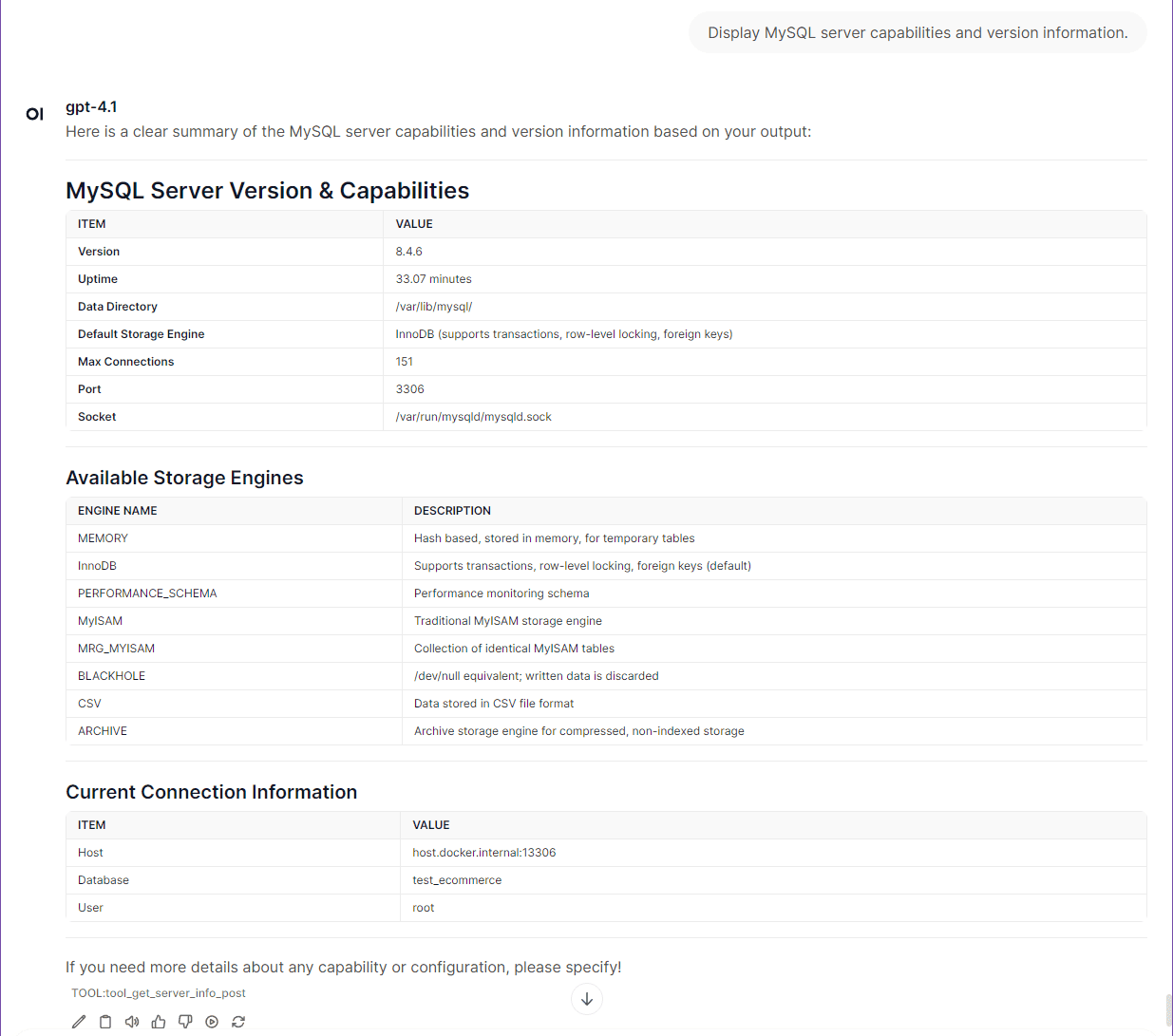
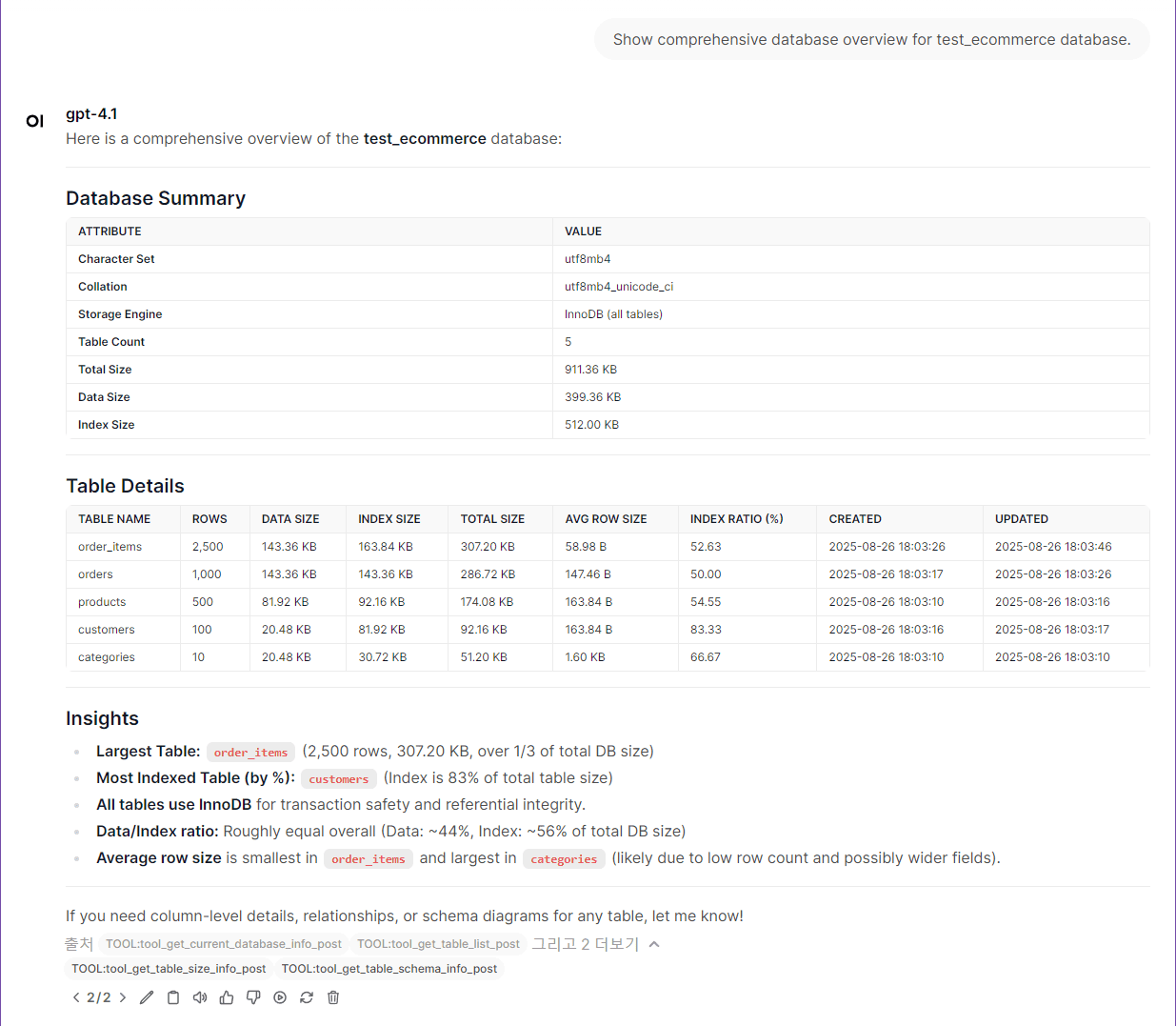
⭐ Quickstart (5 minutes)
> Note: The `mysql` container included in `docker-compose.yml` is intended for quickstart testing purposes only. You can connect to your own MySQL instance by adjusting the environment variables as needed.
> If you want to use your own MySQL instance instead of the built-in test container:
> - Update the target MySQL connection information in your `.env` file (see MYSQL_HOST, MYSQL_PORT, MYSQL_USER, MYSQL_PASSWORD, MYSQL_DATABASE).
> - In `docker-compose.yml`, comment out (disable) the `mysql` and `mysql-init-data` containers to avoid starting the built-in test database.
Flow Diagram of Quickstart/Tutorial
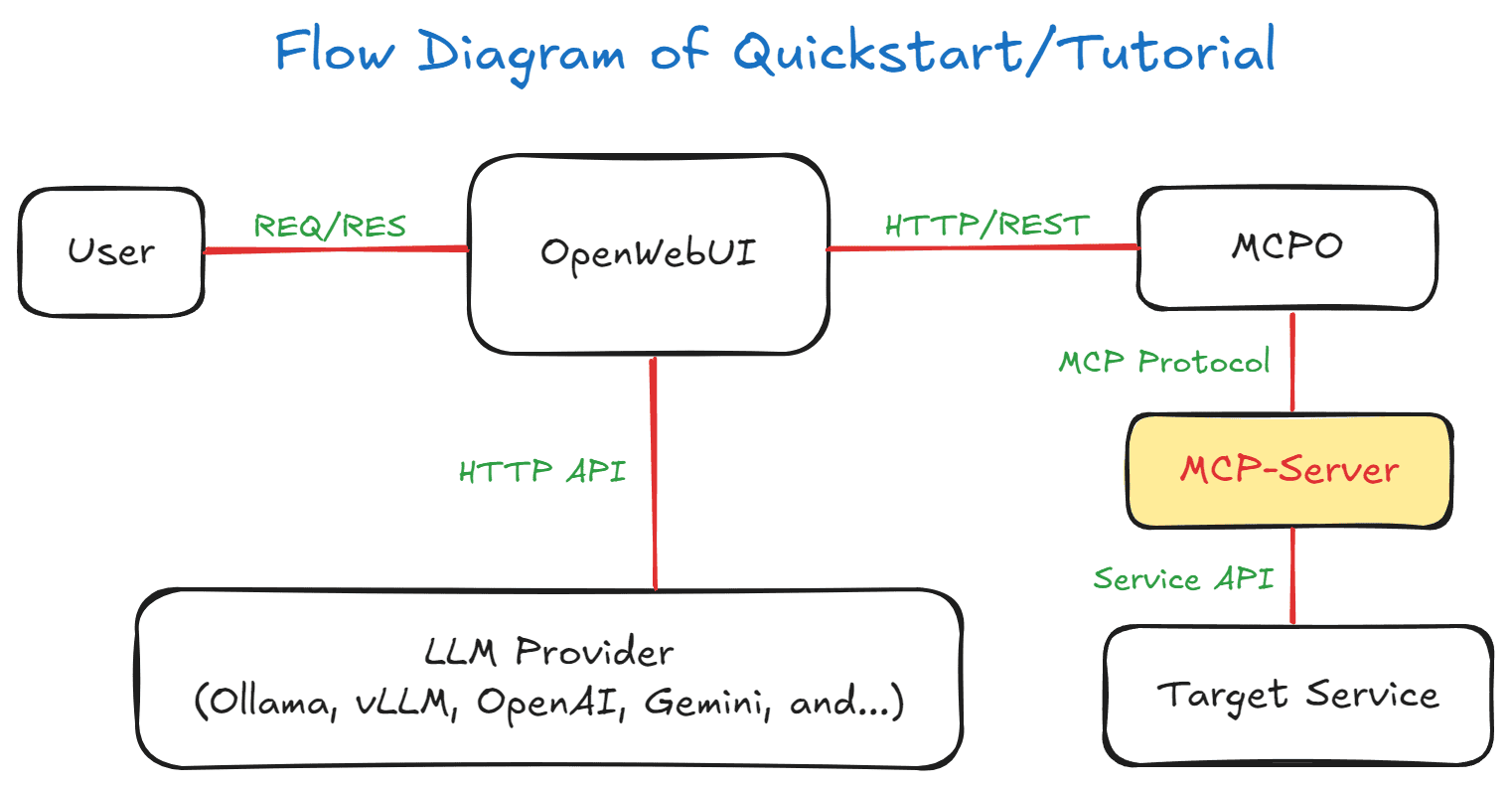
1. Environment Setup
> Note: The system automatically handles user permissions - both root users and regular users are supported with appropriate access control.
git clone https://github.com/call518/MCP-MySQL-Ops.git
cd MCP-MySQL-Ops

# Copy and check environment configuration
cp .env.example .env
Default configuration (works out-of-the-box):
#### MySQL Root Configuration for Docker:
MYSQL_ROOT_HOST=%
MYSQL_ROOT_PASSWORD=changeme!@34

#### MySQL Host Configuration:
MYSQL_HOST=host.docker.internal
MYSQL_PORT=13306
MYSQL_USER=root
MYSQL_PASSWORD=${MYSQL_PASSWORD}
MYSQL_DATABASE=test_ecommerce
For your own MySQL server:
# Edit .env file with your MySQL connection details
MYSQL_HOST=your-mysql-server.com
MYSQL_PORT=3306
MYSQL_USER=your_username     # Will auto-grant permissions on test DBs
MYSQL_PASSWORD=your_password
MYSQL_DATABASE=your_default_db

# Then disable built-in containers in docker-compose.yml
# Comment out: mysql and mysql-init-data services
> Note: The MySQL container is configured with proper volume mapping for data persistence and initial database setup.
Additional Resources:
- MCP Tool Features (Swagger): http://localhost:8004/docs
- MCPO Proxy API Documentation: http://localhost:8004/mysql-ops/docs
2. Run Docker Stack
# Start all services (MySQL + MCP server + test interfaces)
docker-compose up -d

# Check container status
docker-compose ps

# Watch the logs (Ctrl+C to exit)
docker-compose logs -f mysql-init-data
⏱️ Container Startup Sequence & Wait Time:
- MySQL Container: Starts first and initializes database (~30-60 seconds)
- MySQL Init Data: Generates test data automatically (~1-2 minutes)
- MCP Server: Starts after MySQL is ready (~10-20 seconds)
- OpenWebUI: Starts last to ensure all services are available (~10-30 seconds)
💡 Please wait 2-3 minutes for all containers to fully initialize before accessing the web interface. You can monitor the startup progress with:
# Monitor all container logs
docker-compose logs -f

# Check if all containers are healthy
docker-compose ps
3. Automatic Test Data Generation
🎉 No manual setup required! Test data is automatically generated during first startup by the `mysql-init-data` container.
What happens automatically:
- ✅ 4 comprehensive test databases created (`test_ecommerce`, `test_analytics`, `test_inventory`, `test_hr`)
- ✅ ~2,745 realistic records with proper foreign key relationships
- ✅ User permissions automatically configured for your `MYSQL_USER` (from .env)
- ✅ Test users and roles created for different access scenarios
Manual execution (if needed):
# Force regenerate test data (optional)
docker-compose run --rm mysql-init-data /scripts/create-test-data.sh

# Check generation logs
docker logs mcp-mysql-ops-mysql-init-data
Verification:
# Connect and verify test databases exist
docker exec -it mcp-mysql-ops-mysql-8 mysql -u [your_mysql_user] -p -e "SHOW DATABASES;"
4. Access to OpenWebUI
🌐 Web Interface: http://localhost:3004/
> ⏳ Important: Please wait 2-3 minutes after running `docker-compose up -d` for all containers to fully initialize. OpenWebUI starts last to ensure all backend services (MySQL, test data generation, MCP server) are ready.
Quick Status Check:
# Verify all containers are running
docker-compose ps

# If any container shows "starting" or "unhealthy", wait a bit longer
# You can watch the startup logs:
docker-compose logs -f
5. Registering the Tool in OpenWebUI
> 📌 Note: Web-UI configuration instructions are based on OpenWebUI v0.6.22. Menu locations and settings may differ in newer versions.
1. logging in to OpenWebUI with an admin account
1. go to "Settings" → "Tools" from the top menu.
1. Enter the `mysql-ops` Tool address (e.g., `http://localhost:8004/mysql-ops`) to connect MCP Tools.
1. Setup Ollama or OpenAI.
6. Complete!
Congratulations! Your MCP MySQL Operations server is now ready for use. You can start exploring your databases with natural language queries.
🚀 Try These Example Queries:
- "Show me the current active connections"
- "What are the current server status and configuration?"
- "Analyze table sizes and storage efficiency"
- "Show me database size information"
- "What tables have the most rows?"
Security & Authentication
Bearer Token Authentication
For `streamable-http` mode, this MCP server supports Bearer token authentication to secure remote access. This is especially important when running the server in production environments.
Configuration
Enable Authentication:
# In .env file
REMOTE_AUTH_ENABLE=true
REMOTE_SECRET_KEY=your-secure-secret-key-here
Or via CLI:
python -m mcp_mysql_ops --type streamable-http --auth-enable --secret-key your-secure-secret-key-hereSecurity Levels
1. stdio mode (Default): Local-only access, no authentication needed
2. streamable-http + REMOTE_AUTH_ENABLE=false: Remote access without authentication ⚠️ NOT RECOMMENDED for production
3. streamable-http + REMOTE_AUTH_ENABLE=true: Remote access with Bearer token authentication ✅ RECOMMENDED for production
Client Configuration
When authentication is enabled, MCP clients must include the Bearer token in the Authorization header:
{
  "mcpServers": {
    "mcp-mysql-ops": {
      "type": "streamable-http",
      "url": "http://your-server:8000/mcp",
      "headers": {
        "Authorization": "Bearer your-secure-secret-key-here"
      }
    }
  }
}
Security Best Practices
- Always enable authentication when using streamable-http mode in production
- Use strong, randomly generated secret keys (32+ characters recommended)
- Use HTTPS when possible (configure reverse proxy with SSL/TLS)
- Restrict network access using firewalls or network policies
- Rotate secret keys regularly for enhanced security
- Monitor access logs for unauthorized access attempts
Error Handling
When authentication fails, the server returns:
- 401 Unauthorized for missing or invalid tokens
- Detailed error messages in JSON format for debugging
🐛 Usage & Configuration
This MCP server supports two connection modes: stdio (traditional) and streamable-http (Docker-based). You can configure the transport mode using CLI arguments or environment variables.
Configuration Priority: CLI arguments > Environment variables > Default values
CLI Arguments
- `--type` (`-t`): Transport type (`stdio` or `streamable-http`) - Default: `stdio`
- `--host`: Host address for HTTP transport - Default: `127.0.0.1`
- `--port` (`-p`): Port number for HTTP transport - Default: `8000`
- `--auth-enable`: Enable Bearer token authentication for streamable-http mode - Default: `false`
- `--secret-key`: Secret key for Bearer token authentication (required when auth enabled)
Environment Variables
| Variable | Description | Default | Project Default |
|---|---|---|---|
| `PYTHONPATH` | Python module search path for MCP server imports | - | `/app/src` |
| `MCP_LOG_LEVEL` | Server logging verbosity (DEBUG, INFO, WARNING, ERROR) | `INFO` | `INFO` |
| `FASTMCP_TYPE` | MCP transport protocol (stdio for CLI, streamable-http for web) | `stdio` | `streamable-http` |
| `FASTMCP_HOST` | HTTP server bind address (0.0.0.0 for all interfaces) | `127.0.0.1` | `0.0.0.0` |
| `FASTMCP_PORT` | HTTP server port for MCP communication | `8000` | `8000` |
| `REMOTE_AUTH_ENABLE` | Enable Bearer token authentication for streamable-http mode. If undefined/empty, defaults to `false`. Accepts: true/false, 1/0, yes/no, on/off (case insensitive) | `false` | `false` |
| `REMOTE_SECRET_KEY` | Secret key for Bearer token authentication. If undefined/empty, authentication will be disabled even if `REMOTE_AUTH_ENABLE=true`. Recommended: 32+ character random string | `""` (empty) | `your-secret-key-here` |
| `MYSQL_HOST` | MySQL server hostname or IP address | `127.0.0.1` | `host.docker.internal` |
| `MYSQL_PORT` | MySQL server port number | `3306` | `13306` |
| `MYSQL_USER` | Username for MySQL server authentication | `root` | `root` |
| `MYSQL_PASSWORD` | Password for MySQL server authentication | - | `changeme!@34` |
| `MYSQL_DATABASE` | Name of the default target MySQL database | - | `test_ecommerce` |
| `DOCKER_EXTERNAL_PORT_OPENWEBUI` | Host port mapping for Open WebUI container | `8080` | `3004` |
Environment Setup
Copy `.env.example` to `.env` and configure your environment:
cp .env.example .env
# Edit .env file with your specific configuration
Environment Variable Defaults Policy
Authentication Variables:
- `REMOTE_AUTH_ENABLE`: If undefined, commented out, or empty → defaults to `false`
- `REMOTE_SECRET_KEY`: If undefined, commented out, or empty → defaults to `""` (empty string)
Security Behavior:
- Authentication is only enabled when both conditions are met:
1. `REMOTE_AUTH_ENABLE` is explicitly set to a truthy value (true/1/yes/on)
2. `REMOTE_SECRET_KEY` is set to a non-empty string
- If either condition fails, the server runs without authentication
- This ensures safe defaults and prevents accidental authentication bypass
Example configurations:
# Authentication disabled (all equivalent)
# REMOTE_AUTH_ENABLE=            # undefined/commented
REMOTE_AUTH_ENABLE=false         # explicit false
REMOTE_AUTH_ENABLE=""           # empty string

# Authentication enabled (requires both)
REMOTE_AUTH_ENABLE=true         # or 1, yes, on
REMOTE_SECRET_KEY=my-secret-key # non-empty string
🛠️ Local Development & Installation
For developers wanting to run the MCP server locally or integrate it into their own projects:
Method 1: Console Script (Recommended)
# Clone and install
git clone https://github.com/call518/MCP-MySQL-Ops.git
cd MCP-MySQL-Ops
pip install -e .

# Run with simple command
mcp-mysql-ops --type stdio
mcp-mysql-ops --type streamable-http --host 127.0.0.1 --port 8000
Method 2: Module Execution
# Clone and set PYTHONPATH
git clone https://github.com/call518/MCP-MySQL-Ops.git
cd MCP-MySQL-Ops
export PYTHONPATH=$(pwd)/src

# Run as module
python -m mcp_mysql_ops --type stdio
python -m mcp_mysql_ops --type streamable-http --host 127.0.0.1 --port 8000
> 💡 Pro Tip: Use Method 1 (console script) for cleaner integration. Method 2 is useful when you need to modify the source code directly.
Running Tests
Two test suites are available:
| Suite | File | Requires Docker |
|---|---|---|
| Unit tests (version compatibility logic) | `tests/test_version_compat.py` | No |
| Integration tests (all tools × MySQL 5.7 / 8.0 / 8.4) | `tests/test_tools_integration.py` | Yes |
Run everything with a single command
`uv run pytest` automatically starts the Docker test containers (MySQL 5.7, 8.0, 8.4), waits for them to be fully initialized (schema + seed data + Performance Schema), runs all tests, then tears everything down.
# Install dev dependencies (one-time)
uv sync --extra dev

# Run all tests (unit + integration) — Docker is managed automatically
uv run pytest -v

# Unit tests only (no Docker needed)
uv run pytest tests/test_version_compat.py -v

# Integration tests only
uv run pytest tests/test_tools_integration.py -v

# Run against a specific MySQL version only
uv run pytest -v -k MySQL80
> Note: Docker must be running. The test stack uses ports `3357` (MySQL 5.7), `3380` (8.0), and `3384` (8.4) on `127.0.0.1`.
>
> If containers are already running (e.g. between repeated debug runs), the test fixture detects them and skips the up/down lifecycle — useful for fast iteration. To pre-start manually:
>
> ```bash
> docker compose -f tests/docker/docker-compose.test.yml up -d
> uv run pytest -v # reuses running containers, does not tear down
> ```
Continuous Integration
Every push to `main` and every pull request triggers `.github/workflows/test.yml`, which runs the unit suite and the full MySQL 5.7 / 8.0 / 8.4 integration matrix on GitHub-hosted runners.
(NOTE) Sample Test Data Overview
The test data generation system follows the PostgreSQL MCP project pattern - using a dedicated `mysql-init-data` container that automatically creates comprehensive test databases on first startup.
🚀 Automatic Test Data Generation
The `mysql-init-data` container (defined in docker-compose.yml) automatically executes `scripts/create-test-data.sh` and `scripts/create-test-data.sql` on first startup, generating realistic business data for MCP tool testing.
| Database | Purpose | Tables | Scale |
|---|---|---|---|
| test_ecommerce | E-commerce system | categories, products, customers, orders, order_items | 10 categories, 500 products, 100 customers, 1000 orders, 2500 order items |
| test_analytics | Analytics & reporting | page_views, sales_summary | 500 page views, 30 sales summaries |
| test_inventory | Warehouse management | suppliers, inventory_items, purchase_orders | 10 suppliers, 100 items, 50 purchase orders |
| test_hr | HR management | departments, employees, payroll | 5 departments, 50 employees, 150 payroll records |
Total Records: ~2,745 records across all test databases
Test users created: `app_readonly`, `app_readwrite`, `analytics_user`, `backup_user`
User Permission Management: The system automatically creates specified `MYSQL_USER` (from .env) and grants full permissions on the 4 test databases only, ensuring secure access control.
Features for Testing:
- ✅ Foreign key relationships with proper referential integrity
- ✅ Various storage engines (InnoDB optimization)
- ✅ Mixed index types (used/unused for testing index analysis tools)
- ✅ Time-series data for analytics testing
- ✅ Realistic business scenarios across multiple domains
- ✅ Safe test environment with isolated user permissions
📋 PostgreSQL-Style Init Pattern
Similar to the MCP-PostgreSQL-Ops project, this MySQL implementation uses:
- Dedicated init container (`mysql-init-data`) for one-time data generation
- Health check dependencies ensuring MySQL is ready before data creation
- Root privileges for database creation, then permission delegation to specified user
- Comprehensive logging and error handling during initialization
Tool Compatibility Matrix
> Automatic Adaptation: All tools work transparently across supported versions - no configuration needed!
🟢 Professional MySQL Tools (19 Tools Available)
| Tool Name | MySQL Versions | Features | Information Source |
|---|---|---|---|
| `get_server_info` | MySQL 5.7.9+ / 8.0+ | ✅ Server version, configuration, status variables | `SHOW VERSION`, `INFORMATION_SCHEMA` |
| `get_database_list` | MySQL 5.7.9+ / 8.0+ | ✅ Database sizes, character sets, collations | `INFORMATION_SCHEMA.SCHEMATA`, `information_schema.tables` |
| `get_table_list` | MySQL 5.7.9+ / 8.0+ | ✅ Table information, storage engines, row counts | `INFORMATION_SCHEMA.TABLES` |
| `get_table_schema_info` | MySQL 5.7.9+ / 8.0+ | ✅ Columns, indexes, constraints, foreign keys | `INFORMATION_SCHEMA.COLUMNS`, `INFORMATION_SCHEMA.STATISTICS` |
| `get_database_overview` | MySQL 5.7.9+ / 8.0+ | ✅ Database summary, table counts, sizes | `INFORMATION_SCHEMA.TABLES`, aggregated statistics |
| `get_user_list` | MySQL 5.7.9+ / 8.0+ | ✅ MySQL users, hosts, privileges, account status | `mysql.user`, `INFORMATION_SCHEMA.USER_PRIVILEGES` |
| `get_active_connections` | MySQL 5.7.9+ / 8.0+ | ✅ Active connections, connection details, process list | `performance_schema.processlist` |
| `get_server_status` | MySQL 5.7.9+ / 8.0+ | ✅ Server status variables, performance counters | `SHOW STATUS`, system status variables |
| `get_table_size_info` | MySQL 5.7.9+ / 8.0+ | ✅ Table sizes, index sizes, data/index ratios | `INFORMATION_SCHEMA.TABLES` (DATA_LENGTH, INDEX_LENGTH) |
| `get_database_size_info` | MySQL 5.7.9+ / 8.0+ | ✅ Database sizes, storage usage analysis | Aggregated `INFORMATION_SCHEMA.TABLES` data |
| `get_index_usage_stats` | MySQL 5.7.9+ / 8.0+ | ✅ Index usage, cardinality, efficiency analysis | `INFORMATION_SCHEMA.STATISTICS`, `SHOW INDEX` |
🚀 Performance Schema Enhanced Tools (8 Additional Tools)
| Tool Name | MySQL Versions | Features | Information Source |
|---|---|---|---|
| `get_mysql_config` | MySQL 5.7.9+ / 8.0+ | ✅ MySQL configuration variables and settings | `SHOW VARIABLES`, system configuration |
| `get_slow_queries` | MySQL 5.7.9+ / 8.0+ | ✅ Slow query analysis and performance insights | `Performance Schema`, slow query log |
| `get_table_io_stats` | MySQL 5.7.9+ / 8.0+ | ✅ Table I/O statistics and access patterns | `Performance Schema` I/O monitoring |
| `get_lock_monitoring` | MySQL 5.7.9+ / 8.0+ | ✅ Lock analysis and contention monitoring | `Performance Schema` lock tables |
| `get_all_databases_tables` | MySQL 5.7.9+ / 8.0+ | ✅ Cross-database table overview and analysis | Multi-database `INFORMATION_SCHEMA` queries |
| `get_all_databases_table_sizes` | MySQL 5.7.9+ / 8.0+ | ✅ Global table size analysis across databases | Aggregated size statistics |
| `get_connection_info` | MySQL 5.7.9+ / 8.0+ | ✅ Connection details and session information | `performance_schema.processlist` |
| `get_current_database_info` | MySQL 5.7.9+ / 8.0+ | ✅ Current database context and details | Active database information |
🚀 Version-Aware Enhancements
| Feature | MySQL 5.7.9+ | MySQL 8.0+ | Enhanced Capabilities |
|---|---|---|---|
| Performance Schema | ✅ Basic | ✅ Enhanced | MySQL 8.0+: Advanced query monitoring, improved Performance Schema tables |
| Information Schema | ✅ Standard | ✅ Enhanced | MySQL 8.0+: Additional metadata tables and improved statistics |
| Storage Engine Info | ✅ InnoDB Focus | ✅ Multi-Engine | MySQL 8.0+: Enhanced storage engine statistics and monitoring |
| JSON Support | ✅ Basic | ✅ Advanced | MySQL 8.0+: Improved JSON functions and indexing capabilities |
| User Management | ✅ Traditional | ✅ Role-Based | MySQL 8.0+: Role-based access control and enhanced security features |
> 📋 MySQL Version Support: Requires MySQL 5.7.9 or newer (5.7.9, 8.0+, 8.4+ are supported). The minimum is dictated by `performance_schema.processlist`, introduced in MySQL 5.7.9 and used by `get_active_connections`, `get_connection_info`, and `get_lock_monitoring`. MySQL 8.1+ and 8.2+ compatibility will be added as they reach stable release status.
Usage Examples
Claude Desktop Integration
Method 1: Local MCP (transport="stdio")
{
  "mcpServers": {
    "mcp-mysql-ops": {
      "command": "uvx",
      "args": ["--python", "3.11", "mcp-mysql-ops"],
      "env": {
        "MYSQL_HOST": "127.0.0.1",
        "MYSQL_PORT": "13306",
        "MYSQL_USER": "root",
        "MYSQL_PASSWORD": "changeme!@34",
        "MYSQL_DATABASE": "test_ecommerce"
      }
    }
  }
}
Method 2: Remote MCP (transport="streamable-http")
On MCP-Client Host:
{
  "mcpServers": {
    "mcp-mysql-ops": {
      "type": "streamable-http",
      "url": "http://localhost:18004/mcp"
    }
  }
}
With Bearer Token Authentication (Recommended for production):
{
  "mcpServers": {
    "mcp-mysql-ops": {
      "type": "streamable-http",
      "url": "http://localhost:18004/mcp",
      "headers": {
        "Authorization": "Bearer your-secure-secret-key-here"
      }
    }
  }
}
"Display MySQL server capabilities and version information."
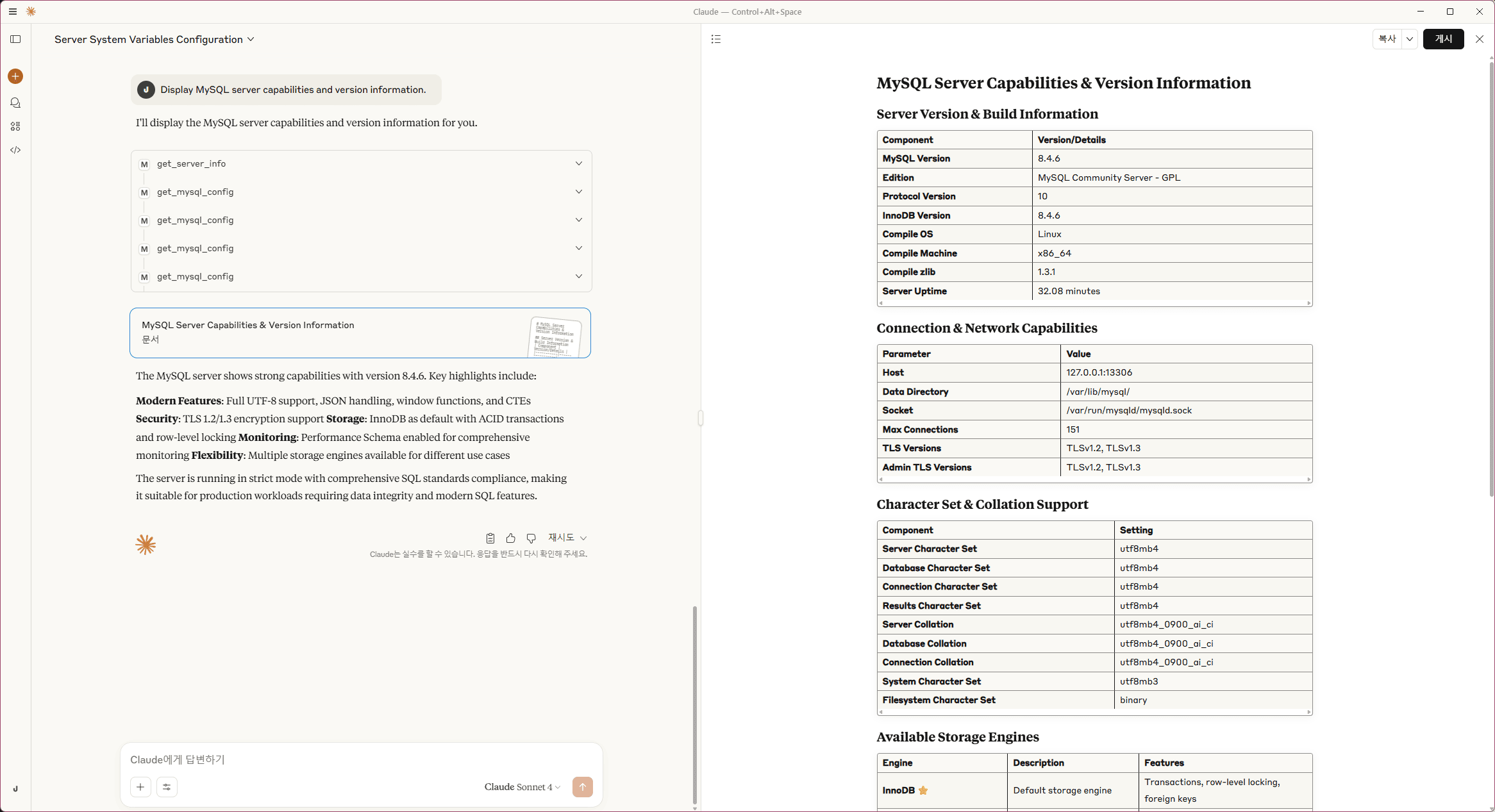
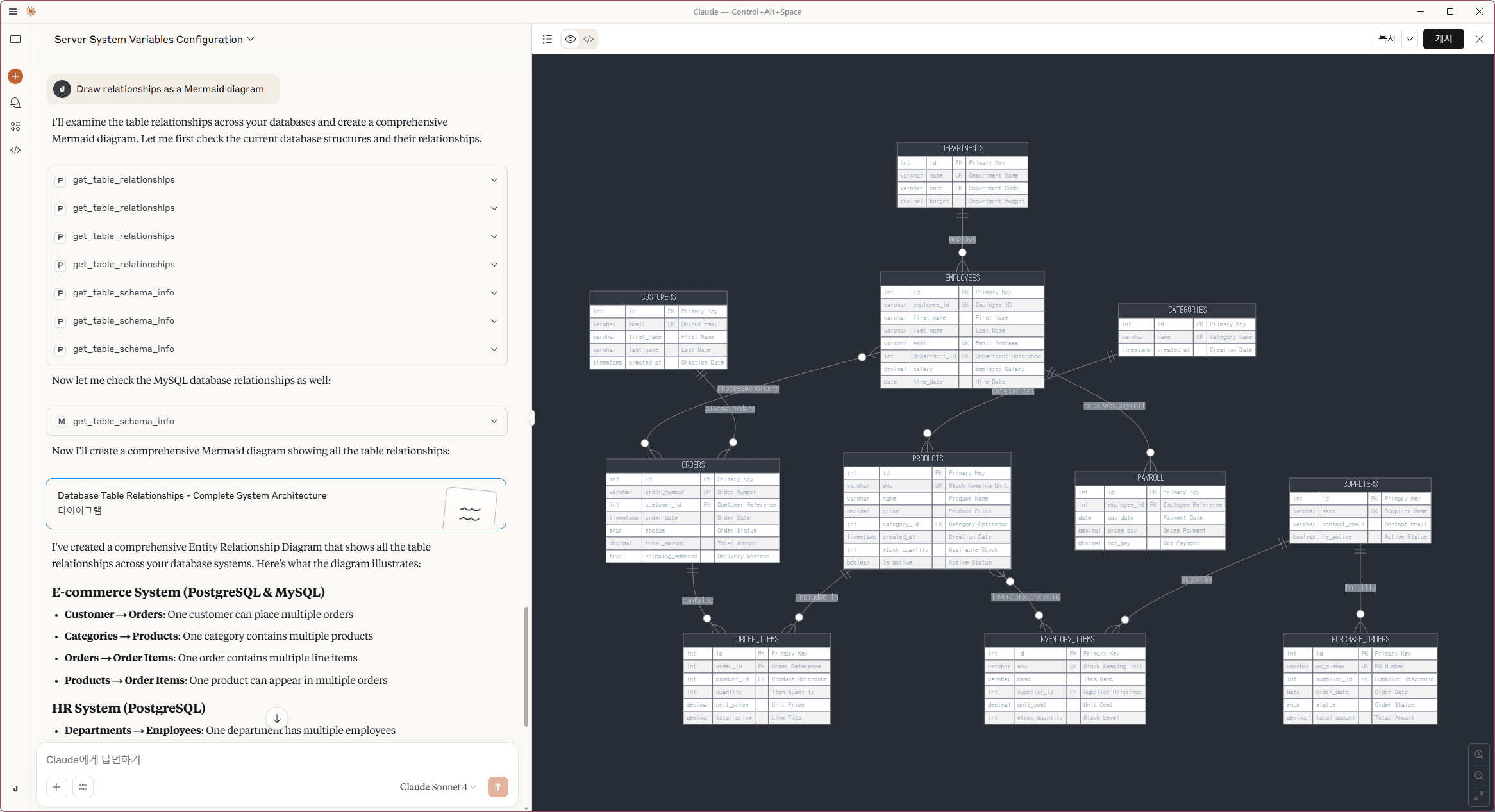
"Draw relationships as a Mermaid diagram"
(Optional) Run with Local Source:
{
  "mcpServers": {
    "mcp-mysql-ops": {
      "command": "uv",
      "args": ["run", "python", "-m", "src.mcp_mysql_ops.mcp_main"],
      "env": {
        "PYTHONPATH": "/path/to/MCP-MySQL-Ops",
        "MYSQL_HOST": "127.0.0.1",
        "MYSQL_PORT": "13306",
        "MYSQL_USER": "root",
        "MYSQL_PASSWORD": "changeme!@34",
        "MYSQL_DATABASE": "test_ecommerce"
      }
    }
  }
}
Run MCP-Server as Standalon
/w Pypi and uvx (Recommended)
# Stdio mode
uvx --python 3.11 mcp-mysql-ops \
  --type stdio

# HTTP mode
uvx --python 3.11 mcp-mysql-ops
  --type streamable-http \
  --host 127.0.0.1 \
  --port 8000 \
  --log-level DEBUG
(Option) Configure Multiple MySQL Instances
{
  "mcpServers": {
    "MySQL-A": {
      "command": "uvx",
      "args": ["--python", "3.11", "mcp-mysql-ops"],
      "env": {
        "MYSQL_HOST": "a.foo.com",
        "MYSQL_PORT": "3306",
        "MYSQL_USER": "root",
        "MYSQL_PASSWORD": "password",
        "MYSQL_DATABASE": "information_schema"
      }
    },
    "MySQL-B": {
      "command": "uvx",
      "args": ["--python", "3.11", "mcp-mysql-ops"],
      "env": {
        "MYSQL_HOST": "b.bar.com",
        "MYSQL_PORT": "3306",
        "MYSQL_USER": "root",
        "MYSQL_PASSWORD": "password",
        "MYSQL_DATABASE": "information_schema"
      }
    }
  }
}
/w Local Source
# Method 1: Using installed console script (after pip install -e .)
mcp-mysql-ops --type stdio
mcp-mysql-ops --type streamable-http --host 127.0.0.1 --port 8000 --log-level DEBUG

# Method 2: Using module execution
PYTHONPATH=/path/to/MCP-MySQL-Ops/src
python -m mcp_mysql_ops --type stdio
python -m mcp_mysql_ops --type streamable-http --host 127.0.0.1 --port 8000 --log-level DEBUG
Environment Variables
| Variable | Description | Default | Project Default |
|---|---|---|---|
| `PYTHONPATH` | Python module search path for MCP server imports | - | `/app/src` |
| `MCP_LOG_LEVEL` | Server logging verbosity (DEBUG, INFO, WARNING, ERROR) | `INFO` | `INFO` |
| `FASTMCP_TYPE` | MCP transport protocol (stdio for CLI, streamable-http for web) | `stdio` | `streamable-http` |
| `FASTMCP_HOST` | HTTP server bind address (0.0.0.0 for all interfaces) | `127.0.0.1` | `0.0.0.0` |
| `FASTMCP_PORT` | HTTP server port for MCP communication | `8000` | `8000` |
| `MYSQL_VERSION` | MySQL major version for Docker image selection | `8.0` | `8.0` |
| `MYSQL_HOST` | MySQL server hostname or IP address | `127.0.0.1` | `host.docker.internal` |
| `MYSQL_PORT` | MySQL server port number | `3306` | `13306` |
| `MYSQL_USER` | MySQL connection username (auto-granted permissions on test DBs) | `root` | `testuser` |
| `MYSQL_PASSWORD` | MySQL user password (supports special characters) | `changeme!@34` | `testpass` |
| `MYSQL_DATABASE` | Default database name for connections | `information_schema` | `testdb` |
| `MYSQL_ROOT_HOST` | MySQL root host access pattern for Docker container | `%` | `%` |
| `MYSQL_ROOT_PASSWORD` | MySQL root password for Docker container initialization | `changeme!@34` | `changeme!@34` |
| `DOCKER_EXTERNAL_PORT_OPENWEBUI` | Host port mapping for Open WebUI container | `8080` | `3004` |
| `DOCKER_EXTERNAL_PORT_MCP_SERVER` | Host port mapping for MCP server container | `8000` | `18004` |
| `DOCKER_EXTERNAL_PORT_MCPO_PROXY` | Host port mapping for MCPO proxy container | `8000` | `8004` |
Note: `MYSQL_DATABASE` serves as the default target database for operations when no specific database is specified. In Docker environments, if set to a custom database name, this database will be automatically created during initial MySQL startup.
User Permission Management: When using a non-root `MYSQL_USER`, the initialization process automatically:
- Creates the specified user if it doesn't exist
- Grants full permissions on the 4 test databases (`test_ecommerce`, `test_analytics`, `test_inventory`, `test_hr`)
- Maintains security by restricting access to only the necessary databases
- Enables monitoring capabilities through automatic information_schema/performance_schema access
Prerequisites
Minimum Requirements
- MySQL 5.7.9 or newer (5.7.9+, 8.0+, 8.4+ supported; tested with MySQL 8.0.37). Versions older than 5.7.9 are not supported because the server depends on `performance_schema.processlist`, introduced in 5.7.9.
- Python 3.11+
- Network access to MySQL server
- Read permissions on system databases (`information_schema`, `performance_schema`)
Recommended MySQL Configuration
⚠️ Performance Monitoring Settings:
Some MCP tools provide enhanced functionality with specific MySQL configuration parameters. These settings are optional but recommended for comprehensive monitoring:
Tools enhanced by these settings:
- get_server_status: More detailed statistics with Performance Schema enabled
- get_index_usage_stats: Enhanced with Performance Schema table statistics
- get_connection_info: Improved connection tracking with Performance Schema
Verification:
After applying any configuration changes, verify the settings:
SHOW VARIABLES LIKE 'performance_schema';
SHOW VARIABLES LIKE 'information_schema_stats_expiry';

+----------------------------------+-------+
| Variable_name                    | Value |
+----------------------------------+-------+
| performance_schema               | ON    |
| information_schema_stats_expiry  | 86400 |
+----------------------------------+-------+
Method 1: my.cnf Configuration (Recommended for Self-Managed MySQL)
Add the following to your `my.cnf` or `my.ini`:
[mysqld]
# Performance Schema (usually enabled by default in MySQL 8.0+)
performance_schema = ON

# Enhanced statistics collection
information_schema_stats_expiry = 0  # Real-time statistics (use 86400 for cached)

# Optional: Enhanced query logging (use carefully in production)
# slow_query_log = ON
# slow_query_log_file = /var/log/mysql/slow.log
# long_query_time = 2
Then restart MySQL server.
Method 2: MySQL Startup Parameters
For Docker or command-line MySQL startup:
# Docker example
docker run -d \
  -e MYSQL_ROOT_PASSWORD=mypassword \
  mysql:8.0 \
  --performance-schema=ON \
  --information-schema-stats-expiry=0

# Direct mysqld command
mysqld \
  --performance-schema=ON \
  --information-schema-stats-expiry=0
Method 3: Dynamic Configuration (MySQL 8.0+, AWS RDS, Azure, GCP)
For managed MySQL services where you cannot modify `my.cnf`, use SQL commands to change dynamic settings:
-- Enable real-time statistics (requires SUPER privilege or SYSTEM_VARIABLES_ADMIN)
SET GLOBAL information_schema_stats_expiry = 0;

-- Verify Performance Schema status (usually enabled by default)
SHOW VARIABLES LIKE 'performance_schema';

-- Optional: Enable slow query log for enhanced monitoring
SET GLOBAL slow_query_log = 'ON';
SET GLOBAL long_query_time = 2;
Note for session-level testing:
-- Set for current session only (temporary)
SET SESSION information_schema_stats_expiry = 0;
RDS/Aurora MySQL Compatibility
- This server is read-only and works with regular roles on AWS RDS MySQL and Aurora MySQL. All core functionality is available through standard Information Schema and Performance Schema access.
- Performance Schema is enabled by default on RDS/Aurora MySQL 8.0+ instances.
- For enhanced monitoring capabilities, consider Parameter Group configuration:
-- Check Performance Schema status
  SHOW VARIABLES LIKE 'performance_schema';

  -- Verify Information Schema settings
  SHOW VARIABLES LIKE 'information_schema_stats_expiry';

  -- Recommended user permissions for monitoring
  GRANT SELECT ON *.* TO @'%';
  GRANT PROCESS ON *.* TO @'%';
Example Queries
🟢 Core MySQL Monitoring Tools (Always Available)
- get_server_info
- "Show MySQL server version and configuration status."
- "Check server system variables and runtime configuration."
- "Display MySQL server capabilities and version information."
- 📋 Features: Server version, system variables, configuration status, feature availability
- 🔧 MySQL 5.7.9+/8.0+: Fully compatible, no additional setup required
- get_database_list
- "List all databases and their sizes."
- "Show database list with character sets and collation information."
- "Display database storage usage and table counts."
- 📋 Features: Database sizes, character sets, collations, table counts, storage usage
- 🔧 MySQL 5.7.9+/8.0+: Uses Information Schema for comprehensive database information
- get_table_list
- "List all tables in the test_ecommerce database."
- "Show table information with storage engines and row counts."
- "Display table creation dates and update timestamps."
- 📋 Features: Table names, storage engines, row counts, sizes, creation/update times
- ⚠️ Required: `database_name` parameter must be specified
- 💡 Usage: Supports filtering by table name patterns
- get_table_schema_info
- "Show detailed schema information for the customers table in test_ecommerce database."
- "Get column details and constraints for products table in test_ecommerce database."
- "Analyze table structure with indexes and foreign keys for orders table in test_ecommerce database."
- "Show schema overview for all tables in test_inventory database."
- 📋 Features: Column types, constraints, indexes, foreign keys, table metadata
- ⚠️ Required: `database_name` parameter must be specified
- 💡 Usage: Leave `table_name` empty for database-wide schema analysis
- get_database_overview
- "Show comprehensive database overview for test_ecommerce database."
- "Get detailed summary of test_analytics database structure and statistics."
- "Analyze database overview with table counts and sizes for test_inventory database."
- "Show database structure summary for test_hr database."
- 📋 Features: Database overview, table statistics, storage summary, schema analysis
- ⚠️ Required: `database_name` parameter must be specified
- get_user_list
- "List all MySQL users and their privileges."
- "Show user accounts with host information and account status."
- "Display user privilege summary and authentication details."
- 📋 Features: User accounts, host patterns, privileges, account status, authentication info
- 🔧 MySQL 5.7.9+/8.0+: Enhanced user management information in MySQL 8.0+
- get_active_connections
- "Show all active connections and their details."
- "List current database connections with user and host information."
- "Monitor active sessions and their current operations."
- "Display connection statistics and process information."
- 📋 Features: Active connections, process list, connection details, session information
- 🔧 MySQL 5.7.9+/8.0+: Enhanced process information with Performance Schema integration
- get_server_status
- "Show MySQL server status variables and performance counters."
- "Display current server performance metrics and statistics."
- "Monitor server operational status and key performance indicators."
- "Analyze server health metrics and resource utilization."
- 📋 Features: Status variables, performance counters, connection statistics, resource metrics
- 🔧 MySQL 5.7.9+/8.0+: Comprehensive server status monitoring
- get_table_size_info
- "Show table and index size analysis for test_ecommerce database."
- "Find largest tables by data and index size."
- "Analyze storage efficiency and table size distribution."
- "Display table size details with data/index ratios."
- 📋 Features: Table sizes, index sizes, data/index ratios, storage efficiency analysis
- ⚠️ Required: `database_name` parameter for accurate size analysis
- get_database_size_info
- "Show database capacity analysis and storage usage."
- "Find the largest databases by total size."
- "Display comprehensive database size statistics."
- "Analyze storage distribution across databases."
- 📋 Features: Database sizes, table counts, storage distribution, capacity analysis
- 🔧 MySQL 5.7.9+/8.0+: Accurate size calculation using Information Schema
- get_index_usage_stats
- "Analyze index usage and efficiency statistics."
- "Show index cardinality and selectivity information."
- "Find potentially unused or redundant indexes."
- "Display index performance and usage patterns."
- 📋 Features: Index statistics, cardinality, selectivity, usage analysis, optimization recommendations
- ⚠️ Required: `database_name` parameter for targeted index analysis
- 💡 Enhanced with: Performance Schema enabled for more detailed statistics
🚀 Version-Enhanced Tools
- get_server_info (Enhanced!)
- "Show server version and MySQL 8.0 advanced features."
- "Check server compatibility and available enhancements."
- "Display MySQL version-specific capabilities and recommendations."
- 📈 MySQL 8.0+: Enhanced JSON support, improved Performance Schema, CTE support, window functions
- 📊 MySQL 5.7.9+: Core functionality with basic JSON and Performance Schema support
💡 Natural Language Query Examples
Test tools with realistic prompts - never use function names directly:
- ✅ "Show me the current server status and key performance metrics"
- ❌ "Run get_server_status"
📊 Monitoring Examples:
- "What databases exist and how much space do they use?"
- "Show me all tables in the ecommerce database with their sizes"
- "Which tables have the most rows and largest indexes?"
- "Display current database connections and their activity"
- "Analyze the schema structure of the test_ecommerce database"
- "Show me MySQL server configuration and performance status"
- "List all users and their database privileges"
- "Find tables that might need index optimization"
💡 Pro Tip: All tools support multi-database operations using the `database_name` parameter. This allows MySQL root users to analyze and monitor multiple databases from a single MCP server instance.
Troubleshooting
Connection Issues
1. Check MySQL server status
2. Verify connection parameters in `.env` file
3. Ensure network connectivity
4. Check user permissions and authentication
Configuration Issues
1. "Access denied" errors: Check user privileges
SHOW GRANTS FOR 'username'@'host';Quick fix for monitoring user setup:
-- Create monitoring user with necessary permissions
   CREATE USER 'monitoring'@'%' IDENTIFIED BY 'secure_password';
   GRANT SELECT ON *.* TO 'monitoring'@'%';
   GRANT PROCESS ON *.* TO 'monitoring'@'%';
2. "Table doesn't exist" for Performance Schema: Check Performance Schema status
SHOW VARIABLES LIKE 'performance_schema'; -- Should be 'ON'Note: Performance Schema is enabled by default in MySQL 8.0+ but may be disabled in some configurations.
3. Missing database information: Verify Information Schema access
SHOW VARIABLES LIKE 'information_schema_stats_expiry';
   SELECT COUNT(*) FROM information_schema.tables;
Quick fix for real-time statistics:
SET GLOBAL information_schema_stats_expiry = 0;4. Apply configuration changes:
Performance Issues
1. Use `limit` parameters to reduce result size
2. Run monitoring during off-peak hours
3. Check database load before running analysis
4. Consider setting `information_schema_stats_expiry` for cached statistics
Version Compatibility Issues
> For more details, see the ## Tool Compatibility Matrix
1. Run compatibility check first:
# "Use get_server_info to check version and available features"2. Understanding feature availability:
async def get_your_custom_data(target_resource: str = None) -> List[Dict[str, Any]]:
    """Your custom data retrieval function."""
    # Example implementation - adapt to your service
    data_source = await get_data_connection(target_resource)
    results = await fetch_data_from_source(
        source=data_source,
        filters=your_conditions,
        aggregations=["count", "sum", "avg"],
        sorting=["count DESC", "timestamp ASC"]
    )
    return results
2. Create Your MCP Tool
Add your tool function to `src//mcp_main.py`:
@mcp.tool()
async def get_your_custom_analysis(limit: int = 50, target_name: Optional[str] = None) -> str:
    """
    [Tool Purpose]: Brief description of what your tool does

    [Exact Functionality]:
    - Feature 1: Data aggregation and analysis
    - Feature 2: Resource monitoring and insights
    - Feature 3: Performance metrics and reporting

    [Required Use Cases]:
    - When user asks "your specific analysis request"
    - Your business-specific monitoring needs

    Args:
        limit: Maximum results (1-100)
        target_name: Target resource/service name

    Returns:
        Formatted analysis results
    """
    try:
        limit = max(1, min(limit, 100))  # Always validate input

        results = await get_your_custom_data(target_resource=target_name)

        if results:
            results = results[:limit]

        return format_table_data(results, f"Custom Analysis (Top {len(results)})")

    except Exception as e:
        logger.error(f"Failed to get custom analysis: {e}")
        return f"Error: {str(e)}"
3. Update Imports (If Needed)
Add your helper function to imports in `src//mcp_main.py`:
from .functions import (
    # ...existing imports...
    get_your_custom_data,  # Add your new function
)
4. Update Prompt Template (Recommended)
Add your tool description to `src//prompt_template.md` for better natural language recognition:
### **Your Custom Analysis Tool**

### X. **get_your_custom_analysis**
**Purpose**: Brief description of what your tool does
**Usage**: "Show me your custom analysis" or "Get custom analysis for database_name"
**Features**: Data aggregation, resource monitoring, performance metrics
**Required**: `target_name` parameter for specific resource analysis
5. Test Your Tool
# Local testing
./scripts/run-mcp-inspector-local.sh

# Or with Docker
docker-compose up -d
docker-compose logs -f mcp-server

# Test with natural language:
# "Show me your custom analysis"
# "Get custom analysis for target_name"
That's it! Your custom tool is ready to use with natural language queries.
Development
Testing & Development
# Test with MCP Inspector
./scripts/run-mcp-inspector-local.sh

# Direct execution methods for debugging
# Method 1: Console script (after pip install -e .)
pip install -e .
mcp-mysql-ops --log-level DEBUG

# Method 2: Module execution
PYTHONPATH=src python -m mcp_mysql_ops --log-level DEBUG

# Test with different MySQL versions
# Modify MYSQL_HOST in .env to point to different MySQL instances

# Run tests (if you add any)
uv run pytest
Version Compatibility Testing
The MCP server automatically adapts to MySQL versions 5.7.9+ and 8.0+. To test across versions:
1. Set up test databases: Different MySQL versions (5.7, 8.0, 8.1+)
2. Run compatibility tests: Point to each version and verify tool behavior
3. Check feature detection: Ensure proper version detection and feature availability
4. Verify performance: Confirm optimal performance across MySQL versions
Security Notes
- All tools are read-only - no data modification capabilities
- Sensitive information (passwords) are masked in outputs
- No direct SQL execution - only predefined, safe queries
- Follows principle of least privilege
- Compatible with MySQL security best practices
Contributing
🤝 Got ideas? Found bugs? Want to add cool features?
We're always excited to welcome new contributors! Whether you're fixing a typo, adding a new monitoring tool, or improving documentation - every contribution makes this project better.
Ways to contribute:
- 🐛 Report issues or bugs
- 💡 Suggest new MySQL monitoring features
- 📝 Improve documentation
- 🚀 Submit pull requests
- ⭐ Star the repo if you find it useful!
Pro tip: The codebase is designed to be super friendly for adding new tools. Check out the existing `@mcp.tool()` functions in `mcp_main.py`.
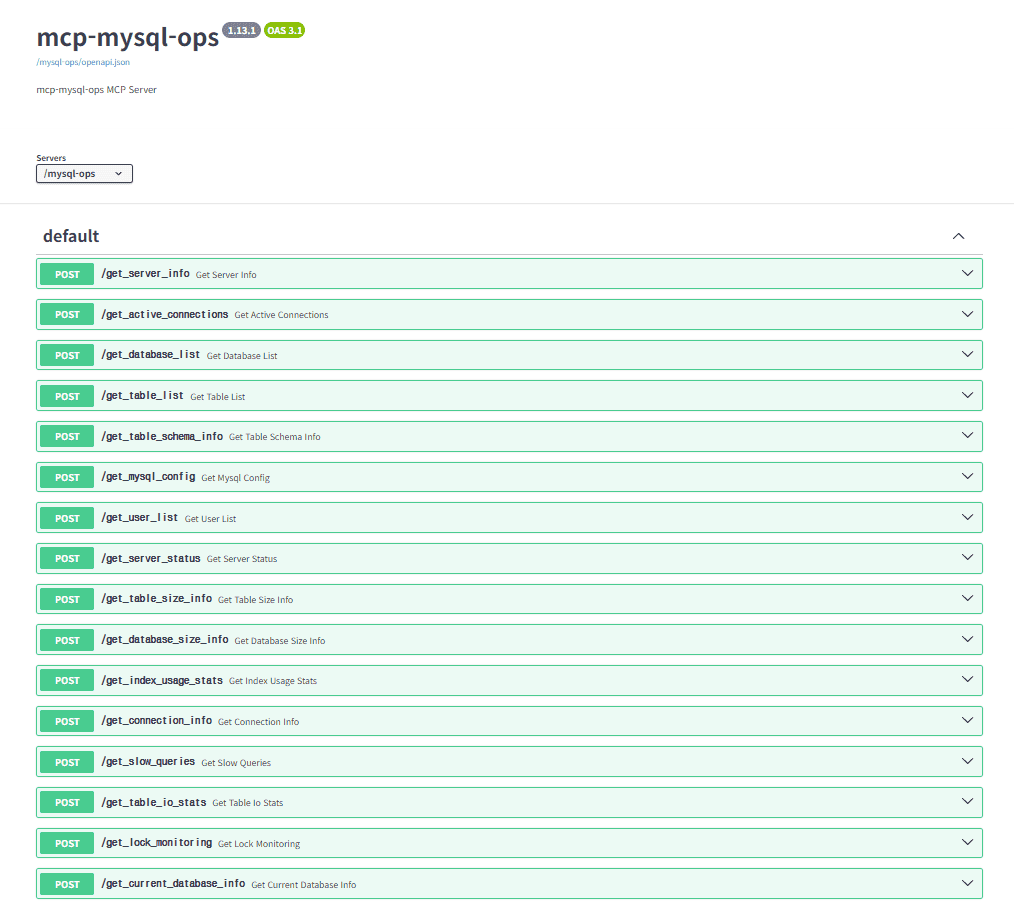
MCPO Swagger Docs
> [MCPO Swagger URL] http://localhost:8004/mysql-ops/docs
License
Freely use, modify, and distribute under the MIT License.
⭐ Other Projects
Other MCP servers by the same author:
Frequently asked questions
What is MCP-MySQL-Ops?
MCP-MySQL-Ops is 🛠️ MCP server for MySQL ops — 19+ tools for monitoring, diagnostics & performance analysis. Natural language queries, read-only & production-safe, MySQL 5.7.9+/8.0+. Works with Claude, Cursor, Cline & all MCP clients.
How do I install MCP-MySQL-Ops?
Open the GitHub repository and follow its README. Most MCP servers are added to your client's MCP config, then called by your agent.
Is MCP-MySQL-Ops open source?
Yes — it is hosted on GitHub at https://github.com/call518/MCP-MySQL-Ops and has 2 stars.
Related MCP tools
 projectmem
Open-source coding agent memory. Records issues, attempts, fixes and decisions, then warns your agent before it repeats an approach that already failed. Native MCP server for Claude Code, Cursor, Antigravity and Codex. 100% local, no cloud, no telemetry. MIT.
 jcodemunch-mcp
Cut AI token costs 95%+ on code exploration. The leading MCP server for precise, symbol-level GitHub code retrieval via tree-sitter AST. Works with Claude Code, Cursor & any MCP client. 313B+ tokens saved.
 OpenOSINT
AI-powered OSINT agent with interactive REPL, MCP server, and CLI. 19 tools. Works with Claude, GPT-4, or local models. For authorized security research only.
 fastapi_mcp
Expose your FastAPI endpoints as Model Context Protocol (MCP) tools, with Auth! Python-based implementation. Trusted by 11000+ developers.
 google_workspace_mcp
Control Gmail, Google Calendar, Docs, Sheets, Slides, Chat, Forms, Tasks, Search & Drive with AI - Comprehensive Google Workspace MCP Server & CLI Tool
 paperbanana
Open source implementation and extension of Google Research’s PaperBanana for automated academic figures, diagrams, and research visuals, expanded to new domains like slide generation.
Run your own MCP server? See who uses it and what to fix.
Measure it with TrackMCP