
claude-code-whatsapp-approval
MCP server with Whatsapp integration (Twilio) to remote approve Claude Code tool use
Documentation
Claude MCP Approval Server
A Model Context Protocol (MCP) server that provides approval prompts via WhatsApp before executing potentially sensitive commands. Built with FastMCP and Twilio.
Features
- 🔐 Permission Prompts: Intercepts tool executions and requests approval via WhatsApp
- 📱 WhatsApp Integration: Uses Twilio to send approval requests with quick-reply buttons
- ⚡ FastMCP: Built on FastMCP for easy integration with Claude
- 🎯 Smart Formatting: Formats commands and reasons in a readable way
- ⏱️ Auto-expiry: Requests expire after 5 minutes for security
- 💾 Database Tracking: SQLite database to track approval requests
Setup Instructions
1. Install Dependencies
uv install2. Set Up Twilio Account
1. Sign up to Twilio at https://www.twilio.com
2. Try WhatsApp messaging - Go to https://console.twilio.com/us1/develop/sms/try-it-out/whatsapp-learn and follow the setup guide to:
3. Get Twilio Credentials
1. Get your Account SID from the Twilio Console dashboard
2. Generate an Auth Token at https://console.twilio.com/us1/account/keys-credentials/api-keys
4. Configure Environment
cp .env.example .envEdit `.env` with your credentials:
TWILIO_ACCOUNT_SID=your_account_sid_here
TWILIO_AUTH_TOKEN=your_auth_token_here
TWILIO_WHATSAPP_FROM=whatsapp:+14155238886  # Your sandbox number
APPROVAL_PHONE=+1234567890  # YOUR phone number (without whatsapp: prefix)
SERVER_PORT=8000 # Optional: Server port (defaults to 8000)Important: Replace `+1234567890` with your actual phone number that you used to join the WhatsApp sandbox. This is where approval requests will be sent.
5. Create WhatsApp Template
python setup_template.pyThis automatically creates the Twilio template and updates your `.env` file with the template SID.
6. Expose the Server
Expose your local server using ngrok or Tailscale:
Option A: ngrok
ngrok http 8000 # Replace 8000 with your SERVER_PORT if differentOption B: Tailscale
tailscale funnel --bg 8000 # Replace 8000 with your SERVER_PORT if differentNote your public URL (e.g., `https://abc123.ngrok.io` or `https://hostname.tail12345.ts.net`)
7. Configure Twilio Webhook
1. Go back to the Try WhatsApp page: https://console.twilio.com/us1/develop/sms/try-it-out/whatsapp-learn
2. Click Sandbox Settings
3. Set both webhook URLs to: `https://your-public-url/twilio-webhook`
8. Start the Approval Server
Important: Start the server BEFORE running Claude!
uv run approval_server.pyThe server should show:
- ✅ Twilio configured
- 🌐 Server endpoints listed
- Webhook URL ready
9. Run Claude with Permission Prompts
claude --mcp-config mcp-servers.json \
       --mcp-debug \
       --permission-prompt-tool mcp__approval-server__permissions__approve \
       --verbose \
       --debug \
       --output-format stream-json \
       -p "your prompt here"
10. Approve/Deny from Anywhere! 🎉
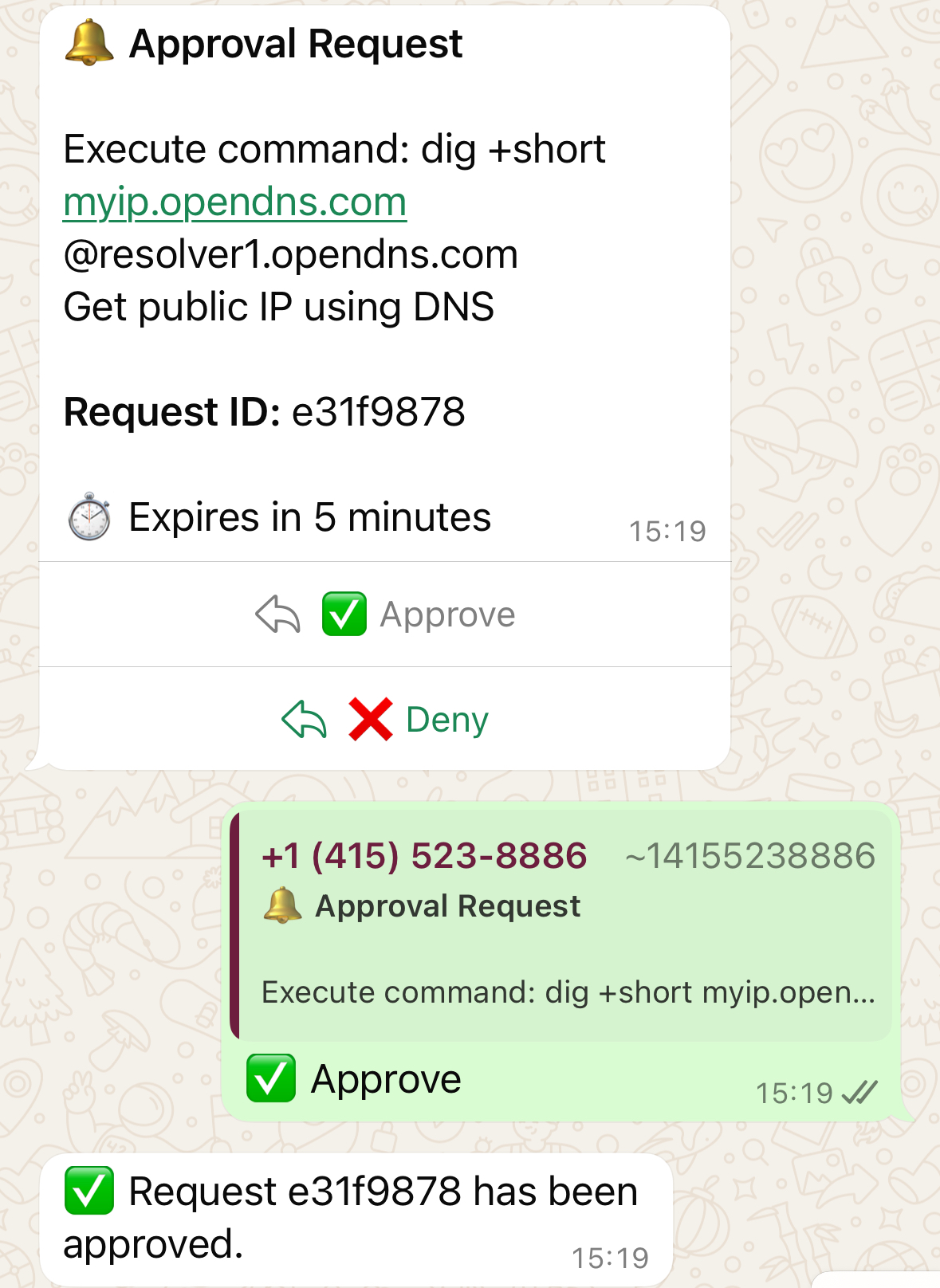
When Claude tries to execute a command, you'll receive a WhatsApp message with ✅ Approve and ❌ Deny buttons. Tap to respond from anywhere in the world!
Important Caveats
⚠️ Network Access: The `-p` (prompt) mode has no network access
⚠️ Interactive Mode: Non-interactive mode (without `-p`) does not use the `--permission-prompt-tool`
MCP Configuration
The MCP configuration is in `mcp-servers.json`.
Replace `8000` with your `SERVER_PORT` if you're using a different port.
How It Works
1. Tool Interception: When Claude tries to execute a tool, the `permissions__approve` function is called first
2. WhatsApp Notification: An approval request is sent to your WhatsApp with formatted command details
3. User Response: You can approve or deny using the quick-reply buttons
4. Execution: Based on your response, Claude either proceeds or stops
Message Format
Bash commands:
🔔 Approval Request

Execute command: `ls -la /etc`
*Reason:* List system configuration files

*Request ID:* abc123

⏱️ Expires in 5 minutes
Other tools:
🔔 Approval Request

*Tool:* WebFetch
  • url: https://example.com
  • prompt: Extract title

*Request ID:* abc123

⏱️ Expires in 5 minutes
Customizing the Template
To modify the WhatsApp message format or buttons:
1. Edit `template_config.json`
2. Run `python setup_template.py` to create a new template
3. The script will update your `.env` file with the new SID
Security & Features
- ⏱️ Auto-expiry: Requests expire after 5 minutes
- 🔒 Phone verification: Only responses from your configured phone number are accepted
- 📊 Audit trail: Database stores request history for tracking
- 🔐 E2E encryption: WhatsApp messages use end-to-end encryption
- 🌍 Global access: Approve/deny from anywhere with WhatsApp
Credits
https://github.com/mmarcen/test_permission-prompt-tool for providing a working example of using an MCP server with permission prompt tool.
Frequently asked questions
What is claude-code-whatsapp-approval?
claude-code-whatsapp-approval is MCP server with Whatsapp integration (Twilio) to remote approve Claude Code tool use
How do I install claude-code-whatsapp-approval?
Open the GitHub repository and follow its README. Most MCP servers are added to your client's MCP config, then called by your agent.
Is claude-code-whatsapp-approval open source?
Yes — it is hosted on GitHub at https://github.com/adstastic/claude-code-whatsapp-approval and has 7 stars.
Related MCP tools
 openhands
🙌 OpenHands: Code Less, Make More for the Model Context Protocol. Enhance AI assistants with powerful integrations. Python-based implementation.
 mem0
mem0Universal memory layer for AI Agents; Announcing OpenMemory MCP - local and secure memory management. Python-based implementation.
 chatgpt-on-wechat
基于大模型搭建的聊天机器人,同时支持 微信公众号、企业微信应用、飞书、钉钉 等接入,可选择ChatGPT/Claude/DeepSeek/文心一言/讯飞星火/通义千问/ Gemini/GLM-4/Kimi/LinkAI,能处理文本、语音和图片,访问操作系统和互联网,支持基于自有知识库进行定制企业智能客服。
 gpt-researcher
An LLM agent that conducts deep research (local and web) on any given topic and generates a long report with citations. Built for the Model Context Protocol to
 fastmcp
🚀 The fast, Pythonic way to build MCP servers and clients Trusted by 19900+ developers. Trusted by 19900+ developers. Trusted by 19900+ developers.
 maxkb
maxkb🔥 MaxKB is an open-source platform for building enterprise-grade agents. MaxKB 是强大易用的开源企业级智能体平台。 for the Model Context Protocol. Enhance AI assistants with po
Run your own MCP server? See who uses it and what to fix.
Measure it with TrackMCP