
codemcp
Coding assistant MCP for Claude Desktop Python-based implementation. Trusted by 1500+ developers. Trusted by 1500+ developers.
Documentation
NOTICE: claude code is available with Anthropic's $20/mo subscription, so I consider
codemcp fully obsolete. However, there are some good design ideas (especially around
the Git-versioning scheme) that I eventually want to port into the current generation
of agentic coding clis.
codemcp
Make Claude Desktop a pair programming assistant by installing codemcp. With
it, you can directly ask Claude to implement features, fix bugs and do
refactors on a codebase on your computer; Claude will directly edit files and
run tests. Say goodbye to copying code in and out of Claude's chat window!
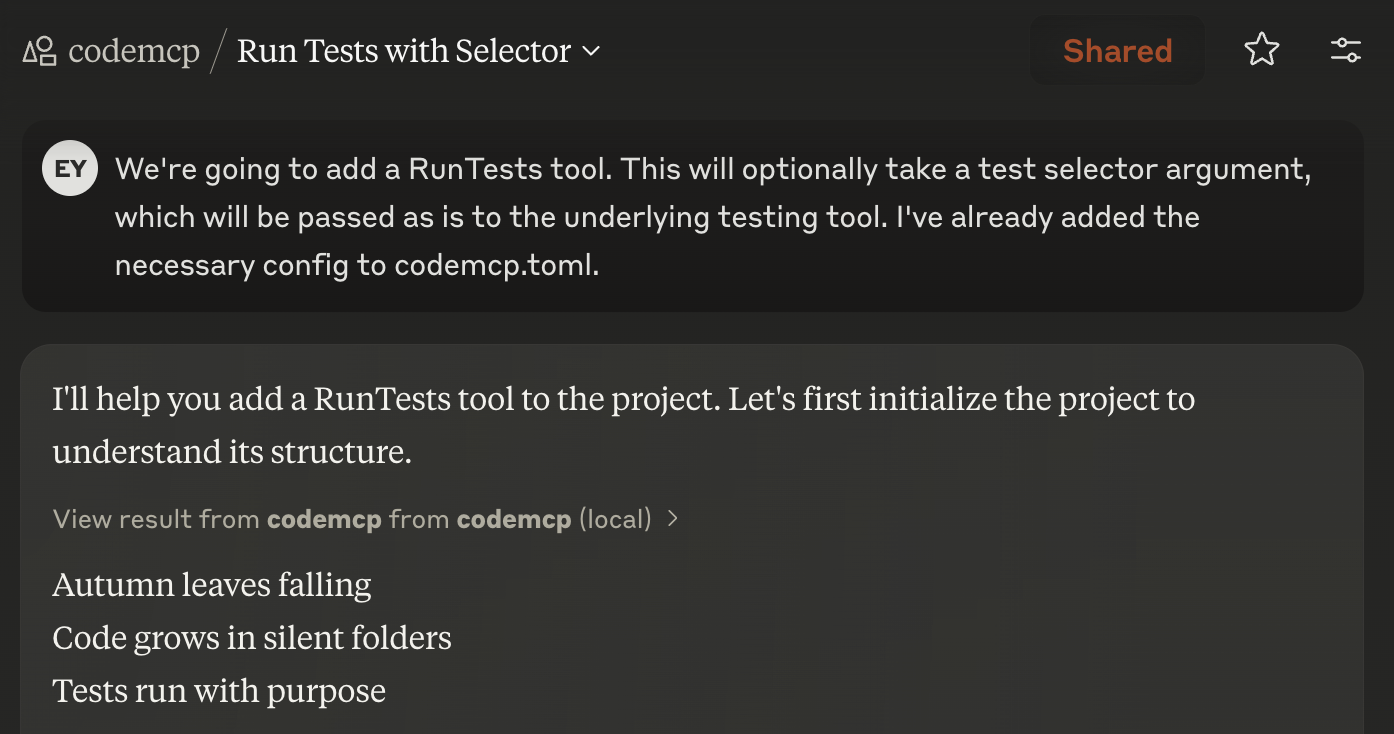
codemcp offers similar functionality to other AI coding software (Claude Code,
Cursor, Cline, Aider), but it occupies a unique point in the design space:
1. It's intended to be used with Claude Pro, Anthropic's $20/mo
subscription offering. I like paying for my usage with a subscription plan
because it means zero marginal cost for agent actions; no more feeling
bad that you wasted five bucks on a changeset that doesn't work.
Note that if you have Claude Max ($100/mo), Claude Code can also be used
with subscription based pricing. The value proposition for codemcp is
murkier in this case (and it is definitely inferior to Claude Code in some
respects), but you can still use codemcp with Claude Max if you prefer some
of the other UI decisions it makes. (Also, it's open source, so you can
change it if you don't like it, unlike Claude Code!)
2. It's built around auto-accept by default. I want my agent to get as
far as it can without my supervision, so I can review everything in one go at
the end. There are two key things that codemcp does differently than most
coding agents: we forbid unrestricted shell, instead requiring you to
predeclare commands the agent can use in ``codemcp.toml``, and we **Git
version all LLM edits**, so you can roll back agent changes on a
fine-grained basis and don't have to worry about forgetting to commit
changes.
3. It's IDE agnostic: you ask Claude to make changes, it makes them, and
then you can use your favorite IDE setup to review the changes and make
further edits. I use vim as my daily driver editor, and coding environments
that require VSCode or a specific editor are a turn off for me.
IMPORTANT: For master users - Major changes for token efficiency
To improve codemcp's token efficiency, on master I am in the process of
changing codemcp back into a multi-tool tool (instead of a single tool whose
instructions are blatted into chat when you InitProject). This means you have
to manually approve tool use. Because tool use approval is persistent across
multiple chats, I think this is a reasonable tradeoff to make, but if you
really don't like, file a bug at
refined-claude browser
extension for supporting auto-approve tool use.
Installation
I recommend this specific way of installing and using codemcp:
1. Install `uv` and install git, if they are not installed already.
2. Install claude-mcp on your browser.
This enables you to connect to SSE MCP servers directly from the website,
which means you don't need to use Claude Desktop and can easily have
multiple chat windows going in parallel. We expect this extension should
be soon obsoleted by the rollout of
Integrations. At time of
writing, however, Integrations have not yet arrived for Claude Pro subscribers.
3. Run codemcp using ``uvx --from git+https://github.com/ezyang/codemcp@prod codemcp serve``.
You can add ``--port 1234`` if you need it to listen on a non-standard port.
Pro tip: if you like to live dangerously, you can change `prod` to `main`. If
you want to pin to a specific release, replace it with `0.3.0` or similar.
Pro tip: you can run codemcp remotely! If you use
Tailscale and trust all devices on your Tailnet,
you can do this securely by passing ``--host 100.101.102.103`` (replace the
IP with the Tailscale IP address of your node. This IP typically lives in
the 100.64.0.0/10 range.) WARNING: Anyone with access to this MCP can perform
arbitrary code execution on your computer, it is EXTREMELY unlikely you want to
bind to 0.0.0.0.
4. Configure claude-mcp with URL: ``http://127.0.0.1:8000/sse`` (replace the port if needed.)
5. Unfortunately, the web UI inconsistently displays the hammer icon. However, you can verify
that the MCP server is working by looking for "[MCP codemcp] SSE connection opened" in the
Console, or by asking Claude what tools it has available (it should say
tools from codemcp are available.)
If you prefer to use Claude Desktop or have unusual needs, check out INSTALL.md for
installation instructions for a variety of non-standard situations.
Usage
First, you must create a `codemcp.toml` file in the Git repository checkout
you want to work on. If you want the agent to be able to do things like run
your formatter or run tests, add the commands to execute them in the commands
section (note: these commands need to appropriately setup any virtual
environment they need):
format = ["./run_format.sh"]
test = ["./run_test.sh"]
The ``format`` command is special; it is always run after every file edit.
Next, in Claude Desktop, we recommend creating a Project and putting this in
the Project Instructions:
Initialize codemcp with $PROJECT_DIRWhere `$PROJECT_DIR` is the path to the project you want to work on.
Then chat with Claude about what changes you want to make to the project.
Every time codemcp makes a change to your code, it will generate a commit.
To see some sample transcripts using this tool, check out:
codemcp will generate a commit per chat and amend it as it is working on your feature.
Philosophy
- When you get rate limited, take the time to do something else (review
Claude's code, review someone else's code, make plans, do some meetings)
- This is *not* an autonomous agent. At minimum, you have to intervene after
every chat to review the changes and request the next change. While you
*can* ask for a long list of things to be done in a single chat, you will
likely hit Claude Desktop's output limit and have to manually "continue" the
agent anyway. Embrace it, and use the interruptions to make sure Claude is
doing the right thing.
- When Claude goes off the rails, it costs you time rather than dollars.
Behave accordingly: if time is the bottleneck, watch Claude's incremental
output carefully.
Configuration
Here are all the config options supported by `codemcp.toml`:
project_prompt = """
Before beginning work on this feature, write a short haiku.  Do this only once.
"""

[commands]
format = ["./run_format.sh"]
test = ["./run_test.sh"]
The `project_prompt` will be loaded when you initialize the project in chats.
The `commands` section allows you to configure commands for specific tools. The
names are told to the LLM, who will decide when it wants to run them. You can add
instructions how to use tools in the `project_prompt`; we also support a more verbose
syntax where you can give specific instructions on a tool-by-tool basis:
[commands.test]
command = ["./run_test.sh"]
doc = "Accepts a pytest-style test selector as an argument to run a specific test."
Troubleshooting
To run the server with inspector, use:
PYTHONPATH=. mcp dev codemcp/__main__.pyLogs are written to `~/.codemcp/codemcp.log`. The log level can be set in a global configuration file at `~/.codemcprc`:
[logger]
verbosity = "INFO"  # Can be DEBUG, INFO, WARNING, ERROR, or CRITICAL
Logging is not configurable on a per project basis, but this shouldn't matter
much because it's difficult to use Claude Desktop in parallel on multiple
projects anyway.
Contributing
See CONTRIBUTING.md.
Frequently asked questions
What is codemcp?
codemcp is Coding assistant MCP for Claude Desktop Python-based implementation. Trusted by 1500+ developers. Trusted by 1500+ developers.
How do I install codemcp?
Open the GitHub repository and follow its README. Most MCP servers are added to your client's MCP config, then called by your agent.
Is codemcp open source?
Yes — it is hosted on GitHub at https://github.com/ezyang/codemcp and has 1,563 stars.
Related MCP tools
 langchain-mcp-adapters
LangChain 🔌 MCP Python-based implementation. Trusted by 3000+ developers. Trusted by 3000+ developers. Trusted by 3000+ developers.
 ai-infra-guard
A.I.G (AI-Infra-Guard) is a comprehensive, intelligent, and easy-to-use AI Red Teaming platform developed by Tencent Zhuque Lab.
 basic-memory
AI conversations that actually remember. Never re-explain your project to Claude again. Local-first, integrates with Obsidian.
 mcp-crawl4ai-rag
Web Crawling and RAG Capabilities for AI Agents and AI Coding Assistants for the Model Context Protocol. Enhance AI assistants with powerful integrations.
 postgres-mcp
Postgres MCP Pro provides configurable read/write access and performance analysis for you and your AI agents. Python-based implementation.
 mcp-scan
Constrain, log and scan your MCP connections for security vulnerabilities. Python-based implementation. Trusted by 1200+ developers.
Run your own MCP server? See who uses it and what to fix.
Measure it with TrackMCP