
deskbrid
Linux desktop HAL for AI agents. One daemon, one socket, every desktop action. GNOME, KDE, Hyprland, X11. Ships in one command.
Documentation
deskbrid
mcp-name: io.github.coe0718/deskbrid
**📖 Documentation | API Reference | Architecture | v1.0.0 Release Notes**
The HAL your Linux desktop agents are missing.
Deskbrid is a single Rust binary that auto-detects your desktop environment and wraps it into a JSON-over-Unix-socket protocol. GNOME, Hyprland, KDE, COSMIC, Sway, Niri, Wayfire, Labwc, Cinnamon, MATE — one daemon, one protocol, one binary.
# Human
deskbrid windows list
deskbrid clipboard read

# Agent (same socket)
{"action": "windows.list"}  →  [{"title": "VS Code", "app_id": "code", ...}]
Table of Contents
Why Deskbrid
Every major AI lab is racing to ship desktop agents. AppleScript gives macOS agents native control. Windows has UI Automation. Linux has `xdotool` — which breaks on Wayland, the default display protocol for every major distro.
Deskbrid fills that gap. It auto-detects your compositor and loads the right backend — GNOME (Mutter RemoteDesktop DBus), Hyprland (hyprctl + ydotool + grim), KDE (KWin D-Bus + ydotool + spectacle), wlroots-style compositors, or shared X11. Same binary, same protocol, same socket.
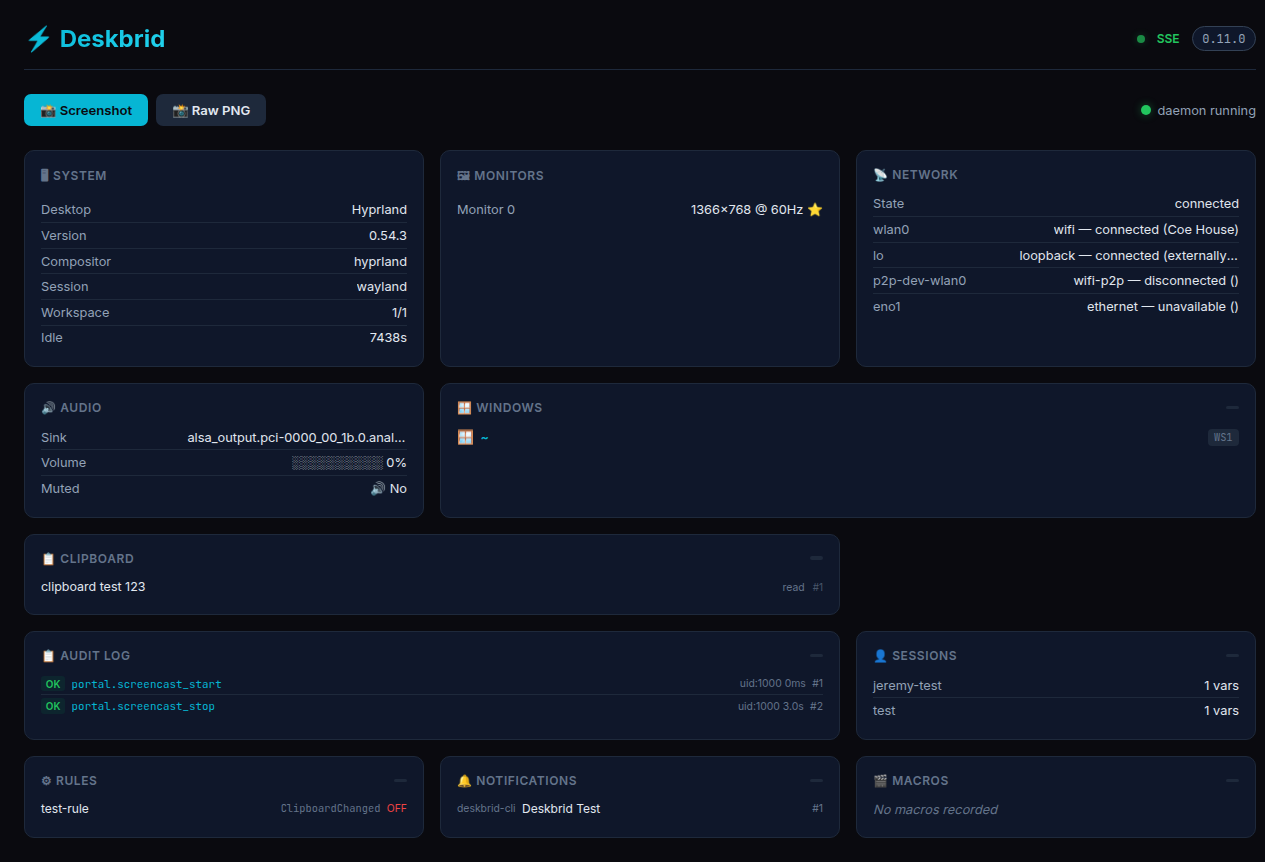
Dashboard
Deskbrid ships with a built-in web dashboard at `localhost:20129` — system info, monitors, windows, network, audio, clipboard, and an audit log of agent actions, all live:
**🔴 Live Demo →**
Supported Desktops
| Desktop | Session | Status | Backend |
|---|---|---|---|
| GNOME 46–50 | Wayland | ✅ Core | Mutter RemoteDesktop + Shell Extension |
| KDE Plasma | Wayland | ✅ Core | KWin D-Bus + ydotool + spectacle |
| Hyprland | Wayland | ✅ Core | hyprctl + ydotool + grim |
| Sway | Wayland | ✅ Core | swaymsg + ydotool + grim |
| Labwc | Wayland | ⚠️ Partial | wlrctl + ydotool + grim + wlr-randr |
| COSMIC | Wayland | ⚠️ Partial | cosmic-helper + cosmic-randr + ydotool + grim |
| Niri | Wayland | 🔲 Untested | niri msg + ydotool + grim + wlr-randr |
| Wayfire | Wayland | 🔲 Untested | wf-ipc + ydotool + grim + wlr-randr |
| Cinnamon | X11 | 🔲 Untested | xdotool + wmctrl + xclip + import |
| MATE | X11 | 🔲 Untested | xdotool + wmctrl + xclip + import |
| X11 (generic) | X11 | 🔲 Untested | xdotool + wmctrl + xclip + import |
> Honest coverage: Deskbrid works well on GNOME, KDE, Hyprland, and Sway — tested on real hardware (Turtle, a 2014 Haswell laptop). The other seven backends have code but zero runtime verification. Even within core backends, support is uneven: Hyprland lacks `windows.minimize` and `monitor.set_primary`, COSMIC lacks window move/resize and tiling, Labwc lacks move/resize, minimize, tile, and primary monitor control. Stubbed actions (`ui.tree.get`, `ui.element.click`, `bluetooth.pair`) return "not supported." This is broad but partial Linux desktop automation, not universal cross-desktop control. See the full DE Test Matrix for per-action, per-compositor detail.
Installation
One-liner install (recommended):
bash  ⚠️ Standalone Wayland compositors don't ship a notification daemon. Deskbrid's `notify send` will hang without one. Install **dunst**, **mako**, or **swaync** and add it to your compositor's autostart.

**KDE Plasma:**
sudo apt install spectacle imagemagick wl-clipboard ydotool
## Quick Startdeskbrid daemon &
deskbrid windows list # List open windows
deskbrid clipboard read # Read clipboard
deskbrid screenshot # Take screenshot
deskbrid system info # Get system info
deskbrid windows focus --app code # Focus VS Code
deskbrid input keyboard type "Hello!" # Type text
## Features

### Windows & Workspaces

| Action | Description |
|--------|-------------|
| `windows.list` | List all open windows |
| `windows.focus` | Focus a window by app_id or title |
| `windows.get` | Get details for a specific window |
| `windows.close` | Request window close |
| `windows.minimize/maximize` | Window state control |
| `windows.move_resize` | Move and resize windows |
| `windows.tile` | Tile to screen regions |
| `windows.activate_or_launch` | Focus or launch app |
| `workspaces.*` | Workspace management |
| `layout_profiles.*` | Save/restore layouts |

### Input & Clipboard

| Action | Description |
|--------|-------------|
| `input.keyboard type` | Type text |
| `input.keyboard key` | Send keypress |
| `input.keyboard combo` | Send key combinations |
| `input.mouse.*` | Mouse control |
| `clipboard.read/write` | Clipboard access |
| `clipboard.history` | Clipboard history |

### Screenshots & Media

| Action | Description |
|--------|-------------|
| `screenshot` | Screen capture |
| `screenshot.ocr` | Extract text via Tesseract |
| `screenshot.diff` | Compare screenshots |
| `mpris.*` | Media player control |
| `color.pick` | Sample pixel colors |

### System & Services

| Action | Description |
|--------|-------------|
| `system.info` | Desktop information |
| `system.battery` | Battery status |
| `system.idle` | Idle detection |
| `system.power` | Power management |
| `service.*` | systemd units |
| `journal.query` | Log inspection |
| `terminal.*` | PTY sessions |
| `monitor.*` | Display control |

### Network & Bluetooth

| Action | Description |
|--------|-------------|
| `network.*` | WiFi status/connect |
| `bluetooth.*` | Device pairing/control |

### Speech & Audio Output

| Action | Description |
|--------|-------------|
| `speech.speak` | Speak text aloud (spd-say / espeak-ng) |
| `speech.stop` | Cancel in-flight utterances |
| `speech.voices` | List available voices |

## Protocol

Deskbrid uses JSON-over-Unix-socket. See [PROTOCOL.md](docs/PROTOCOL.md) for the complete specification.
→ {"action": "windows.list"}
← {"type": "response", "status": "ok", "data": [{"title": "VS Code", ...}]}
→ {"action": "windows.focus", "window_id": "code"}
← {"type": "response", "status": "ok"}
### Events

Subscribe to real-time updates:
{"action": "subscribe", "events": ["file.*"]}
## Python Clientfrom deskbrid import Deskbrid
client = Deskbrid()
List and focus VS Code
windows = client.windows_list()
code_window = next((w for w in windows if w.app_id == 'code'), None)
if code_window:
client.focus_window(app_id='code')
client.type_text("Fixed the bug!\n")
Subscribe to events
@client.on("file.*")
def on_file_change(event):
print(f"File changed: {event['path']}")
## MCP Integration

Deskbrid exposes a full Model Context Protocol server for AI coding tools:
deskbrid mcp
### Hermes Agent (built-in skill)

Deskbrid ships with a Hermes skill for one-command setup. In any Hermes session:
/deskbrid-hermes-mcp
Or from the terminal:hermes mcp add deskbrid --command "deskbrid mcp"
hermes mcp test deskbrid
→ ✓ deskbrid: connected
After a session restart (`/reset`), the agent gains 100+ Linux desktop control tools.

### Claude Desktop

`~/.config/Claude/claude_desktop_config.json`:
{
"mcpServers": {
"deskbrid": {
"command": "/usr/local/bin/deskbrid",
"args": ["mcp"]
}
}
}
### Codex / Cursor / any MCP client

Configure the MCP server with command `deskbrid mcp` — the protocol is standard JSON-RPC over stdio.

**Available MCP tools (100+ across 20 categories):** windows, input, clipboard, screenshots, system, AT-SPI accessibility, terminal PTY, files, audio, network, MPRIS, print, notifications, keyring, rules, confirmation, agent messaging, search, macros, capabilities, speech.

## Compared to Alternatives

| Tool | Wayland | Agent-native | JSON | Windows | Input | Clipboard | Screenshot | Bluetooth | Audio |
|------|---------|--------------|------|---------|-------|-----------|------------|-----------|-------|
| **deskbrid** | ✅ | ✅ | ✅ | ✅ | ✅ | ✅ | ✅ | ✅ | ✅ |
| xdotool | ❌ | ❌ | ❌ | ✅ | ✅ | ❌ | ❌ | ❌ | ❌ |
| ydotool | ✅ | ❌ | ❌ | ❌ | ✅ | ❌ | ❌ | ❌ | ❌ |
| grim | ✅ | ❌ | ❌ | ❌ | ❌ | ❌ | ✅ | ❌ | ❌ |
| wl-clipboard | ✅ | ❌ | ❌ | ❌ | ❌ | ✅ | ❌ | ❌ | ❌ |

## License

MIT

## How This Started

Deskbrid began with Tuck — an autonomous agent that needed to control a real Linux desktop. When the community asked for Hyprland support, Tuck asked Jeremy for a bare Arch Linux box with SSH and sudo. He installed Hyprland himself and built the backend from inside the environment he just configured.

The first working demo was a Telegram message: Tuck focused a window and typed "Hello from the other side" in under 60 seconds. That moment — an agent controlling a real desktop through a Unix socket — became Deskbrid. It's built for agents first: same protocol for humans on the CLI, same socket for AIs, one binary that works everywhere.Frequently asked questions
What is deskbrid?
deskbrid is Linux desktop HAL for AI agents. One daemon, one socket, every desktop action. GNOME, KDE, Hyprland, X11. Ships in one command.
How do I install deskbrid?
Open the GitHub repository and follow its README. Most MCP servers are added to your client's MCP config, then called by your agent.
Is deskbrid open source?
Yes — it is hosted on GitHub at https://github.com/coe0718/deskbrid and has 30 stars.
Related MCP tools
 goose
goosean open source, extensible AI agent that goes beyond code suggestions - install, execute, edit, and test with any LLM
 chroma
Search infrastructure for AI
 screenpipe
YC (S26) | Open Computer History | Record your screen continuously locally and provide context to your agents (Claude, Codex, Openclaw, Hermes, Runner...)
 fff
fffThe fastest and the most accurate file search SDK for AI agents, Neovim, Rust, C, Python, Bun and NodeJS
 sem
semSemantic version control => entity-level diffs, blame, and impact analysis on top of git. 28 languages via tree-sitter. Built for coding agents.
 webclaw
Fast, local-first web content extraction for LLMs. Scrape, crawl, extract structured data — all from Rust. CLI, REST API, and MCP server.
Run your own MCP server? See who uses it and what to fix.
Measure it with TrackMCP