
yonote-mcp
Yonote MCP Server Prototype
Documentation
Yonote MCP Server Prototype
This is an MVP project of an MCP server for the Yonote service, an alternative to Notion. The server provides API tools to interact with Yonote documents and collections.
Features
- List documents and collections from Yonote
- Get detailed information about a document
- Exposes tools via the FastMCP framework
Requirements
- Python 3.13+
- Yonote API credentials
- The following Python packages (see `pyproject.toml`):
- `fast-agent-mcp>=0.2.23`
- `requests>=2.32.3`
- `python-dotenv` (for loading environment variables)
- uv for dependency management
Setup
Installing via Smithery
To install Yonote Document Interaction Server for Claude Desktop automatically via Smithery:
npx -y @smithery/cli install @cutalion/yonote-mcp --client claudeManual Installation
1. Clone the repository:
git clone
   cd yonote-mcp
2. Install dependencies using uv:
uv pip install -r requirements.txt
   # or, using pyproject.toml:
   uv pip install .
3. Configure environment variables:
Create a `.env` file in the project root with the following content:
API_TOKEN=your_yonote_api_token
   API_BASE_URL=https://app.yonote.ru/api  # Optional, defaults to this value
Usage
Run the MCP server:
python main.pyThe server exposes the following tools:
- `documents_list`: Get a list of documents (with optional limit, offset, and collectionId)
- `documents_info`: Get info about a document by ID
- `collections_list`: Get a list of collections (with optional limit and offset)
Project Structure
- `main.py` — Main server code and tool definitions
- `pyproject.toml` — Project metadata and dependencies
License
MIT (or specify your license)
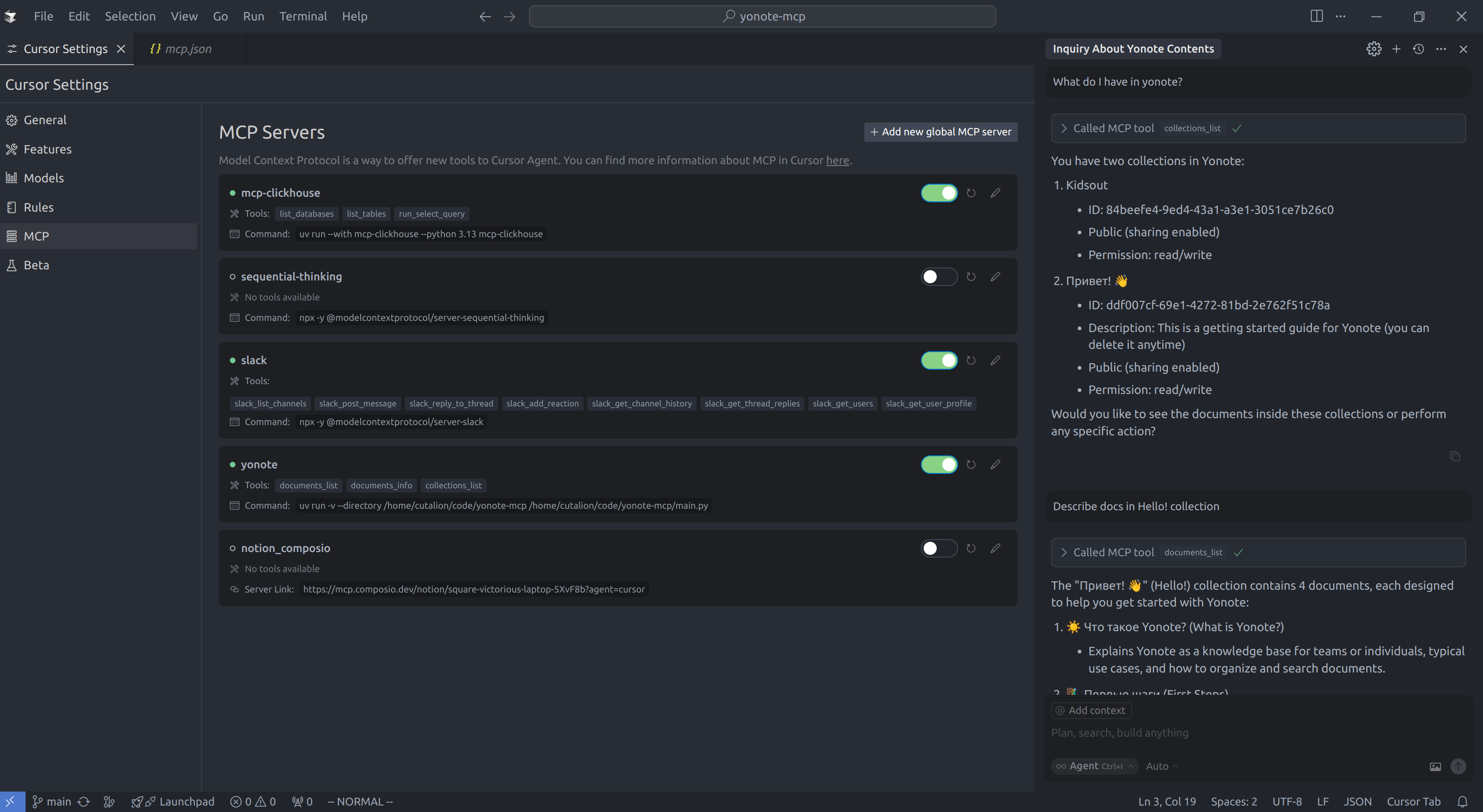
Cursor Configuration Example
To use this MCP server with Cursor, add the following to your `~/.cursor/mcp.json` configuration file:
{
  "mcpServers": {
    "yonote": {
      "command": "uv",
      "args": [
        "run",
        "-v",
        "--directory",
        "/path/to/yonote-mcp",
        "/path/to/yonote-mcp/main.py"
      ]
    }
  }
}
Replace `/path/to/yonote-mcp` with the actual path to your project directory.
Frequently asked questions
What is yonote-mcp?
yonote-mcp is Yonote MCP Server Prototype
How do I install yonote-mcp?
Open the GitHub repository and follow its README. Most MCP servers are added to your client's MCP config, then called by your agent.
Is yonote-mcp open source?
Yes — it is hosted on GitHub at https://github.com/cutalion/yonote-mcp and has 3 stars.
Related MCP tools
 cognee
Cognee is the open-source AI memory platform for agents. Give your AI agents persistent long-term memory across sessions with a self-hosted knowledge graph engine.
 skyvern
Automate browser based workflows with AI
 hindsight
Hindsight: Agent Memory That Learns
 watermarks-remover
A privacy-first app that strips AI watermarks from content you own.
 Qwen-Agent
Agent framework and applications built upon Qwen>=3.0, featuring Function Calling, MCP, Code Interpreter, RAG, Chrome extension, etc.
 pal-mcp-server
The power of Claude Code / GeminiCLI / CodexCLI + [Gemini / OpenAI / OpenRouter / Azure / Grok / Ollama / Custom Model / All Of The Above] working as one.
Run your own MCP server? See who uses it and what to fix.
Measure it with TrackMCP