
cisco-nso-mcp-server
A Model Context Protocol (MCP) server implementation for Cisco NSO that enables AI-powered network automation through natural language interactions.
Documentation
Cisco NSO MCP Server
A Model Context Protocol (MCP) server implementation for Cisco NSO (Network Services Orchestrator) that exposes NSO data and operations as MCP primitives (Tools, Resources, etc.) that can be consumed by an MCP-compatible client, enabling AI-powered network automation through natural language interactions.
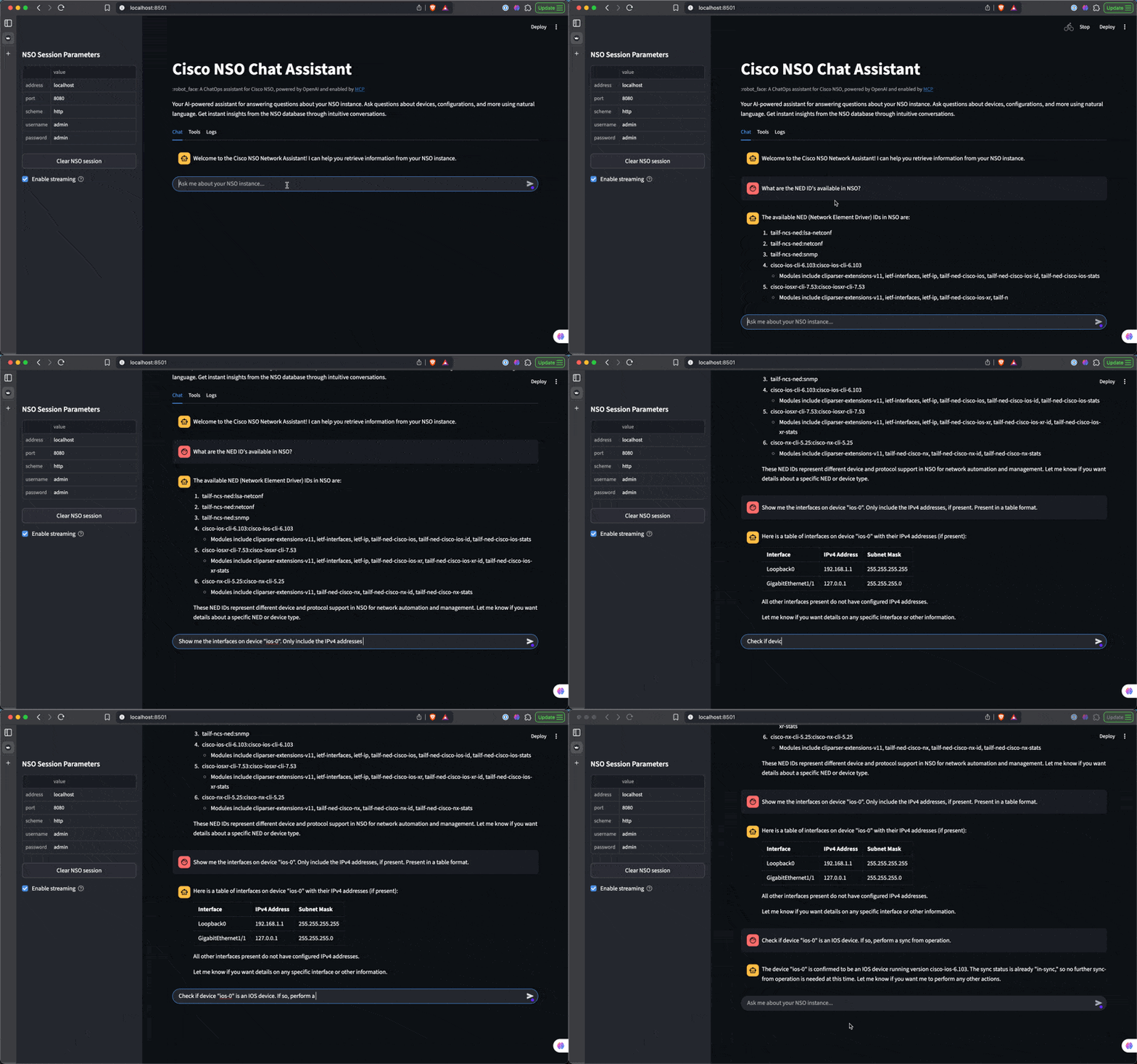
Sample Custom Client
What is MCP?
Model Context Protocol (MCP) is an open protocol that standardizes how AI models interact with external tools and services. MCP enables:
- Tool Definition: Structured way to define tools that AI models can use
- Tool Discovery: Mechanism for models to discover available tools
- Tool Execution: Standardized method for models to call tools and receive results
- Context Management: Efficient passing of context between tools and models
- Framework Agnostic: Works across multiple AI frameworks including OpenAI, Anthropic, Google Gemini, and others
- Interoperability: Provides a common language for AI systems to communicate with external tools
Features
- Stdio Transport: By default, this MCP server uses stdio transport for process-bound communication
- Tool-First Design: Network operations are defined as discrete tools with clear interfaces
- Asynchronous Processing: All network operations are implemented asynchronously for better performance
- Structured Responses: Consistent response format with status, data, and metadata sections
- Environment Resources: Provides contextual information about the NSO environment
- NSO Integration: Uses cisco-nso-restconf library for a clean, Pythonic interface to NSO's RESTCONF API
- Flexible Logging: Configurable logging to stdout and/or file via environment variables. When the `LOG_FILE` environment variable is set, logs are sent to both stdout and the specified file. If the log file cannot be created or written to, the server falls back to stdout-only logging with an error message
- Multiple Client Support: Works with any MCP-compatible client including Windsurf Cascade and custom Python applications
Available Tools and Resources
Tools
| Tool Name | Description | Inputs | Returns |
|---|---|---|---|
| `get_device_ned_ids` | Retrieves Network Element Driver (NED) IDs from Cisco NSO | A dictionary with a list of NED IDs | |
| `get_device_groups` | Retrieves device groups from Cisco NSO | A dictionary with a list of device groups | |
| `get_device_platform` | Gets platform information for a specific device in Cisco NSO | 'device_name' (string) | A dictionary with platform information for the specified device |
| `get_device_config` | Gets full configuration for a specific device in Cisco NSO | 'device_name' (string) | A dictionary with configuration for the specified device |
| `get_device_state` | Gets state for a specific device in Cisco NSO | 'device_name' (string) | A dictionary with state for the specified device |
| `check_device_sync` | Checks sync status for a specific device in Cisco NSO | 'device_name' (string) | A dictionary with sync status for the specified device |
| `sync_from_device` | Syncs from a specific device in Cisco NSO | 'device_name' (string) | A dictionary with sync status for the specified device |
| `get_service_types` | Gets service types in Cisco NSO | A dictionary with service types | |
| `get_services` | Gets services for a specific service type in Cisco NSO | 'service_type' (string) | A dictionary with services for the specified service type |
Resources
- `https://resources.cisco-nso-mcp.io/environment`: Provides a curated summary of the NSO environment:
- _Device count, Operating System Distribution, Unique Operating System Count, Unique Model Count, Model Distribution, Device Series Distribution, Device Groups and Members_
Requirements
- Python 3.12+
- Cisco NSO with RESTCONF API enabled
- Network connectivity to NSO RESTCONF API
Configuration Options
You can configure the server using command-line arguments or environment variables:
NSO Connection Parameters
| Command-line Argument | Environment Variable | Default | Description |
|---|---|---|---|
| `--nso-scheme` | `NSO_SCHEME` | http | NSO connection scheme (http/https) |
| `--nso-address` | `NSO_ADDRESS` | localhost | NSO server address |
| `--nso-port` | `NSO_PORT` | 8080 | NSO server port |
| `--nso-timeout` | `NSO_TIMEOUT` | 10 | Connection timeout in seconds |
| `--nso-username` | `NSO_USERNAME` | admin | NSO username |
| `--nso-password` | `NSO_PASSWORD` | admin | NSO password |
| `--nso-verify` | `NSO_VERIFY` | True | Verify NSO HTTPS certificate (default: True). Use `--no-nso-verify` for self-signed certs (dev only). |
| `--nso-ca-bundle` | `NSO_CA_BUNDLE` | None | Path to a CA bundle file to trust for NSO HTTPS. Applicable when `-nso-verify` is `True`. |
MCP Server Parameters
| Command-line Argument | Environment Variable | Default | Description |
|---|---|---|---|
| `--transport` | `MCP_TRANSPORT` | stdio | MCP transport type (stdio/http) |
HTTP Transport Options (only used when --transport=http)
| Command-line Argument | Environment Variable | Default | Description |
|----------------------|---------------------|---------|-------------|
| `--host`             | `MCP_HOST`          | 0.0.0.0 | Host to bind to when using HTTP transport |
| `--port`             | `MCP_PORT`          | 8000    | Port to bind to when using HTTP transport |

### Logging Configuration

| Environment Variable | Default | Description |
|---------------------|---------|-------------|
| `LOG_FILE`          | None    | Path to log file. If not set, logs will be sent to stdout only |

Environment variables take precedence over default values but are overridden by command-line arguments.

## Connecting to the Server with MCP Clients

You can connect to the server using any MCP client that supports the selected transport type. A few options are:

### Windsurf Cascade

Windsurf Cascade [supports MCP servers](https://docs.windsurf.com/windsurf/cascade/mcp#model-context-protocol-mcp) through a configuration file. To use the Cisco NSO MCP server with Windsurf, add it to your `mcp_config.json` file.

#### Using uv (recommended)

When using uv, no specific installation is needed. You can use `uvx` to directly run the package:
{
"mcpServers": {
"nso": {
"command": "uvx",
"args": [
"cisco-nso-mcp-server",
"--nso-address=127.0.0.1",
"--nso-port=8080",
"--nso-username=admin",
"--nso-password=admin"
],
"env": {
"LOG_FILE": "/path/to/your/logs/nso-mcp.log"
}
}
}
}
#### Using with pip installation

Alternatively, you can install `cisco-nso-mcp-server` via pip:
pip install cisco-nso-mcp-server
Now you can use the direct path to the executable:{
"mcpServers": {
"nso": {
"command": "/path/to/your/env/bin/cisco-nso-mcp-server",
"args": [
"--nso-address=127.0.0.1",
"--nso-port=8080",
"--nso-username=admin",
"--nso-password=admin"
],
"env": {
"LOG_FILE": "/path/to/your/logs/nso-mcp.log"
}
}
}
}
Replace `/path/to/your/env/bin/cisco-nso-mcp-server` with the actual path where you [installed the package with pip](#using-with-pip-installation). You can find this by running `which cisco-nso-mcp-server` if you installed it in your main environment, or by locating it in your virtual environment's bin directory.

In either case, the `env` section is optional. If you include it, you can specify the `LOG_FILE` environment variable to enable file logging.

### Using in a custom MCP client Python application with stdio transport

A sample Python application is provided in [sample_stdio_client.py](./sample_stdio_client.py) that demonstrates how to connect to the MCP server locally and execute a tool.

## Running the Server as Standalone

While the server is typically used with an [MCP client](#connecting-to-the-server-with-mcp-clients), you can also run it directly as a standalone process:
Run with default NSO connection and MCP settings (see Configuration Options above for details)
cisco-nso-mcp-server
Run with custom NSO connection parameters
cisco-nso-mcp-server --nso-scheme=http --nso-address=127.0.0.1 --nso-port=8080 --nso-username=admin --nso-password=admin
When running as a standalone process with stdio transport, you'll need to pipe input/output to the process or use it with an MCP client that supports stdio transport.

## License

This project is licensed under the [MIT License](LICENSE). This means you can use, modify, and distribute the code, subject to the terms and conditions of the MIT License.Frequently asked questions
What is cisco-nso-mcp-server?
cisco-nso-mcp-server is A Model Context Protocol (MCP) server implementation for Cisco NSO that enables AI-powered network automation through natural language interactions.
How do I install cisco-nso-mcp-server?
Open the GitHub repository and follow its README. Most MCP servers are added to your client's MCP config, then called by your agent.
Is cisco-nso-mcp-server open source?
Yes — it is hosted on GitHub at https://github.com/dbono711/cisco-nso-mcp-server and has 4 stars.
Related MCP tools
 mcp-context-forge
An AI Gateway, registry, and proxy that sits in front of any MCP, A2A, or REST/gRPC APIs, exposing a unified endpoint with centralized discovery, guardrails and management. Optimizes Agent & Tool calling, and supports plugins.
 mcp-bridge
A middleware to provide an openAI compatible endpoint that can call MCP tools Python-based implementation. Trusted by 800+ developers.
 unity-mcp
Unity MCP acts as a bridge between AI assistants and your Unity Editor. Give your LLM tools to manage assets, control scenes, edit scripts, and automate tasks within Unity.
 Unity-MCP
AI Skills, MCP Tools, and CLI for Unity Engine. Full AI develop and test loop. Use cli for quick setup. Efficient token usage, advanced tools. Any C# method may be turned into a tool by a single line. Works with Claude Code, Gemini, Copilot, Cursor and any other absolutely for free.
 chatgpt-on-wechat
基于大模型搭建的聊天机器人,同时支持 微信公众号、企业微信应用、飞书、钉钉 等接入,可选择ChatGPT/Claude/DeepSeek/文心一言/讯飞星火/通义千问/ Gemini/GLM-4/Kimi/LinkAI,能处理文本、语音和图片,访问操作系统和互联网,支持基于自有知识库进行定制企业智能客服。
 watermarks-remover
A privacy-first app that strips AI watermarks from content you own.
Run your own MCP server? See who uses it and what to fix.
Measure it with TrackMCP