
md-redline
Inline review comments for markdown specs. Built-in MCP server hands feedback directly to your AI agent.
Documentation
md-redline

Inline review comments for markdown specs, prompts, and design docs.
Highlight text in a rendered document, leave comments, and your AI agent can read and address them directly. Comments are stored as invisible HTML markers in the `.md` file itself. No sidecar files, no database, no external service. The markdown file stays the source of truth.
With the built-in MCP server, review runs in both directions. Your agent can request your review mid-task and pause until you send your feedback, or review a doc you wrote and leave anchored comments for you. Either way: no copy-paste, no context switching.
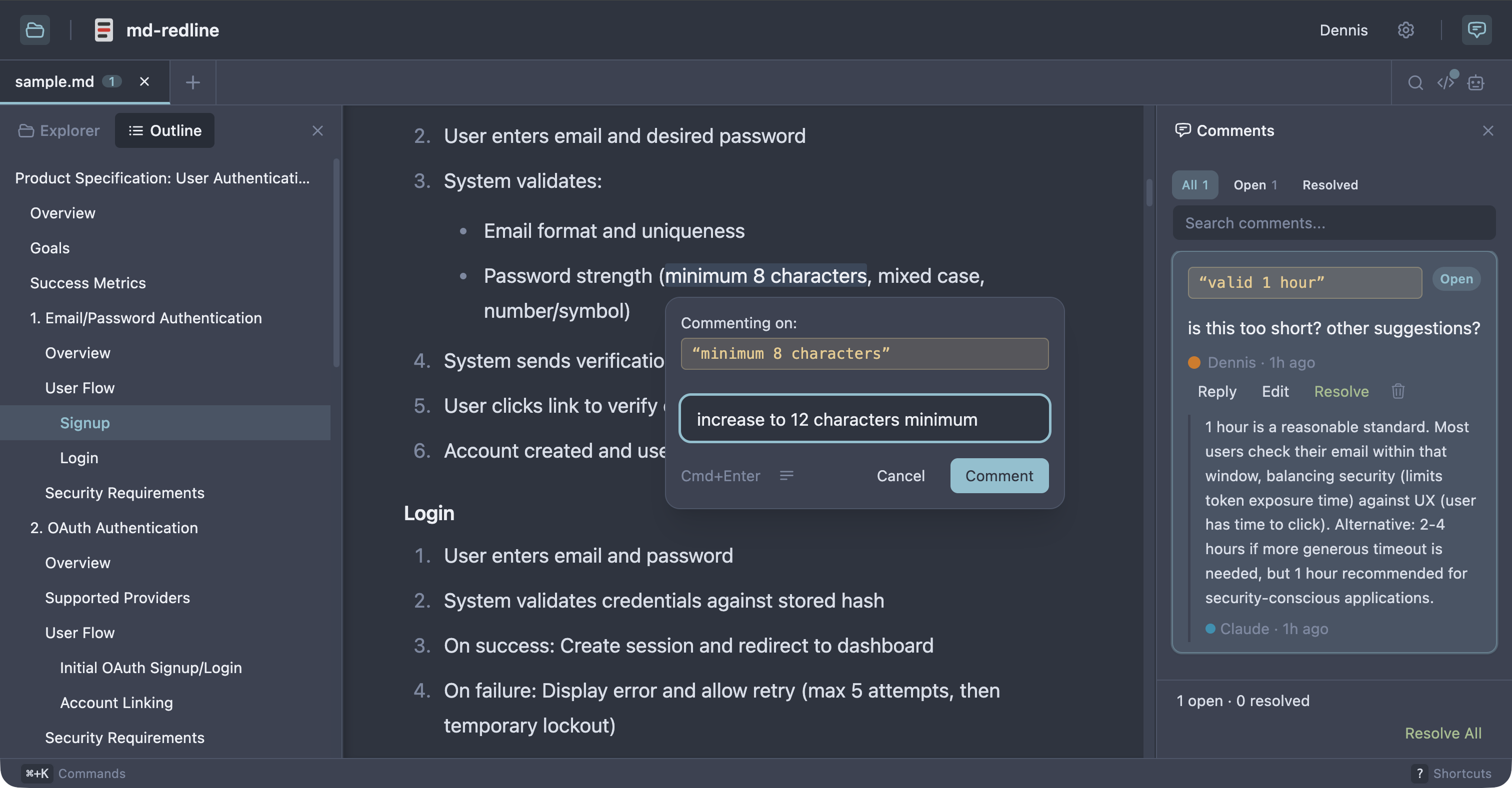
See the full review workflow in about 30 seconds:
https://github.com/user-attachments/assets/8b9b3546-a895-42e1-b3cc-5ee5b2c00398
Works with Claude Code, Claude Desktop, Codex CLI, Gemini CLI, and any other MCP client that supports stdio servers. As Sean Grove argues in specs are the new code, specs are becoming the primary unit of work in agentic development. `mdr` gives that workflow review tooling closer to code review.
Quick start
Prerequisite: Node 20 or newer.
npx md-redline /path/to/spec.mdThis starts the local app if needed and opens it in your browser.
Or install globally:
npm install -g md-redline
mdr /path/to/spec.md        # Open a file
mdr /path/to/dir             # Open a directory
mdr --stop                   # Stop the running server
`md-redline` also works as an alias for `mdr`.
That gives you the viewer and commenting. The agent integration (reviews in both directions, anchored questions) comes from the MCP server, registered in the next section.
Updating
mdr checks npm once a day (from its local server, never blocking anything)
and shows a small notice in the viewer and the terminal when a new version
is out. Upgrading is one command:
npm install -g md-redline@latestThe running server restarts itself on the next `mdr` invocation after an
upgrade. To disable update checks entirely, set `NO_UPDATE_NOTIFIER=1` (or
run in CI, which is auto-detected). Note this is a presence check, following
the ecosystem convention: any value, even `0` or empty, disables the checks.
MCP setup
Register the MCP server with your agent so it can request reviews mid-task.
Claude Code or Claude Desktop
mdr mcp install                   # register with both clients (default)
mdr mcp install --claude-code     # just Claude Code (via `claude mcp add`)
mdr mcp install --claude-desktop  # just Claude Desktop (JSON config file)
Codex CLI
codex mcp add md-redline -- mdr mcpGemini CLI
gemini mcp add --scope user md-redline mdr mcpThe `--scope user` flag is important. Gemini defaults to per-project scope, which only registers mdr for the current directory.
Other MCP clients
Add this server entry to your client's MCP config file:
{
  "mcpServers": {
    "md-redline": {
      "command": "mdr",
      "args": ["mcp"]
    }
  }
}
Prerequisite: `mdr` must be on your `PATH` (e.g. via `npm install -g md-redline`). If your client spawns subprocesses without inheriting your shell's `PATH`, use the absolute path from `which mdr` as the `command` value.
After installing, restart your MCP client; most clients only discover new servers at launch. To verify, ask your agent "what mdr tools do you have?" and it should list `mdr_request_review`, `mdr_comment`, `mdr_ask`, and `mdr_wait`. (`mdr_comment` was called `mdr_review` before 0.9; the old name still works if you have it saved in a prompt, but agents are no longer offered it.)
Review workflow
With MCP registered, review runs in both directions. Pick by who is giving the feedback:
| You review the agent's doc | The agent reviews your doc | |
|---|---|---|
| Typical moment | The agent just drafted or edited a spec; you want to mark it up before it continues | You wrote a PRD (or received one) and want a critique |
| What you say | "Let me review specs/feature-x.md in mdr before you continue." | "Use mdr to review prd.md and leave comments." |
| Who comments | You | The agent |
| How it ends | You click Send & finish | You click End review |
1. You review the agent's doc
The common flow right after an agent drafts a document. Tell the agent:
> "Let me review docs/specs/feature-x.md in mdr before you continue."
The agent calls `mdr_request_review` and pauses. mdr opens the file, you highlight text and leave comments, then click Send N comments. The agent receives your feedback as a structured prompt and starts addressing your comments. You can keep sending follow-up batches while it works; Send N & finish sends the last batch and closes the loop. The review is opt-in per request. The agent only pauses when you ask for it.
2. The agent reviews your doc
The reverse direction, for docs the agent did not just write: your own draft, a teammate's PRD, a spec from another repo. Tell the agent:
> "Use mdr to review prd.md and leave comments."
The agent calls `mdr_comment`. Its findings land as inline comments anchored to the exact text, and the browser opens so you can read them as they arrive. The agent then waits (via `mdr_wait`) while you work through the feedback: reply on any card, edit the doc, delete comments you disagree with. When you are done, click End review in the banner. That click is the signal for the agent to re-read the file and pick up your replies and edits, so the session stays open until you press it. The agent is not stuck; it is listening.
https://github.com/user-attachments/assets/a695017d-ed59-4fe8-8a29-e5306dab788c
Either direction: the agent can ask you questions
Inside any active session, the agent can hit a fork where your answer changes what it should do next. Rather than guessing, it can call `mdr_ask` to post anchored questions into the doc and block until you answer:
- You get a toast with a View button, a banner chip ("N questions awaiting your reply"), and a "(N questions)" tab title, so you notice even from another window.
- Each question is a normal comment card anchored to the sentence it is about. Reply right on the card.
- The moment every question has an answer, the agent unblocks with your reply text. No End review needed.
This shines during hand-offs. Leave a comment like "this conflicts with what we decided, fix it," and instead of guessing, the agent asks "which decision: per-seat or flat-rate?" anchored where it matters. You can also request the pattern directly:
> "Review prd.md with mdr. For your top 2 open questions, use mdr_ask and incorporate my answers before summarizing."
Questions and reviews survive in the file as ordinary comment markers, so nothing is lost if a session ends early: the agent is always told to re-read the file.
Without MCP
1. Open a markdown file with `mdr /path/to/spec.md`.
2. Highlight text and leave inline comments.
3. Copy the hand-off prompt.
4. Paste the prompt into your AI agent.
5. The agent edits the file, addresses the feedback, and removes the comment markers it handled.
6. Review the result in diff view.
Optional: resolve workflow
Enable resolve mode in Settings for human review with explicit `open` and `resolved` states.
Who this is for
- People writing specs, prompts, or design docs locally with file-based AI agents
- Teams reviewing docs before they are committed or sent out for wider review
- Anyone in a human + agent editing loop who wants structured inline feedback in plain files
Non-goals
- Not a collaborative multi-user editing tool.
- Not a replacement for GitHub PR reviews (use those once the file is in git).
- Not designed for untrusted content. This is a local dev tool for your own files.
How comments are stored
Comments are stored as invisible HTML markers directly in the markdown, immediately before the text they refer to, so both humans and agents can work from the same file.
Some text highlighted text continues here.This makes feedback:
- visible to AI agents via a plain file read
- portable with the markdown file
- invisible in normal renderers (GitHub, VS Code preview)
Features
Review and commenting
- Inline comments anchored to rendered text, including overlapping comments
- Two-way agent review over MCP: agents request your review, review your docs, and ask anchored questions
- Threaded replies and optional `open` / `resolved` review states
- Adjustable anchors with drag handles
- Touch and pen commenting: select with the native handles, then tap the floating Comment button when done (nothing pops up while you adjust)
- Rendered, raw, and diff views
- Hand-off prompt copying for one or multiple files
Navigation and editing
- Multi-tab editing with session persistence and tab context menus
- File explorer, recent files, and native OS file picker
- Find in document (`Cmd+F`) with match navigation
- Table of contents with scroll spy
- Command palette (`Cmd+K`), keyboard shortcuts, and settings panel (`Cmd+,`)
- Resizable panels and right-click context menus
Rendering and integrations
- Real-time reload via SSE when files change externally
- Mermaid diagram rendering with commentable text
- YAML and TOML frontmatter rendered as commentable content, not hidden
- Local image embeds and clickable links between markdown files
- Customizable comment templates
- 8 themes: Light, Dark, Sepia, Nord, Solarized, GitHub, Rosé Pine, Catppuccin
Supported platforms
- macOS: supported
- Linux: supported; system file picker requires `zenity`
- Windows: supported; system file picker uses PowerShell
- Touch browsers (iPad Safari and similar): supported for reviewing and commenting; selections made by touch or pen use the floating Comment button flow
Permissions
By default, md-redline can read any markdown file in your home directory. The first time you run `mdr` (or the first time after upgrading from a version without the trusted-roots feature), your home folder is added to a trusted-roots list at `~/.md-redline.json`. Files outside your home directory (`/tmp`, mounted volumes, system paths) require an explicit permission grant via the OS folder picker the first time you open them. Granted folders are remembered across restarts.
To use the strict per-folder model instead, run `mdr --restrict` once after install. This creates a `~/.md-redline.json` with no default trust, and you'll grant each folder explicitly the first time you open a file in it.
File saves use atomic write-then-rename and mtime-based conflict detection to prevent data loss from concurrent edits. Mermaid SVG output is sanitized via DOMPurify before rendering. Only run md-redline in environments you trust.
Configuration
All of these environment variables are optional.
| Variable | Default | Purpose |
|---|---|---|
| `MD_REDLINE_BROWSER` | OS default browser | Command used to open the review URL. Set it to a specific browser binary (for example `MD_REDLINE_BROWSER=firefox`); it is spawned with the URL as its argument. The older `MDR_BROWSER` still works: it is used whenever this one is unset or blank. |
| `MD_REDLINE_PORT` (or `PORT`) | `6373` | Port for the API server. It scans up to 10 ports upward from here if that one is taken. `MD_REDLINE_PORT` wins when both are set; a blank one defers to `PORT`. |
| `MD_REDLINE_VITE_PORT` | `5188` | Port for the Vite dev client (development only). |
| `MD_REDLINE_HOME` | your OS home directory | Base directory for md-redline's preferences file (`.md-redline.json`, which stores trusted roots and the update-check cache). |
| `MD_REDLINE_REGISTRY_URL` | public npm registry | Registry base URL used for the background update check. |
| `MD_REDLINE_ALLOWED_HOSTS` | unset | Comma-separated extra hostnames accepted by the Host-header check, so the loopback-bound server can sit behind a trusted reverse proxy. Read Reaching md-redline from another device before setting it. |
| `NO_UPDATE_NOTIFIER` or `CI` | unset | If either is present (any value, including empty), the background update check is disabled. |
Reaching md-redline from another device
md-redline binds to `127.0.0.1` and has no authentication of any kind. That is
safe today because only your own machine can reach it.
`MD_REDLINE_ALLOWED_HOSTS` lets you put a reverse proxy in front of it
(`tailscale serve`, nginx, Caddy) and review from a tablet. It does not change the
bind address, so the proxy still runs on the same machine. It does change the
security boundary, from "my machine" to "anything that can reach the proxy".
Whatever reaches the proxy can read and write every markdown file under your
trusted roots, browse those directories, see their absolute paths and your recent
files, open native file pickers and reveal files in Finder on your machine,
answer agent review sessions, and shut the server down. There is no login.
So if you set it:
- Prefer `tailscale serve`, reachable only from your own tailnet. Do not use
`tailscale funnel`, which publishes to the open internet.
- With nginx or Caddy, terminate TLS and put authentication in front of md-redline
yourself. It will not do it for you.
- Only list hostnames you actually control. The DNS-rebinding defense still holds
for everything else, because an attacker's rebinding domain never matches a
hostname you listed explicitly.
- Serve it over HTTPS if you can. The clipboard API the hand-off prompt copy needs
only works in a secure context, so over plain HTTP that button fails on the very
tablet you set this up for.
A reachable client cannot widen its own filesystem access: trusted roots grow
only when you pick a file or folder in the native dialog, so the readable set
stays whatever you approved locally.
Proxy configuration details and how the request checks work
Whether you need the variable at all depends on your proxy. `tailscale serve`
and Caddy preserve the original `Host`, so you must list the public hostname.
nginx's default `proxy_set_header Host $proxy_host` rewrites it to
`127.0.0.1:6373`, which already passes, so you only need the variable if you
forward the original host (`proxy_set_header Host $host`).
Turn off response buffering for `/api/watch`. Live file updates arrive over
Server-Sent Events. md-redline sends `X-Accel-Buffering: no`, which nginx honours;
if your proxy ignores it, disable buffering for that path or edits will not appear
until a buffer fills.
Why a hostile page cannot drive these endpoints. Every endpoint that changes
something is a `POST` or a `PUT` requiring a JSON content type, which a web page
cannot send to another origin without the browser asking this server for
permission first. That is what stops a page you visit, a link in a chat message,
or an image embedded in a markdown file you are reviewing from quietly triggering
an endpoint here. md-redline additionally rejects requests a browser labels
cross-site, but only as a second layer: clients that send no such metadata, like
the CLI and the MCP server, are deliberately unaffected.
The full surface, if you want to audit it: `GET`/`PUT /api/file`,
`GET /api/browse`, `GET /api/files`, `GET /api/asset`, `GET`/`PUT /api/preferences`,
`GET /api/config`, `GET /api/version`, `GET /api/platform`,
`POST /api/pick-file`, `POST /api/pick-folder`, `POST /api/reveal`,
`GET /api/watch`, `POST /api/shutdown`, and `/api/review-sessions/*`.
`POST /api/grant-access` only re-checks a path against roots you already approved
rather than adding new ones.
Troubleshooting
- The agent says it has no mdr tools. Restart your MCP client after `mdr mcp install`; most clients only discover new servers at launch. For non-Claude clients, confirm `mdr` is on the `PATH` the client actually uses (see MCP setup above).
- The browser opened but the page will not load. A stale server may be holding the port. Run `mdr --stop`, then reopen your file.
- A review banner is stuck on screen. Click End review (agent reviews) or Cancel review (your reviews). Sessions do not survive a server restart, but comments do.
- Something went wrong mid-session. The file is always the source of truth. Comments and agent questions live in the markdown itself as `` markers, so you can read, edit, or delete them in any editor, and the agent is always told to re-read the file when a session ends unexpectedly.
Development
From source
git clone https://github.com/dejuknow/md-redline.git
cd md-redline
npm install
npm run dev
Open the local URL printed by Vite (usually `http://localhost:5188`).
Scripts
npm run dev          # Start dev server
npm run lint         # Lint
npm test             # Production build + unit tests
npm run test:e2e     # Playwright E2E tests
npm run build        # Production build
Agent eval
The eval harness tests whether AI agents correctly read, address, and remove inline comments.
- `npm run eval:dry` validates eval fixtures
- `npm run eval` runs the full eval harness
- See eval/README.md for details
Architecture
bin/md-redline             CLI entry point (invoked as `mdr` or `md-redline`)
bin/cli.js                 CLI implementation behind that entry point
server/index.ts            Hono server for file I/O, browsing, SSE, and local integrations
src/App.tsx                Main application shell
src/components/            Viewer, sidebar, raw view, diff view, TOC, explorer, settings, etc.
src/hooks/                 State, persistence, selection, file watching, drag handles, tabs
src/lib/comment-parser.ts  Inline comment parsing and mutation helpers
src/markdown/pipeline.ts   Markdown rendering pipeline
eval/                      Eval harness for agent behavior against inline comments
e2e/                       Playwright end-to-end coverage
License
Frequently asked questions
What is md-redline?
md-redline is Inline review comments for markdown specs. Built-in MCP server hands feedback directly to your AI agent.
How do I install md-redline?
Open the GitHub repository and follow its README. Most MCP servers are added to your client's MCP config, then called by your agent.
Is md-redline open source?
Yes — it is hosted on GitHub at https://github.com/dejuknow/md-redline and has 35 stars.
Related MCP tools
 memorix
Open-source cross-agent memory layer for coding agents via MCP. Compatible with Claude Code, Codex, Cursor, Windsurf, Gemini CLI, Antigravity, OpenClaw, Hermes Agent, Oh-my-Pi, Pi, Copilot, Kiro, OpenCode, and Trae.
 jcodemunch-mcp
Cut AI token costs 95%+ on code exploration. The leading MCP server for precise, symbol-level GitHub code retrieval via tree-sitter AST. Works with Claude Code, Cursor & any MCP client. 313B+ tokens saved.
 projectmem
Open-source coding agent memory. Records issues, attempts, fixes and decisions, then warns your agent before it repeats an approach that already failed. Native MCP server for Claude Code, Cursor, Antigravity and Codex. 100% local, no cloud, no telemetry. MIT.
 opentabs
Browser automation clicks buttons. OpenTabs calls APIs.
 open-codex-computer-use
👾 Open Computer Use – Open-Source Alternative to Codex Computer Use
 wigolo
The go-to web for your AI coding agent — local-first search, fetch, crawl & research over MCP. No API keys, no cloud, $0/query. Public beta.
Run your own MCP server? See who uses it and what to fix.
Measure it with TrackMCP