
scrapi-mcp
MCP server for using ScrAPI to scrape web pages.
Documentation

ScrAPI MCP Server




ScrAPI MCP Server lets MCP-compatible clients scrape web pages through ScrAPI.
ScrAPI is useful when a page needs a real browser session, CAPTCHA solving, residential proxy access, cookie banner handling, JavaScript rendering, geolocation-aware fetching, or pre-scrape browser actions such as clicking and scrolling.
Contents
- Features
- Available tools
- Prerequisites
- API key
- Quick start
- MCP client setup
- HTTP transport
- Cloud-hosted server
- Usage examples
- Browser commands
- Troubleshooting
- Development
- License
Features
- Scrape any valid `https://` or `http://` URL through ScrAPI.
- Return either raw HTML or readable Markdown.
- Run browser commands before scraping.
- Use stdio transport for desktop MCP clients.
- Use Streamable HTTP transport for remote MCP clients and local testing.
- Run with `npx`, Docker, Smithery, or from source.
Available Tools
`scrape_url_html`
Scrapes a URL and returns the result as HTML.
Use this when you need the page structure, links, tables, embedded metadata, or custom downstream parsing.
Inputs:
| Name | Type | Required | Description |
|---|---|---|---|
| `url` | string | Yes | The absolute URL to scrape. Must be a valid URL. |
| `browserCommands` | string | No | JSON array string of browser commands to execute before scraping. |
Returns:
- `text/html` content from the requested page.
- `isError: true` with the ScrAPI error body when the upstream request fails.
`scrape_url_markdown`
Scrapes a URL and returns the result as Markdown.
Use this when the text content matters more than the HTML structure, for example article extraction, product copy, search result summaries, or LLM-friendly page analysis.
Inputs:
| Name | Type | Required | Description |
|---|---|---|---|
| `url` | string | Yes | The absolute URL to scrape. Must be a valid URL. |
| `browserCommands` | string | No | JSON array string of browser commands to execute before scraping. |
Returns:
- `text/markdown` content from the requested page.
- `isError: true` with the ScrAPI error body when the upstream request fails.
Prerequisites
Choose one of the following runtime options:
- Node.js 18 or newer for `npx` or local development.
- Docker for container-based usage.
- An MCP-compatible client such as Claude Desktop, MCP Inspector, or another client that supports stdio or Streamable HTTP MCP servers.
API Key
Set `SCRAPI_API_KEY` to use your ScrAPI account:
export SCRAPI_API_KEY="your-scrapi-api-key"PowerShell:
$env:SCRAPI_API_KEY = "your-scrapi-api-key"An API key is required. Without one, ScrAPI currently allows limited free usage on certain domain with lower concurrency and queueing priority.
Quick Start
Run with NPX
The default transport is stdio, which is the transport most desktop MCP clients use when they launch a local server process.
npx -y @deventerprisesoftware/scrapi-mcpWith an API key:
SCRAPI_API_KEY="your-scrapi-api-key" npx -y @deventerprisesoftware/scrapi-mcpPowerShell:
$env:SCRAPI_API_KEY = "your-scrapi-api-key"
npx -y @deventerprisesoftware/scrapi-mcp
Run with Docker
The published Docker image starts in HTTP mode by default and listens on port `5000`.
docker run --rm -p 5000:5000 -e SCRAPI_API_KEY="your-scrapi-api-key" deventerprisesoftware/scrapi-mcpMCP endpoint:
http://localhost:5000/mcpTo run the container as a stdio server for a local MCP client:
docker run -i --rm -e TRANSPORT=stdio -e SCRAPI_API_KEY="your-scrapi-api-key" deventerprisesoftware/scrapi-mcpMCP Client Setup
Most local coding assistants use one of these two configuration shapes:
- Stdio: the client starts this package with `npx` or Docker and communicates over stdin/stdout.
- Streamable HTTP: you start this server yourself with `TRANSPORT=http`, then point the client at `http://localhost:5000/mcp` or your deployed URL.
When a client has a tool timeout setting, use a value close to `300000` milliseconds or `300` seconds. ScrAPI can take several minutes for pages that require CAPTCHA solving, browser rendering, or multiple browser commands.
Claude Desktop with NPX
Add this to your `claude_desktop_config.json`:
{
  "mcpServers": {
    "ScrAPI": {
      "command": "npx",
      "args": ["-y", "@deventerprisesoftware/scrapi-mcp"],
      "env": {
        "SCRAPI_API_KEY": "your-scrapi-api-key"
      }
    }
  }
}
Claude Desktop with Docker
{
  "mcpServers": {
    "ScrAPI": {
      "command": "docker",
      "args": [
        "run",
        "-i",
        "--rm",
        "-e",
        "SCRAPI_API_KEY",
        "deventerprisesoftware/scrapi-mcp"
      ],
      "env": {
        "SCRAPI_API_KEY": "your-scrapi-api-key"
      }
    }
  }
}
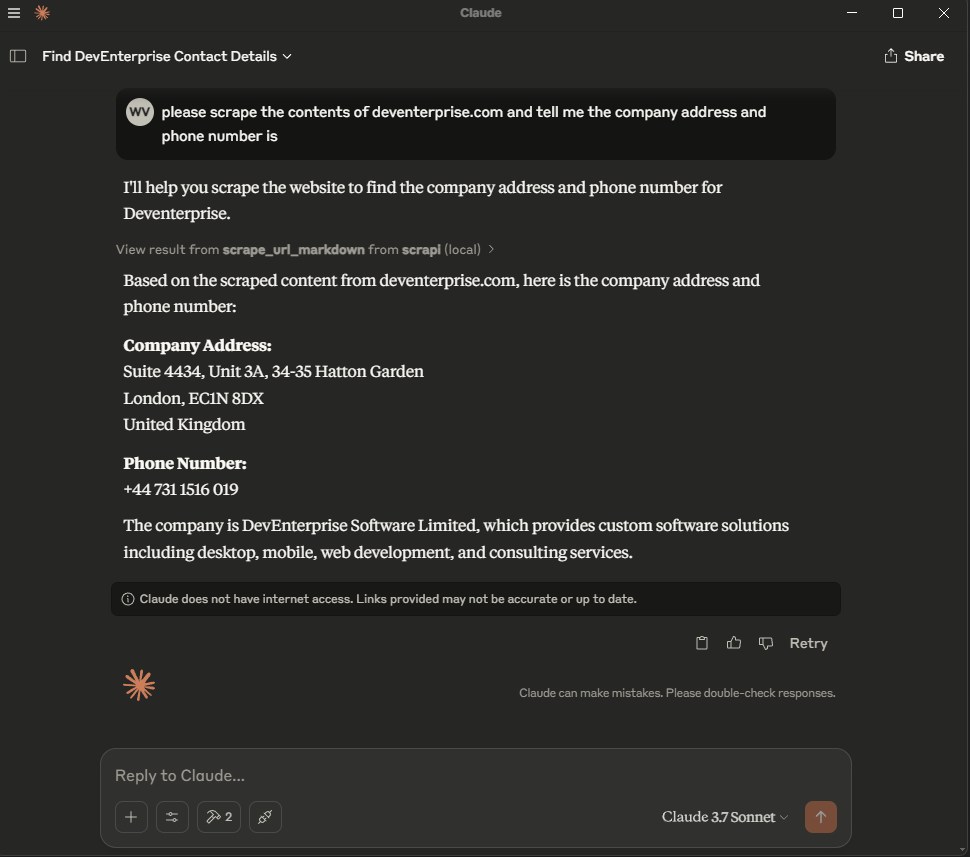
After changing the config, restart Claude Desktop. You should see the two ScrAPI tools available in the MCP tools list.
Cursor
Cursor supports project configuration at `.cursor/mcp.json` and global configuration at `~/.cursor/mcp.json`. See the Cursor MCP documentation.
Stdio configuration:
{
  "mcpServers": {
    "scrapi": {
      "command": "npx",
      "args": ["-y", "@deventerprisesoftware/scrapi-mcp"],
      "env": {
        "SCRAPI_API_KEY": "${env:SCRAPI_API_KEY}"
      }
    }
  }
}
HTTP configuration:
{
  "mcpServers": {
    "scrapi": {
      "url": "http://localhost:5000/mcp"
    }
  }
}
For HTTP, start the server first:
TRANSPORT=http PORT=5000 SCRAPI_API_KEY="your-scrapi-api-key" npx -y @deventerprisesoftware/scrapi-mcpWindsurf
Windsurf Cascade stores MCP servers in `~/.codeium/windsurf/mcp_config.json`. You can also add servers from `Windsurf Settings` > `Cascade` > `MCP Servers`. See the Windsurf MCP documentation.
Stdio configuration:
{
  "mcpServers": {
    "scrapi": {
      "command": "npx",
      "args": ["-y", "@deventerprisesoftware/scrapi-mcp"],
      "env": {
        "SCRAPI_API_KEY": "${env:SCRAPI_API_KEY}"
      }
    }
  }
}
HTTP configuration:
{
  "mcpServers": {
    "scrapi": {
      "serverUrl": "http://localhost:5000/mcp"
    }
  }
}
Windsurf supports `serverUrl` or `url` for remote HTTP MCP servers. If your team uses enterprise MCP controls, the server ID in the admin whitelist must match the key name, for example `scrapi`.
Kilo Code
Kilo Code stores MCP configuration in the main Kilo config file. Use `~/.config/kilo/kilo.jsonc` for global configuration, `kilo.jsonc` in the project root, or `.kilo/kilo.jsonc` for project-specific configuration. See the Kilo Code MCP documentation.
Local stdio configuration:
{
  "mcp": {
    "scrapi": {
      "type": "local",
      "command": ["npx", "-y", "@deventerprisesoftware/scrapi-mcp"],
      "environment": {
        "SCRAPI_API_KEY": "your-scrapi-api-key"
      },
      "enabled": true,
      "timeout": 300000
    }
  }
}
Remote HTTP configuration:
{
  "mcp": {
    "scrapi": {
      "type": "remote",
      "url": "http://localhost:5000/mcp",
      "enabled": true,
      "timeout": 300000
    }
  }
}
On Windows, if `npx` is not found from the Kilo Code UI, use `cmd` as the command and pass `/c`, `npx`, `-y`, and `@deventerprisesoftware/scrapi-mcp` as arguments.
Codex
Codex supports MCP servers in the CLI and IDE extension. Both use the same MCP configuration. By default, Codex stores it in `~/.codex/config.toml`; trusted projects can also use `.codex/config.toml`. See the Codex MCP documentation.
Add a stdio server with the Codex CLI:
codex mcp add scrapi --env SCRAPI_API_KEY="your-scrapi-api-key" -- npx -y @deventerprisesoftware/scrapi-mcp
codex mcp list
Equivalent `config.toml` stdio configuration:
[mcp_servers.scrapi]
command = "npx"
args = ["-y", "@deventerprisesoftware/scrapi-mcp"]
startup_timeout_sec = 20
tool_timeout_sec = 300

[mcp_servers.scrapi.env]
SCRAPI_API_KEY = "your-scrapi-api-key"
HTTP configuration:
[mcp_servers.scrapi]
url = "http://localhost:5000/mcp"
tool_timeout_sec = 300
In the Codex terminal UI, run `/mcp` to confirm the server is connected.
VS Code
VS Code stores MCP configuration in `.vscode/mcp.json` for a workspace or in your user profile. The top-level key is `servers`, not `mcpServers`. See the VS Code MCP configuration reference.
Stdio configuration:
{
  "inputs": [
    {
      "type": "promptString",
      "id": "scrapi-api-key",
      "description": "ScrAPI API key",
      "password": true
    }
  ],
  "servers": {
    "scrapi": {
      "type": "stdio",
      "command": "npx",
      "args": ["-y", "@deventerprisesoftware/scrapi-mcp"],
      "env": {
        "SCRAPI_API_KEY": "${input:scrapi-api-key}"
      }
    }
  }
}
HTTP configuration:
{
  "servers": {
    "scrapi": {
      "type": "http",
      "url": "http://localhost:5000/mcp"
    }
  }
}
Use the Command Palette commands `MCP: Add Server`, `MCP: List Servers`, and `MCP: Reset Cached Tools` to add, inspect, and refresh MCP servers.
Claude Code
Claude Code supports MCP servers through the `claude mcp` CLI and the `/mcp` command inside Claude Code. See the Claude Code MCP documentation.
Add a stdio server:
claude mcp add --transport stdio --env SCRAPI_API_KEY="your-scrapi-api-key" scrapi -- npx -y @deventerprisesoftware/scrapi-mcp
claude mcp list
Add an HTTP server:
claude mcp add --transport http scrapi http://localhost:5000/mcp
claude mcp list
To make the server available across all Claude Code projects, add `--scope user` before the server name:
claude mcp add --transport stdio --scope user --env SCRAPI_API_KEY="your-scrapi-api-key" scrapi -- npx -y @deventerprisesoftware/scrapi-mcpInside Claude Code, run `/mcp` to confirm the server is connected.
Generic Stdio MCP Client
Use this shape for clients that accept a command, arguments, and environment variables:
{
  "name": "ScrAPI",
  "command": "npx",
  "args": ["-y", "@deventerprisesoftware/scrapi-mcp"],
  "env": {
    "SCRAPI_API_KEY": "your-scrapi-api-key"
  }
}
HTTP Transport
Set `TRANSPORT=http` to run the server over Streamable HTTP.
TRANSPORT=http PORT=5000 SCRAPI_API_KEY="your-scrapi-api-key" npx -y @deventerprisesoftware/scrapi-mcpPowerShell:
$env:TRANSPORT = "http"
$env:PORT = "5000"
$env:SCRAPI_API_KEY = "your-scrapi-api-key"
npx -y @deventerprisesoftware/scrapi-mcp
The MCP endpoint is:
http://localhost:5000/mcpEnvironment variables:
| Name | Default | Description |
|---|---|---|
| `SCRAPI_API_KEY` | Limited default key | ScrAPI API key used when calling the ScrAPI scrape API. |
| `TRANSPORT` | `stdio` | Use `stdio` or `http`. |
| `PORT` | `5000` | Port used when `TRANSPORT=http`. |
Test with MCP Inspector
Stdio mode:
npx @modelcontextprotocol/inspector npx -y @deventerprisesoftware/scrapi-mcpHTTP mode:
TRANSPORT=http PORT=5000 npx -y @deventerprisesoftware/scrapi-mcpThen open MCP Inspector and connect to:
http://localhost:5000/mcp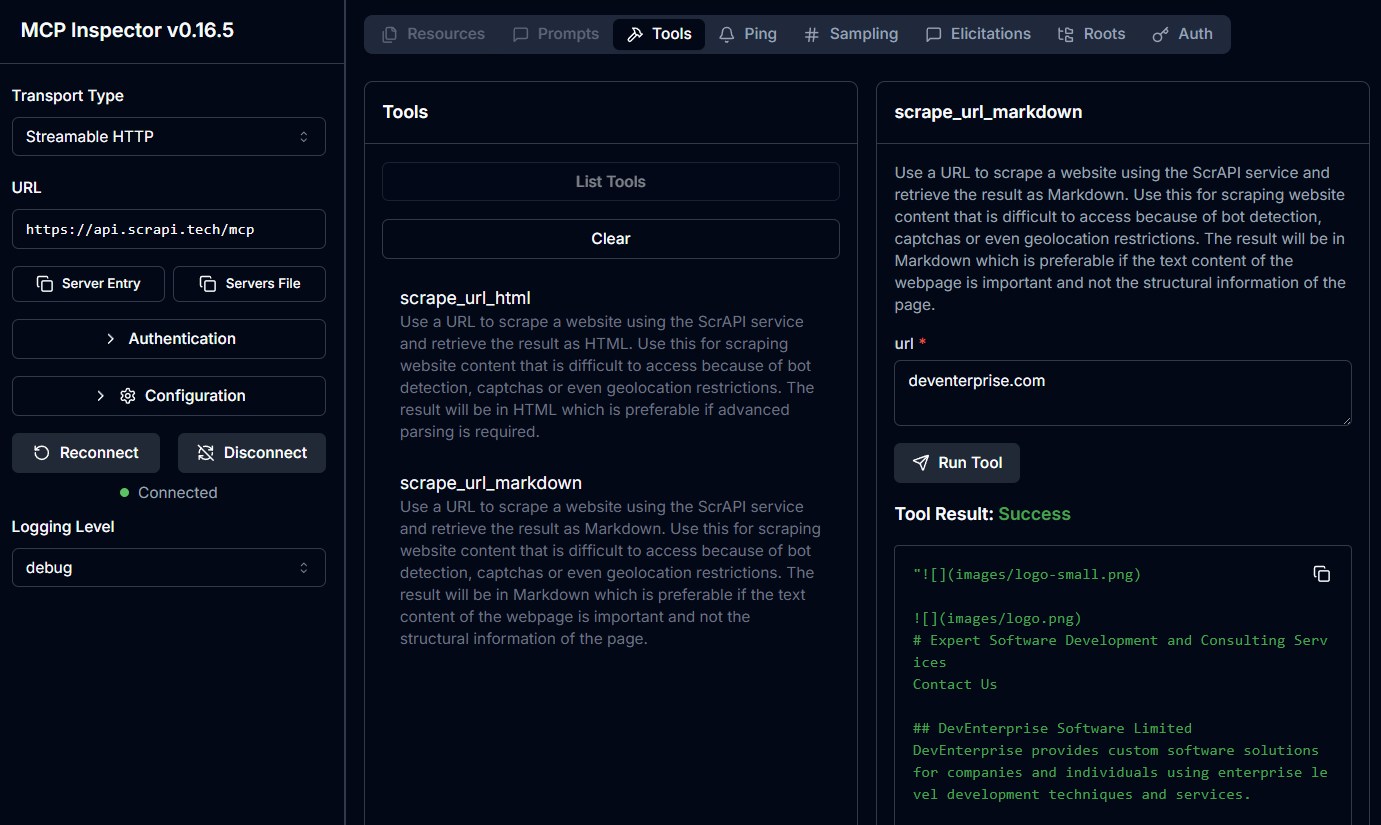
Cloud-Hosted Server
ScrAPI also provides hosted MCP endpoints:
Streamable HTTP: https://api.scrapi.tech/mcpCloud MCP servers are not yet supported by every MCP client. They are most useful for custom clients, MCP Inspector, or platforms that support remote MCP servers.
To authenticate with your ScrAPI API key, pass it as a query parameter or request header:
- Query parameter: `https://api.scrapi.tech/mcp?apiKey=`
- Request header: `X-API-KEY: `
Usage Examples
The exact interaction depends on your MCP client. In most clients, you can either ask the model to use the ScrAPI tool or call the tool directly from a tool inspector.
Scrape a Page as Markdown
Tool:
scrape_url_markdownArguments:
{
  "url": "https://example.com"
}
Example prompt:
Use ScrAPI to scrape https://example.com as Markdown and summarize the page.Scrape a Page as HTML
Tool:
scrape_url_htmlArguments:
{
  "url": "https://example.com"
}
Example prompt:
Use ScrAPI to scrape https://example.com as HTML and extract every link.Accept Cookies Before Scraping
The `browserCommands` value must be a string containing a JSON array.
{
  "url": "https://example.com",
  "browserCommands": "[{\"click\":\"#accept-cookies\"},{\"wait\":1000}]"
}
Search a Site Before Scraping Results
{
  "url": "https://example.com/search",
  "browserCommands": "[{\"input\":{\"input[name='q']\":\"web scraping\"}},{\"click\":\"button[type='submit']\"},{\"waitfor\":\"#results\"}]"
}
Load More Content
{
  "url": "https://example.com/products",
  "browserCommands": "[{\"scroll\":1200},{\"wait\":1000},{\"click\":\"button.load-more\"},{\"waitfor\":\".product-card:nth-child(25)\"}]"
}
Browser Commands
Both tools support optional browser commands that interact with the page before ScrAPI captures the final result.
Commands are provided as a JSON array string. They are executed with human-like behavior such as random mouse movement and variable typing speed.
| Command | Format | Description |
|---|---|---|
| Click | `{"click": "#buttonId"}` | Click an element by CSS selector. |
| Input | `{"input": {"input[name='email']": "value"}}` | Fill an input field. |
| Select | `{"select": {"select[name='country']": "USA"}}` | Select an option by value or visible text. |
| Scroll | `{"scroll": 1000}` | Scroll down by pixels. Use a negative value to scroll up. |
| Wait | `{"wait": 5000}` | Wait for milliseconds. Maximum: `15000`. |
| WaitFor | `{"waitfor": "#elementId"}` | Wait for an element to appear in the DOM. |
| JavaScript | `{"javascript": "console.log('test')"}` | Execute custom JavaScript. |
Readable command array:
[
  { "click": "#accept-cookies" },
  { "wait": 2000 },
  { "input": { "input[name='search']": "web scraping" } },
  { "click": "button[type='submit']" },
  { "waitfor": "#results" },
  { "scroll": 500 }
]
Escaped as an MCP tool argument:
{
  "url": "https://example.com",
  "browserCommands": "[{\"click\":\"#accept-cookies\"},{\"wait\":2000},{\"input\":{\"input[name='search']\":\"web scraping\"}},{\"click\":\"button[type='submit']\"},{\"waitfor\":\"#results\"},{\"scroll\":500}]"
}
Need help finding CSS selectors? Try the Rayrun browser extension to select elements and generate selectors.
For more details, see the Browser Commands documentation.
Troubleshooting
The MCP client cannot find the server
- Confirm Node.js 18 or newer is installed if using `npx`.
- Confirm Docker Desktop is running if using Docker.
- Restart the MCP client after editing its config file.
- Check that the configured command works in a terminal.
The tools appear, but scraping fails
- Confirm `SCRAPI_API_KEY` is set correctly.
- Try the same URL without `browserCommands`.
- Make sure `browserCommands` is a JSON array string, not a raw JSON array.
- Use `scrape_url_html` if Markdown extraction omits structure you need.
- Long-running pages, CAPTCHA flows, and heavy JavaScript pages can take several minutes.
Browser commands are ignored
The server only sends browser commands when `browserCommands` parses as a JSON array. This is valid:
{
  "browserCommands": "[{\"click\":\"#accept-cookies\"}]"
}
This is not valid for this MCP tool schema because it is an object array, not a string:
{
  "browserCommands": [{ "click": "#accept-cookies" }]
}
HTTP endpoint does not respond
- Confirm the server was started with `TRANSPORT=http`.
- Confirm the client connects to `/mcp`, not `/`.
- Confirm the port matches `PORT`.
Development
Install dependencies:
npm installRun tests:
npm testBuild:
npm run buildRun from source in stdio mode:
npm run build
node dist/index.js
Run from source in HTTP mode:
TRANSPORT=http PORT=5000 node dist/index.jsBuild the Docker image:
docker build -t deventerprisesoftware/scrapi-mcp -f Dockerfile .Or use the package script:
npm run docker:buildLicense
This MCP server is licensed under the MIT License. You are free to use, modify, and distribute the software subject to the terms of the MIT License. See LICENSE for details.
Frequently asked questions
What is scrapi-mcp?
scrapi-mcp is MCP server for using ScrAPI to scrape web pages.
How do I install scrapi-mcp?
Open the GitHub repository and follow its README. Most MCP servers are added to your client's MCP config, then called by your agent.
Is scrapi-mcp open source?
Yes — it is hosted on GitHub at https://github.com/DevEnterpriseSoftware/scrapi-mcp and has 18 stars.
Related MCP tools
 wigolo
The go-to web for your AI coding agent — local-first search, fetch, crawl & research over MCP. No API keys, no cloud, $0/query. Public beta.
 UI-TARS-desktop
The Open-Source Multimodal AI Agent Stack: Connecting Cutting-Edge AI Models and Agent Infra
 n8n-mcp
A MCP for Claude Desktop / Claude Code / Windsurf / Cursor to build n8n workflows for you
 Figma-Context-MCP
MCP server to provide Figma layout information to AI coding agents like Cursor
 DesktopCommanderMCP
This is MCP server for Claude that gives it terminal control, file system search and diff file editing capabilities
 mcp
mcpBrowser MCP is a Model Context Provider (MCP) server that allows AI applications to control your browser
Run your own MCP server? See who uses it and what to fix.
Measure it with TrackMCP