
plex-mcp
Plex MCP server
Documentation
Plex MCP Server
This is a Python-based MCP server that integrates with the Plex Media Server API to search for movies and manage playlists. It uses the PlexAPI library for seamless interaction with your Plex server.
Screenshots
Here are some examples of how the Plex MCP server works:
1. Find Movies in Plex Library by Director
Search for movies in your Plex library by specifying a director's name. For example, searching for "Alfred Hitchcock" returns a list of his movies in your library.

2. Find Missing Movies for a Director
Identify movies by a specific director that are missing from your Plex library. This helps you discover gaps in your collection.

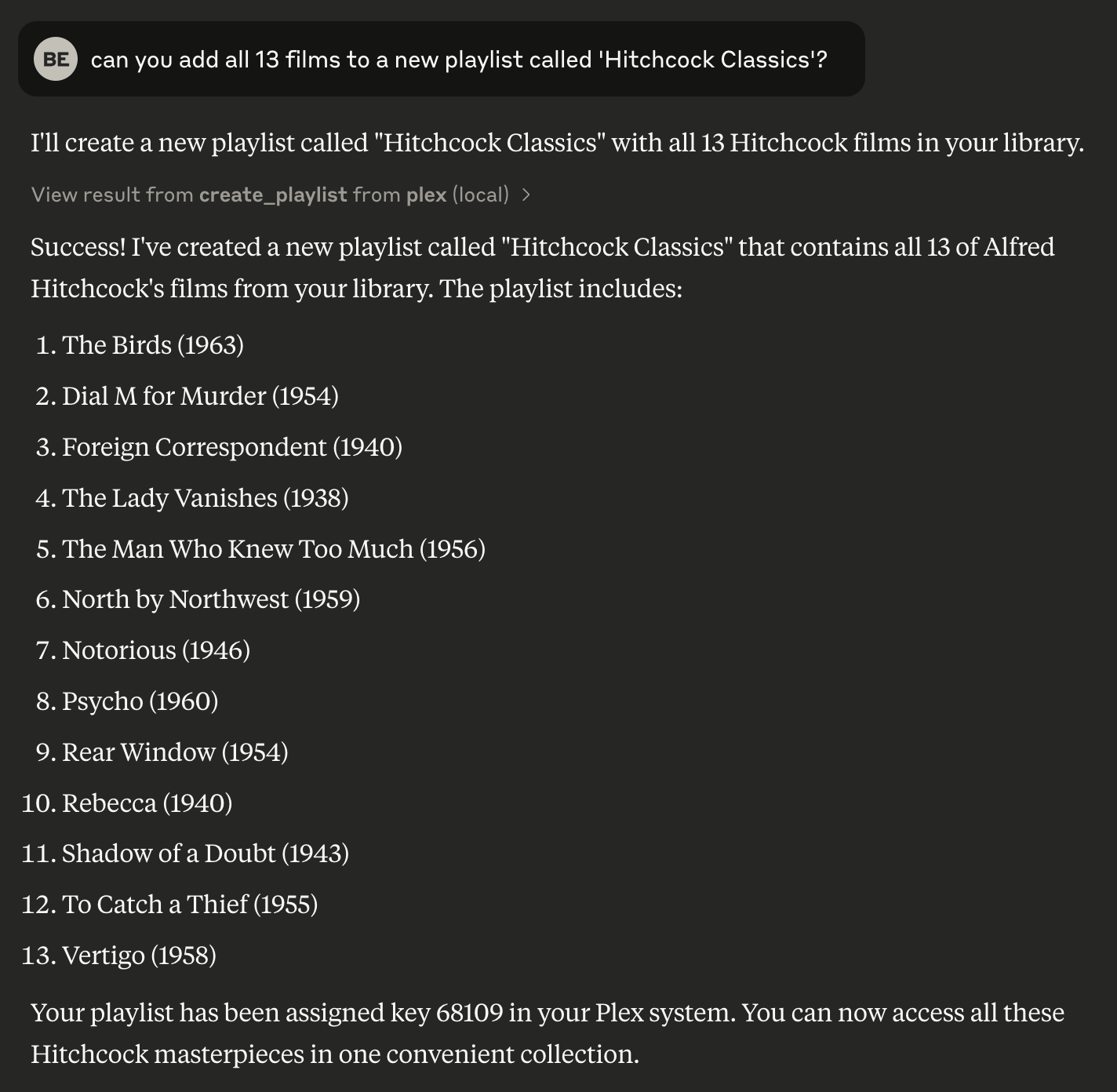
3. Create a Playlist in Your Plex Library
Create a new playlist in your Plex library using the movies found in a search. This allows you to organize your library efficiently.
Setup
Prerequisites
- Python 3.8 or higher
- `uv` package manager
- A Plex Media Server with API access
Installation
Installing via Smithery
To install Plex Media Server Integration for Claude Desktop automatically via Smithery:
npx -y @smithery/cli install @djbriane/plex-mcp --client claudeInstalling Manually
1. Clone this repository:
git clone
   cd plex-mcp
2. Install dependencies with `uv`:
uv venv
   source .venv/bin/activate
   uv sync
3. Configure environment variables for your Plex server:
Finding Your Plex Token
You can find your Plex token in this way:
window.localStorage.getItem('myPlexAccessToken')Usage with Claude
Add the following configuration to your Claude app:
{
    "mcpServers": {
        "plex": {
            "command": "uv",
            "args": [
                "--directory",
                "FULL_PATH_TO_PROJECT",
                "run",
                "src/plex_mcp/plex_mcp.py"
            ],
            "env": {
                "PLEX_TOKEN": "YOUR_PLEX_TOKEN",
                "PLEX_SERVER_URL": "YOUR_PLEX_SERVER_URL"
            }
        }
    }
}
Available Commands
The Plex MCP server exposes these commands:
| Command | Description | OpenAPI Reference |
|---|---|---|
| `search_movies` | Search for movies in your library by various filters (e.g., title, director, genre) with support for a `limit` parameter to control the number of results. | `/library/sections/{sectionKey}/search` |
| `get_movie_details` | Get detailed information about a specific movie. | `/library/metadata/{ratingKey}` |
| `get_movie_genres` | Get the genres for a specific movie. | `/library/sections/{sectionKey}/genre` |
| `list_playlists` | List all playlists on your Plex server. | `/playlists` |
| `get_playlist_items` | Get the items in a specific playlist. | `/playlists/{playlistID}/items` |
| `create_playlist` | Create a new playlist with specified movies. | `/playlists` |
| `delete_playlist` | Delete a playlist from your Plex server. | `/playlists/{playlistID}` |
| `add_to_playlist` | Add a movie to an existing playlist. | `/playlists/{playlistID}/items` |
| `recent_movies` | Get recently added movies from your library. | `/library/recentlyAdded` |
Running Tests
This project includes both unit tests and integration tests. Use the following instructions to run each type of test:
Unit Tests
Unit tests use dummy data to verify the functionality of each module without requiring a live Plex server.
To run all unit tests:
uv run pytestIntegration Tests
Integration tests run against a live Plex server using environment variables defined in a .env file. First, create a .env file in your project root with your Plex configuration:
PLEX_SERVER_URL=https://your-plex-server-url:32400
PLEX_TOKEN=yourPlexTokenHere
Integration tests are marked with the integration marker. To run only the integration tests:
uv run pytest -m integrationIf you are experiencing connection issues to your Plex server try running the integration tests to help troubleshoot.
Code Style and Conventions
- Module Structure:
Use clear section headers for imports, logging setup, utility functions, class definitions, global helpers, tool methods, and main execution (guarded by `if __name__ == "__main__":`).
- Naming:
Use CamelCase for classes and lower_snake_case for functions, variables, and fixtures. In tests, list built-in fixtures (e.g. `monkeypatch`) before custom ones.
- Documentation & Comments:
Include a concise docstring for every module, class, and function, with in-line comments for complex logic.
- Error Handling & Logging:
Use Python’s `logging` module with consistent error messages (prefix “ERROR:”) and explicit exception handling.
- Asynchronous Patterns:
Define I/O-bound functions as async and use `asyncio.to_thread()` to handle blocking operations.
Frequently asked questions
What is plex-mcp?
plex-mcp is Plex MCP server
How do I install plex-mcp?
Open the GitHub repository and follow its README. Most MCP servers are added to your client's MCP config, then called by your agent.
Is plex-mcp open source?
Yes — it is hosted on GitHub at https://github.com/djbriane/plex-mcp and has 6 stars.
Related MCP tools
 cognee
Cognee is the open-source AI memory platform for agents. Give your AI agents persistent long-term memory across sessions with a self-hosted knowledge graph engine.
 skyvern
Automate browser based workflows with AI
 hindsight
Hindsight: Agent Memory That Learns
 watermarks-remover
A privacy-first app that strips AI watermarks from content you own.
 Qwen-Agent
Agent framework and applications built upon Qwen>=3.0, featuring Function Calling, MCP, Code Interpreter, RAG, Chrome extension, etc.
 pal-mcp-server
The power of Claude Code / GeminiCLI / CodexCLI + [Gemini / OpenAI / OpenRouter / Azure / Grok / Ollama / Custom Model / All Of The Above] working as one.
Run your own MCP server? See who uses it and what to fix.
Measure it with TrackMCP