
substack-publisher-mcp
MCP server for Substack's official Publisher API — query posts, analytics, and subscribers from Claude, Cursor, or any MCP client
Documentation
substack-publisher-mcp
MCP server for Substack's official Publisher API



> Note: This is an unofficial, community-developed tool and is not affiliated with, endorsed by, or supported by Substack, Inc.
The first MCP server for Substack's official Publisher API. Query post analytics, subscriber counts, and publication data directly from Claude, Cursor, or any MCP client.
Why this server?
| substack-publisher-mcp | Other Substack MCP servers | |
|---|---|---|
| API | Official Publisher API | Unofficial internal API |
| Auth | API key (stable) | Browser cookies (fragile) |
| Stability | Official, documented API | Breaks when Substack changes internals |
| Multi-publication | Built-in support | Not available |
Prerequisites
- Node.js 18+. Check with `node --version`; install from nodejs.org if missing.
- Substack Publisher API key. Generate one from your publication's Substack dashboard. If you don't see a Publisher API option there, it may not be enabled for your publication yet; see the Publisher API docs for availability.
Quick Start
1. Install
git clone https://github.com/dkships/substack-publisher-mcp.git
cd substack-publisher-mcp
npm install && npm run build
2. Configure your MCP client
Add to your client's MCP config file (create the file if it doesn't exist):
| Client | Config file |
|---|---|
| Claude Desktop (macOS) | `~/Library/Application Support/Claude/claude_desktop_config.json` |
| Claude Desktop (Windows) | `%APPDATA%\Claude\claude_desktop_config.json` |
| Claude Code | `.mcp.json` in your project directory |
| Cursor | `.cursor/mcp.json` |
{
  "mcpServers": {
    "substack": {
      "command": "node",
      "args": ["/path/to/substack-publisher-mcp/dist/index.js"],
      "env": {
        "SUBSTACK_API_KEY": "your-api-key-here"
      }
    }
  }
}
> Claude Code users: Add `"type": "stdio"` to the server config.
Restart your MCP client after editing the config — servers load at startup.
3. Start using it
Ask Claude (or your MCP client):
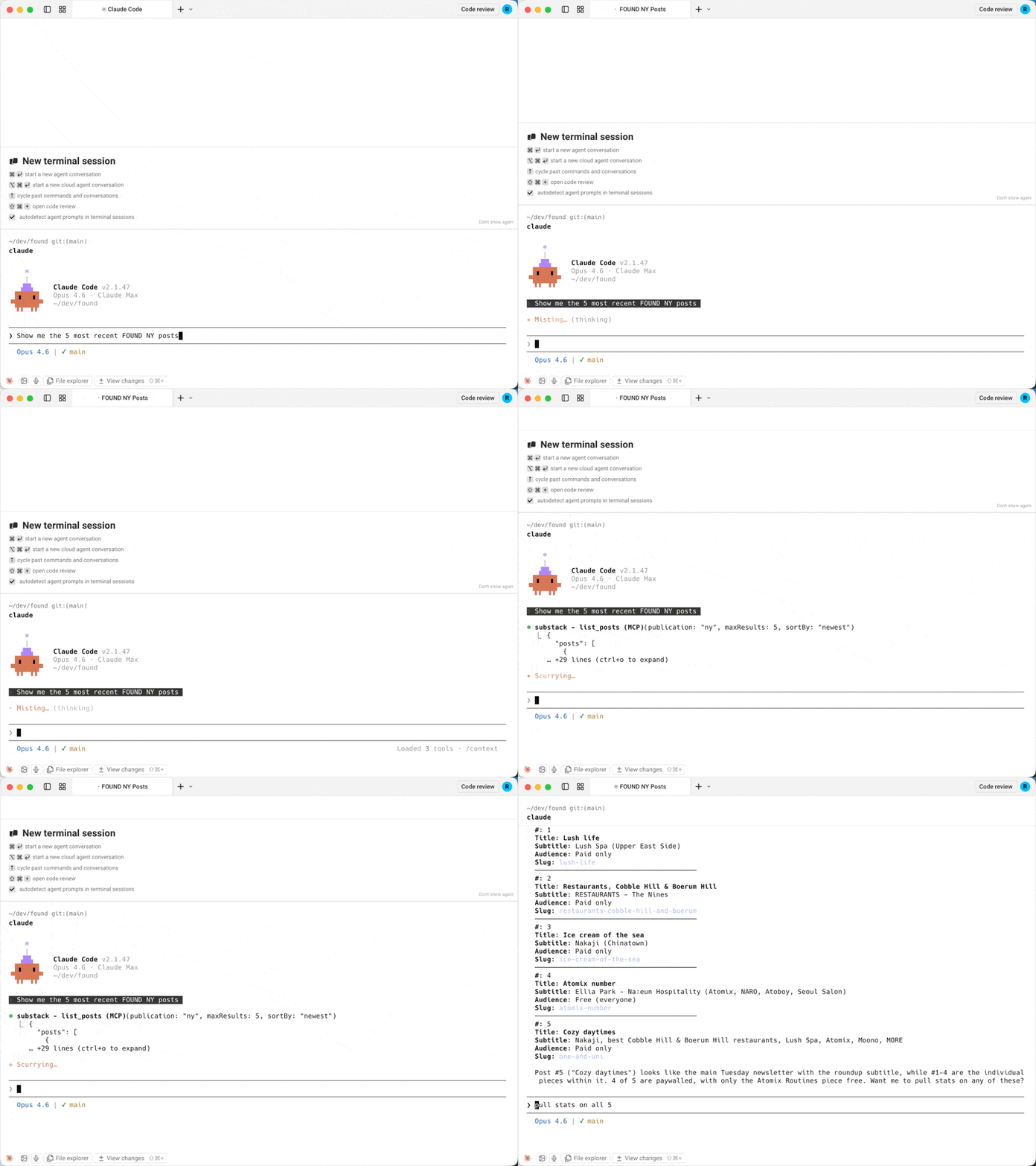
- *"Which Substack publications do I have configured?"*
- *"Show me my posts from the last month"*
- *"Pull up my post with the slug my-latest-post"*
- *"How many opens and clicks did my latest post get?"*
- *"What are my subscriber counts for the last 30 days?"*
- *"Look up subscriber jane@example.com"*
> Installing through an AI agent or registry? See llms-install.md for a condensed, machine-readable setup guide.
Tools
| Tool | Description | Key Parameters |
|---|---|---|
| `list_publications` | List configured publications | None |
| `list_posts` | List published posts | `startDate`, `endDate`, `sortBy`, `type`, `maxResults`, `next` |
| `get_post` | Get a specific post by URL slug | `urlSlug` (required) |
| `get_post_stats` | Get engagement stats for a post | `urlSlug` (required) |
| `get_subscriber_counts` | Get daily subscriber counts by type | `startDate`, `endDate` |
| `get_subscriber` | Look up a subscriber by email | `email` (required) |
All tools except `list_publications` accept an optional `publication` parameter when multiple publications are configured.
Example responses
get_subscriber_counts
[
  {
    "date": "2025-01-15",
    "total_email_subscribers": 25000,
    "paid_subscribers": 500,
    "free_trial_subscribers": 10,
    "comp_subscribers": 50,
    "gift_subscribers": 15,
    "lifetime_subscribers": 0,
    "founding_subscribers": 25
  }
]
get_post_stats
{
  "clicks": 320,
  "opens": 5400,
  "post_id": 12345678,
  "recipients": 10000,
  "views": 6100,
  "new_free_subscriptions": 80,
  "new_paid_subscriptions": 5,
  "estimated_revenue_increase": 400
}
list_posts
{
  "posts": [
    {
      "title": "My Latest Post",
      "audience": "only_paid",
      "subtitle": "A deep dive into the topic",
      "postDate": "2025-01-15T12:00:00.000Z",
      "urlSlug": "my-latest-post",
      "coverImage": "https://substackcdn.com/image/..."
    }
  ],
  "next": "abc123cursor"
}
Multiple publications
If you manage multiple Substack publications, configure a separate API key for each using the `SUBSTACK_API_KEY_` pattern:
{
  "mcpServers": {
    "substack": {
      "command": "node",
      "args": ["/path/to/substack-publisher-mcp/dist/index.js"],
      "env": {
        "SUBSTACK_API_KEY_MAIN": "your-main-blog-key",
        "SUBSTACK_API_KEY_TECH": "your-tech-newsletter-key",
        "SUBSTACK_API_KEY_COMPANY": "your-company-updates-key"
      }
    }
  }
}
Then specify which publication to query:
> *"Show me subscriber counts for main"*
> *"List recent posts from the tech publication"*
Use `list_publications` to see all configured publication names.
Troubleshooting
| Issue | Solution |
|---|---|
| `Unauthorized` error | Verify your API key is correct. The key goes directly in the `authorization` header with no `Bearer` prefix. |
| `Missing environment variables` warning | Only configure env vars for publications you have keys for. Remove the rest. |
| Server won't start | Make sure you ran `npm run build` after cloning. The server runs from `dist/`, not `src/`. |
| `No API keys configured` | Set `SUBSTACK_API_KEY` or `SUBSTACK_API_KEY_` in your MCP client config. |
| Server doesn't appear in your client | Check the config file is valid JSON (no trailing commas), then restart the client. |
| `command not found` / `spawn node ENOENT` | Node.js isn't installed or isn't on your PATH. Check `node --version`. |
| Still stuck | Check your client's MCP logs. Claude Desktop on macOS: `~/Library/Logs/Claude/mcp*.log`. |
API Reference
This server wraps the Substack Publisher API. See Substack's documentation for details on available data and rate limits.
Contributing
See CONTRIBUTING.md for guidelines.
License
MIT License. See LICENSE for details.
Substack is a trademark of Substack, Inc. This project is not affiliated with Substack, Inc. Use of the Substack name is for descriptive purposes only.
Frequently asked questions
What is substack-publisher-mcp?
substack-publisher-mcp is MCP server for Substack's official Publisher API — query posts, analytics, and subscribers from Claude, Cursor, or any MCP client
How do I install substack-publisher-mcp?
Open the GitHub repository and follow its README. Most MCP servers are added to your client's MCP config, then called by your agent.
Is substack-publisher-mcp open source?
Yes — it is hosted on GitHub at https://github.com/dkships/substack-publisher-mcp and has 6 stars.
Related MCP tools
 wigolo
The go-to web for your AI coding agent — local-first search, fetch, crawl & research over MCP. No API keys, no cloud, $0/query. Public beta.
 Unity-MCP
AI Skills, MCP Tools, and CLI for Unity Engine. Full AI develop and test loop. Use cli for quick setup. Efficient token usage, advanced tools. Any C# method may be turned into a tool by a single line. Works with Claude Code, Gemini, Copilot, Cursor and any other absolutely for free.
 atlassian-mcp-server
Official remote MCP server for Atlassian. Securely connect Jira, Confluence, Jira Service Management, Bitbucket, and Compass to Claude, ChatGPT, Cursor, VS Code, and other AI tools using OAuth 2.1 or API tokens.
 mcp
mcpBrowser MCP is a Model Context Provider (MCP) server that allows AI applications to control your browser
 gemini-mcp-tool
MCP server that enables AI assistants to interact with Google Gemini CLI, leveraging Gemini's massive token window for large file analysis and codebase understanding
 codesight
Universal AI context generator. Saves thousands of tokens per conversation in Claude Code, Cursor, Copilot, Codex, and more.
Run your own MCP server? See who uses it and what to fix.
Measure it with TrackMCP