
reaper-mcp-server
An MCP Server for interacting with Reaper projects.
Documentation
Reaper MCP Server
This is an MCP server that connects Reaper projects to an MCP client like Claude Desktop, enabling you to ask questions about your projects and get comprehensive audio analysis for mixing feedback.
This server is read-only by design. It exposes no tools that lets AI modify your project. What it's good for is understanding what you've already made and learning how to improve it. Let AI suggest some ideas and you can try tweaking the knobs and understand how it affects your music by doing.
Tools
Project Discovery & Parsing
- `find_reaper_projects`: Finds all Reaper projects in the directory you specified in the config.
- `parse_reaper_project`: Parses a Reaper project file (.RPP) and returns detailed information including tempo, tracks, FX chains, and audio items.
Each track carries its position and identity (`track_number` matching Reaper's display order, `guid`), its routing (`is_folder`/`folder_depth`, `main_send`, `receives`, `num_channels`, `midi_hardware_out`), and its mixer state (`volume`, `pan`, `mute`, `solo`). Each item carries `position`, `length`, `start_offset`, `playrate`, `mute`, fades, and every take — with the active take marked, since that is the one that plays.
`receives` entries name the source track by index and by name, which is what distinguishes a live signal path from a leftover track: a track with `main_send: false` does not reach the master, and its audio is only audible through whatever receives from it.
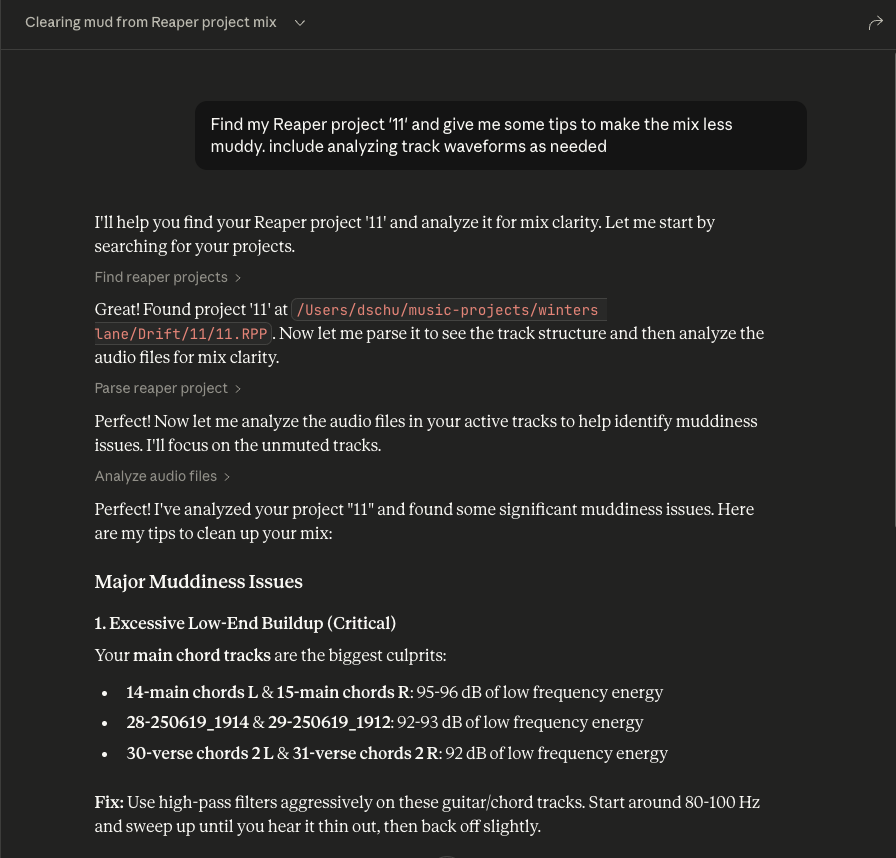
These tools work in tandem. When you ask Claude a question about a specific Reaper project, it will use the `find_reaper_projects` tool to find the project, then use the `parse_reaper_project` tool to parse the project and answer your question.
Installed FX Discovery
- `list_installed_fx(plugin_type=None, search_query=None)`: Lists all installed FX/plugins available in Reaper.
Parameters:
Returns: List of installed plugins including:
Example Questions:
Note: This tool scans your Reaper plugin cache files. If you recently installed new plugins and haven't scanned them in Reaper yet, they won't appear in the results. Make sure to open Reaper and let it scan for new plugins first.
Audio Analysis
- `analyze_audio_files(project_path, track_filter=None, whole_file=False)`: Analyzes the audio in a Reaper project for mixing feedback.
Parameters:
Returns: Comprehensive audio analysis including:
Example Questions:
What is measured: By default each item is analyzed over exactly the region it plays — its source start offset, length, and playrate — not its whole source file. Distinct regions are analyzed once and reused, so an item repeated across the arrangement costs one measurement. MIDI items have no audio source and are listed under `skipped` rather than reported as errors.
Frequency figures are relative. Each band is reported as a share of that region's total spectral power (and the same share in dB). Absolute band energy scales with clip length, which makes a long file look tens of dB "hotter" than a short one of identical material and makes cross-file comparison meaningless.
These numbers are pre-FX. Analysis reads the source files from disk, so it reflects neither the track's FX chain nor its fader. On a track running an amp sim or heavy EQ, the analysis describes the raw DI, not what you hear. Every response is labelled `signal_stage: pre-fx`.
Warning Thresholds:
Loudness is reported as `null` rather than a stand-in value when it cannot be measured (regions shorter than 400 ms), and regions under 50 ms are measured but not warned about.
To see all data structures parsed from projects, check out the `src/reaper_mcp_server/reaper_dataclasses.py` file.
Setup
You need uv installed. You do not need to clone this repo or create a virtualenv — `uvx` fetches, builds, and runs the server for you, and it manages its own Python.
1. Configure Claude Desktop
Follow the instructions to configure Claude Desktop for a custom MCP server, then use the sample in `setup/claude_desktop_config.json`:
{
    "mcpServers": {
        "reaper": {
            "command": "/path/to/your/uv-installation/uvx",
            "args": [
                "--from",
                "git+https://github.com/dschuler36/reaper-mcp-server",
                "reaper-mcp-server",
                "--reaper-projects-dir",
                "/path/to/your/reaper/projects"
            ]
        }
    }
}
Two paths to fill in:
- `uvx` — use the absolute path, not bare `uvx`. Claude Desktop does not inherit your shell's `PATH`, so a bare command name will fail to launch. Run `which uvx` to find it (typically `~/.local/bin/uvx`).
- `--reaper-projects-dir` — the directory holding your Reaper projects.
To pick up new commits later, run `uvx --refresh --from git+https://github.com/dschuler36/reaper-mcp-server reaper-mcp-server --help` once, or restart Claude Desktop after clearing the uv cache.
Using Claude Code instead
claude mcp add reaper -- \
  uvx --from git+https://github.com/dschuler36/reaper-mcp-server \
  reaper-mcp-server --reaper-projects-dir /path/to/your/reaper/projects
2. Launch and Configure
- Open Claude Desktop
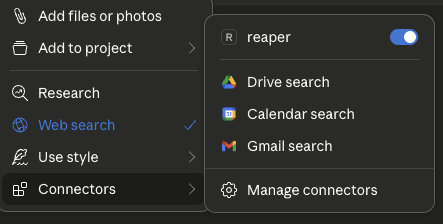
- Click the '+' icon on the chat box
- Click on 'Connectors' and you should see the 'reaper' connector enabled
3. Ask Away!
- Ask questions about your Reaper project
- Always include the name of the specific Reaper project you're asking about
- You can expand the tool boxes to see the raw project data being passed to Claude
Running from a clone
If you want to modify the server, clone it and point Claude at your working copy. `uv run` syncs the locked dependencies on every launch, so there is no separate install step:
git clone https://github.com/dschuler36/reaper-mcp-server
cd reaper-mcp-server
uv sync                       # optional — only needed for running tests
uv run --group dev pytest
Then use `setup/claude_desktop_config_local.json`, which runs the server out of your clone:
{
    "mcpServers": {
        "reaper": {
            "command": "/path/to/your/uv-installation/uv",
            "args": [
                "--directory",
                "/path/to/this/repo/reaper-mcp-server/",
                "run",
                "reaper-mcp-server",
                "--reaper-projects-dir",
                "/path/to/your/reaper/projects"
            ]
        }
    }
}Frequently asked questions
What is reaper-mcp-server?
reaper-mcp-server is An MCP Server for interacting with Reaper projects.
How do I install reaper-mcp-server?
Open the GitHub repository and follow its README. Most MCP servers are added to your client's MCP config, then called by your agent.
Is reaper-mcp-server open source?
Yes — it is hosted on GitHub at https://github.com/dschuler36/reaper-mcp-server and has 57 stars.
Related MCP tools
 damn-vulnerable-mcp-server
Damn Vulnerable MCP Server Python-based implementation. Trusted by 1200+ developers. Trusted by 1200+ developers. Trusted by 1200+ developers.
 mysql_mcp_server
A Model Context Protocol (MCP) server that enables secure interaction with MySQL databases Python-based implementation. Trusted by 900+ developers.
 supabase-mcp-server
Query MCP enables end-to-end management of Supabase via chat interface: read & write query executions, management API support, automatic migration versioning...
 mcp-neo4j
Model Context Protocol with Neo4j Python-based implementation. Trusted by 700+ developers. Trusted by 700+ developers. Trusted by 700+ developers.
 android-mcp-server
An MCP server that provides control over Android devices via adb Python-based implementation. Trusted by 500+ developers.
 pg-mcp-server
A Model Context Protocol (MCP) server for PostgreSQL databases with enhanced capabilities for AI agents. Python-based implementation.
Run your own MCP server? See who uses it and what to fix.
Measure it with TrackMCP