
mcp-scholarly
A MCP server to search for accurate academic articles.
Documentation
mcp-scholarly MCP server
A MCP server to search for accurate academic articles. More scholarly vendors will be added soon.
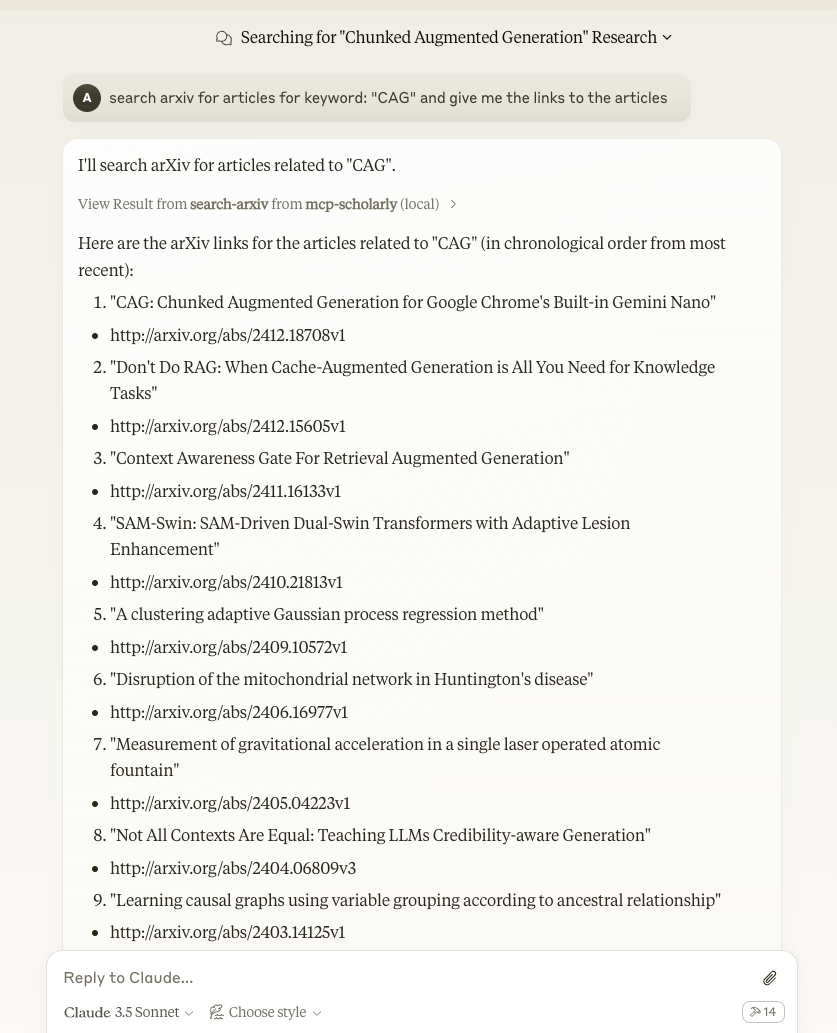
Components
Tools
The server implements one tool:
- search-arxiv: Search arxiv for articles related to the given keyword.
- Takes "keyword" as required string arguments
Quickstart
Install
Claude Desktop
On MacOS: `~/Library/Application\ Support/Claude/claude_desktop_config.json`
On Windows: `%APPDATA%/Claude/claude_desktop_config.json`
Development/Unpublished Servers Configuration
"mcpServers": {
    "mcp-scholarly": {
      "command": "uv",
      "args": [
        "--directory",
        "/Users/adityakarnam/PycharmProjects/mcp-scholarly/mcp-scholarly",
        "run",
        "mcp-scholarly"
      ]
    }
  }
Published Servers Configuration
"mcpServers": {
    "mcp-scholarly": {
      "command": "uvx",
      "args": [
        "mcp-scholarly"
      ]
    }
  }
or if you are using Docker
Published Docker Servers Configuration
"mcpServers": {
    "mcp-scholarly": {
      "command": "docker",
      "args": [
        "run", "--rm", "-i",
        "mcp/scholarly"
      ]
    }
  }
Installing via Smithery
To install mcp-scholarly for Claude Desktop automatically via Smithery:
npx -y @smithery/cli install mcp-scholarly --client claudeDevelopment
Building and Publishing
To prepare the package for distribution:
1. Sync dependencies and update lockfile:
uv sync2. Build package distributions:
uv buildThis will create source and wheel distributions in the `dist/` directory.
3. Publish to PyPI:
uv publishNote: You'll need to set PyPI credentials via environment variables or command flags:
- Token: `--token` or `UV_PUBLISH_TOKEN`
- Or username/password: `--username`/`UV_PUBLISH_USERNAME` and `--password`/`UV_PUBLISH_PASSWORD`
Debugging
Since MCP servers run over stdio, debugging can be challenging. For the best debugging
experience, we strongly recommend using the MCP Inspector.
You can launch the MCP Inspector via `npm` with this command:
npx @modelcontextprotocol/inspector uv --directory /Users/adityakarnam/PycharmProjects/mcp-scholarly/mcp-scholarly run mcp-scholarlyUpon launching, the Inspector will display a URL that you can access in your browser to begin debugging.
Frequently asked questions
What is mcp-scholarly?
mcp-scholarly is A MCP server to search for accurate academic articles.
How do I install mcp-scholarly?
Open the GitHub repository and follow its README. Most MCP servers are added to your client's MCP config, then called by your agent.
Is mcp-scholarly open source?
Yes — it is hosted on GitHub at https://github.com/Dys-347/mcp-scholarly.
Related MCP tools
 cognee
Cognee is the open-source AI memory platform for agents. Give your AI agents persistent long-term memory across sessions with a self-hosted knowledge graph engine.
 skyvern
Automate browser based workflows with AI
 hindsight
Hindsight: Agent Memory That Learns
 watermarks-remover
A privacy-first app that strips AI watermarks from content you own.
 Qwen-Agent
Agent framework and applications built upon Qwen>=3.0, featuring Function Calling, MCP, Code Interpreter, RAG, Chrome extension, etc.
 pal-mcp-server
The power of Claude Code / GeminiCLI / CodexCLI + [Gemini / OpenAI / OpenRouter / Azure / Grok / Ollama / Custom Model / All Of The Above] working as one.
Run your own MCP server? See who uses it and what to fix.
Measure it with TrackMCP