
taskbounty-check
Local-only GitHub Actions and CI maintenance check for AI-built apps.
Documentation
taskbounty-check
A local check for GitHub Actions and CI maintenance hygiene (third-party action pinning,
workflow token permissions, and update automation), built for apps shipped with Lovable, Bolt,
Replit, Cursor, or v0.
Local by default. No uploads. No telemetry. It reads only your workflow files, on your machine.
The default code path makes no outbound network requests, writes its report locally, and sends
nothing anywhere. There is no analytics or phone-home of any kind. Only the opt-in `--gh-org` mode
uses the network (through your own `gh` session).
Works with Cursor, Claude Code, and Codex (local MCP server, below).
Three ways to use it
1. GitHub Action — add a maintenance check to CI that writes a summary to the run (no PR
comments, no source upload):
permissions:
  contents: read
steps:
  - uses: actions/checkout@v4
  - run: npx taskbounty-check@0.1.6 . --github-summary --no-network
Want a human to interpret or fix what the Action surfaces? Request a free launch-safety review. TaskBounty gets no access to your repo, source, or workflows unless you submit that form.
2. Agent / MCP — a local stdio server for Cursor, Claude Code, and Codex:
npx -y taskbounty-check@0.1.6 mcp3. One-off CLI — scan the current repo locally and write a report:
npx -y taskbounty-check@0.1.6 .> Pin a version (`@0.1.6`) in committed config and CI for reproducibility. `@latest` is convenient
> for a quick one-off, but a pinned version is the reproducible choice.
The GitHub job summary
The Action writes a counts-only maintenance summary to the workflow run (categories and next steps,
no filenames, line numbers, or repo source). Below is that exact summary, rendered from this repo's
own CI output:
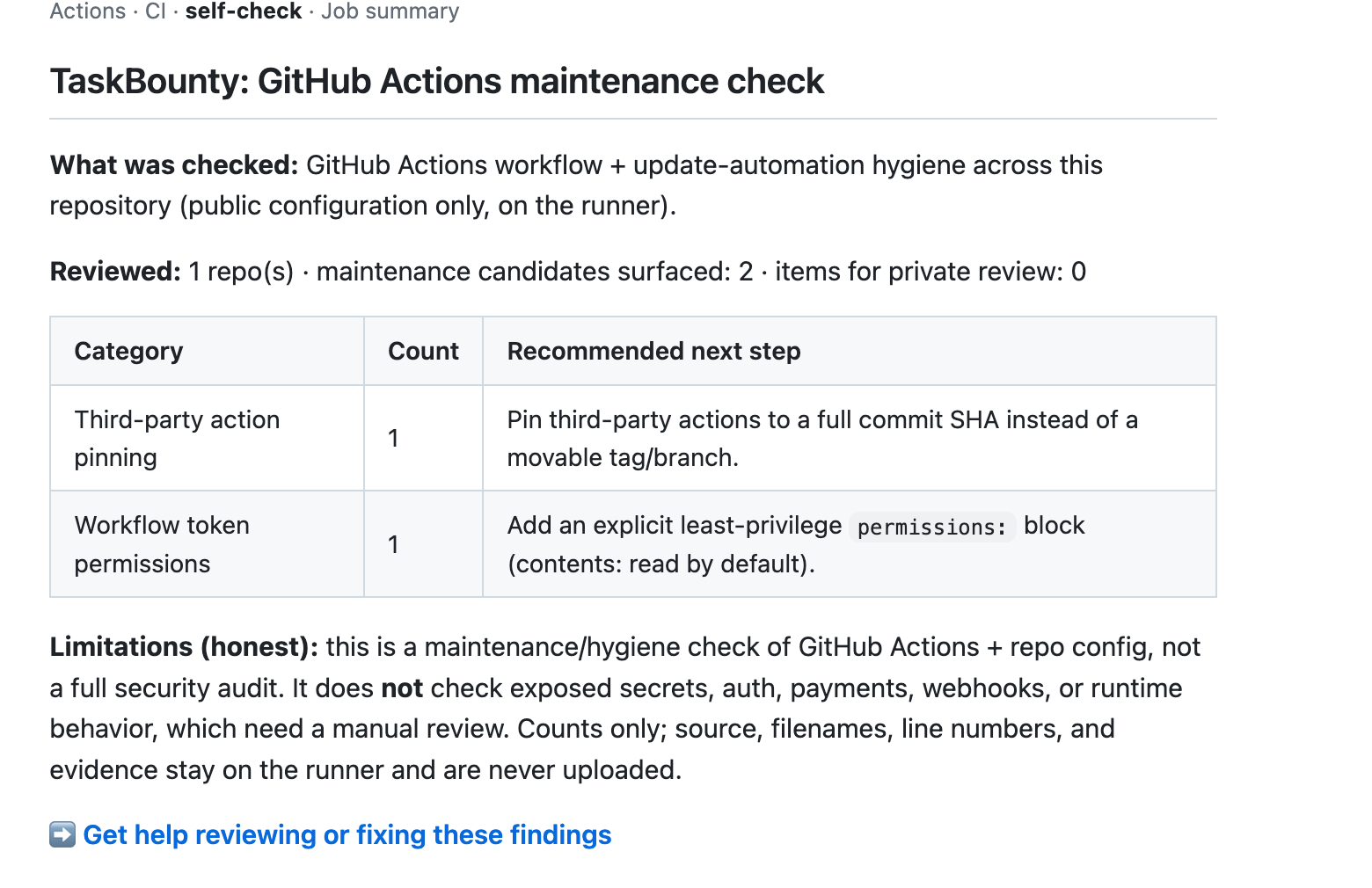
See it produced live by the self-check job in this repository's Actions runs.
Prefer a guided walkthrough? Follow the
five-minute real-repository quickstart.
Learn more
- Methodology — exactly what it reviews and how findings are labeled.
- Privacy and scope — local-by-default data handling.
- Limitations — what it does NOT check (below).
Supported checks (and honest limitations)
Checks (GitHub Actions + CI maintenance hygiene):
- Third-party actions pinned to a movable tag/branch instead of a commit SHA
- Broad (write-all) workflow token permissions
- Missing explicit `permissions:` block
- Update automation (Dependabot/Renovate) presence
- Context-dependent workflow patterns flagged for private review (e.g. `pull_request_target`, script injection)
Does NOT check (these need a manual review): exposed secrets, auth/authorization, payments,
webhooks, runtime behavior. It is a maintenance/hygiene check, not a full security audit or a
penetration test.
What it does
- Reads only your GitHub Actions workflow files and update-automation config, scans them
in-process with a deterministic ruleset (the same rules as the public checker), and writes a
local HTML + JSON report. It does not execute workflows, install dependencies, or run any
repository code.
Modes
| Mode | Command | Network |
|---|---|---|
| Single repo | `npx taskbounty-check .` | none |
| Directory of repos | `npx taskbounty-check ./all-repos` | none |
| Explicit paths | `npx taskbounty-check --manifest repos.json` | none |
| GitHub org (your `gh` session) | `npx taskbounty-check --gh-org ` | yes, opt-in |
`--gh-org` uses your existing `gh` CLI session to fetch each repo's workflow files **to this
machine** (read-only). Your GitHub token is never read by this tool and never sent to TaskBounty.
What is read, written, transmitted
Run `--explain-data` to print this at any time.
- Reads (allowlist — nothing else is opened): `/.github/workflows/*.yml|*.yaml` and
update-automation config (`dependabot.yml`/`renovate.json*`). Never source files, `.env`,
secrets, SSH keys, credential stores, or anything outside the selected repository roots.
Symlinks that escape a root are skipped, never followed.
- Writes (local only): `.json` (full detail) and `.html`.
- Transmits: nothing by default. `--share` uploads nothing — it writes a *sanitized,
counts-only* file (scan id, label, candidate counts by category, private-review count,
scanner version, timestamps; repo names only with `--include-repo-names`) for you to submit
manually. Network stays off under `--share`. Only `--gh-org` intentionally uses the network.
Flags
`--share` · `--gh-org ` · `--manifest ` · `--org-label ` ·
`--include-repo-names` · `--dry-run` · `--explain-data` · `--delete-local-report` ·
`--no-network` (default everywhere except `--gh-org`) · `--out ` · `--version` · `--help`
Want help interpreting or fixing these results?
Request a free 20-minute launch-safety review:
https://www.task-bounty.com/ai-app-security-check/review?utm_source=npm&utm_medium=npm_readme&utm_campaign=workflow_security
TaskBounty receives nothing unless you submit that form. The scan runs locally and the full
report stays on your machine; the review form gives us no access to your repositories, source,
workflows, or secrets.
GitHub Code Scanning (SARIF)
Emit SARIF 2.1.0 and surface findings in your repo's Security → Code scanning tab:
npx taskbounty-check@latest . --format sarif --output taskbounty.sarifThe SARIF carries deterministic rule ids (`taskbounty/`), severity levels, and file/line
references — no source contents, secrets, or environment values, and no network access.
Confirmed findings are emitted as `kind: fail`; lower-confidence items as `kind: review`.
Help interpreting SARIF results: https://www.task-bounty.com/ai-app-security-check/review?utm_source=github&utm_medium=sarif_docs&utm_campaign=workflow_security
Upload it with the official action (full example in `examples/code-scanning.yml`):
permissions:
  contents: read
  security-events: write
steps:
  - uses: actions/checkout@v4
  - run: npx taskbounty-check@0.1.6 . --format sarif --output taskbounty.sarif
  - uses: github/codeql-action/upload-sarif@v3
    with:
      sarif_file: taskbounty.sarif
Local agent (MCP)
Run a local stdio MCP server so Codex, Claude Code, or Cursor can scan and reason about findings
in your editor. It runs locally, makes zero outbound network requests, uploads no source, and
never modifies files — `generate_fix_plan` returns a plan as text for you to apply yourself.
npx taskbounty-check@latest mcpTools: `scan_repo` (local scan summary), `explain_finding` (plain-language explanation), `generate_fix_plan` (text fix plan).
Want a human to review the plan? https://www.task-bounty.com/ai-app-security-check/review?utm_source=mcp&utm_medium=mcp_docs&utm_campaign=workflow_security
Cursor — `.cursor/mcp.json`:
{ "mcpServers": { "taskbounty-check": { "command": "npx", "args": ["-y", "taskbounty-check@latest", "mcp"] } } }Claude Code:
claude mcp add taskbounty-check -- npx -y taskbounty-check@latest mcpCodex — in `~/.codex/config.toml`:
[mcp_servers.taskbounty-check]
command = "npx"
args = ["-y", "taskbounty-check@latest", "mcp"]
Security
Zero runtime dependencies. Published to npm with provenance (verify on the package's npm page). The
default run makes no outbound requests and uploads nothing; see the
methodology for the full
data-handling and scope boundaries.
Frequently asked questions
What is taskbounty-check?
taskbounty-check is Local-only GitHub Actions and CI maintenance check for AI-built apps.
How do I install taskbounty-check?
Open the GitHub repository and follow its README. Most MCP servers are added to your client's MCP config, then called by your agent.
Is taskbounty-check open source?
Yes — it is hosted on GitHub at https://github.com/eliottreich/taskbounty-check and has 2 stars.
Related MCP tools
 projectmem
Open-source coding agent memory. Records issues, attempts, fixes and decisions, then warns your agent before it repeats an approach that already failed. Native MCP server for Claude Code, Cursor, Antigravity and Codex. 100% local, no cloud, no telemetry. MIT.
 memorix
Open-source cross-agent memory layer for coding agents via MCP. Compatible with Claude Code, Codex, Cursor, Windsurf, Gemini CLI, Antigravity, OpenClaw, Hermes Agent, Oh-my-Pi, Pi, Copilot, Kiro, OpenCode, and Trae.
 jcodemunch-mcp
Cut AI token costs 95%+ on code exploration. The leading MCP server for precise, symbol-level GitHub code retrieval via tree-sitter AST. Works with Claude Code, Cursor & any MCP client. 313B+ tokens saved.
 atlassian-mcp-server
Official remote MCP server for Atlassian. Securely connect Jira, Confluence, Jira Service Management, Bitbucket, and Compass to Claude, ChatGPT, Cursor, VS Code, and other AI tools using OAuth 2.1 or API tokens.
 Unity-MCP
AI Skills, MCP Tools, and CLI for Unity Engine. Full AI develop and test loop. Use cli for quick setup. Efficient token usage, advanced tools. Any C# method may be turned into a tool by a single line. Works with Claude Code, Gemini, Copilot, Cursor and any other absolutely for free.
 memora
Give your AI agents persistent, collective memory — with deduplicating absorb, supersession lineage, semantic search, and a graph UI. Speaks MCP.
Run your own MCP server? See who uses it and what to fix.
Measure it with TrackMCP