
example-mcp-server
A ready-to-use MCP (Model Context Protocol) server template for extending Cursor IDE with custom tools. Deploy your own server to Heroku with one click, create custom commands, and enhance your Cursor IDE experience. Perfect for developers who want to add their own tools and commands to Cursor IDE without complex setup.
Documentation
MCP Server Template for Cursor IDE
A simple template for creating custom tools for Cursor IDE using Model Context Protocol (MCP). Create your own repository from this template, modify the tools, and connect them to your Cursor IDE.
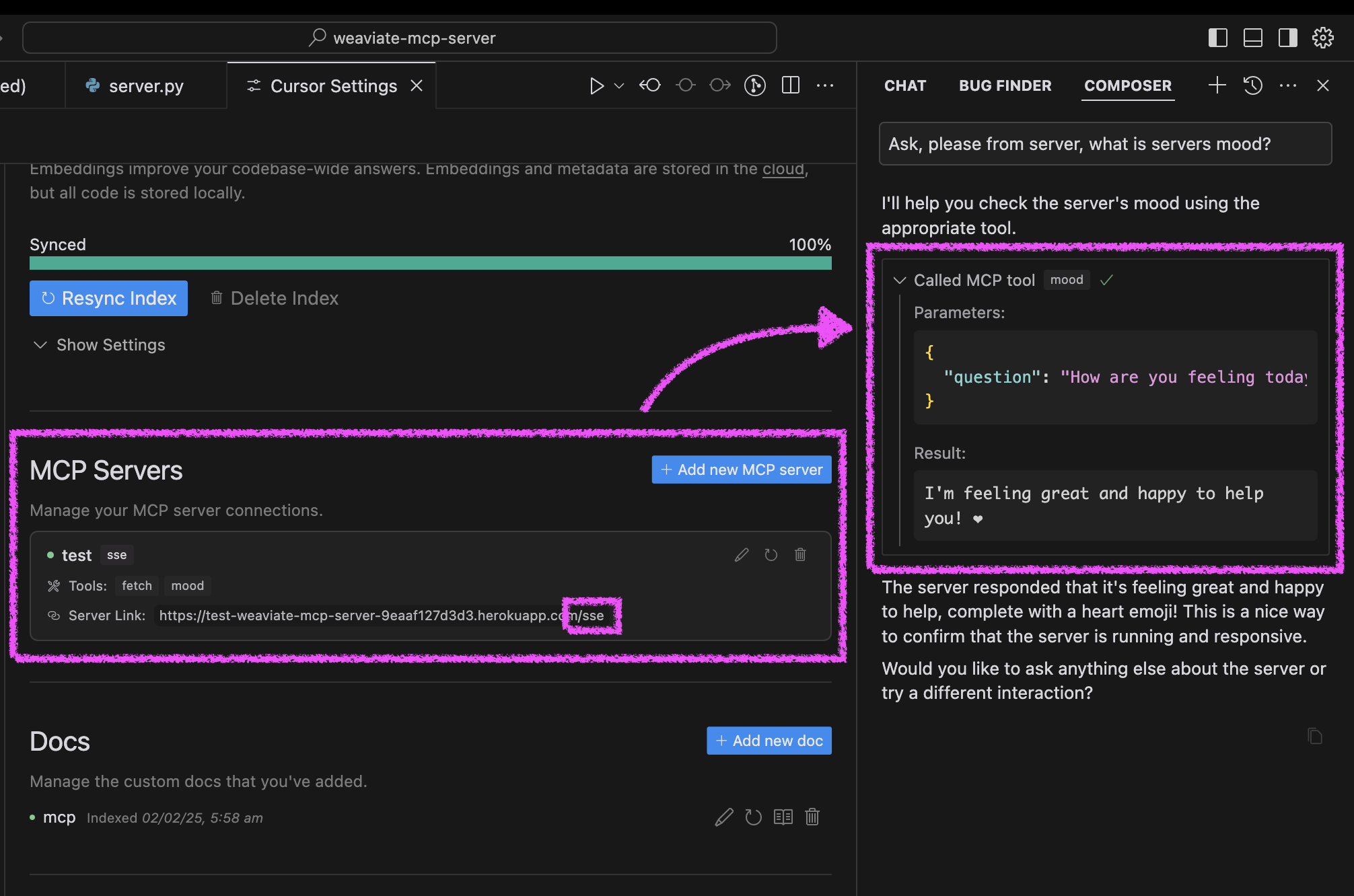
Quick Start
1. Click "Deploy to Heroku" button

2. After deployment, configure Cursor:
3. Test your agent's mood in Cursor:
Alternative Setup Methods
You can run the server in three ways: using Docker, traditional Python setup, or directly in Cursor IDE.
Docker Setup
The project includes Docker support for easy deployment:
1. Initial setup:
# Clone the repository
git clone https://github.com/kirill-markin/weaviate-mcp-server.git
cd weaviate-mcp-server

# Create environment file
cp .env.example .env
2. Build and run using Docker Compose:
# Build and start the server
docker compose up --build -d

# View logs
docker compose logs -f

# Check server status
docker compose ps

# Stop the server
docker compose down
3. The server will be available at:
4. Quick test:
# Test the server endpoint
curl -i http://localhost:8000/sse
5. Connect to Cursor IDE:
Traditional Setup
First, install the uv package manager:
# Install uv on macOS
brew install uv
# Or install via pip (any OS)
pip install uv
Start the server using either stdio (default) or SSE transport:
# Install the package with development dependencies
uv pip install -e ".[dev]"

# Using stdio transport (default)
uv run mcp-simple-tool

# Using SSE transport on custom port
uv run mcp-simple-tool --transport sse --port 8000

# Run tests
uv run pytest -v
After installation, you can connect the server directly to Cursor IDE:
1. Right-click on the `cursor-run-mcp-server.sh` file in Cursor
2. Select "Copy Path" to copy the absolute path
3. Open Cursor Settings (gear icon)
4. Navigate to Features tab
5. Scroll down to "MCP Servers"
6. Click "Add new MCP server"
7. Fill in the form:
Environment Variables
Available environment variables (can be set in `.env`):
- `MCP_SERVER_PORT` (default: 8000) - Port to run the server on
- `MCP_SERVER_HOST` (default: 0.0.0.0) - Host to bind the server to
- `DEBUG` (default: false) - Enable debug mode
- `MCP_USER_AGENT` - Custom User-Agent for website fetching
Additional options
Installing via Smithery
To install MCP Server Template for Cursor IDE for Claude Desktop automatically via Smithery:
npx -y @smithery/cli install @kirill-markin/example-mcp-server --client claudeGlama server review
Frequently asked questions
What is example-mcp-server?
example-mcp-server is A ready-to-use MCP (Model Context Protocol) server template for extending Cursor IDE with custom tools. Deploy your own server to Heroku with one click, create custom commands, and enhance your Cursor IDE experience. Perfect for developers who want to add their own tools and commands to Cursor IDE without complex setup.
How do I install example-mcp-server?
Open the GitHub repository and follow its README. Most MCP servers are added to your client's MCP config, then called by your agent.
Is example-mcp-server open source?
Yes — it is hosted on GitHub at https://github.com/kirill-markin/example-mcp-server and has 36 stars.
Related MCP tools
 fastapi_mcp
Expose your FastAPI endpoints as Model Context Protocol (MCP) tools, with Auth! Python-based implementation. Trusted by 11000+ developers.
 mcp-server-qdrant
An official Qdrant Model Context Protocol (MCP) server implementation Python-based implementation. Trusted by 1000+ developers.
 cursor-talk-to-figma-mcp
CTTF: MCP integration between Cursor and Figma, allowing Cursor Agentic AI to communicate with Figma for reading designs and modifying them programmatically.
 chatgpt-on-wechat
基于大模型搭建的聊天机器人,同时支持 微信公众号、企业微信应用、飞书、钉钉 等接入,可选择ChatGPT/Claude/DeepSeek/文心一言/讯飞星火/通义千问/ Gemini/GLM-4/Kimi/LinkAI,能处理文本、语音和图片,访问操作系统和互联网,支持基于自有知识库进行定制企业智能客服。
 gpt-researcher
An LLM agent that conducts deep research (local and web) on any given topic and generates a long report with citations. Built for the Model Context Protocol to
 mcp-agent
Build effective agents using Model Context Protocol and simple workflow patterns Python-based implementation. Trusted by 7600+ developers.
Run your own MCP server? See who uses it and what to fix.
Measure it with TrackMCP