
forge-mcp
MCP server for project scaffolding agent
Documentation
Forge MCP Server



A Model Context Protocol (MCP) server for the Forge project scaffolding agent. This server acts as a bridge between Large Language Models (LLMs) and the Forge API, enabling AI assistants to scaffold new projects based on user requirements.
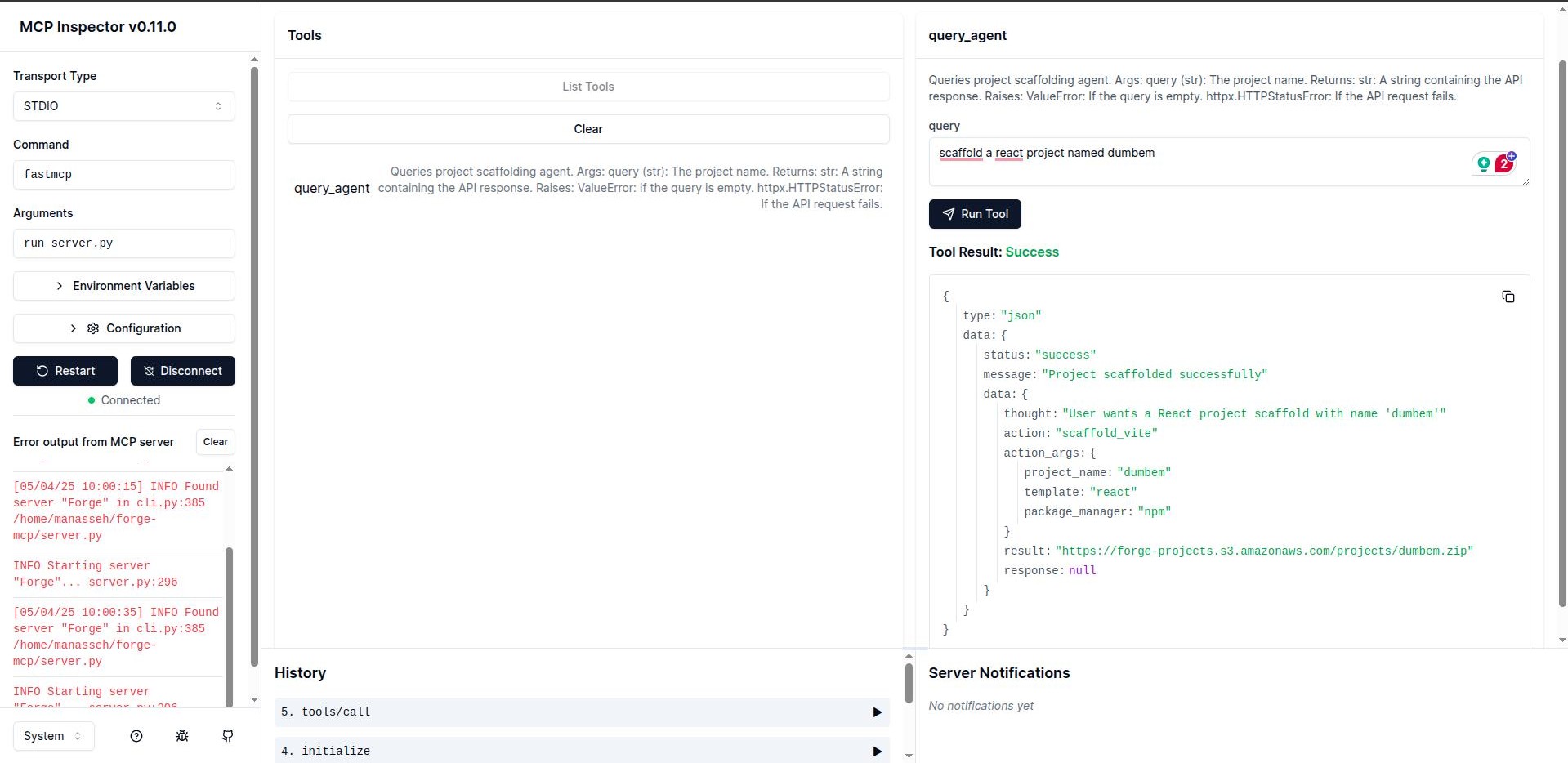
Overview
Forge MCP Server uses the FastMCP framework to create tools that LLMs can use to interact with the Forge project scaffolding API. This allows AI assistants to generate project structures, boilerplate code, and configurations based on natural language descriptions.
Features
- Easy integration with LLMs using the Model Context Protocol
- Connection to the Forge project scaffolding API
- Simple query interface for project generation
- Error handling and timeout management
Prerequisites
- Python 3.13+
- Pipenv
Installation
Clone the repository:
git clone https://github.com/believemanasseh/forge-mcp.git
cd forge-mcp
Install dependencies:
pipenv --python 3.13
source .venv/bin/activate
pipenv install
Development
Running the Server
fastmcp dev server.pyThe server uses stdio for communication by default, making it compatible with various LLM integration frameworks.
API Reference
`query_agent`
Sends request queries to the Forge API and returns the results.
Parameters:
- `query` (string): Natural language description of the project to scaffold
Returns:
- JSON response from the Forge API
Example:
query_agent("Create a Django project named deet.")Integration with MCP Hosts
Integrating Cursor or Windsurf
Update your configuration files at:
- Cursor: `~/.cursor/mcp.json` or `.cursor/mcp.json`
- Windsurf: `~/.codeium/windsurf/mcp_config.json`
{
    "mcpServers": {
        "forge-mcp": {
            "command": "pipenv",
            "args": ["run", "fastmcp", "run", "server.py"],
            "transport": "stdio"
        }
    }
}
Integrating Claude Desktop
In Claude Desktop, go to `Settings > Developer > Edit Config`. Replace the configuration with:
{
    "mcpServers": {
        "forge-mcp": {
            "command": "pipenv",
            "args": [
                "run",
                "fastmcp",
                "run",
                "server.py"
            ],
            "cwd": "/path/to/your/forge-mcp"
        }
    }
}
*Note: Replace `/path/to/your/forge-mcp` with the absolute path to your cloned `forge-mcp` directory.*
Integrating VSCode
Update the VSCode workspace configuration file at `.vscode/mcp.json`:
{
    "servers": {
        "forge-mcp": {
            "type": "stdio",
            "command": "pipenv",
            "args": ["run", "fastmcp", "run", "server.py"],
        }
    }
}
Contributing
We welcome contributions to the Forge MCP Server project! Here's how you can contribute:
1. Fork the repository - Create your own fork of the project
2. Create a feature branch - `git checkout -b feature/your-feature-name`
3. Commit your changes - Make sure to write clear commit messages
4. Push to your branch - `git push origin feature/your-feature-name`
5. Open a pull request - Describe the changes you've made and why they should be included
Development Guidelines
- Follow PEP 8 style guidelines for Python code
- Write docstrings for all functions, classes, and methods
- Add appropriate unit tests for new features
- Update documentation to reflect any changes
License
Frequently asked questions
What is forge-mcp?
forge-mcp is MCP server for project scaffolding agent
How do I install forge-mcp?
Open the GitHub repository and follow its README. Most MCP servers are added to your client's MCP config, then called by your agent.
Is forge-mcp open source?
Yes — it is hosted on GitHub at https://github.com/believemanasseh/forge-mcp.
Related MCP tools
 mcp
mcpAWS MCP Servers — helping you get the most out of AWS, wherever you use MCP. Python-based implementation. Trusted by 6900+ developers.
 mcpo
mcpoA simple, secure MCP-to-OpenAPI proxy server Python-based implementation. Trusted by 3500+ developers. Trusted by 3500+ developers.
 minimax-mcp
Official MiniMax Model Context Protocol (MCP) server that enables interaction with powerful Text to Speech, image generation and video generation APIs.
 mcpstore
开盒即用的优雅管理mcp服务 | 结合Agent框架 | 作者听劝 | 已发布pypi | Vue页面demo Python-based implementation.
 gpt-researcher
An LLM agent that conducts deep research (local and web) on any given topic and generates a long report with citations. Built for the Model Context Protocol to
 fastapi_mcp
Expose your FastAPI endpoints as Model Context Protocol (MCP) tools, with Auth! Python-based implementation. Trusted by 11000+ developers.
Run your own MCP server? See who uses it and what to fix.
Measure it with TrackMCP