
fused-mcp
Fused MCP Agents: Setting up MCP Servers for Data Scientists
Documentation
Fused MCP Agents: Setting up MCP Servers for Data
🌪️
🔥
MCP servers allow LLMs like Claude to make HTTP requests, connecting them to APIs & executable code. We built this repo for ourselves & anyone working with data to easily pass _any_ Python code directly to your own desktop Claude app.
This repo offers a simple step-by-step notebook workflow to setup MCP Servers with Claude's Desktop App, all in Python built on top of Fused User Defined Functions (UDFs).

Requirements
- Python 3.11
- Latest Claude Desktop app installed (macOS & Windows)
If you're on Linux, the desktop app isn't available so we've made a simple client you can use to have it running locally too!
You do _not_ need a Fused account to do any of this! All of this will be running on your local machine.
Installation
- Clone this repo in any local directory, and navigate to the repo:
git clone https://github.com/fusedio/fused-mcp.git
cd fused-mcp/- Install `uv`
if you don't have it:
macOS / Linux:
curl -LsSf https://astral.sh/uv/install.sh | shWindows:
powershell -ExecutionPolicy ByPass -c "irm https://astral.sh/uv/install.ps1 | iex"- Test out the client by asking for its info:
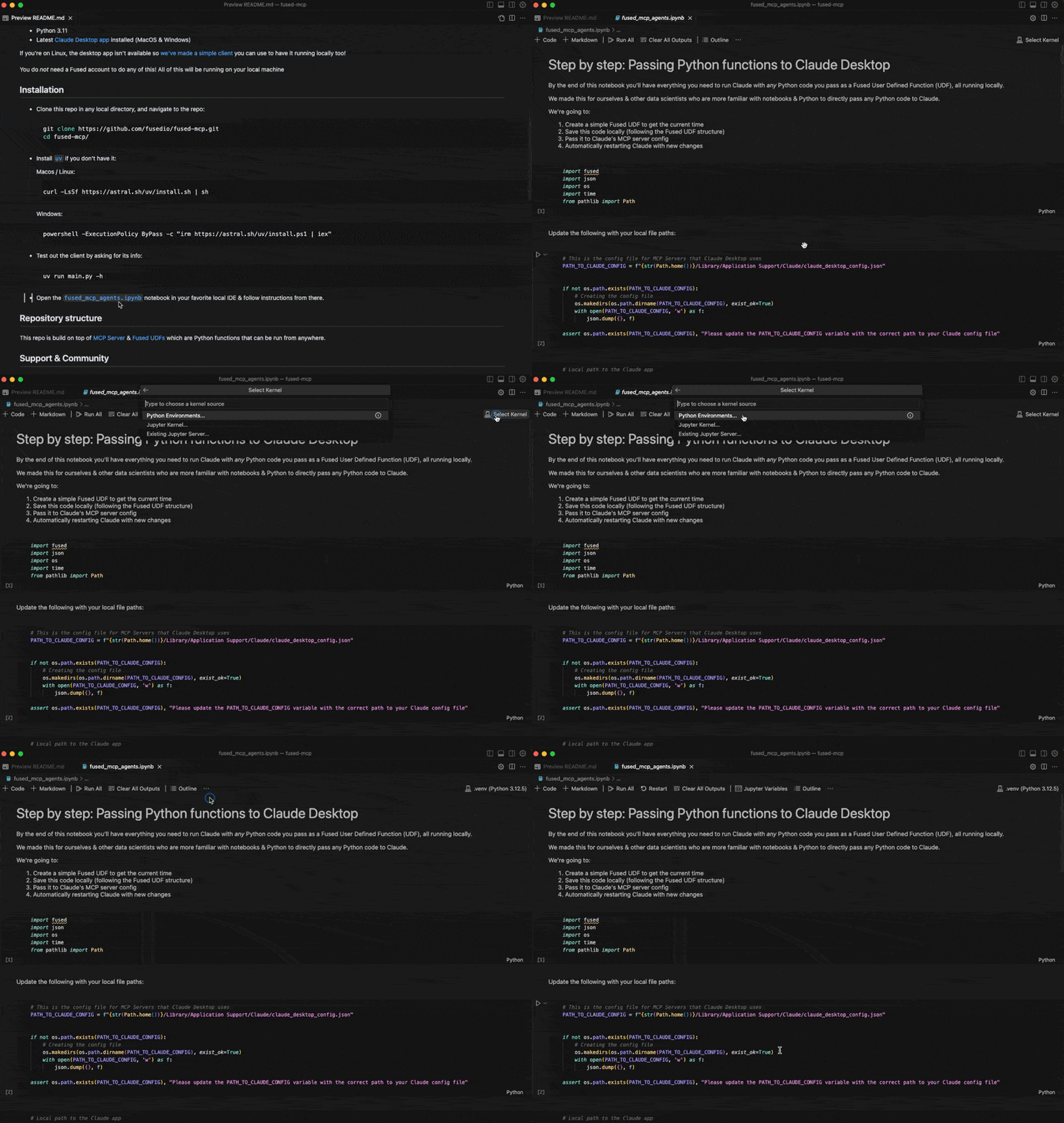
uv run main.py -h- Start by following our getting-started notebook `fused_mcp_agents.ipynb` in your favorite local IDE to get set up and then make your way to the more advanced notebook to make your own Agents & functions
Repository structure
This repo is build on top of MCP Server & Fused UDFs which are Python functions that can be run from anywhere.
Support & Community
Feel free to join our Discord server if you want some help getting unblocked!
Here are a few common steps to debug the setup:
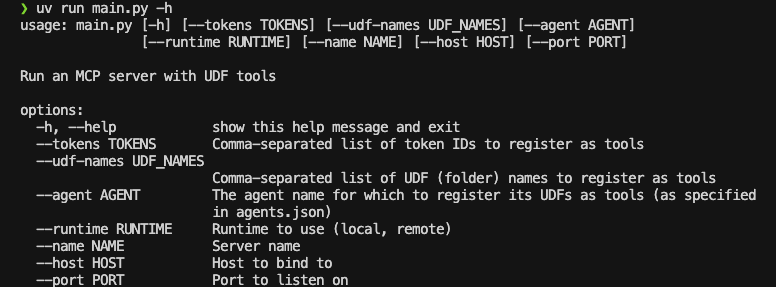
- Running `uv run main.py -h` should return something like this:
- You might need to pass global paths to some functions to the `Claude_Desktop_Config.json`. For example, by default we only pass `uv`:
{
    "mcpServers": {
        "qgis": {
            "command": "uv",
            "args": ["..."]
        }

    }
}
But you might need to pass the full path to `uv`, which you can simply pass to `common.generate_local_mcp_config` in the notebook:
# in fused_mcp_agents.ipynb
import shutil

common.generate_local_mcp_config(
    config_path=PATH_TO_CLAUDE_CONFIG,
    agents_list = ["get_current_time"],
    repo_path= WORKING_DIR,
    uv_path=shutil.which('uv'),
)
Which would create a config like this:
{
    "mcpServers": {
        "qgis": {
            "command": "/Users//.local/bin/uv",
            "args": ["..."]
        }

    }
}- If Claude runs without showing any connected tools, take a look at the MCP Docs for troubleshooting the Claude Desktop setup
Contribute
Feel free to open PRs to add your own UDFs to `udfs/` so others can play around with them locally too!
Using a local Claude client (without Claude Desktop app)
If you are unable to install the Claude Desktop app (e.g., on Linux), we provide
a small example local client interface to use Claude with the MCP server configured
in this repo:
NOTE: You'll need an API key for Claude here as you won't use the Desktop App
- Create an Anthropic Console Account
- Create an Anthropic API Key
- Create a `.env`:
touch .env- Add your key as `ANTHROPIC_API_KEY` inside the `.env`:
# .env
ANTHROPIC_API_KEY = "your-key-here"- Start the MCP server:
uv run main.py --agent get_current_time- In another terminal session, start the local client, pointing to the address of the server:
uv run client.py http://localhost:8080/sseFrequently asked questions
What is fused-mcp?
fused-mcp is Fused MCP Agents: Setting up MCP Servers for Data Scientists
How do I install fused-mcp?
Open the GitHub repository and follow its README. Most MCP servers are added to your client's MCP config, then called by your agent.
Is fused-mcp open source?
Yes — it is hosted on GitHub at https://github.com/fusedio/fused-mcp and has 26 stars.
Related MCP tools
 mcp-context-forge
An AI Gateway, registry, and proxy that sits in front of any MCP, A2A, or REST/gRPC APIs, exposing a unified endpoint with centralized discovery, guardrails and management. Optimizes Agent & Tool calling, and supports plugins.
 cocoindex-code
A super light-weight embedded code search engine CLI (AST based) that just works - improves speed and efficiency for coding agent 🌟 Star if you like it!
 OpenOSINT
AI-powered OSINT agent with interactive REPL, MCP server, and CLI. 19 tools. Works with Claude, GPT-4, or local models. For authorized security research only.
 cve-mcp-server
Production-grade MCP server giving Claude 27 security intelligence tools across 21 APIs — CVE lookup, EPSS scoring, CISA KEV, MITRE ATT&CK, Shodan, VirusTotal, and more.
 projectmem
Open-source coding agent memory. Records issues, attempts, fixes and decisions, then warns your agent before it repeats an approach that already failed. Native MCP server for Claude Code, Cursor, Antigravity and Codex. 100% local, no cloud, no telemetry. MIT.
 goose
goosean open source, extensible AI agent that goes beyond code suggestions - install, execute, edit, and test with any LLM
Run your own MCP server? See who uses it and what to fix.
Measure it with TrackMCP