
mcp-pdf2md
PDF to Markdown conversion tool
Documentation
MCP-PDF2MD
MCP-PDF2MD Service
An MCP-based high-performance PDF to Markdown conversion service powered by MinerU API, supporting batch processing for local files and URL links with structured output.
Key Features
- Format Conversion: Convert PDF files to structured Markdown format.
- Multi-source Support: Process both local PDF files and URL links.
- Intelligent Processing: Automatically select the best processing method.
- Batch Processing: Support multi-file batch conversion for efficient handling of large volumes of PDF files.
- MCP Integration: Seamless integration with LLM clients like Claude Desktop.
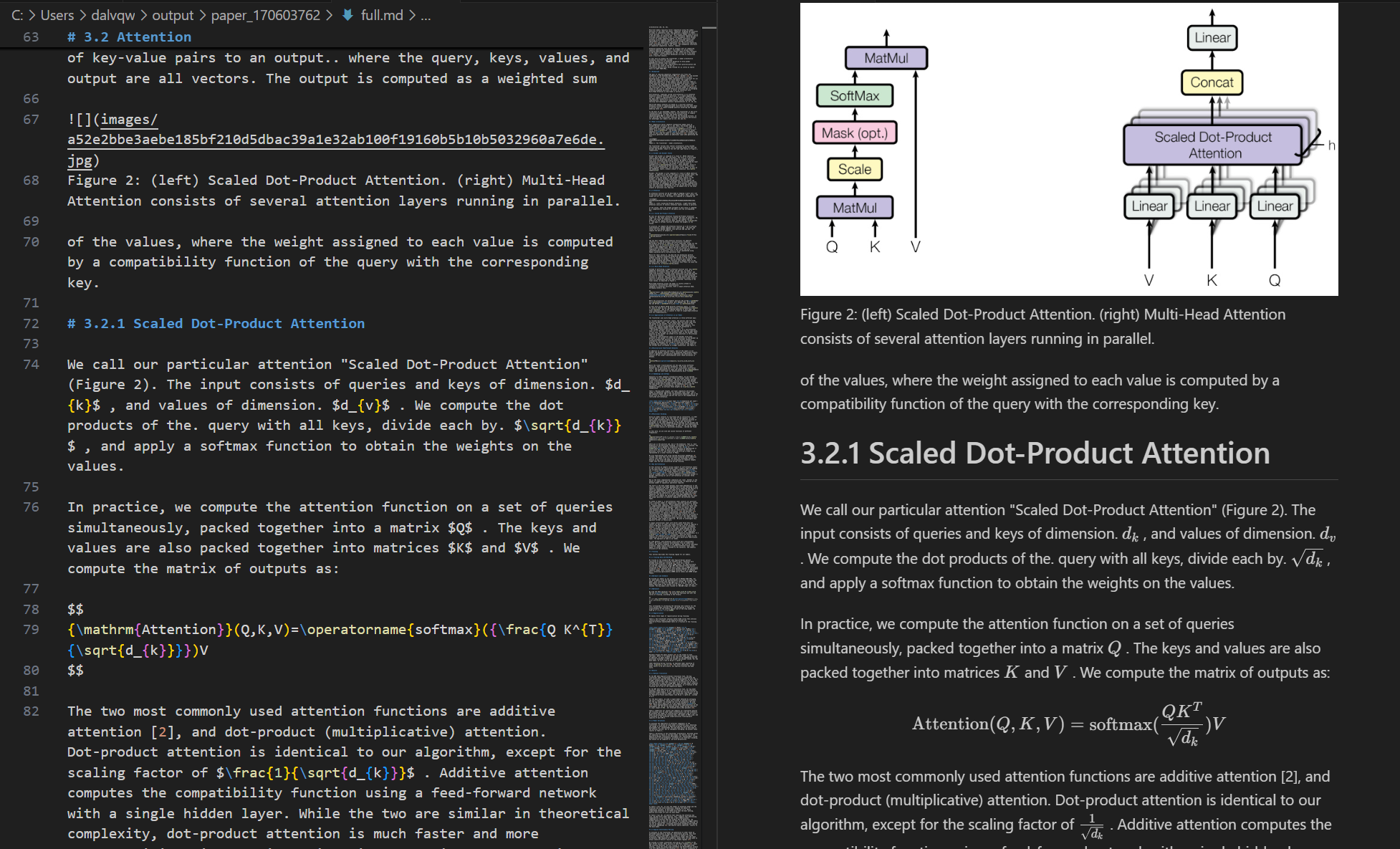
- Structure Preservation: Maintain the original document structure, including headings, paragraphs, lists, etc.
- Smart Layout: Output text in human-readable order, suitable for single-column, multi-column, and complex layouts.
- Formula Conversion: Automatically recognize and convert formulas in the document to LaTeX format.
- Table Extraction: Automatically recognize and convert tables in the document to structured format.
- Cleanup Optimization: Remove headers, footers, footnotes, page numbers, etc., to ensure semantic coherence.
- High-Quality Extraction: High-quality extraction of text, images, and layout information from PDF documents.
System Requirements
- Software: Python 3.10+
Quick Start
1. Clone the repository and enter the directory:
git clone https://github.com/FutureUnreal/mcp-pdf2md.git
   cd mcp-pdf2md
2. Create a virtual environment and install dependencies:
Linux/macOS:
uv venv
   source .venv/bin/activate
uv pip install -e .Windows:
uv venv
   .venv\Scripts\activate
   uv pip install -e .
3. Configure environment variables:
Create a `.env` file in the project root directory and set the following environment variables:
MINERU_API_BASE=https://mineru.net/api/v4/extract/task
   MINERU_BATCH_API=https://mineru.net/api/v4/extract/task/batch
   MINERU_BATCH_RESULTS_API=https://mineru.net/api/v4/extract-results/batch
   MINERU_API_KEY=your_api_key_here
4. Start the service:
uv run pdf2mdCommand Line Arguments
The server supports the following command line arguments:
Claude Desktop Configuration
Add the following configuration in Claude Desktop:
Windows:
{
    "mcpServers": {
        "pdf2md": {
            "command": "uv",
            "args": [
                "--directory",
                "C:\\path\\to\\mcp-pdf2md",
                "run",
                "pdf2md",
                "--output-dir",
                "C:\\path\\to\\output"
            ],
            "env": {
                "MINERU_API_KEY": "your_api_key_here"
            }
        }
    }
}Linux/macOS:
{
    "mcpServers": {
        "pdf2md": {
            "command": "uv",
            "args": [
                "--directory",
                "/path/to/mcp-pdf2md",
                "run",
                "pdf2md",
                "--output-dir",
                "/path/to/output"
            ],
            "env": {
                "MINERU_API_KEY": "your_api_key_here"
            }
        }
    }
}
Note about API Key Configuration:
You can set the API key in two ways:
1. In the `.env` file within the project directory (recommended for development)
2. In the Claude Desktop configuration as shown above (recommended for regular use)
If you set the API key in both places, the one in the Claude Desktop configuration will take precedence.
MCP Tools
The server provides the following MCP tools:
- convert_pdf_url: Convert PDF URL to Markdown
- convert_pdf_file: Convert local PDF file to Markdown
Getting MinerU API Key
This project relies on the MinerU API for PDF content extraction. To obtain an API key:
1. Visit MinerU official website and register for an account
2. After logging in, apply for API testing qualification at this link
3. Once your application is approved, you can access the API Management page
4. Generate your API key following the instructions provided
5. Copy the generated API key
6. Use this string as the value for `MINERU_API_KEY`
Note that access to the MinerU API is currently in testing phase and requires approval from the MinerU team. The approval process may take some time, so plan accordingly.
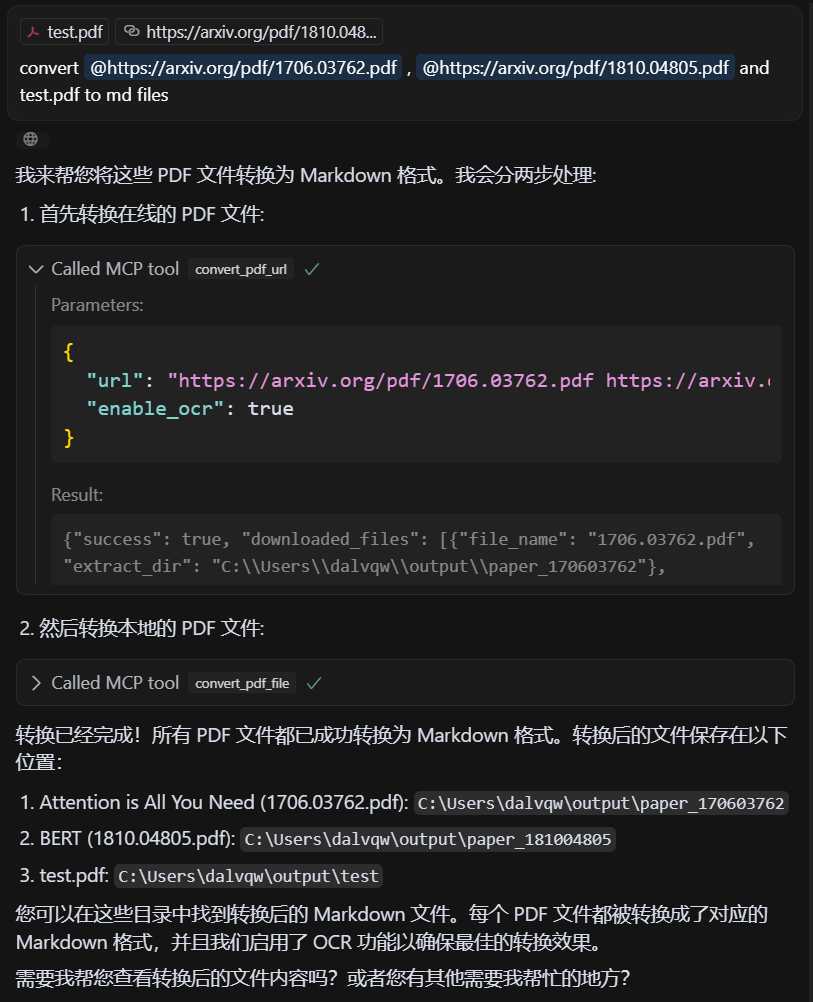
Demo
Input PDF
Output Markdown
License
MIT License - see the LICENSE file for details.
Credits
This project is based on the API from MinerU.
Frequently asked questions
What is mcp-pdf2md?
mcp-pdf2md is PDF to Markdown conversion tool
How do I install mcp-pdf2md?
Open the GitHub repository and follow its README. Most MCP servers are added to your client's MCP config, then called by your agent.
Is mcp-pdf2md open source?
Yes — it is hosted on GitHub at https://github.com/FutureUnreal/mcp-pdf2md and has 35 stars.
Related MCP tools
 cognee
Cognee is the open-source AI memory platform for agents. Give your AI agents persistent long-term memory across sessions with a self-hosted knowledge graph engine.
 skyvern
Automate browser based workflows with AI
 hindsight
Hindsight: Agent Memory That Learns
 watermarks-remover
A privacy-first app that strips AI watermarks from content you own.
 Qwen-Agent
Agent framework and applications built upon Qwen>=3.0, featuring Function Calling, MCP, Code Interpreter, RAG, Chrome extension, etc.
 pal-mcp-server
The power of Claude Code / GeminiCLI / CodexCLI + [Gemini / OpenAI / OpenRouter / Azure / Grok / Ollama / Custom Model / All Of The Above] working as one.
Run your own MCP server? See who uses it and what to fix.
Measure it with TrackMCP