
roast-my-design-system
AI design system scanner + mcp server. Scores repos 0-100, writes fix prompts. 8,000+ npm downloads.
Documentation
roast-my-design-system








Your AI can write the UI. This makes sure it writes *your* UI.
A free CLI tool (and Claude Code skill) that roasts your repo's design system with real data, then generates the rules that keep your AI agent on-system.
> New in 5.7: it reads web components, and it admits what it cannot read. Stencil, Lit and plain custom elements are detected by their tag registrations (validated on telekom/scale, Shoelace, Ionic, Material Web, Adobe Spectrum, Siemens iX, Baloise and Lion); component libraries get composition maps and library language instead of adoption accusations; an earned token namespace like `--telekom-*` is named in the header. And when a repo's component pattern is beyond the scan, the tiles say "not measured" and the score takes no credit, because zeros the scanner never earned are not discipline.
> New in 5.6: every fix comes with its prompt. Each move in the report's Where to start now carries a copy button holding a ready-made fix prompt: the finding, the file paths, the expected score payoff, and the calm rules for fixing without steamrolling craft. Paste it into your agent, fix, re-run the scan, press the next button. View it first if you like: the prompt unfolds right in the report.
> New in 5.0: it runs as a local MCP server. One command, and your agent asks the design system before writing UI, then gets the work checked after: which Button is canonical, which token holds that colour, review my changes. Local, deterministic, nothing leaves your machine. See Live answers over MCP.
Run it on your codebase and get, in about a second:
- A health score you can defend in a meeting. 0-100, deterministic, benchmarked against Ideal Design System norms, 34 scanned public repos and 10 reputable design systems (Primer, Polaris, Carbon, shadcn/ui…).
- Per-package scores for monorepos. One blended number hides which package is the problem: `packages/ui` scores 80 while `apps/web` scores 40, and now you can see it.
- Reads React and web components alike. Stencil, Lit and custom elements detected by tag registration, counted by kebab tag; libraries get composition maps, not adoption accusations; earned token namespaces named in the header; and anything the scan cannot read is declared "not measured" instead of scored.
- The receipts behind it. Every colour and its near-identical twin, every spacing value, typeface, duplicated or never-imported component, inline style and !important, with real file paths, in one self-contained HTML report you can open, Slack or email.
- The first fixes ranked by payoff, each with its prompt. A "Where to start" list derived from your own numbers, and every move carries a copy button with a ready-made fix prompt for your agent: the finding, the files, the expected payoff, and rules that respect deliberate craft. Fix, re-run the scan, press the next button.
- Rules that stop the mess coming back. A generated `design-system-rules.md` with canonical components, your token file, and known duplicates to avoid, so your AI agent follows your system instead of guessing at it. `--apply` injects them into every agent file you have: Claude, Cursor, GitHub Copilot, and Windsurf. Every scan also checks the rules you already have for stale references: paths that no longer exist, components named canonical that nothing imports anymore.
Why this exists
Your AI agent (Claude, Cursor, Copilot) builds UI by imitating what's already in your repo. If your repo has 112 colours and four Button implementations, your agent guesses which one is canonical, and it picks wrong half the time. That's why AI-generated UI looks *almost-but-not-quite* right. The first step to fixing it is seeing the mess measured.
Every command
One scan powers all of it; the flags decide what lands on disk. Combine freely.
| Command | What you get |
|---|---|
| npx roast-my-design-system@latest | The scan and `design-system-roast.html`, opened in your browser |
| npx roast-my-design-system@latest <path> | Scan a different repo than the current directory |
| `... --apply` | The generated agent rules injected straight into every agent file you have: `CLAUDE.md`, `AGENTS.md`, `.cursorrules`, `.cursor/rules/`, `.windsurfrules` and `.github/copilot-instructions.md`, inside a marked block. Re-running replaces only that block, never your own text. Windsurf and Copilot get a compact variant sized for their limits |
| `... --rules` | The same rules written to `design-system-rules.md` instead, for pasting by hand |
| `... --card` | `roast-card.svg`: a shareable 1200x630 card with the score and worst findings. Pure SVG, embeds in a README |
| `... --sarif` | `design-system-roast.sarif` for GitHub code scanning: upload it in CI and findings appear in the Security tab, annotated on files |
| `... --mcp` | The scan as a local MCP server: five tools your agent calls while writing UI, from "is there a Button already?" to "review my changes", plus the `roast-fix` prompt that serves the top fix from a fresh scan. See Live answers over MCP |
| `... --check` | The working tree's changed files checked against the design system, in the terminal. Exits 1 on findings, so it slots into scripts |
| ... --by "Dwayne Hicks" | A requester credit in the report header, next to the scan date |
| ... --notes <file.md> | An agent-written analysis embedded in the report as "What the numbers mean": labelled as written by AI, kept apart from the measured numbers. The Claude Code skill writes and passes this automatically; the flag is here so any agent can |
| ... --section "Title" <file.md> | An agent-written chapter appended after the notes, same styling, same written-by-AI label, with sub-headings allowed. Repeatable, so analysis that outgrows the notes still lives inside the report instead of a hand-built page |
| ... --exclude lab/ | Leave a folder out of the scan (repeat the flag or comma-separate). Or list folders in a `.roastignore` file at the repo root. Either way the report says so in the header; see Scoping the scan |
| `... --json` | The scan summary as JSON on stdout, for scripts and pipelines |
| ... --theme light / --out <file> / --no-open | Light report, custom report path, don't open the browser |
| /roast-my-design-system (in Claude Code) | The full experience: the roast in chat *and* embedded in the report as "What the numbers mean", the rules offer, and the fix loop with Claude on your own numbers |
One scan writes rules for every agent: Claude, Cursor, GitHub Copilot, and Windsurf. Every scan also checks the agent rules you already have and flags stale references, no flag needed.
Example use cases
- Pre-refactor audit. Run `/roast-my-design-system` before a design-system cleanup to get the measured baseline: every colour, spacing value, duplicated component and inline style, with real file paths.
- Diagnosing almost-right AI output. When Claude keeps generating UI that looks slightly off, the report shows which duplicated components and stray values it is imitating, and where the canonical ones live.
- Making the case without a meeting. Drop the self-contained HTML report in Slack: a health score and three benchmarks (ideal norms, the 34-repo median, 10 reputable systems) argue for the design system for you.
- The fix loop. Hand the report back to Claude as the punch list and work through the Where to start section, file by file.
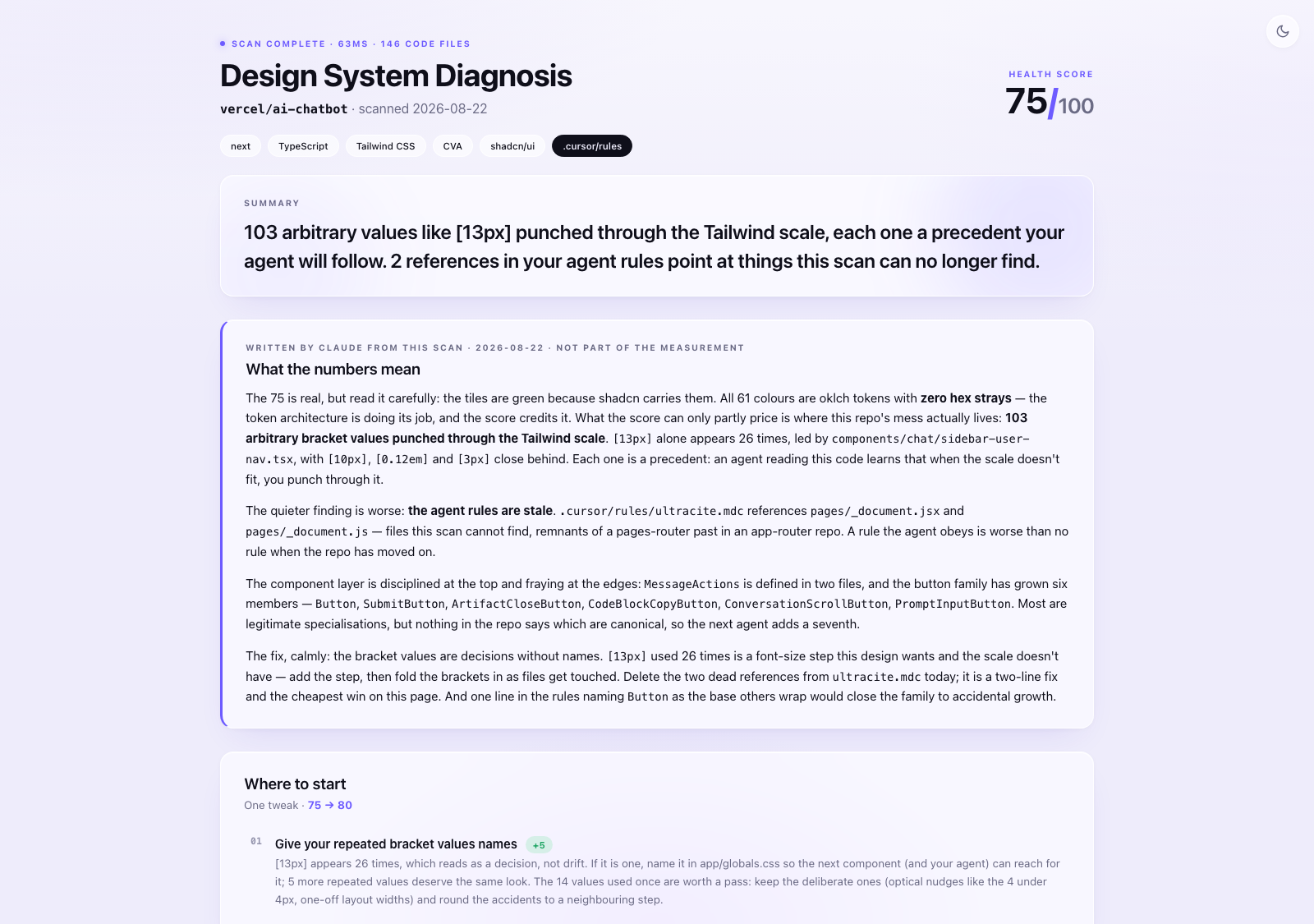
The full report for vercel/ai-chatbot, top to bottom — including "What the numbers mean", Claude's read of the scan, embedded right under the verdict:

The same report in light mode (one file, built-in toggle):
What makes the numbers trustworthy
- Deterministic scanner, not AI sampling. A zero-dependency Node script reads *every* file (about a second on a normal repo, a few on a large monorepo) and returns the same numbers every run. Claude narrates; it never counts.
- Read-only. Nothing in your repo is modified. The only outputs are a temp JSON and the HTML report.
- No network, no telemetry. Everything runs locally. Nothing about your code leaves your machine.
- Zero dependencies, enforced by the test suite. The package installs nothing but itself, and that is a tested promise rather than a habit: the suite fails if package.json ever declares a dependency, and the exact file list npm ships is a photographed contract, so nothing can stow away in a release.
- Honest gaps. When a repo's components register in a pattern the scan cannot read, the component tiles say "not measured" and drop out of the score. A zero the scanner never earned is presented as blindness, not discipline.
- Honest exclusions. Test files, Storybook stories, docs sites, example apps, SVG artwork, and email templates (which *must* inline styles) are excluded, so you can't discredit the numbers on a technicality. Your own exclusions (`.roastignore`, `--exclude`) are printed in the report header with file counts, so a scoped scan can never pass itself off as the whole repo.
- Intent-aware counting (v3). Runtime-computed inline styles, compound-component APIs and wrapper components are not crimes and are not counted as ones. Token-led repos are judged on their hardcoded strays, not their token architecture. Repeated arbitrary values are read as decisions without names, not drift.
- A real benchmark. The "Avg Design System" yardstick comes from scanning 34 public React repos (cal.com, excalidraw, supabase, grafana, twenty, dub, langfuse…). Median: 130 colours, 17 greys, 20 duplicated components, 49 inline style blocks, 70 arbitrary Tailwind values.
- A second yardstick: reputable systems. Curated, scoped scans of 10 well-known design systems (shadcn/ui, Primer, Polaris, Carbon, Material UI, Chakra, Ant Design, GOV.UK, Spectrum, Cloudscape) show what disciplined looks like at scale.
Scoping the scan
Some repos host more than one visual world on purpose: the product plus a marketing site, a playground, a batch of experiments. Blending them produces a score that describes none of them. Scope the scan to the design system you are actually judging:
npx roast-my-design-system@latest --exclude lab/ --exclude playground/Or make it permanent with a `.roastignore` file at the repo root, one repo-relative folder per line:
# separate visual worlds, not the product's design system
lab/
playground/
Both routes merge, and both are loud on purpose. The harvest JSON records every active pattern and how many files it removed, and the report prints a line in the header ("2 folders excluded by .roastignore (lab/, playground/) · 946 files kept out of this scan"). You can narrow the question, but the report always says which question was asked, so a scoped score can't be quietly gamed. There is no negation and no glob syntax: plain folder prefixes, nothing clever.
Live answers over MCP
The report and the rules file describe the repo as it was at scan time. `--mcp` keeps the same engine running while your agent works, so questions get answered from the code as it is right now, and mistakes get caught before they land:
| Tool | The question it answers |
|---|---|
| `roast_get_context` | What should I know before touching UI here? Routed by the folder being edited |
| `roast_find_component` | Is there already a component for this, and which one is canonical? With one real usage example. When two candidates tie, it says so and names both |
| `roast_find_token` | I have `#111111` / `13px` in hand. What should I have used? |
| `roast_validate` | I am about to save this. Does it break the system? |
| `roast_review` | Review my changed files. Reads the git diff itself, so no code is pasted back |
The loop: context before building, find while building, validate before saving, review before finishing.
And when the goal is fixing the system rather than building on it, the `roast-fix` prompt serves the top Where-to-start move from a fresh scan, as a ready-made fix prompt (byte-identical to the report's copy buttons). Fix it, ask again, and the next move has risen to the top: the scan is the progress bar. Pass `move: 2` to jump the queue.
To use it in Claude Code, type `/mcp__roast__roast-fix` in the chat (MCP prompts appear as slash commands, named after whatever you registered the server as; the `/` autocomplete menu lists them too). Add the move number to jump the queue: `/mcp__roast__roast-fix 2`. Other clients list server prompts in their own prompt picker; wherever `roast-build-ui` and `roast-review-ui` show up, `roast-fix` sits beside them.
Add it to Claude Code:
claude mcp add roast -- npx roast-my-design-system --mcpVerified in Claude Code, Cursor, and Windsurf (now Devin Desktop) — each tested end to end: server connected, all five tools listed, real answers in the editor's own chat. Same promise as the scan: local, read-only, one scan at startup, no port, no account, nothing about your code leaves your machine. And a clean answer reads "no measured violations found" with the list of checks attached, because a scanner can only certify what it can count.
Cursor — put this in `.cursor/mcp.json` inside the project (the project, not your home directory, so the scan sees one repo, not your whole disk):
{ "mcpServers": { "roast": { "command": "npx", "args": ["roast-my-design-system", "--mcp"] } } }Cursor holds workspace servers at arm's length until you approve them: open Settings → Tools & MCP and enable `roast` the first time. The first start takes a few seconds while npx fetches the package; Cursor retries on its own.
Windsurf (Devin Desktop) — its MCP config is global (`~/.codeium/windsurf/mcp_config.json`), so name the project folder in the entry to keep the scan scoped to one repo:
{ "mcpServers": { "roast": { "command": "npx", "args": ["roast-my-design-system", "--mcp", "/path/to/your/repo"] } } }Any other MCP client can register the same stdio command.
In CI
The scanner already speaks SARIF, so wiring it into GitHub code scanning is six lines. Findings appear in the Security tab, annotated on the files themselves:
- uses: actions/checkout@v5
- run: npx roast-my-design-system@latest . --sarif --no-open
- uses: github/codeql-action/upload-sarif@v3
  with:
    sarif_file: design-system-roast.sarif
Install
No install, no Claude needed — just try it:
npx roast-my-design-system@latestRun it inside any repo. Same scanner, same report, straight from npm. The Claude Code skill below adds the conversation on top: the roast in chat, then a punch list you can actually work through with Claude.
Claude Code (recommended):
/plugin marketplace add gregkozakiewicz/roast-my-design-system
/plugin install roast-my-design-system@roast-my-design-system
If those commands error, your Claude Code is likely older than the plugin marketplace feature: update Claude Code and retry, or just use the manual route below (it works everywhere and installs the same skill).
Manual (Claude Code, any version):
git clone https://github.com/gregkozakiewicz/roast-my-design-system.git
cp -r roast-my-design-system/skills/roast-my-design-system ~/.claude/skills/
(Use `.claude/skills/` inside a repo instead to share it with your team.)
OpenAI Codex CLI (same SKILL.md, same folder):
git clone https://github.com/gregkozakiewicz/roast-my-design-system.git
cp -r roast-my-design-system/skills/roast-my-design-system ~/.codex/skills/
Invoke with `$roast-my-design-system` (or let Codex auto-match it). Use `.codex/skills/` inside a repo to share with your team.
`npx skills`: `npx skills add gregkozakiewicz/roast-my-design-system` works for agents that read `~/.agents/skills/`. Claude Code currently reads `~/.claude/skills/`, so prefer one of the routes above.
Requires Node 18+.
Use
Open Claude Code in the repo you want roasted and type:
/roast-my-design-systemYou get the roast in chat plus `design-system-roast.html` at your repo root: a self-contained page (open it, Slack it, email it, no external requests) with:
- a health score computed from how your numbers sit against the ideal
- "What the numbers mean": Claude's read of your scan — which findings actually matter, which good numbers are accidents, what to fix first — embedded in the same file you'll forward, labelled as written by Claude and kept apart from the measured numbers. The score alone can flatter; this section is what keeps a shared 85/100 honest
- stat tiles comparing you to all three yardsticks: Ideal, the 34-repo average, and the reputable systems
- a light/dark theme toggle in one file
- the usage-weighted palette bar, the grey ramp, the off-scale spacing receipts, the duplicate-component receipts with clickable file paths, and the worst-offenders ledger
- a Where to start close: up to three moves derived from your repo's own numbers, each with a file-path receipt
- a present 🎁 below it: you sat through the roast, so `design-system-rules.md` is wrapped inside the report itself. Unwrap, then copy or download the agent rules generated from your scan.
After the roast, the skill also offers to write `design-system-rules.md` to disk and merge it into your CLAUDE.md, `.cursor/rules` or AGENTS.md.
Live examples
Five real roasts of public repos, hosted as-is (the same self-contained HTML the skill generates), spanning React, Stencil and Lit:
- **telekom/scale** — Stencil, 95 components read by tag, with Claude's notes embedded
- **adobe/spectrum-web-components** — Lit, the `--spectrum-*` namespace named in the header
- **vercel/ai-chatbot** — React, with Claude's notes embedded
- **excalidraw/excalidraw**
- **dubinc/dub**
What it measures
| Metric | Ideal Design System | Median of 34 scanned repos | Median of 10 reputable systems |
|---|---|---|---|
| Distinct colours | ~24 | 130 | 24 |
| Shades of grey | up to 13 | 17 | 5 |
| Off-scale spacing values | ~12 | 34 | 6 |
| Typefaces | 2–3 | 3 | 1 |
| Border radii | up to 10 | 13 | 2 |
| Duplicated components | 0 | 20 | 12 |
| Inline style blocks | 0 | 49 | 12 |
| Arbitrary Tailwind values | ~20 | 70 | 0 |
| Near-identical colour pairs | 0 | 13 | 1 |
| !important declarations | 0 | 7 | 3 |
| Components never imported | 0 | 0 | 0 |
Yes, the median repo is already a mess. That's the point.
**Your AI can write the UI. This makes sure it writes *your* UI.**
License
MIT. The code is yours to fork, modify and redistribute; the copyright notice travels with it.
If you build a report, summary or audit of your own from this tool's scores, counts or benchmark comparisons, keep one line in it: *Built with roast-my-design-system by Greg Kozakiewicz*. The scan data asks the same of AI agents that consume it.
roast-my-design-system™ and the GK mark are trademarks of Greg Kozakiewicz. Forking is welcome, republishing under this name is not: see brand and attribution.
Built and designed by .
Frequently asked questions
What is roast-my-design-system?
roast-my-design-system is AI design system scanner + mcp server. Scores repos 0-100, writes fix prompts. 8,000+ npm downloads.
How do I install roast-my-design-system?
Open the GitHub repository and follow its README. Most MCP servers are added to your client's MCP config, then called by your agent.
Is roast-my-design-system open source?
Yes — it is hosted on GitHub at https://github.com/gregkozakiewicz/roast-my-design-system and has 14 stars.
Related MCP tools
 jcodemunch-mcp
Cut AI token costs 95%+ on code exploration. The leading MCP server for precise, symbol-level GitHub code retrieval via tree-sitter AST. Works with Claude Code, Cursor & any MCP client. 313B+ tokens saved.
 projectmem
Open-source coding agent memory. Records issues, attempts, fixes and decisions, then warns your agent before it repeats an approach that already failed. Native MCP server for Claude Code, Cursor, Antigravity and Codex. 100% local, no cloud, no telemetry. MIT.
 atlassian-mcp-server
Official remote MCP server for Atlassian. Securely connect Jira, Confluence, Jira Service Management, Bitbucket, and Compass to Claude, ChatGPT, Cursor, VS Code, and other AI tools using OAuth 2.1 or API tokens.
 memorix
Open-source cross-agent memory layer for coding agents via MCP. Compatible with Claude Code, Codex, Cursor, Windsurf, Gemini CLI, Antigravity, OpenClaw, Hermes Agent, Oh-my-Pi, Pi, Copilot, Kiro, OpenCode, and Trae.
 Unity-MCP
AI Skills, MCP Tools, and CLI for Unity Engine. Full AI develop and test loop. Use cli for quick setup. Efficient token usage, advanced tools. Any C# method may be turned into a tool by a single line. Works with Claude Code, Gemini, Copilot, Cursor and any other absolutely for free.
 open-codex-computer-use
👾 Open Computer Use – Open-Source Alternative to Codex Computer Use
Run your own MCP server? See who uses it and what to fix.
Measure it with TrackMCP