
workfile
Repository-native Work, Docs, History and durable Memory for humans and AI agents — Markdown as the source of truth, with a local UI, CLI and MCP server
Documentation
The repository is the database.
`@illodev/workfile` is a repository-native protocol for coordinating **Work, Docs,
History and durable project Memory** between humans and software agents.
Markdown files in the repository are canonical. The CLI, HTTP API and local UI use the
same core services, collection registry, index and validation rules. No exclusive state
is kept in the browser or in a database.
> Work, Docs, History and Memory share the common
> `ProjectRecord` index. The core, CLI, HTTP server and MCP runtime are authored in
> TypeScript and distributed as compiled ESM with public declarations. The local UI is
> precompiled and included in the package, and semantic search runs on-device through
> the optional `@illodev/workfile-search-local` workspace package.
**Try the live demo** — it replays this
repository's own workspace: the real cards, releases, incidents and learnings of
Workfile's development. Mutations work per browser session and reset on reload.
https://github.com/user-attachments/assets/c9cd3035-6729-4cda-9172-984829ab5dbc
Used by
In production
Workfile — dogfooding: every release is planned and recorded in this repo's own
Boundaries
Workfile records work. It does not configure agents.
The two get confused because both live next to the same repository. Ecosystem
configurators — gentle-ai is a
good example — install a persona, curated skills, model routing, MCP servers and
review gates into the agents you already use, across many agents at once. Their
question is *how your agent works*. Workfile's question is *what was done, who holds
it and on what evidence*, and its answer is Markdown files that outlive the agent,
the session and this package.
They compose. A well-configured agent still needs somewhere durable to write down
what it did.
What is here, and is not a configurator's job:
- The repository is canonical. A card is a file in the pull request: reviewed in
the diff, reported by `workfile doctor` when malformed. No exclusive state in a
browser, a database or `~/.config`. Remove the package and the records stay
readable.
- Claims are enforced, not agreed. Ownership is checked at the mutation, so a
card another actor holds refuses your transition with `CARD_CLAIM_OWNER_MISMATCH`
instead of quietly accepting it — a guarantee no sentence in a prompt can make.
- `review` is not `done`. `done` requires evidence from somewhere the code
actually ran. A merge is not evidence.
- Humans read the same records. The UI, the rendered changelog and the releases
are derived from exactly what the agent writes; there is no machine view and human
view to keep in sync.
What is deliberately absent: Workfile does not install or update agents, ship a
persona, route models or curate a skill catalogue. It syncs its own protocol into
the instruction files an agent already reads (`workfile agents sync`) and exposes
every operation over MCP — vendor neutral, but a server, not an ecosystem.
Requirements
- Node.js 22 or newer.
- npm, pnpm, yarn or Bun may invoke the package.
Install
Every `workfile …` command in this README requires the package to be installed —
`pnpm dlx` / `npx` one-offs run a command and discard the binary afterwards:
pnpm add -D @illodev/workfile     # per repository (recommended)
pnpm workfile doctor              # dependency bins run through pnpm / npx

pnpm add -g @illodev/workfile     # or globally: `workfile` lands on your PATH
workfile doctor
wf doctor                         # `wf` is the same binary, for typing by hand
`wf` is an alias, not a rename: both names reach the same entry point, and the
help and error hints answer in whichever one you typed. Keep the long form in
anything generated or shared. `wf` only resolves once the package is installed,
and an unrelated `wf` exists on the registry — so `npx wf` would fetch someone
else's tool where `npx workfile` fails outright.
`pnpm dlx @illodev/workfile init` is fine for one-shot initialization, but keep the
package as a devDependency afterwards: that is what makes the `project*` scripts that
`init` adds to package.json resolve. That prefix is an npm script namespace — `pnpm
project` opens the UI, `pnpm project:doctor` runs the checks — and has nothing to do
with the old binary name.
TypeScript API
The published surface exposes JavaScript and declarations through conditional package
exports. TypeScript consumers receive typed configuration, workspace, record, search and
integration contracts from the root package and every documented subpath:
import {
    defineProject,
    type CardStatus,
    type ProjectConfig,
    type ProjectRecord
} from "@illodev/workfile";
import { createSemanticSearchProvider } from "@illodev/workfile/search";

const config: ProjectConfig = defineProject({
    schemaVersion: 2,
    name: "Billing",
    cards: {
        areas: ["api", "web"]
    }
});

const status: CardStatus = "doing";
The CLI and UI do not require TypeScript in consuming projects. React, Primer, Vite and the
UI type packages are build-only dependencies; the installed package serves bundled browser
assets from `dist/ui`.
Workspace
A project is discovered through `project.config.mjs` and normally stores protocol-owned
files under `.project/`:
project.config.mjs
.project/
├── VERSION
├── cards/
│   └── archive/
├── assets/
├── docs/
├── changelog/
│   ├── unreleased/
│   └── releases/
├── memory/
│   ├── learnings/
│   ├── decisions/
│   ├── incidents/
│   ├── conventions/
│   └── context/
├── agents/
└── .cache/
Minimal configuration — a plain object, not `defineProject(...)`. The loader
applies `defineProject` itself, and an import here is a bare specifier the file
can only resolve with `node_modules` present, which breaks the two consumers
that run without one: a `pnpm dlx`-initialized workspace before the package is
installed, and the generated CI job's `npx` run on a clean clone. The JSDoc
annotation keeps editor typing without a runtime import:
/** @type {import("@illodev/workfile").ProjectConfigInput} */
export default {
    schemaVersion: 2,
    name: "My project",
    cards: {
        areas: ["api", "web", "infra", "docs"]
    },
    docs: {
        sources: [
            "README.md",
            "docs/**/*.md",
            "apps/*/README.md",
            ".project/specs/**/*.md"
        ]
    },
    changelog: {
        releaseStrategy: "semver",
        defaultVisibility: "public"
    },
    memory: {
        collections: [
            "learnings",
            "decisions",
            "incidents",
            "conventions",
            "context"
        ]
    },
    agents: {
        targets: ["agents-md", "cursor"]
    },
    ci: {
        targets: ["github"]
    },
    mcp: {
        allowMutations: true
    },
    search: {
        semanticWeight: 0.35,
        maxProviderRecords: 500
    }
};
Project-specific areas, paths and vocabularies are resolved at runtime and exposed through
the effective schema. The eight Work statuses and the schema-v2 memory collection
semantics remain protocol contracts.
Work
Cards are managed Markdown records under `.project/cards/`. The Work module provides
hierarchy, dependencies, claims, scope, status transitions, archives, assets and
conflict-aware writes.
workfile card list --json
workfile card show T-0042 --json
workfile card create --title "Implement runtime schema" --area infra
workfile card create --json-input card.json   # body, parent, source and tags in one call
workfile card claim T-0042 --scope apps/api,packages/sdk   # actor resolves itself
workfile card transition T-0042 review
workfile card patch T-0042 --json-input changes.json --expected-revision sha256:...
workfile card archive T-0042
workfile card reopen T-0042 --status backlog
Docs
Docs combines two sources without copying existing documentation:
- Indexed documents discovered from configured globs. They receive deterministic
`PATH-*` IDs and remain read-only through the protocol.
- Managed documents stored in `.project/docs/` with stable `DOC-NNNN` IDs, typed
frontmatter and revision-aware mutations.
Managed documents are read recursively, so they can be grouped in folders — including
folders you create by hand. IDs stay global and sequential: a folder is organization,
not identity. New documents follow `docs.layout` (`kind`, the default, groups them by
document kind; `flat` writes them to the managed root) and `--folder` overrides it.
workfile doc list --query billing
workfile doc show DOC-0012 --json
workfile doc create --title "Deployment runbook" --kind runbook --status current
workfile doc create --title "Rate limiting" --folder architecture/billing
workfile doc move DOC-0012 --folder architecture
workfile doc patch DOC-0012 --json-input changes.json --expected-revision sha256:...
The doctor detects broken local links, unresolved related or superseded records, missing
scope paths and stale review/source relationships.
History
History uses atomic change fragments rather than asking multiple branches or agents to
edit one shared `CHANGELOG.md`.
Unreleased fragment:
---
id: CHG-0042
title: Add portable history workspace
type: added
area: infra
visibility: public
cards: [T-0042]
created: 2026-07-28
updated: 2026-07-28
---
A release consumes selected fragments, moves them beneath the release directory and
creates a canonical `REL-NNNN` record. Public or internal changelogs are derived output.
workfile changelog list --unreleased
workfile changelog add --title "Add portable history" --type added --area infra
workfile changelog preview
workfile changelog release 0.4.0 --title "History and Memory"
workfile changelog render --visibility public
workfile changelog render --visibility public --write
workfile changelog verify
Release versions can use `semver`, `calendar` or `freeform` validation according to
configuration. Fragments and releases participate in the same workfile search and backlink
graph as cards, docs and memory.
Memory
Memory is a set of typed, atomic and lifecycle-aware records rather than a single growing
conversation transcript:
| Collection | Prefix | Purpose |
|---|---|---|
| Learnings | `LRN` | Reusable observations with confidence and occurrence signals |
| Decisions | `ADR` | Proposed, accepted, rejected or superseded decisions |
| Incidents | `INC` | Operational events, severity, timing and corrective actions |
| Conventions | `CONV` | Durable rules followed by humans and agents |
| Context | `CTX` | Useful but potentially expiring project state |
workfile memory list --collection learnings --status active
workfile memory add learning --title "Atomic fragments avoid merge conflicts" \
  --confidence high
workfile memory add decision --title "Keep Markdown canonical" --status accepted
workfile memory add incident --title "Release pipeline stalled" --severity high
workfile memory graduate LRN-0004 --to CONV-0002,DOC-0012
workfile memory supersede ADR-0003 --by ADR-0009
workfile memory patch CTX-0002 --json-input changes.json --expected-revision sha256:...
workfile memory verify
The doctor checks invalid lifecycle states, missing graduation/supersession targets,
expired context and incomplete incident resolution metadata.
Unified index
Every module normalizes its files as `ProjectRecord` entries through a common collection
registry. The derived process-local index provides:
- weighted full-project text search;
- lookup by stable record ID;
- outgoing references and incoming backlinks across all four domains;
- card `source:` links and local Markdown links;
- module-specific health, lifecycle and freshness signals;
- module and collection counts.
Canonical state always remains on disk. The server cache is short-lived, invalidatable and
fully rebuildable.
workfile search "billing architecture"
workfile search release --kind change,release,memory --limit 25 --json
Initialization
The initializer can run interactively or deterministically in automation. It detects the
package manager, monorepo folders, likely card areas, documentation sources, existing agent
environments and CI providers. A dry run exposes the exact filesystem plan.
pnpm dlx @illodev/workfile init
pnpm dlx @illodev/workfile init --yes \
  --agents agents-md,claude,cursor,copilot --ci github
workfile init --dry-run --json
The generated `project.config.mjs` exports a plain object, so a workspace initialized via
`pnpm dlx` remains loadable before the package is installed locally. Existing files are not
overwritten unless `--force` is explicit. `.project/.cache/` is added to `.gitignore`; all
canonical protocol files remain tracked.
Hosted demo
The UI ships with a demo mode for static hosting (Vercel, GitHub Pages, any file server).
`npm run build:demo` builds the UI with an in-memory API that replays a snapshot of a seeded
workspace: every view works and mutations behave normally for the session, then reset on
reload. The repository includes a `vercel.json`, so importing it into Vercel deploys the
demo with zero configuration.
pnpm run demo:data   # reseed and resnapshot packages/workfile/ui/src/demo-data.json
pnpm run build:demo  # static demo build into packages/workfile/dist/demo
Regular builds tree-shake the demo layer and snapshot out of the bundle.
Releasing
Releases publish from CI via npm trusted publishing
(OIDC) — no npm token is stored in the repository. The circuit:
1. Cut the changelog: `workfile changelog release ` and `workfile changelog render --write`.
2. Bump and tag: `npm version ` then `git push && git push --tags`.
The version hook carries every `packages/*` package inside the same bump —
workspace packages always ship the core's version.
3. The `Release` workflow verifies the tag matches `package.json` (and that no
workspace version drifted), runs `check:release` (build, typechecks, tests,
audit and a packaged-tarball smoke) with pnpm, and publishes the core and
every workspace package with the npm CLI under `latest`.
There is no prerelease channel: every published version is one `npm install`
away, and a `v*-rc.*` tag fails the release rather than publishing. That is a
consequence of trusted publishing rather than a preference — OIDC authorizes
`npm publish` and no other registry write, so CI cannot move a dist-tag off a
release candidate once it has been set.
Agent Protocol
Canonical instructions and workflows live under `.project/agents/`. Compact managed blocks
are synchronized into supported environments without replacing unrelated user content:
AGENTS.md
CLAUDE.md
.cursor/rules/workfile.mdc
.github/copilot-instructions.mdworkfile agents sync
workfile agents sync --targets agents-md,claude,cursor,copilot
workfile agents check
workfile agents context --card T-0042Managed blocks carry the package version and a SHA-256 digest. `agents check` and
`workfile doctor` report missing, unmanaged or stale generated instructions. Agent context is
bounded and prioritizes the selected card, direct relationships, active conventions,
unresolved incidents and non-expired context instead of loading all workfile memory.
Model Context Protocol
Workfile includes a local, dependency-free MCP server using UTF-8,
newline-delimited JSON-RPC over stdio. It delegates every operation to the same core
services used by the CLI and HTTP API, speaks both the modern (`2026-07-28`) and legacy
(`2025-11-25`) protocol revisions, and exposes 30 tools, four resources and three
prompts. Mutation tools disappear entirely in `--read-only` mode.
Point a client at it without installing anything. This is the invocation the
official registry publishes for
`io.github.illodev/workfile`, and what most clients will build for you from
that listing:
{
  "mcpServers": {
    "workfile": {
      "command": "npx",
      "args": ["-y", "@illodev/workfile", "mcp"]
    }
  }
}
`mcp` there is a subcommand, not a binary: `npx` resolves the bin whose name
matches the package and hands it everything that follows. Append `--root PATH`
when the client starts somewhere other than the workspace — it searches
upwards for `.project/` otherwise — and `--read-only` to serve the read tools
alone, with every mutation refused.
With the package installed, the same server is a subcommand away:
workfile mcp
workfile mcp inspect --json
workfile mcp config --read-only --json
For Claude Code the same surface ships as a plugin — the MCP server plus
`/claim`, `/context`, `/next` and `/done` commands, a skill, and hooks that
turn card claims into an executable guard rail — with no generated files
committed to the repository:
/plugin marketplace add illodev/workfile
/plugin install workfile@illodev
The full contract — tool inventory, resources, prompts, process hygiene and the
plugin's surface — is documented in `docs/mcp.md`.
The server is listed on Glama,
which builds it in a container and inspects the capabilities it reports:

Search integrations
Lexical search remains deterministic and local. Hosts may inject an optional semantic
provider programmatically; Workfile never selects a vendor or sends repository
content over the network by itself.
First-party: local embeddings
`@illodev/workfile-search-local` runs embeddings on-device (onnxruntime-web,
ONNX on CPU, `Xenova/multilingual-e5-small` quantized) — repository content
never leaves the machine. Declare it in `project.config.mjs` with a **guarded
import**, because the config must also load where the package cannot resolve
(the generated CI job runs `npx` on a clean clone):
export const integrations = await (async () => {
    try {
        const { localSearchIntegration } = await import(
            "@illodev/workfile-search-local"
        );
        return [localSearchIntegration()];
    } catch {
        return []; // package absent: search stays lexical
    }
})();

export default {
    // …
    search: { provider: "local-embeddings" }
};
Know the cost model before wiring it: the first hybrid search embeds every
uncached candidate record — minutes of sustained CPU on a few-thousand-record
workspace, triggered by whichever surface searches first (CLI, board UI, or
the MCP server an agent loads). The provider caps ONNX at half the cores by
default, persists per batch so an interrupted pass resumes instead of
restarting, and reports progress on stderr; sizing `search.maxProviderRecords`
to your corpus makes every record eligible. Details and options in
`packages/search-local/README.md`.
Bring your own
import {
    createSemanticSearchProvider,
    searchProjectRecordsHybrid
} from "@illodev/workfile/search";

const provider = createSemanticSearchProvider({
    id: "company-embeddings",
    async search({ query, records }) {
        // Return [{ id, score }] with scores between 0 and 1.
        return rankWithYourApprovedProvider(query, records);
    }
});

const result = await searchProjectRecordsHybrid(index.records, query, {
    provider,
    semanticWeight: 0.35
});
The adapter boundary makes external data disclosure an explicit host decision and keeps the
canonical Markdown/index implementation provider-independent.
Experimental integration registry
Programmatic hosts can group approved semantic search and health adapters in a small,
vendor-neutral registry:
import {
    createIntegrationRegistry,
    defineProjectIntegration
} from "@illodev/workfile/integrations";

const integrations = createIntegrationRegistry([
    defineProjectIntegration({
        id: "company.platform",
        semanticSearchProvider: provider,
        async healthCheck({ workspace, index }) {
            return [];
        }
    })
]);
The registry is accepted by the MCP server and doctor APIs. It is intentionally limited in
the current RC: vendor-specific issue trackers, deployment systems and credentials are not part of
the canonical package. The boundary can mature from real integrations without committing
the schema to GitHub, GitLab, Jira or a deployment provider.
CI templates
CI files use the same managed-file contract and can be generated for GitHub Actions,
GitLab CI or a generic shell runner:
workfile ci sync --targets github,gitlab,generic
workfile ci check
Templates run both the workfile doctor and agent synchronization check against the pinned
Workfile version.
Legacy migration
The v1 `.planning` system can be planned and applied with deterministic collision checks:
workfile migrate plan --source .planning
workfile migrate apply --source .planning --mode copy
workfile migrate apply --source .planning --mode move
Valid legacy cards and assets become canonical v2 Work records. Old proposals, changelogs,
learnings and malformed records are preserved under `.project/sources/legacy-planning/`
rather than being silently reinterpreted with an incompatible schema. Every applied
migration writes `.project/migrations/legacy-planning.json` with source, destination, digest
and result metadata.
General CLI
workfile init
workfile schema --json
workfile doctor --json
workfile ui
workfile ui --read-only --host 0.0.0.0 --allowed-host board.example.com
Commands return stable machine-readable errors with `--json`. A stale revision exits with
code `3`; configuration errors exit with code `2`; validation and not-found errors exit
with code `1`. The complete command surface is documented in
HTTP API
`workfile ui --read-only --host 0.0.0.0 --allowed-host board.example.com` serves the same
board as a thing people read: every mutating route answers `409 WORKSPACE_READ_ONLY` and
the UI drops its editing affordances. There is still no authentication of its own, so put
a reverse proxy that authenticates in front of anything published this way — see
`workfile ui` starts the local server, normally at `http://127.0.0.1:4747`. The versioned
`/api/v2/*` surface covers the workspace, unified search, and every collection — cards,
docs, changelog (including release preview/assembly/render), memory lifecycle, agents and
CI sync. Managed record reads expose an `ETag`, writes accept `If-Match`, and errors use
stable codes. The endpoint reference lives in `docs/http-api.md`.
Local UI
Navigation is a collapsible sidebar grouped by domain:
- Work: Explorer, Triage, Flow, Epics and a Gantt Timeline (status-colored bars,
month scale, today marker).
- Knowledge: Docs (search, Markdown, metadata, freshness, scope, backlinks) and
Memory (typed collections, lifecycle warnings, graduation and supersession).
- Project: Workflow (the provenance graph — every record a node, typed relations as
edges), History (fragments, releases, release preparation, rendered changelog
preview) and Health.
Health issues can navigate to records in any domain. Runtime configuration drives card
areas, change vocabularies and memory collection statuses; these values are not compiled
into the views. File links open the local editor, or the repository web UI when the
server provides a `repoUrl` (as the hosted demo does).
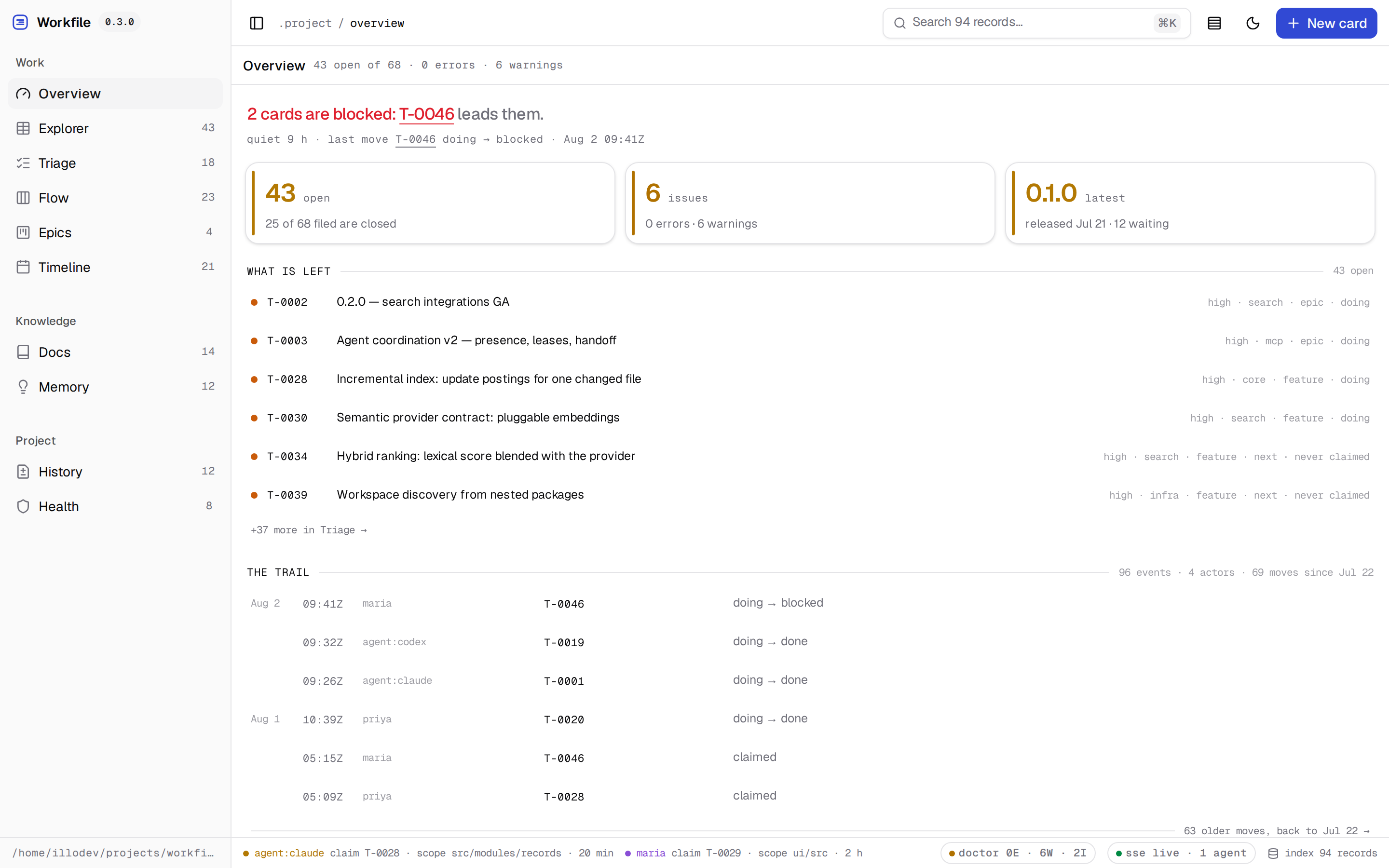
The Overview answers "how are we doing" in a sentence chosen worst-first — doctor
errors, hanging claims, colliding scopes, blocked cards, work in flight — above the
trail of every move the agents wrote while you were away.
| Explorer with the inspector open | Gantt timeline |
|---|---|
| !Explorer with a card selected — claim, scope and metadata in the inspector | !Gantt timeline: month scale, status-colored bars, dependency arcs and today marker |
| History with releases | Memory (dark theme) |
|---|---|
| !History: change fragments, the derived changelog and release preparation | !Memory: learnings, decisions and incidents as typed collections |
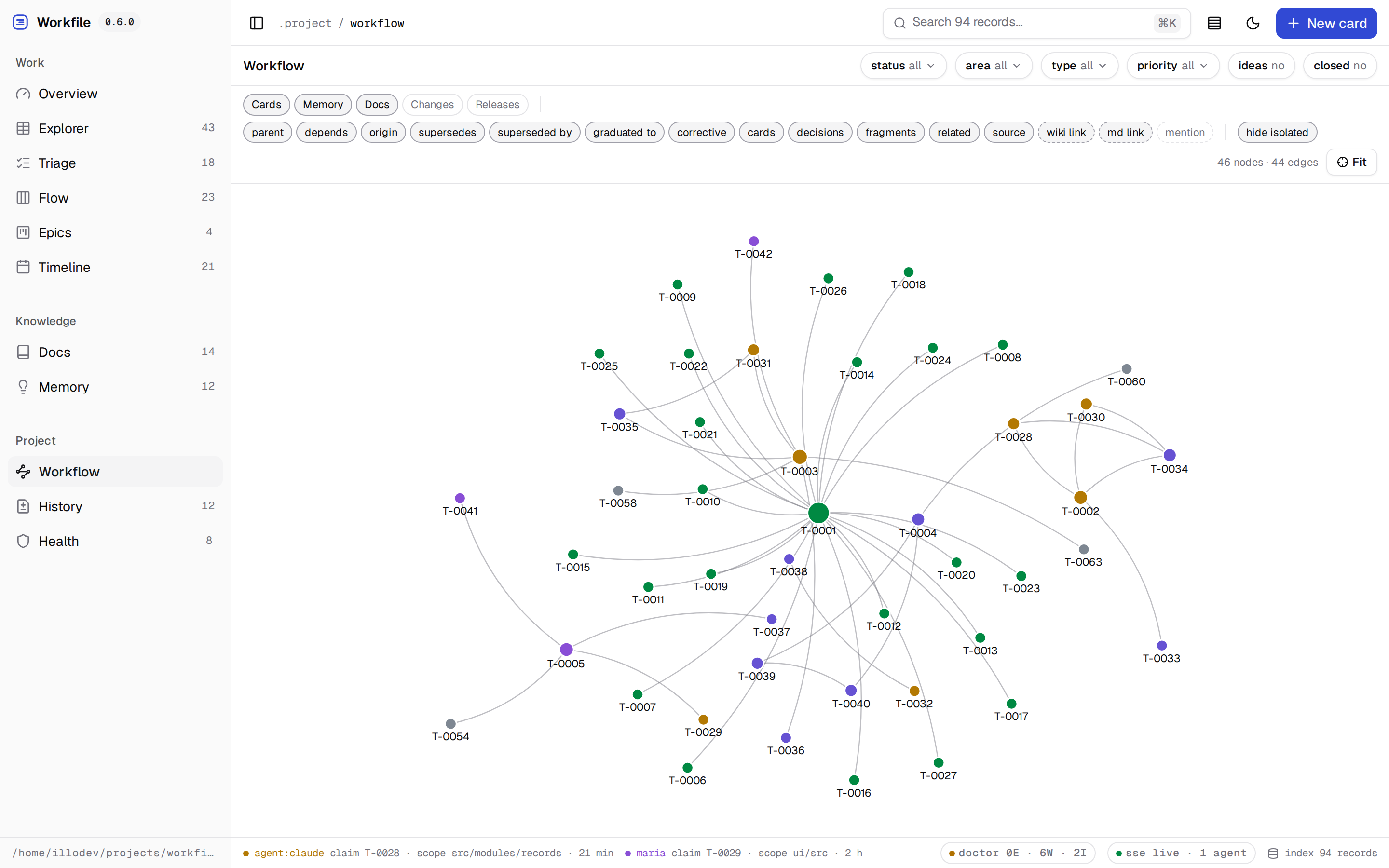
Workflow reads the collections into one graph instead of four lists: the first row of
toggles selects them, the second selects relation types. A relation declared in
frontmatter draws a solid edge and an ID written into a sentence a dashed one, because a
link in prose is a weaker claim than a field and should not look equally solid. Prose
scanning is off by default — it is 294 of this workspace's 742 edges.
Development
The repository is a pnpm workspace: the root is a private shell that holds the
version and delegator scripts, while everything published lives under
`packages/` — the core in `packages/workfile`, providers
like `packages/search-local` beside it, all shipping
in version lockstep. pnpm is pinned via the `packageManager` field
(`corepack enable` picks it up automatically):
pnpm install
pnpm run check
pnpm run smoke:package
node ./packages/workfile/dist/bin/workfile.js mcp inspect --root ./packages/workfile/test/fixtures/workspace --json
node ./packages/workfile/dist/bin/workfile.js schema --root ./packages/workfile/test/fixtures/workspace --json
node ./packages/workfile/dist/bin/workfile.js doctor --root ./packages/workfile/test/fixtures/workspace --json
node ./packages/workfile/dist/bin/workfile.js ui --root ./packages/workfile/test/fixtures/workspace
`pnpm run check` compiles the TypeScript runtime and declarations, checks the strict public
consumer contract, typechecks and bundles the React UI, and runs the complete test suite.
`pnpm run smoke:package` packs and installs the actual tarball in a temporary project before
exercising initialization, all four domains, MCP and the packaged UI — the smoke installs
with npm on purpose, exercising the npm consumer path.
`prepack` rebuilds the runtime declarations and UI so a future published package contains
only compiled runtime artifacts under `dist/`, never development TypeScript or a copied UI
source tree.
Current guarantees
- restricted frontmatter codec with byte-stable scalar/list round trips;
- preservation of unknown frontmatter fields and body bytes;
- atomic file replacement, per-record locks and collision-safe ID reservations;
- SHA-256 revision tokens and stale-write rejection;
- atomic Work claims, transitions, archive and reopen operations;
- managed Docs, History fragments and typed Memory mutations;
- release assembly with canonical fragment consumption and derived rendering;
- configurable repository-safe paths and runtime vocabularies;
- common normalization, search, references and backlinks across all domains;
- health diagnostics for Work, Docs, History and Memory;
- compiled ESM and `.d.ts` declarations for the public package and subpath exports;
- executable packaged CLI/MCP binaries verified from a clean tarball installation;
- versioned API plus a compatibility adapter for the original board.
Documents
- `docs/getting-started.md` — install, initialize and the
daily loop.
- `docs/cli.md` — complete CLI reference for every module.
- `docs/http-api.md` — endpoint reference, conventions and errors.
- `docs/mcp.md` — MCP server contract: tools, resources, prompts.
- `docs/security.md` — threat model of the local server,
request guard, asset handling and what is deliberately out of scope.
- `docs/ui.md` — the interface: its build, the zero-dependency
guarantee and how the shadcn migration coexists with the design system.
- `docs/SPEC.md` — the normative protocol specification: data model,
record contracts, revision semantics and the MCP integration contract.
Frequently asked questions
What is workfile?
workfile is Repository-native Work, Docs, History and durable Memory for humans and AI agents — Markdown as the source of truth, with a local UI, CLI and MCP server
How do I install workfile?
Open the GitHub repository and follow its README. Most MCP servers are added to your client's MCP config, then called by your agent.
Is workfile open source?
Yes — it is hosted on GitHub at https://github.com/illodev/workfile and has 2 stars.
Related MCP tools
 wigolo
The go-to web for your AI coding agent — local-first search, fetch, crawl & research over MCP. No API keys, no cloud, $0/query. Public beta.
 composio
Composio equips your AI agents & LLMs with 100+ high-quality integrations via function calling for the Model Context Protocol. Enhance AI assistants with powerf
 gemini-mcp-tool
MCP server that enables AI assistants to interact with Google Gemini CLI, leveraging Gemini's massive token window for large file analysis and codebase understanding
 superglue
superglue (YC W25) builds integrations and tools from natural language. Get production-grade tools for long tail and enterprise systems.
 mcp
mcpOfficial Microsoft Learn MCP Server and CLI tool – powering LLMs and AI agents with real-time, trusted Microsoft docs & code samples.
 memorix
Open-source cross-agent memory layer for coding agents via MCP. Compatible with Claude Code, Codex, Cursor, Windsurf, Gemini CLI, Antigravity, OpenClaw, Hermes Agent, Oh-my-Pi, Pi, Copilot, Kiro, OpenCode, and Trae.
Run your own MCP server? See who uses it and what to fix.
Measure it with TrackMCP