
inspector
Visual testing tool for MCP servers TypeScript-based implementation. Trusted by 7300+ developers. Trusted by 7300+ developers.
Documentation
MCP Inspector
A developer tool for inspecting Model Context Protocol (MCP) servers. It ships as a single package, `@modelcontextprotocol/inspector`, that provides three ways to inspect a server:
- Web — a Vite + React + Mantine single-page app with a Node backend.
- CLI — a scriptable command-line client for automation, CI, and fast agent feedback loops.
- TUI — an interactive terminal UI built with Ink.
All three run through one global `mcp-inspector` binary:
npx @modelcontextprotocol/inspector          # web UI (default)
npx @modelcontextprotocol/inspector --cli    # CLI
npx @modelcontextprotocol/inspector --tui    # TUI
> Upgrading from v1? Read the v1 → v2 migration guide — CLI flags, the new `--config` vs. `--catalog` split, the Node engine bump, and what no longer ships.
> Repo status. This is the v2 line of the Inspector. Active development happens on `v2/main` (the develop branch — all v2 PRs target it), which is merged into `main` at milestone releases; `main` is the default branch and holds the latest released v2, published to the npm `latest` tag. The legacy v1 line lives on `v1/main` — security fixes only, published straight from that branch to the npm `v1-latest` tag (`npx @modelcontextprotocol/inspector@v1-latest`). See `AGENTS.md` for branch/board conventions.
Project layout
v2 is not an npm workspace. Each client under `clients/*` keeps its own `package.json` and `node_modules`; shared code lives in `core/` and is consumed via a `@inspector/core` build-time alias (no `package.json` of its own). A single `npm install` at the root cascades installs into every client (see Setup).
inspector/
├── clients/
│   ├── web/          # Web client (Vite + React + Mantine). src/ = browser app; server/ = Node dev/prod backend
│   ├── cli/          # CLI client (tsup bundle, @inspector/core alias)
│   ├── tui/          # TUI client (Ink + React, tsup bundle)
│   └── launcher/     # Shared launcher — provides the `mcp-inspector` bin, dispatches to web/cli/tui
├── core/             # Shared code consumed via the `@inspector/core` alias (no package.json)
│   ├── auth/         # OAuth: providers, discovery, storage, endpoint overrides, mid-session recovery (browser/node/remote backends);
│   │                 #   plus per-server secret storage — the keychain/file/memory SecretStore
│   │                 #   implementations, the selection policy, and the descriptor the banner and UI report
│   ├── client/       # Install-level client config (`client.json`): browser-safe parse/validate + Node load/save, remote backend, secrets
│   ├── json/         # JSON + parameter/argument conversion utilities, the nullable-union
│   │                 #   schema collapse shared by the web and TUI form builders, and the
│   │                 #   tool-schema portability lint all three clients report from
│   ├── logging/      # Silent pino logger singleton
│   ├── mcp/          # InspectorClient runtime, state stores, transports, config import,
│   │                 #   and the RFC 6570 URI-template helpers the web form and TUI expand through
│   ├── node/         # Node-only shared helpers: version reader, hostUrl (host normalize/canonicalize + all-interfaces/loopback detection)
│   ├── react/        # React hooks over the state stores
│   └── storage/      # File I/O helpers for the OAuth persist backends
├── test-servers/     # Composable MCP test servers + fixtures used by integration tests
├── scripts/          # Root build/verify tooling (install cascade, smokes, verify-build-gate, verify-format-coverage, verify-dep-lockstep, pack:verify)
├── docs/             # Task-oriented guides (v1→v2 migration, server configuration, MCP App review, launcher/config plan)
├── specification/    # Design/build specifications
├── AGENTS.md         # Contribution rules for agents AND humans (see below)
└── README.md         # You are here
Each client has its own README with client-specific detail:
Task-oriented guides live under `docs/`:
- Migrating from v1 to v2 — the v1 → v2 map: CLI flag mapping, `--config` vs. `--catalog` semantics with before/after examples, the Node engine bump (`>=22.7.5` → `>=22.19.0`), env-var renames, and the sub-packages that no longer ship.
- MCP server configuration — which server(s) the Inspector connects to: `--catalog` vs. `--config`, ad-hoc targets, the `--` separator, the file format and its Inspector-specific per-server fields. Shared by all three clients; the cli and tui READMEs delegate their server-options sections to it.
- Reviewing an MCP App — the CLI-first → one-shot-web recipe for automated App-tool review: `--app-info` probe → deep-link navigate → rendered widget, plus OAuth handoff and proxy support.
- Launcher and config consolidation — why the launcher runs a client in-process rather than spawning it, and how the shared config processor fits in.
Setup
Requires Node `>=22.19.0`.
npm install # root install; postinstall cascades into every client- Fresh clone: run `npm install` at the repo root.
- After a pull that changes a client's dependencies: re-run `npm install` at the root to re-sync every client.
The cascade (`scripts/install-clients.mjs`) is dev-only — it exits early when the package is installed as a dependency, and the published tarball ships only each client's `build/`, so end users are unaffected. Set `INSPECTOR_SKIP_CLIENT_INSTALL=1` to skip it.
Where a dependency is declared. The MCP SDK packages (`@modelcontextprotocol/client`, `core`, `server`, `server-legacy`, `ext-apps`) live in the root `package.json` only — never in a client's. Node resolution walks up, so the root install is on every client's chain, and the root manifest is already what the published tarball resolves against. Declaring them per client installs a second copy that can drift from the root's, which is how two versions of `ext-apps` (and of the transitive v1 `@modelcontextprotocol/sdk`) ended up in the tree before #1970 — and a second copy of `client`/`core` is the failure `vitest.shared.mts` carries a `dedupe` workaround for. The same root-only placement holds for anything reached solely through root-owned code with no manifest of its own (`test-servers/src`, `core/`), and `vitest.shared.mts` aliases those to the repo root — `express` and `yaml`, both reached through `test-servers/src`, are the two today. Whether such a package is a `dependency` or a `devDependency` follows from who consumes it at runtime, not from where it is declared: anything `core/` imports at runtime must be a root `dependency`, because the client builds externalize npm packages and a published install resolves them from the root manifest, where devDependencies are absent. `express` is test-only and is a devDependency; `yaml` currently sits in `dependencies`. `vite` and `@vitejs/plugin-react` are root `dependencies` for the same reason, not by mistake — they look like build tooling, but `clients/web/server/start-vite-dev-server.ts` imports them at runtime for `mcp-inspector --web --dev`, and `clients/web/tsup.runner.config.ts` lists both as `external`, so a published install resolves them from the root manifest. Moving them to `devDependencies` would break `--web --dev` for consumers (and the on-demand `vite build` in `ensure-web-build.ts`) while passing every local check. It does mean they show up under `npm audit --omit=dev`, which is a feature: they really are in the production tree.
Running during development
For day-to-day web iteration, run Vite directly from the web client (fast HMR, no launcher build needed):
cd clients/web && npm run devThe launcher-driven scripts below run the built launcher, so build first (`npm run build`):
npm run web        # prod web launcher against clients/web/dist
npm run web:dev    # web launcher in --dev mode (Vite)
The `@inspector/core` shared package
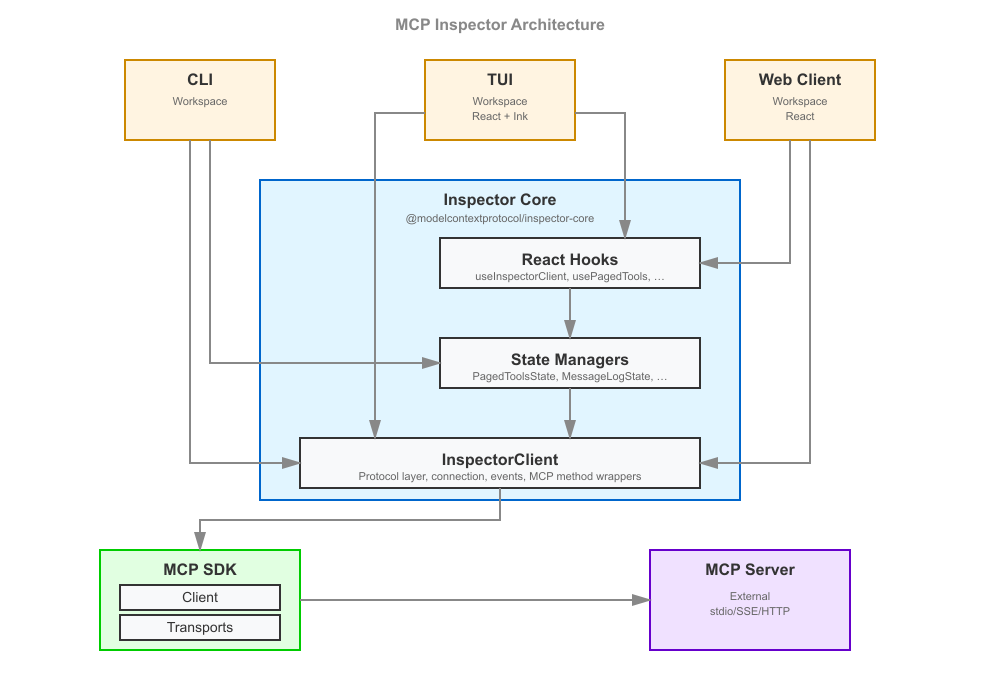
`core/` holds the logic shared by all three clients so that web, CLI, and TUI behave identically. Its entry point is the `InspectorClient` class (`core/mcp/`), which owns the connection to an MCP server, the request/response lifecycle, and a set of state stores; `core/react/` exposes React hooks over those stores that both the web and TUI (Ink) React trees consume. OAuth (`core/auth/`) is factored into isomorphic logic plus browser/node/remote backends so the same flows work in the browser, in Node, and against a remote backend.
`core/` intentionally has no `package.json` — it is not published on its own. Each client bundles it in via a `@inspector/core` alias:
- CLI / TUI: `esbuildOptions.alias` in their `tsup.config.ts` maps `@inspector/core` → the repo `core/` directory, and `noExternal: [/^@inspector\/core/]` inlines it into the bundle.
- Web: the same alias in `clients/web/vite.config.ts` for the browser app and the Node backend runner.
Publishing `core/` as its own package (e.g. for third parties to build on) is deliberately deferred — see issue #1636.
Web client: "dumb components" + Storybook
The v2 web client is built from presentational ("dumb") components — they accept data and callbacks as props and contain only display logic, with no direct data fetching or client state. State comes from the `@inspector/core` hooks, wired in near the top of the tree. This keeps components isolated, testable, and documentable.
That approach is what makes Storybook first-class here: every screen and element component has a `*.stories.tsx` file (96+ stories) that renders it against fixture props. Storybook play functions double as interaction tests, run headless in CI (`npm run ci:storybook`, Chromium via Playwright).
Styling follows a strict Mantine-first convention (theme variants and component props over CSS classes, `--inspector-*` CSS custom properties over raw color literals). The full rules live in `AGENTS.md` under React instructions — read them before touching web UI. Element components live in `clients/web/src/components/elements/`; theme variants in `clients/web/src/theme/`.
Test servers
`test-servers/` provides composable MCP servers used by the integration and smoke suites, so tests exercise a real server over a real transport instead of mocks. A server is assembled from presets (fixture factories in `test-servers/src/preset-registry.ts` — tools, resources, prompts, tasks, elicitation, sampling, OAuth, …) and can be driven two ways:
- In-process — import the factories (`createTestServerHttp`, `createEchoTool`, …) and run the server inside the test's event loop (used by the HTTP integration paths).
- As a subprocess — `test-servers/build/test-server-stdio.js` is spawned as a real stdio child (used by the CLI smoke and stdio integration tests).
Configure a server declaratively with a JSON config (see `test-servers/configs/*.json`) selecting presets, then load it via `--config`. Because the servers are spawned as real subprocesses, the build output must exist first:
npm run test-servers:build # (from clients/web) → tsc -p test-servers, emits test-servers/build/The Vite alias `@modelcontextprotocol/inspector-test-server` (in `clients/web/vite.config.ts`) points at `test-servers/build/index.js` so `getTestMcpServerPath()` resolves to a real `.js` path.
Serving the modern protocol era
A streamable-HTTP server can also serve the modern (2026-07-28) protocol era via the SDK's `createMcpHandler`:
- Set `transport.modern` in the JSON config — `true` for dual-era stateless serving, or `{ "legacy": "reject" }` for modern-only strict.
- Or pass `modern` on the `ServerConfig` for an in-process `createTestServerHttp`.
This is what lets an Inspector connection negotiating `protocolEra: "auto" | "modern"` reach the modern leg (populated `server/discover`, sessionless). See `test-servers/configs/modern-http.json`.
Showcase configs
Each config below is a ready-made server for exercising one feature by hand. Load one with `--config`, and unless noted, connect with Protocol Era = Modern.
| Config | Demonstrates | Issue |
|---|---|---|
| `mcp-app-http.json` (legacy era) | An MCP App (UI resource + app tool) in the Apps tab | #1859 |
| `app-elicitation-http.json` (legacy era) | An MCP App rendering a form elicitation | #1854 |
| `mcp-app-domain-http.json` (legacy era) | An MCP App asking for a dedicated origin (`_meta.ui.domain`) | #2056 |
| `modern-mrtr-http.json` | A single MRTR round-trip | — |
| `mrtr-showcase-http.json` | Every MRTR preset in one server | #1860 |
| `modern-network-http.json` | Network tab: `Mcp-*` headers + error taxonomy | #1628 |
| `xmcpheader-modern-http.json` | Tools tab: `x-mcp-header` mirroring and exclusions | #1632 |
| `pagination-http.json` | Page-by-page list fetching | #1721 |
| `structured-output-http.json` | Tools tab: a result's `structuredContent` section | #1908 |
| `duplicate-tool-names-http.json` | A `tools/list` that repeats a tool name | #1957 |
| `nullable-fields-http.json` | Tools tab: nullable (`anyOf` + `null`) arguments | #1928 |
| `unportable-schemas-http.json` (legacy era) | Tool schemas a real client rejects, flagged in all three clients | #1005 |
| `rfc6570-templates-http.json` | Resources tab: RFC 6570 resource-template expansion | #1919 |
| `advertised-extensions-http.json` | Tool registration gated on advertised extensions | #1739 |
| `oauth-custom-resource-metadata-http.json` (legacy era) | OAuth discovery driven by the challenge's `resource_metadata` | #2071 |
| `logging-{legacy,modern}-http.json` | Logging, both eras | #1629 |
| `subscriptions-{legacy,modern}-http.json` | Resource subscriptions, both eras | #1630 |
| `tasks-{legacy,modern}-http.json` | Tasks, both eras | #1631 |
MCP Apps
`mcp-app-http.json` serves the `mcp_app_demo` tool (`_meta.ui.resourceUri`) alongside its `mcp_app_demo_widget` UI resource, so the Apps tab has a real App to render. It is a plain streamable-HTTP server — connect with the default (legacy) protocol era, not Modern.
Open the Apps tab, select `mcp_app_demo`, give it a title and click Open App: the widget renders inside the sandbox iframe and exercises the host-side UI protocol surface — host-context render, `size-changed`, `ui/message`, and a log line into the App logs panel. Because the widget is served through the sandbox proxy page, this config is also what reproduces #1859 (a missing `clients/web/static/sandbox_proxy.html` surfaces here as a "Sandbox not loaded" message in place of the widget) — a failure that only ever appeared in an installed package, never in the repo.
For the scripted version of the same flow (`--app-info` probe → deep link → rendered widget), see Reviewing an MCP App.
An App's dedicated origin
`mcp-app-domain-http.json` serves the same `mcp_app_demo` widget as above, with one addition: its UI resource declares `_meta.ui.domain`. Plain streamable-HTTP; connect with the default (legacy) protocol era.
That field is how a server asks its host for a stable, dedicated origin. Without one, an App renders into a `srcdoc` frame sandboxed without `allow-same-origin`, so its document has an *opaque* origin and every request it makes carries `Origin: null` — which no CORS policy, OAuth callback, or API-key allowlist can admit (#2056).
Open the Apps tab and run `mcp_app_demo`. The widget renders identically to `mcp-app-http.json` — the difference is not visual. Inspect the inner iframe in devtools: on this server it is served from `http://127.0.0.1:6278/app-document/` and `location.origin` is that real origin, where on `mcp-app-http.json` it is `about:srcdoc` with an origin of `null`. (The host is whatever the Inspector bound to — `127.0.0.1` by default, an *address* rather than the name `localhost`, for the reason `resolve-bind-host.ts` documents.)
The spec makes `domain`'s format host-dependent, and the Inspector owns no domain infrastructure — so it reads any non-empty value as a *request* rather than an address, and answers with a real loopback origin of its own. See MCP App dedicated origins for the full contract, including what the one shared origin does and does not isolate, and how every failure falls back to the default render rather than blanking the app.
App-rendered form elicitations
`app-elicitation-http.json` serves `app_choose_option` alongside the `choose_option_app` UI resource (`ui://demo/choose-option.html`). The tool sends a completely ordinary form `elicitation/create` — the only thing added is `_meta.ui.resourceUri` naming that app. Plain streamable-HTTP; connect with the default (legacy) protocol era.
Run `app_choose_option` from the Tools tab. The server's app renders in a modal instead of the built-in elicitation form, and clicking Option A, Decline, or Cancel returns the standard `ElicitResult` straight to the server, which echoes it into the tool result.
App rendering is selected only when all four conditions hold (#1854, per ext-apps#733 / SEP-3118):
1. the client advertises `elicitation.form`;
2. the client advertises `extensions["io.modelcontextprotocol/ui"].mimeTypes` including `text/html;profile=mcp-app`;
3. both the client and the server advertise the nested `elicitation` setting on that same extension;
4. the request carries a valid absolute `ui://` URI in `_meta.ui.resourceUri`.
Only the web client advertises the nested client-side setting, and only because it has a sandbox renderer to back it; the CLI and TUI advertise the MIME type (they know what an App is) but never claim they can resolve an elicitation through one, so the same server falls back to their native prompts. Turning Server Settings → Advertised Extensions → MCP Apps UI off, or turning form elicitation off, removes the claim on web too.
Everything else falls back to the built-in elicitation form, by design: metadata that is absent or not an absolute `ui://` URI, a resource that fails to load, a sandbox or bridge that fails to initialize, an app that did not advertise `elicitation`, a request that times out, and any result that is not a valid `ElicitResult` for the requested schema. An explicit `decline` or `cancel` is not a fallback — it is a completed elicitation and goes back to the server as-is.
> The Inspector speaks the ext-apps#733 wire protocol but does not yet consume its helpers: the released `@modelcontextprotocol/ext-apps` (1.7.5) predates that PR. `core/mcp/appElicitation.ts` and `clients/web/src/components/elements/AppRenderer/requestAppElicitation.ts` mirror it exactly and are marked for deletion in favour of the package's own exports once a release containing it ships.
MRTR
`modern-mrtr-http.json` serves the `mrtr_confirm` tool (preset `mrtr_confirm`, `createMrtrTool`) over the modern leg. Its handler returns `inputRequired(...)` embedding a form elicitation, so invoking it produces a real round-trip: `input_required` → the client fulfils the embedded elicitation and retries with a new id → `complete`.
The Inspector drives MRTR manually (`inputRequired: { autoFulfill: false }`), so the embedded elicitation pauses at the pending-request modal (tagged "input_required") for you to answer, then the retry completes. Useful for eyeballing both that pending-request UX and the Protocol view's MRTR conversation grouping.
`mrtr-showcase-http.json` bundles every MRTR preset in one server:
| Preset | Behavior |
|---|---|
| `mrtr_confirm` | Single round |
| `mrtr_two_step` | Two elicitation rounds via `requestState` |
| `mrtr_sample` | Embedded sampling → the Sampling panel |
| `mrtr_roots` | Embedded `roots/list`, auto-answered silently from configured roots (no modal) |
| `mrtr_edge` | An `inputRequests`-only round, then a `requestState`-only round |
| `mrtr_empty` | Completes with an empty result — no `content`, no `structuredContent` |
| `mrtr_loop` | Never completes → trips the `MRTR_MAX_ROUNDS` bound |
Run `mrtr_empty` and answer its single elicitation: the Protocol tab groups the
exchange as an MRTR conversation ending COMPLETE, and the Results panel says
"Empty result — The tool call completed successfully and returned no content."
On the broken build that same result rendered as "No results yet", the panel's
pre-run placeholder (#1860) —
so a call the user had just watched succeed read as a call that never ran. An
empty `content` array with no `structuredContent` is a legal `CallToolResult`,
and the panel only ever mounts once a result exists, so the placeholder wording
could not be true there. (The neighbouring half of the same gap — a result whose
payload lives only in `structuredContent` — was closed by
#1908.)
> The legacy `collect_elicitation` preset calls `server.elicitInput`, which errors on the 2026-07-28 leg — server→client requests aren't allowed there. MRTR is the modern replacement.
Network tab — standardized headers and error taxonomy
`modern-network-http.json` covers SEP-2243 / SEP-2575. It serves a `get_weather` tool whose `city` argument carries an `x-mcp-header: "City"` annotation, so a modern client mirrors it to `Mcp-Param-City`.
It also serves four `trigger_*` tools that the modern leg's spec-error injector (`transport.modern.injectSpecErrors: true`) answers with a real HTTP status plus JSON-RPC error body:
| Tool | Response |
|---|---|
| `trigger_header_mismatch` | `400` / `-32020` |
| `trigger_missing_capability` | `400` / `-32021` |
| `trigger_unsupported_version` | `400` / `-32022` (with `data.supported`) |
| `trigger_method_not_found` | `404` / `-32601` |
Open the Network tab to see the mirrored `Mcp-*` headers highlighted, sentinel values decoded, and each error rendered distinctly.
> **`Mcp-Param-*` mirroring is built by the Inspector, not the SDK.** The SDK only mirrors inside `client.callTool()`, and skips it in the browser (`detectProbeEnvironment() !== "browser"`). The Inspector routes `tools/call` through `client.request()` to drive MRTR manually, so it builds the mirrored headers itself (#1846) — on every client, web included, since the web client's upstream request is issued by the Node backend rather than the browser. So `get_weather` is callable from web, CLI, and TUI alike, in both the plain and "Run as task" forms.
`x-mcp-header` in the Tools tab
`xmcpheader-modern-http.json` serves:
- `echo` — plain tool.
- `get_weather` — a valid `x-mcp-header: "City"` annotation on its `city` argument.
- `invalid_header_tool` — an annotation using the header name `"Bad Header"`. The space makes it an invalid RFC 9110 token, so the whole tool definition is invalid.
- `trigger_invalid_params` — answered with a real `-32602 Invalid params` error whose message is _not_ about a missing tool.
Open the Tools tab: `get_weather`'s detail panel shows a "Mirrored request headers (SEP-2243)" section (`city → Mcp-Param-City`), and `invalid_header_tool` appears struck-through under an "Excluded (SEP-2243)" divider with the reason on hover. A conforming Streamable HTTP client MUST drop it from `tools/list`; the Inspector surfaces _why_.
Under SDK v2 a `tools/call` rejecting with `-32602` renders as a distinct error panel rather than an `isError` result — headed "Unknown Tool" when the message names a missing tool, or "Invalid Parameters" otherwise (run `trigger_invalid_params`).
Page-by-page fetching
`pagination-http.json` serves 12 tools, 12 resources, and 12 prompts (presets `numbered_tools` / `numbered_resources` / `numbered_prompts`, `count: 12`) with a `maxPageSize` of 4 each, so every list paginates into three pages.
Turn on "Fetch Lists One Page at a Time" (Server Settings — the `paginatedLists` setting, or the Paginated switch in a list sidebar) and the lists load page 1 only (4 items) with a Load next page control and an _N pages loaded_ status. Each click fetches the next 4 and appends them; Refresh resets to page 1. With the switch off (the default), the same lists auto-aggregate all three pages on connect.
Structured output
`structured-output-http.json` serves `list_items` (nested `structuredContent` — objects inside arrays inside an object, the shape from #1908), `get_temp` (a flat three-key payload), and `echo` (no `outputSchema` at all). It is a plain streamable-HTTP server — connect with the default (legacy) protocol era.
Run `list_items` from the Tools tab: the result panel shows the `content[]` text summary ("Found 2 items.") and a collapsible Structured Output section rendering the schema-validated payload as pretty-printed, copyable JSON. That section is what v2 was dropping — a tool declaring an `outputSchema` returns its real data there, and the text block usually only summarizes it. Run `echo` to confirm the section is absent when a result carries no `structuredContent`.
Duplicate tool names
`duplicate-tool-names-http.json` serves `get_weather`, `get_temp`, `echo`, and `add`, then repeats `get_weather` and `echo` at the end of `tools/list` with the same `name` and a `(duplicate)` title (`duplicateToolNames`). No preset can produce this shape — the SDK's `registerTool` rejects a repeated name — but a real server can and does, and the Inspector has to render it faithfully.
Connect (default legacy era), open the Tools tab, and type `get` into Search tools: the list must narrow to exactly the three `get_*` rows. On the broken build it kept a stale `echo` row, because the sidebar keyed rows by `tool.name` alone and the colliding keys orphaned a child during reconciliation (#1957).
The duplicated copies are appended rather than placed beside their twin on purpose. React matches a leading run of same-key children first, so a head-adjacent duplicate happens to line up and the defect hides; separating the pair is what makes it observable — and it is also the realistic shape, two tool sources concatenated.
Nullable arguments
`nullable-fields-http.json` serves `record_shipment`, whose four arguments are each declared with Zod's `.nullish()` — "optional and explicitly nullable". That compiles to `anyOf: [, { "type": "null" }]`, so the real type (and, for the enum, its `enum` list) sits on a branch rather than at the top level. `get_temp` sits alongside it with a plain, non-nullable `units` enum for comparison. Plain streamable-HTTP — connect with the default (legacy) protocol era.
Open the Tools tab and select `record_shipment`: `direction` must render as a Select (`envio` / `recebimento`) with a clear button that sets it back to `null`, `reference` as a text input, `quantity` as a number input, and `express` as a checkbox. On the broken build every one of them fell through to the raw-JSON textarea, which re-escaped its own contents on each keystroke until the value was unusable (#1928). The tool echoes the arguments it received, so the result panel shows exactly what was sent.
The TUI had the same gap and is worth checking against the same server (`--tui`, then test `record_shipment`): `direction` is a select, `quantity` an integer field, `express` a boolean. Both clients now share one collapse step — `normalizeNullableUnion` in `core/json/nullableUnion.ts` — precisely so they cannot drift on which schemas they can render.
Unportable tool schemas
`unportable-schemas-http.json` serves four tools, three of whose advertised
schemas carry constructs that are legal JSON Schema and are refused or
mishandled by real MCP clients:
| Tool | What it carries |
|---|---|
| `get_temp` | `outputSchema.properties.data` as a bare `true` — what Go's `jsonschema` package emits for `interface{}`, the case reported in #1005 |
| `echo` | an array-form `"type": ["null","boolean"]`, and an `opts` property that constrains nothing |
| `add` | a property pointing at a remote `$ref` |
| `get_weather` | nothing — left clean, so a flagged tool sits beside an unflagged one |
Plain streamable-HTTP — connect with the default (legacy) protocol era.
Every tool here is still runnable: the override replaces only the
*advertised* schema, and the flagship bare-`true` rides `get_temp` (which
returns structured content) rather than `echo` — see the ⚠️ caveat at the end
of this section for why that placement matters.
The Inspector is where a server author looks first, so a construct that will
fail downstream is named here rather than passed through silently. All three
clients report the same verdict from
`core/json/schemaLint.ts`, each with the room it
has:
mcp-inspector --cli http://127.0.0.1:6603/mcp --method tools/list --strict # exits 6- CLI — `--strict` prints the full report (path, issue, suggested fix) on
stderr and exits `6` on an error-severity finding; without it, one summary
line. See Schema portability.
- TUI — the tools list marks `get_temp` with a red `!` and `echo`/`add`
with a yellow `?`; the detail pane lists each finding under **Schema
Portability**.
- Web — the Tools sidebar row carries the same flag as a hover-labelled
icon, and selecting the tool shows a Schema portability section above the
argument form.
This is deliberately not a JSON Schema validator. A census of 617 public
servers (14,804 tool schemas) reported on that issue found 0 that fail the
SDK's own `ListToolsResultSchema.safeParse`, so a conformance check would
report nothing on essentially every real server. What bites is the narrower
subset each consumer accepts, and each rule here is a construct known to be
refused or degraded by a shipping client. The schemas are supplied through the
test server's `rawToolSchemas` override, because the Zod-built presets cannot
express any of them — which is the same reason a real server hits this only
when its schemas come from another generator.
⚠️ **If you add an `outputSchema` override of your own, put it on a tool that
returns structured content.** A conforming client validates a tool result
against the advertised output schema, so an override on a preset that returns
none makes every call to it fail with "declares an output schema but returned
no structured content" — a confusing thing to hit from a fixture. That is why
the bare `true` rides `get_temp` here and not `echo`.
RFC 6570 resource templates
`rfc6570-templates-http.json` serves two resource templates straight out of #1919 — `events_by_topic` (`foobar://events/{topic}`) and `events_by_query` (`foobar://events{?topic}`) — each echoing the URI it was matched against, plus a plain `foobar://events` resource (see below). Plain streamable-HTTP; connect with the default (legacy) protocol era.
Open the Resources tab and pick events_by_topic, then enter `foo/bar`. The request must go out as `foobar://events/foo%2Fbar`, and the result echoes back the URI the server matched. On the broken build the value was spliced in raw, so the slash created a second path segment and the SDK's matcher answered `-32602 Resource not found: foobar://events/foo/bar` — the exact failure in the issue. The same holds for `?`, `#`, `%`, spaces, and non-ASCII text.
events_by_query is the half that was invisible: the old `/\{(\w+)\}/g` scan could not see an expression carrying an operator, so no `topic` input was rendered at all. It now appears, marked Optional — RFC 6570 drops the whole expression when the variable is undefined, so reading with the field blank requests `foobar://events`, and filling it in requests `foobar://events?topic=foo%2Fbar`. The URI preview beside the title shows the partially-expanded form as you type, leaving unfilled expressions standing as written.
> The plain `foobar://events` resource is registered deliberately, not as filler. The SDK's `UriTemplate.match()` compiles `{?topic}` to a required `\?topic=([^&]+)`, so a template alone cannot serve the blank read — `match("foobar://events")` returns `null`. A real server exposes the unfiltered collection as its own resource; the showcase does the same so that step actually resolves.
The web client and the TUI expand through one shared helper, `core/mcp/uriTemplate.ts` — the web Resources form directly, the TUI via `InspectorClient.readResourceFromTemplate` — and both derive their form fields from its parser too, which is the half that makes the sharing real: a form submits values under the names it rendered, so a parser that mangles a name silently drops the value at expansion time. (The CLI is not a consumer: it has no template form, and its `resources/read` passes the already-expanded `--uri` straight through.)
The SDK's `UriTemplate` is still used, but only to _validate_ a template (constructing it is what rejects an unclosed expression). Its expander is not, because it is incomplete in five ways — each measured against the pinned SDK, not inferred:
| Shape | SDK behavior |
|---|---|
| `{a,b}` | raw-joins the values — no encoding, operator prefix dropped |
| `{;id}` | `;` is missing from its operator list, so the variable parses as `;id` |
| `{id:3}` | the prefix modifier is folded into the name, giving `id:3` |
| `{+v}` / `{#v}` | `encodeURI` mangles reserved `[`/`]` (`[::1]` → `%5B::1%5D`) and double-encodes pct-triplets (`%2F` → `%252F`) |
| `{v}` | `encodeURIComponent` leaves the sub-delims `!'()*` bare, which RFC 6570 requires encoded |
The `;` and `:3` rows are the ones a user sees directly: on the SDK's parse the form renders fields literally labelled `;id` and `id:3`. The `+`/`#` row is silent corruption rather than over-escaping — an IPv6 literal or an already-encoded path arrives at the server altered.
A template that cannot be expanded at all — an out-of-grammar modifier (`{id:abc}`), or an expression declaring no variable (`{}`, `{a,}`, `{?}`) — withholds the read rather than sending something. Pick events_malformed (`foobar://events/{topic:abc}`) to see it: Read Resource is disabled, the reason is printed under the form, and the preview shows the template as the server declared it. The alternative is worse than it looks: `x://{}` would otherwise expand to `x://` with no inputs rendered, so the form's "everything required is filled" check passes vacuously and it reads a URI that is not the template the server published.
Literals are pct-encoded on expansion too (RFC 6570 §3.1): `café/{var}` sends `caf%C3%A9/value`, not raw UTF-8 in the path — something the SDK's expander does not do either. And the _names_ a template may use are RFC 6570's `varchar` plus a labelled tolerance for `-` and `~`: the conformance suite rejects `{default-graph-uri}`, but real servers publish such names and the SDK's matcher round-trips them, so the Inspector expands them and marks the variable `conforming: false` rather than refusing a resource that demonstrably works.
An undefined variable is what omits its expression — a variable defined as the empty string expands (`x{?q}` gives `x?q=`, `x{;q}` gives `x;q`, per RFC 6570 §3.2.7). The expander honors that distinction, so a caller such as `readResourceFromTemplate` can request either URI. Collapsing the two is a _form_ concern, not a template one: both clients seed every declared variable with `""` and a text input cannot express "defined but empty", so each form drops its blanks (`definedValues`) on the way in.
Requiredness is a property of the expression, not the variable: RFC 6570 drops undefined names from a multi-name expression, so `{a,b}` with only `a` filled is expandable and a form must not block it. `requiredGroups` returns one entry per non-omittable expression and `hasRequiredValues` asks that each be satisfied by any one of its names — which no per-variable flag can express once a name recurs across expressions (`{a,b}{a,c}` is satisfied by filling `b` and `c`).
Advertised extensions
`advertised-extensions-http.json` serves `echo` (always) and a `get_weather` tool gated on the `io.modelcontextprotocol/tasks` extension (`extensionGatedTools`): the tool is registered but starts disabled, and the server enables it on `notifications/initialized` only when the client declared that extension in its `capabilities.extensions`.
1. Connect — the Inspector advertises the Tasks extension by default, so the Tools list shows both `echo` and `get_weather`.
2. Open Server Settings → Advertised Extensions, uncheck Tasks (io.modelcontextprotocol/tasks), and reconnect.
3. The client now advertises no extensions, the server never enables `get_weather`, and the Tools list shows only `echo`.
This is the debugging knob for a server legitimately changing tool registration based on what the client advertises. Legacy stateful leg only — the modern per-request leg has no persistent `oninitialized`.
OAuth `resource_metadata` at a non-default path
`oauth-custom-resource-metadata-http.json` is an OAuth-protected server (combined AS + resource, DCR enabled) that serves its RFC 9728 protected-resource metadata document only from `/custom/protected-resource`, and advertises it on every 401:
HTTP/1.1 401 Unauthorized
WWW-Authenticate: Bearer resource_metadata="http://127.0.0.1:8082/custom/protected-resource"
The default `/.well-known/oauth-protected-resource` route is deliberately left unserved, so a client that ignores the advertised URL cannot discover the document at all. Plain streamable-HTTP — connect with the default (legacy) protocol era.
Add the server, click Connect, and watch the Inspector's first protected-resource metadata request in the Network tab: it must go to `/custom/protected-resource`. On the broken build the challenge's `resource_metadata` was parsed and then dropped before the SDK's `auth()` ever saw it (#2071), so discovery probed locations derived from the MCP server URL, 404'd, and authorization failed for any server that puts the document somewhere other than the well-known path.
The same server is worth running against `--cli` / `--tui`, which reach it by a different route: with no stored token in the legacy era the Inspector connects with no auth provider (so the SDK cannot open a browser before the callback server is listening), the 401 surfaces as the SDK's headerless `UnauthorizedError`, and the client calls `authenticate()` with no challenge in hand. The transport therefore *observes* every 401/403 passively, so the advertised URL is still available on that path.
The value now rides the normalized `AuthChallenge` as a string — it has to be serializable, because the web client's challenge crosses the remote-backend boundary as JSON — and is converted to a `URL` at the OAuth boundary, where it is handed to `auth()` as `resourceMetadataUrl` and to the CIMD pre-registration probe, which runs *before* `auth()` and would otherwise do its own default-location discovery. A malformed value is ignored rather than surfaced, matching the SDK's own `WWW-Authenticate` parser: discovery falls back to the default locations instead of failing the whole authorization on a bad header. The callback leg needs nothing extra — SDK `auth()` persists the URL in its discovery state, so it survives both the web full-page redirect and the CLI/TUI loopback callback.
Logging, both eras
`logging-legacy-http.json` and `logging-modern-http.json` both serve `logging: true` plus a `send_notification` tool that emits a `notifications/message` at a chosen level. The legacy one is a plain streamable-HTTP server; the modern one sets `transport.modern: true`.
- Legacy — the Logs tab gives a session-scoped Set Active Level selector + Set button. Calling `send_notification` streams the log into the panel.
- Modern — the same tab instead shows Log Level per Request. Pick a level to opt in and the client stamps `_meta["io.modelcontextprotocol/logLevel"]` on every subsequent request (verify in the Network tab's request body). Calling `send_notification` streams the log over the request's SSE response. Set it back to Off and the same call is silently gated — the request omits the `logLevel` key, so the log never arrives.
That gating is faithful to the spec ("a server MUST NOT emit `notifications/message` for a request that didn't opt in") because `send_notification` emits through the SDK's request-scoped, threshold-aware `extra.log` (`ctx.mcpReq.log`). On the modern leg it reads the per-request `logLevel` opt-in from the request envelope and drops the message when the client didn't opt in or the level is below the requested severity; on legacy it honors the session level from `logging/setLevel`. Because it emits through the request's `notify`, the modern response upgrades to SSE and the log rides the originating request's stream.
Resource subscriptions, both eras
`subscriptions-legacy-http.json` and `subscriptions-modern-http.json` both serve three `numbered_resources` with `subscriptions: true`. The legacy one also serves an `update_resource` tool; the modern one sets `transport.modern: true`.
- Legacy — open a resource in the Resources tab and click Subscribe. The client sends `resources/subscribe` and the Subscriptions section lists the URI with no stream chrome. Call `update_resource` with that URI and the server updates the content and emits `notifications/resources/updated`, stamping the subscribed tile's last-updated time.
- Modern — the same Subscribe instead sends `subscriptions/listen` (its filter carries `resourceSubscriptions` plus the `resourcesListChanged` opt-in) and resolves on `notifications/subscriptions/acknowledged`. The Subscriptions section then shows a stream-status badge (`Connecting…` → `Listening`) in its header, and reconnects by re-listing if the long-lived stream drops.
The modern config deliberately omits `update_resource`. The SDK's modern leg is stateless/per-request (`createMcpHandler(() => createMcpServer(config))`), so the tool would run against a throwaway server instance — the content change wouldn't persist for the next `resources/read`, and its `resources/updated` wouldn't reach the separate listen stream. More confusing than useful.
So the live update-notification round-trip is demonstrated on the legacy (stateful-session) server, and the modern server is for the subscribe/listen/badge behavior. The Inspector's _receive_ path is era-transparent, so a real stateful modern server that routes `resources/updated` onto the listen stream drives the subscribed tile the same way.
Tasks, both eras
Legacy (`tasks-legacy-http.json`) advertises `capabilities.tasks` (`tasks: { list, cancel }`) with the `simple_task` / `progress_task` / `elicitation_task` presets. Run one of those tools with Run as task on, and the Tasks tab lists it (populated via `tasks/list`), polls `tasks/get`, fetches the payload with the blocking `tasks/result`, and cancels with `tasks/cancel`.
Modern (`tasks-modern-http.json`) sets `transport.modern: true` and `tasksExtension: true`, advertising the `io.modelcontextprotocol/tasks` extension (SEP-2663) and serving `modern_task` / `modern_input_task`. The Tasks tab is gated on the negotiated extension, not `capabilities.tasks`.
- Run `modern_task` as a task — the `tools/call` returns a `CreateTaskResult` (`resultType: "task"`, visible in the Protocol/Network tabs), the client polls `tasks/get` (no `tasks/list`), and the completed task inlines its result (no blocking `tasks/result`).
- Run `modern_input_task` — the task moves to `input_required`, surfacing an embedded elicitation through the pending-request modal. Answering it sends `tasks/update` with the `inputResponses`, and the next poll completes.
SDK v2 removed all tasks support and era-gates the `tasks/*` spec methods out of the modern era on both sides. So the Inspector drives the extension itself — the `resultType: "task"` frame is rewritten at the transport into a `CallToolResult` carrying the handle, and `tasks/get` / `update` / `cancel` ride a raw-wire request channel with the full modern envelope. The test server serves `tasks/*` from an Express interceptor ahead of the SDK handler, since the SDK's modern leg would answer them `-32601`.
The Tasks tab's Refresh re-polls the handles already known to the client — modern has no server-side task list.
Building
npm run build # builds all clients: web → cli → tui → launcherIndividual clients: `build:web`, `build:cli`, `build:tui`, `build:launcher`. The web build produces both the browser SPA (`clients/web/dist`, Vite) and the Node prod-server runner (`clients/web/build`, tsup).
Testing & the quality gate
Each client self-validates from its own folder; the root scripts chain them. There is no aggregate root `test` script — use `validate` (fast) or `coverage` (the gate).
| Script | What it does |
|---|---|
| `npm run validate` | Runs the three durable guards first — `verify:format-coverage` (every tracked source file is format-gated), `verify:typecheck-coverage` (every one lands in a tsconfig project), `verify:dep-lockstep` (no dependency reaching one `tsc` program from two installs skews across them) — then `test:scripts` (the guards' own parser unit tests), then `validate:core` (the shared `core/` `format:check` + `lint` gate), then per client: `format:check` + `lint` + `typecheck` (cli/tui/launcher; web typechecks via `tsc -b` inside its `build`) + `build` + fast unit tests. The quick inner-loop check. |
| `npm run coverage` | The per-file ≥90% gate (lines/statements/functions/branches) under v8 instrumentation, per client. CI-enforced. For web this also runs the integration project and covers the shared `core/` runtime (including `core/json` and `core/client`). |
| `npm run smoke` | End-to-end smokes through the built launcher (`--help` dispatch + prod cli/tui/web), plus three headless-Chromium smokes: a boot smoke that runs the prod web bundle and asserts a clean first render (no uncaught error — sync exception or unhandled rejection, how a Node built-in reaching the browser bundle manifests), and an MCP Apps smoke (`smoke:web:app`) that drives connect → open app → `data-app-status="ready"` against a composable App server, covering the sandbox proxy and UI-protocol bridge, and an app-rendered elicitation smoke (`smoke:web:elicit`) that drives one end to end — call the tool, answer inside the sandboxed app, see the app's `ElicitResult` reach the server — and then the same tool against a server that never advertised the capability, which must fall back to the native elicitation form. |
| `npm run verify:build-gate` | Runs a real `vite build` with a Node built-in forced into the browser graph and asserts the build fails via the #1769 gate (which turns Vite's browser-externalization warning into a hard error). Guards against the warning phrasing drifting in a Vite bump and silently disabling the gate. Part of `npm run ci`. |
| `npm run verify:bundle-externals` | Guards the must-not-bundle invariant (#2067): for each tsup-bundled client it reads the built `build/` output and fails if any package that must stay external was inlined anyway. Candidates are the union of the client's own `external` array and the root manifest's `dependencies` — the latter because #2067 was a *missing* `external` entry, which a self-referential check would have passed. Detection is via esbuild's `// ` module banners, so it covers both shapes — a separate `-HASH.js` chunk (what a dynamically `import()`ed CommonJS package produces) and a statically-imported package folded straight into `index.js`, which emits no chunk at all. A build with no banners fails as such rather than passing clean, so enabling `minify` cannot silently retire the check. `undici` was declared only in the root and `clients/cli` manifests, and tsup auto-externalizes only what the _nearest_ manifest declares, so the web and TUI bundles inlined 1.05MB of it — and CommonJS inlined into an ESM bundle throws `Dynamic require of "assert" is not supported` on first use, from a specifier no user-side install can satisfy. Reads the output rather than the config because those two disagreed for four releases. Part of `npm run ci`. |
| `npm run verify:format-coverage` | Parses the `format:check` globs out of every `package.json` (only those reachable from `validate`), enumerates all tracked source files, and fails listing any not covered by a glob — the durable guard for the "every first-party source file is format-gated" invariant (#1792). Runs first in `validate`. |
| `npm run test:scripts` | Table-driven unit tests (`node --test`) for the guard's own pure parsers (`scripts/lib/npm-scripts.mjs`, `scripts/lib/tsc-program.mjs` + the exported helpers of `verify-typecheck-coverage.mjs` and `verify-dep-lockstep.mjs`), one case per rule they encode, plus two suites over shared `scripts/lib` helpers that no smoke can check itself: `resolve-node-bin.test.mjs` — the cross-platform bin resolver (#1939), pinned against the real `bin`/`exports` shapes of the packages the scripts actually spawn — and `announced-child.test.mjs` — the spawn/readiness ownership helper (#2000), which drives real `node -e` children to prove a child that never announces is still published to the caller before the timeout throws, and so is reachable by teardown rather than orphaned. Two more do the same: `mcp-app-flow.test.mjs` covers the shared MCP Apps flow (#2003) — the deep link's two CSRF gates and `appArgs` encoding, plus `driveAppFlow`'s failure branches against a stand-in page, all of which are dead code from the happy-path smokes' point of view and would otherwise surface only as opaque timeouts; and `ensure-test-servers.test.mjs` pins the #2111 invariant — that `test-servers/build` is rebuilt even when it already exists — which no smoke can assert about itself, since one driving a stale fixture reports a product failure rather than a staleness one. Runs in `validate` — and `verify:typecheck-coverage` guards *this* gate in turn (reachable from `validate`, non-empty test set, every test file matched by the `test:scripts` glob), since `node --test` silently skips a file its glob misses and still exits 0. |
| `npm run verify:typecheck-coverage` | The typecheck-coverage analog of the above (#1791): for each Node client (auto-discovered from disk — enrolled via its `typecheck` script's projects, or for a `tsc -b` client like `clients/web` via its `tsconfig.json` `references`) it runs those projects with `tsc --listFilesOnly`, unions them, and fails listing any tracked `.ts`/`.tsx`/`.mts`/`.cts` under the client that lands in no project (so a new top-level config/helper can't silently go untypechecked). It also requires, deny-by-default, the first-party TS no client owns (`test-servers/src`, the root `vitest.shared.mts`, all of `core/`, and any new top-level location) to land in some client project's tsc pass — so a `core` `*.tsx` web's projects don't reach is caught too. Also asserts the gate is wired (each client's typecheck pass — its `typecheck` script, or web's `tsc -b` — is reachable from its `validate`, and the root chain runs each client's `validate`). Runs in `validate`. |
| `npm run verify:dep-lockstep` | Guards the "one version per install-crossing dependency" invariant (#1896). v2 is not a workspace, so a client's test project compiles the shared first-party TypeScript — `core/`, `test-servers/src`, and the root-owned `vitest.shared.mts`, all of which resolve their dependencies from the root install — alongside the client's own sources, putting the same package in one `tsc` program twice. At the same version that's harmless; skewed, TypeScript must relate two structurally-distinct copies of every type, which for a recursive-generic surface is exponential (zod `4.3.6` vs `4.4.3` exhausted the 4GB tsc heap in `clients/web`). Derives its candidate set from what actually enters each program (#1965) — every client tsconfig project listed with `tsc --listFilesOnly` via the shared `scripts/lib/tsc-program.mjs`, each resolved `node_modules` file mapped to its owning install, keeping the packages that reach one program from two installs (a package whose declarations arrive only through another package's `.d.ts`, as `@modelcontextprotocol/sdk`'s do, is invisible to a scan of first-party imports). Prices each copy from the lockfile entry for the exact install path the program resolved, compares only the installs that met in one program, and fails deny-by-default on any disagreement not in the annotated `TOLERATED_SKEW` allowlist — empty today — with an allowlisted package tolerated only *within a major version*. Runs in `validate`. |
| `npm run ci` | Mandatory pre-push command. `validate` → `coverage` → `verify:build-gate` → `verify:bundle-externals` → `smoke` → Storybook. A true superset of GitHub CI. |
| `npm run pack:verify` | Publish smoke — see Publishing. |
Per-client scripts exist too (`validate:web`, `coverage:cli`, `smoke:tui`, …), plus root `validate:core` / `format:core` for the shared `core/` package, `format:scripts` for the root `scripts/` tooling, and `format:shared` / `lint:shared` for the root "shared" surface (`test-servers/src/**`, `vitest.shared.mts`, the root `eslint.config.js`). Run `npm run format` before committing — the root `format` fixes `core/`, the root `scripts/`, the shared surface, and every client; `validate` runs the non-fixing `format:check` and fails CI on any unformatted file.
Linting is type-aware. All five ESLint scopes (`clients/{web,cli,tui,launcher}` plus the root `core/` + shared gate) enable `@typescript-eslint/no-floating-promises` at `error`, so a promise that is neither awaited, returned, `.catch(…)`-terminated, nor explicitly discarded with `void` fails `lint` — and therefore `validate` (#1959). The rule needs type information, so each scope's config names a parser project; the root scope's is `tsconfig.lint.json`, a lint-only project covering `core/`, `test-servers/src/`, and `vitest.shared.mts`, which have no tsconfig of their own. It emits nothing and changes no typecheck — but a new first-party TS location added to the root lint scope must be added to its `include`. See TypeScript instructions in `AGENTS.md` for when `void` is acceptable.
And lint has no warning tier. Every `lint` script runs with `--max-warnings 0`, so a warning fails `validate` exactly as an error does (#2085) — a `warn`-level `react-hooks/exhaustive-deps` finding had otherwise let a stale-closure bug pass the mandatory pre-push gate and reach review. Fix the finding rather than silencing it; if a rule genuinely must be waived, use its inline disable comment with a one-line justification.
For the full testing rules — the ≥90% per-file gate, where test files live, the unit vs. integration vs. storybook projects, and the `v8 ignore` policy — see `AGENTS.md`.
Publishing
The root `@modelcontextprotocol/inspector` package ships as one tarball with a single version number — no separate `-web` / `-cli` / `-tui` / `-core` packages. `npm run build` builds every client, then `prepack` runs before `npm publish`. Runtime dependencies are declared on the root `package.json`; client builds bundle `@inspector/core` and externalize npm packages resolved from the root install.
What ships, and the packaging invariants
The root `package.json` `"files"` allowlist is the source of truth for the tarball. A few non-obvious entries exist because they are read at runtime or were silently dropped by npm's packlist — do not remove them without re-running `npm run pack:verify`:
- No source maps. The client bundlers set `sourcemap: false` (`clients/{cli,tui}/tsup.config.ts`, `clients/web/tsup.runner.config.ts`); Vite and the launcher's `tsc` already emit none. Maps are ~half the unpacked size and aren't needed at runtime — debug via `npm run dev` on the source.
- `clients/web/build` ships via `clients/web/.npmignore`. `clients/web/.gitignore` lists `build/`, and npm's packlist honors that nested `.gitignore` over the root `"files"` allowlist — so the prod web-server runner was silently missing from the tarball while `clients/web/dist` slipped through (its `.gitignore` only lists `dist-ssr`). `clients/web/.npmignore` overrides the `.gitignore` for publishing so both `build/` (runner) and `dist/` (SPA) ship. The other clients don't need this — none ship a nested `.gitignore`.
- `clients/web/static` ships the MCP Apps sandbox proxy. `clients/web/static/sandbox_proxy.html` is a committed source file (not a build artifact), read from disk at runtime by `clients/web/server/sandbox-controller.ts` as `/../static/sandbox_proxy.html`. It was missing from the root `"files"` allowlist entirely, so every published build failed the Apps tab with "Sandbox not loaded" (#1859) while working fine in the repo. Because the path is resolved _relative to_ `clients/web/build`, the directory must ship at that exact location — `pack:verify` asserts the tarball entry, the installed-on-disk path, and (since #2003) that a widget actually *loads through* it on the installed bin. Presence and reachability are different properties: a rename with a stale reader ships a file that is there and unusable.
- A dependency that renders React is bundled, not externalized. An externalized package resolves its own `react` from wherever npm placed it in the consumer's tree, which is not necessarily where the bundle resolves ours — npm places a package beside a React satisfying _its_ peer range, and those ranges are looser than ours. `ink-form` and `ink-scroll-view` declare `">=18"`, so a project holding React 18 satisfies them and gets them hoisted while the Inspector's React 19 nests underneath: two React copies, and the TUI dies with `TypeError: Cannot read properties of null (reading 'useState')` the moment a tool test form or a scroll view mounts (#1952). Both are therefore inlined by `clients/tui/tsup.config.ts` and are not root dependencies: the tarball ships their code inside `clients/tui/build/index.js` rather than having consumers install them. Bundling also pins their transitive deps to what this repo's install resolved (notably `ink-select-input@6` via `overrides`, which npm ignores for a package installed as a dependency). `ink` is the one exception, on cost: bundling it works but adds ~1.4 MB (`react-reconciler` and `yoga-layout` come along, plus a `createRequire` banner for the inlined CJS), so it stays external — _not_ because its `">=19"` peer makes it safe, which it does not. What keeps that tolerable is the root `react` range: `"^19.0.0"` is deliberately open to the whole major so npm can dedupe our React with whatever React 19 a consumer pins, leaving an external `ink` on the same copy the bundle uses. Narrowing that range reopens the bug for the renderer itself — `clients/tui/__tests__/tsupConfig.test.ts` pins it to `ink`'s peer floor, and guards the rest of the split; see the TUI README.
- A single version number, read from the root `package.json`. The Inspector ships as one package with one version, so only the root `package.json` carries a `version` — the four `clients/*/package.json`s deliberately have none. Every Node client (CLI, TUI, and the web backend) resolves the version through the shared `readInspectorVersion()` reader in `core/node/version.ts`, which walks up to the root manifest (always present in the tarball). No client `package.json` is read at runtime, so none needs to ship. The web browser can't read the filesystem; it gets its version from the backend via `GET /api/config` (see #1639).
`npm run pack:verify` — publish smoke against the real tarball
The `smoke:*` scripts run against the in-repo build tree, which is not the published package. `npm run pack:verify` (`scripts/pack-and-verify.mjs`) closes that gap: it builds, `npm pack`s the publishable tarball (asserting no source maps ship and that the runtime-required files are present), installs the tarball into a clean throwaway consumer — a fresh temp directory where it runs a real `npm install ` (pulls runtime deps, runs `postinstall`), exactly as `npx @modelcontextprotocol/inspector` would — and drives the installed `mcp-inspector` bin end to end: `--help` dispatch, a real `--cli tools/list` over stdio, a prod `--web` boot that must serve `/` from the shipped `dist`, and — riding that same boot — an MCP App rendered in headless Chromium through the shipped sandbox proxy, connect → open app → `data-app-status="ready"` (#2003). That last step shares its flow with `smoke:web:app` via `scripts/lib/mcp-app-flow.mjs` rather than copying it, since the deep-link shape is the part that rots silently; the *client* comes from the install while the App test server stays a repo fixture. It catches "works in `--dev`, breaks under `npx …`" path/packaging failures. It requires network access (the install pulls deps), so it is a local / release check, not part of the fast `validate`/`ci` loop.
Cutting a release
Publishing is automated by two release-gated jobs in `.github/workflows/main.yml` (`github.event_name == 'release'`, both `needs: build`):
- `publish` — the npm package. Runs `npm run pack:verify` as the pre-publish gate, asserts the release tag matches the root `package.json` version, then `npm publish --access public --provenance` — a single `npm publish` (v2 is not an npm workspace, so there is no v1-style `publish-all`/`--workspaces`), with a signed provenance attestation via GitHub OIDC (`id-token: write`, `environment: release`, `NPM_TOKEN`).
- `publish-github-container-registry` — the container image (see Docker).
A v2 release is cut from `main`, after the milestone's work has been merged there from `v2/main` — not from `v2/main` itself. (The v1 line releases independently from `v1/main` to the `v1-latest` tag and never touches `main`; see Repo status.)
Because there is one version number (only the root `package.json` has one — the clients carry none, so there is nothing to keep in sync and no `check-version` step), the release flow is three steps.
1. Bump on `v2/main`, before the milestone merge. The bump is part of the milestone's work, so it belongs on the develop branch and flows into `main` with everything else:
Substitute the real issue number and release below — the commands are written to be copy-pasteable as-is (a `2.2.0` → `2.3.0` minor bump):
git checkout -b v2/chore/2010-bump-2-3-0 v2/main
npm version minor --no-git-tag-version   # or major / patch; bump only, no tag
# PR → v2/main
⚠️ `--no-git-tag-version` is load-bearing. A bare `npm version` also tags, and the tag would land on a `v2/main` commit — but the release must be cut from `main`, so the tag has to point at the merge commit there (step 3). Tagging here creates a tag on a commit that is never released.
2. Merge `v2/main` → `main` through the usual milestone-merge branch. It now carries the bump, so the release lands on `main` with the version already correct.
Between steps 1 and 2 the two branches do differ, and that is expected, not drift: `v2/main` reads the version being built while `main` still reads the one currently released. What this ordering removes is _post-release_ drift — once the milestone merge lands they agree again, and `v2/main` is never left behind `main`. If you see `v2/main` ahead of `main`, a release is in flight; if you see it behind, something went wrong.
3. Tag the `main` commit and draft the Release:
git fetch origin main
git tag 2.3.0 origin/main && git push origin 2.3.0
# then draft & publish a GitHub Release for that tag → triggers `publish`
⚠️ Tag `origin/main`, not your local `HEAD`. `git checkout main && git pull` resolves through whatever merge-or-rebase strategy you have configured, so a divergent local `main` can quietly produce or replay local commits. Tagging `HEAD` there tags a commit that is not on `origin/main`, and `git push origin ` pushes only the tag — leaving a release whose commit was never published. Naming `origin/main` explicitly makes the tagged commit exactly what the remote branch points at, regardless of local state.
⚠️ No `v` prefix. This repo's release tags are bare `x.y.z` — `2.2.0`, `2.1.0`, `2.0.0` — so tag `2.3.0`, not `v2.3.0`. Note npm's own `tag-version-prefix` defaults to `v` and the repo sets no `.npmrc`, so a bare `npm version` would have produced a `v`-prefixed tag that does not match the convention. Tagging by hand (step 3) is what keeps it right. The workflow's assert step strips a leading `v` before comparing, so a `v`-prefixed tag would still publish — it would just be inconsistent with every previous release.
The release's target commit selects which workflow runs, so this only publishes when a release is cut from a commit carrying this (v2) workflow.
**Why the bump goes on `v2/main` first (#2010).** It used to happen on the milestone-merge branch, which is cut from `main` — so the bump existed only _downstream_ of `v2/main` and nothing carried it back. `v2/main` sat at `2.0.0` through both the 2.1.0 and 2.2.0 releases. That is not cosmetic: a branch cut from a milestone-merge branch silently carries the bump into an unrelated PR (this happened on #2009, where a container bugfix arrived with a `2.0.0 → 2.2.0` diff), and anything reading the version in development — `readInspectorVersion()`, `--version`, `GET /api/config` — reported a version two releases old.
Do not "fix" a future drift by merging `main` back into `v2/main`. `main` carries the entire pre-v2 v1 history (retained through `ec5d8e13 chore: replace main's tree with v2` — ~230 commits `v2/main` does not have), so a back-merge grafts all of it into the develop branch's log permanently in order to deliver a two-file change. Bumping first means there is nothing to back-merge.
Docker
A container image is published to GHCR (`ghcr.io/modelcontextprotocol/inspector`, `linux/amd64` + `linux/arm64`) by the release workflow. The `Dockerfile` is a two-stage build: the first stage installs and `npm pack`s the publishable tarball; the second stage `npm install -g`s that tarball, so the image ships the exact same artifact as npm, with a clean `mcp-inspector` bin.
# run the web UI (reads the auth token from the container logs)
docker run --rm -p 127.0.0.1:6274:6274 ghcr.io/modelcontextprotocol/inspector

# or build the image locally
docker build -t mcp-inspector .
docker run --rm -p 127.0.0.1:6274:6274 mcp-inspector
Using the Apps tab? Publish `6275` too. The MCP Apps sandbox is a second listener the browser reaches directly, on `MCP_SANDBOX_PORT` (default `6275`). Nothing else needs it, so the single-port commands above are fine for ordinary inspection — but the Apps tab renders a blank widget without it:
docker run --rm -p 127.0.0.1:6274:6274 -p 127.0.0.1:6275:6275 \
  ghcr.io/modelcontextprotocol/inspector
And `6278` if your app declares `_meta.ui.domain`. That is the spec field a server uses to ask its host for a stable, dedicated origin — without one the app runs at an opaque origin and its requests carry `Origin: null`, which no CORS / OAuth-callback / API-key allowlist can admit. The Inspector answers the request with a real loopback origin on a third listener, `MCP_APP_ORIGIN_PORT` (default `6278`); apps that declare no `domain` never touch it. Publish it if you use one — this is the one failure that does not fall back: the backend publishes fine (its listener bound inside the container), so it hands the browser a URL on a port the browser cannot reach, and that app's frame stays blank. The cross-origin navigation failure is not observable from the page, so there is no opaque-origin fallback and no console warning here; those cover the failures the *backend* can see (no listener, a port that never bound, an older backend). See MCP App dedicated origins for the host-specific contract and its isolation trade-offs.
docker run --rm -p 127.0.0.1:6274:6274 -p 127.0.0.1:6275:6275 -p 127.0.0.1:6278:6278 \
  ghcr.io/modelcontextprotocol/inspector
Publish each on the same port number inside and out. The sandbox URL is handed to the browser via `/api/config` as `http://localhost:/sandbox`, so remapping it (`-p 9000:6275`) advertises a port the browser can't reach; use `-e MCP_SANDBOX_PORT=9000 -p 127.0.0.1:9000:9000` instead. The same holds for the app origin: the URL a published app document is served from is built from the port the container bound, so remap with `-e MCP_APP_ORIGIN_PORT=9001 -p 127.0.0.1:9001:9001` rather than with `-p` alone.
Keep the `127.0.0.1:` prefix on the published port. A bare `-p 6274:6274` publishes on every host interface, putting the Inspector on your local network. The container's `HOST=0.0.0.0` is a separate concern — it governs the _container's_ interfaces, not the host's — so the `DANGEROUSLY_BIND_ALL_INTERFACES` opt-in that guards a wildcard bind outside a container does not cover this. It matters more here than for an ordinary web app: the backend spawns processes on request, `GET /` embeds the API token into the served HTML, and a request arriving with no `Origin` header skips the origin allow-list entirely — so for any non-browser client the API token is the only guard. Publishing wider needs a real access-control boundary in front of the Inspector — a reverse proxy that authenticates, an SSH tunnel, a private network. Setting your own `MCP_INSPECTOR_API_TOKEN` does not substitute: `GET /` discloses whatever token is in use, so a custom one is harvested exactly as easily as a generated one.
Keeping the servers you add. The Inspector saves your server list to `$HOME/.mcp-inspector/mcp.json`, which in the image is `/home/node/.mcp-inspector/mcp.json` — inside the container's writable layer, so `--rm` discards it and every run starts with an empty list. Mount a volume there to keep it:
docker run --rm -p 127.0.0.1:6274:6274 \
  -v mcp-inspector-data:/home/node/.mcp-inspector \
  ghcr.io/modelcontextprotocol/inspector
The same volume also persists OAuth tokens and stored state, so an authorized server stays authorized across runs. Use `-e MCP_CATALOG_PATH=/some/other/path.json` to put the catalog somewhere else — mount a volume covering whatever directory you point it at. If you bind-mount a host directory instead of a named volume (`-v "$PWD/inspector-data:/home/node/.mcp-inspector"`), the directory keeps its host ownership, so on Linux add `--user "$(id -u):$(id -g)"` or `chown` it to uid `1000` — otherwise the non-root `node` user can't write and adding a server fails with `EACCES`.
Where secrets go, and how to make them survive (#1950). The Inspector keeps the values it deliberately does _not_ write to `mcp.json` — an OAuth client secret, an enterprise IdP client secret, each stdio `env:` value — in the OS keychain. A container has no keychain (the published image has no D-Bus session), so on startup the Inspector probes for one and falls back, saying so in the logs and in a permanent footer at the bottom of the Client Settings and Server Settings dialogs. Which fallback you get depends on whether the directory it would write to is going to survive:
| Situation | Store | Secrets survive a restart? |
|---|---|---|
| Keychain reachable (a normal desktop install) | OS keychain | Yes |
| Container, no volume on `/home/node/.mcp-inspector` | Memory | No — session only |
| Container with that volume, or any host without a keychain | `~/.mcp-inspector/secrets.json`, mode `0600` | Yes |
So the same volume that keeps your server list also switches secrets from session-scoped to durable — nothing extra to configure. The in-memory default for an unmounted container is deliberate: a file in the writable layer is discarded by `--rm` and by every image update, and promising durability it can't deliver is worse than declining to.
A file-backed store is unencrypted unless you give it a key. Set `MCP_INSPECTOR_SECRET_KEY` and the file is encrypted with AES-256-GCM (the passphrase is stretched with scrypt against a per-file random salt). Without it the file is still `0600`, but the values are readable to anyone who can read the file — which the startup log and the settings footer both say, every session, in a warning tone:
docker run --rm -p 127.0.0.1:6274:6274 \
  -v mcp-inspector-data:/home/node/.mcp-inspector \
  -e MCP_INSPECTOR_SECRET_KEY="$MY_PASSPHRASE" \
  ghcr.io/modelcontextprotocol/inspector
Use a high-entropy passphrase — generated, not chosen. The random salt stops an attacker precomputing a table across files; it does nothing against _guessing_, and the scrypt cost is deliberately low because the derivation runs on every read and write. Anyone who obtains `secrets.json` can therefore test candidate passphrases quickly and offline, so treat this value like any other credential rather than like a memorable password.
Setting the passphrase later is safe — the next write upgrades an existing plaintext file in place. Until that write happens the existing values really are still readable, and the banner and footer keep saying so rather than reporting the file as encrypted the moment the variable appears. Changing or losing the passphrase is not safe: a file that can no longer be decrypted is read as empty and _refuses to be written_, rather than being silently replaced with a new one holding only your latest secret. Restore the original passphrase, or delete `secrets.json` and re-enter the values.
The Inspector writes the file `0600` and re-tightens it at startup if something loosened it. If it _cannot_ — the file belongs to another user, or the mount is read-only — it says so in the log rather than continuing to describe the file as protected, since on that box the mode claim above is not true.
Two Inspectors, one file. Within a process, mutations are serialized per file path, so a web session's own concurrent saves cannot lose each other. Across processes — a CLI run beside a web session — each mutation takes an exclusive lock on `secrets.json.lock` for the whole read-modify-write, using `proper-lockfile` (the same library npm itself locks with). The lock expires 10 seconds after its holder stops refreshing it, so an Inspector that is killed mid-save does not leave the file unwritable.
Two running Inspectors are therefore genuinely serialized. What a lock file cannot make single-winner is the *takeover of a lock whose holder died* — that needs a compare-and-swap on a directory entry (`renameat2`) which Node does not expose, and it is what an earlier hand-rolled attempt failed three review rounds on. `proper-lockfile` does not close that race either. The window opens only after a holder dies without releasing.
The Inspector adds one thing on top: every lock-directory removal the library makes on its behalf — on release, and from its exit handler — is guarded by a check that the directory is still the one it created (by inode and birth time, which survive the library's own refresh but not a delete-and-recreate). That matters because those removals are otherwise unconditional, so a holder whose lock had been replaced would delete the *winner's* lock on the way out, turning one compromised writer into two unprotected ones. It also surfaces the takeover as a warning. Treat all of this as best-effort: the guard is still a check followed by an act, so it makes the destructive case rare rather than impossible, and it rests on filesystem metadata that not every filesystem reports.
Which is why, underneath the lock, each mutation still reads the file, applies its change, writes, then reads back and compares the whole map; if something wrote in between it re-applies onto what was left and retries, failing loudly after five lost rounds rather than returning as though the value were saved. That check is what still catches a clobber inside that window — and it covers what no lock can, since a lock only orders the writers that *take* it: an editor, a restored backup, or an Inspector older than this release.
If another process holds the lock and will not let go, the save fails rather than going ahead unlocked — waiting past the stale window first, so a crashed Inspector resolves itself rather than failing everyone else's saves. Writing alongside a writer you can see is the one case where degrading would lose the secret it was trying to protect.
It is also what covers the lock being unavailable. This store exists for boxes where the usual mechanism isn't there, so a directory that can't hold a lock file — a read-only `$HOME`, a mount owned by another uid — makes the save proceed unlocked with a warning, rather than turning every `set` into a failure on exactly the deployments the store was written for.
Three env vars affect where the file lands. `MCP_INSPECTOR_SECRET_STORE=keyring|file|memory` picks the store outright, bypassing the probe. `MCP_INSPECTOR_SECRET_FILE` names the file. Failing both, the file follows `MCP_STORAGE_DIR` — the same variable that relocates OAuth tokens and `client.json` — so mounting a volume at your configured storage directory is enough to make secrets durable there.
Upgrading from an image before this fix? Earlier images did not create `/home/node/.mcp-inspector`, so Docker created the volume's mount point as `root` and the non-root `node` user couldn't write to it. An empty volume repairs itself on the first run of a current image (Docker applies the image directory's ownership to an empty volume), but one that already has files in it keeps its old `root` ownership and still fails with `EACCES`. Fix it once:
docker run --rm -u 0 --entrypoint chown \
  -v mcp-inspector-data:/data ghcr.io/modelcontextprotocol/inspector \
  -R node:node /data
The image defaults to `--web` bound to `0.0.0.0:6274` with browser auto-open disabled; override the args to run another mode (`docker run --rm ghcr.io/modelcontextprotocol/inspector --cli …`). Pass `-e MCP_INSPECTOR_API_TOKEN=…` to set a known token (otherwise one is generated and printed in the logs), or `-e DANGEROUSLY_OMIT_AUTH=true` to disable auth. Binding `0.0.0.0` (all network interfaces) is refused by default outside a container — it exposes the process-spawning backend to the local network — so the image opts in explicitly with `DANGEROUSLY_BIND_ALL_INTERFACES=true` (already set in the `Dockerfile`); a bare `HOST=0.0.0.0` without that flag exits with an error. If you remap the published port (`-p 127.0.0.1:8080:6274`), the browser's origin (`http://localhost:8080`) no longer matches the in-container port, so set `-e ALLOWED_ORIGINS=http://localhost:8080,http://127.0.0.1:8080` (or run `-e CLIENT_PORT=8080 -p 127.0.0.1:8080:8080`) or connects will 403. `ALLOWED_ORIGINS` replaces the default list rather than merging, so list every loopback form you'll browse from (see the web README). The image runs as the non-root `node` user and has a `HEALTHCHECK` that probes the web UI — it assumes the default `--web` mode, so add `--no-healthcheck` when running `--cli`/`--tui` (which have no web server).
Contributing — `AGENTS.md` and `CLAUDE.md`
**`AGENTS.md` is the contract for changing this codebase, and it applies to humans and AI agents alike.** It is not agent-only boilerplate — it holds the project's real conventions: the issue-and-board workflow, branch/label rules, the TypeScript and Mantine/React standards, the testing and coverage requirements, and the mandatory pre-push gate. Read it before making changes, and keep it up to date when you change structure, tooling, or rules.
`CLAUDE.md` is the entry point the Claude Code agent loads automatically; it simply includes `AGENTS.md` and this README, so both agents and humans work from the same source of truth. If you use a different agent that reads `AGENTS.md`, you get the same rules.
A key rule worth surfacing here: all work is issue-driven. Before starting, find or create a tracking issue on the v2 project board; open PRs against `v2/main` with `Closes #`. The exact recipes (labels, board IDs, statuses) are in `AGENTS.md`.
License
MIT.
Frequently asked questions
What is inspector?
inspector is Visual testing tool for MCP servers TypeScript-based implementation. Trusted by 7300+ developers. Trusted by 7300+ developers.
How do I install inspector?
Open the GitHub repository and follow its README. Most MCP servers are added to your client's MCP config, then called by your agent.
Is inspector open source?
Yes — it is hosted on GitHub at https://github.com/modelcontextprotocol/inspector and has 7,373 stars.
Related MCP tools
 typescript-sdk
The official TypeScript SDK for Model Context Protocol servers and clients Trusted by 10500+ developers. Trusted by 10500+ developers.
 magic-mcp
It's like v0 but in your Cursor/WindSurf/Cline. 21st dev Magic MCP server for working with your frontend like Magic TypeScript-based implementation.
 mobile-mcp
Model Context Protocol Server for Mobile Automation and Scraping (iOS, Android, Emulators, Simulators and Real Devices) TypeScript-based implementation.
 open-mcp-client
Https://github.com/user-attachments/assets/364b6705-14d4-4e6d-bea7-fb9f12664fab for the Model Context Protocol. Enhance AI assistants with powerful integrations
 n8n-mcp-server
MCP server that provides tools and resources for interacting with n8n API TypeScript-based implementation. Trusted by 1400+ developers.
 openapi-mcp-generator
A tool that converts OpenAPI specifications to MCP server TypeScript-based implementation.
Run your own MCP server? See who uses it and what to fix.
Measure it with TrackMCP