
mcp-server-splunk
MCP server for Splunk
Documentation
MCP Server for Splunk
A Go implementation of the MCP server for Splunk.
Supports STDIO and SSE (Server-Sent Events HTTP API). Uses github.com/mark3labs/mcp-go SDK.
Quickstart - Cursor integration
By configuring MCP Settings in Cursor, you can include remote data directly into the LLM context.
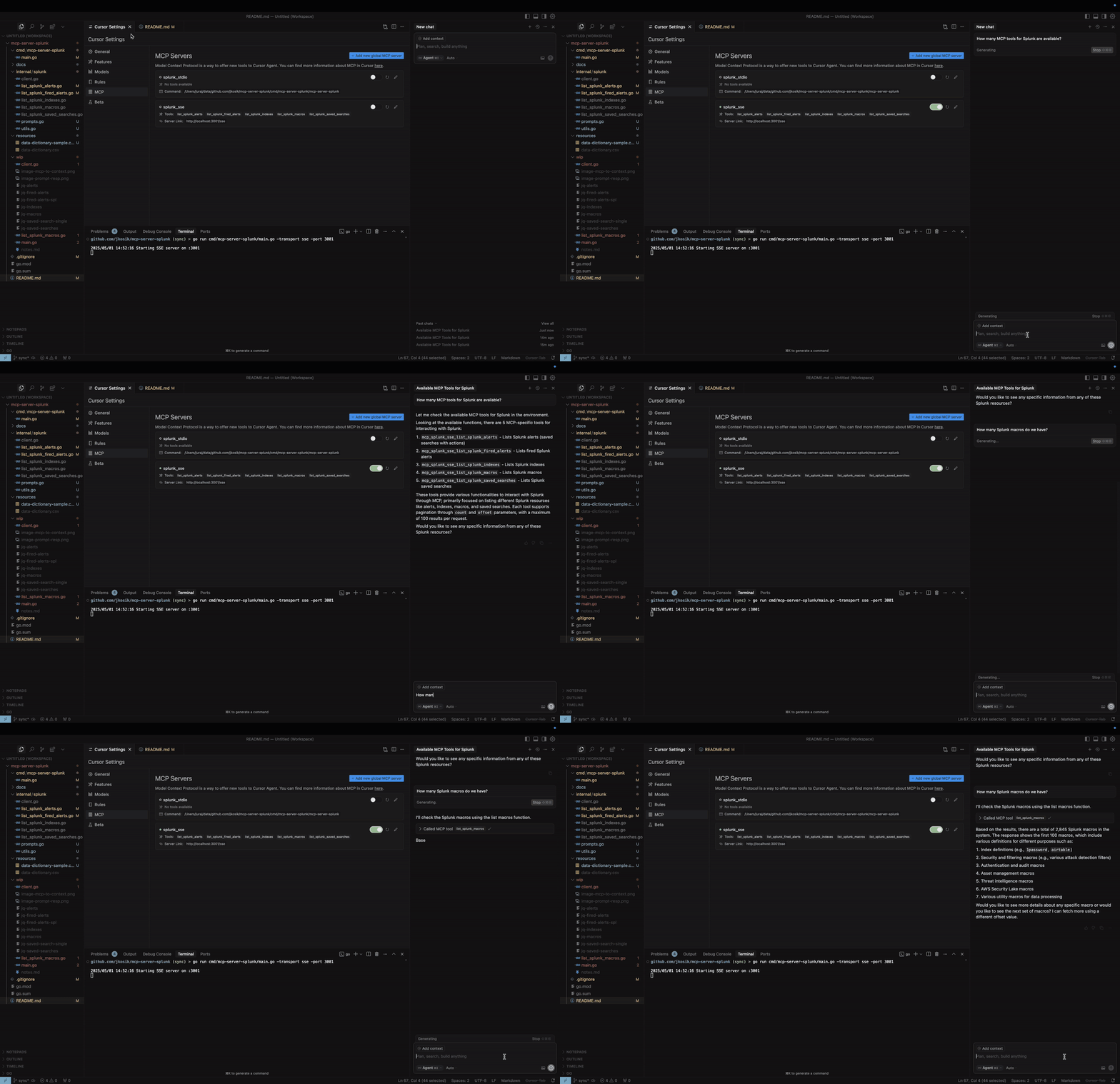
STDIO mode
cd /tmp # CHANGE ME
git clone https://github.com/jkosik/mcp-server-splunk.git
cd mcp-server-splunk/cmd/mcp-server-splunk/
Update Cursor settings in `~/.cursor/mcp.json`:
{
  "mcpServers": {
    "splunk_stdio": {
      "name": "Splunk MCP Server",
      "description": "Splunk MCP server",
      "type": "stdio",
      "command": "/tmp/mcp-server-splunk/cmd/mcp-server-splunk/mcp-server-splunk", # CHANGE ME
      "env": {
        "SPLUNK_URL": "https://changeme.splunkcloud.com:8089", # CHANGE ME
        "SPLUNK_TOKEN": "abcdef" # CHANGE ME
      }
    }
  }
}
Alternatively re-build the server first:
go build -o cmd/mcp-server-splunk/mcp-server-splunk cmd/mcp-server-splunk/main.goSSE mode
Start the server:
export SPLUNK_URL=https://your-splunk-instance:8089
export SPLUNK_TOKEN=your-splunk-token

# Start the server
go run cmd/mcp-server-splunk/main.go -transport sse -port 3001
Update Cursor settings in `~/.cursor/mcp.json`:
{
  "mcpServers": {
    "splunk_sse": {
      "name": "Splunk MCP Server (SSE)",
      "description": "MCP server for Splunk integration (SSE mode)",
      "type": "sse",
      "url": "http://localhost:3001/sse"
    }
  }
}
MCP Tools and Prompts
- `list_splunk_saved_searches`
- `list_splunk_alerts`
- `list_splunk_fired_alerts`
- `list_splunk_indexes`
- `list_splunk_macros`
- `internal/splunk/prompt.go` implements an MCP Prompt to find Splunk alerts for a specific keyword (e.g. GitHub or OKTA) and instructs Cursor to utilise multiple MCP tools to review all Splunk alerts, indexes and macros first to provide the best answer.
- `cmd/mcp/server/main.go` implements MCP Resource in the form of local CSV file with Splunk related content, providing further context to the chat.
Local usage and testing
STDIO mode (default)
export SPLUNK_URL=https://your-splunk-instance:8089
export SPLUNK_TOKEN=your-splunk-token

# List available tools
echo '{"jsonrpc":"2.0","id":1,"method":"tools/list","params":{}}' | go run cmd/mcp-server-splunk/main.go | jq

# Call list_splunk_saved_searches tool
echo '{"jsonrpc":"2.0","id":1,"method":"tools/call","params":{"name":"list_splunk_saved_searches","arguments":{}}}' | go run cmd/mcp-server-splunk/main.go | jq
SSE mode (Server-Sent Events HTTP API)
export SPLUNK_URL=https://your-splunk-instance:8089
export SPLUNK_TOKEN=your-splunk-token

# Start the server
go run cmd/mcp-server-splunk/main.go -transport sse -port 3001

# Call the server and get Session ID from the output. Do not terminate the session.
curl http://localhost:3001/sse

# Keep session running and and use different terminal window for the final MCP call
curl -X POST "http://localhost:3001/message?sessionId=YOUR_SESSION_ID" \
  -H "Content-Type: application/json" \
  -d '{"jsonrpc":"2.0","id":1,"method":"tools/list","params":{}}' | jq
Installing via Smithery
`Dockerfile` and `smithery.yaml` are used to support hosting this MCP server at [Smithery](https://smithery.ai/server/@jkosik/.
_Certified by MCP Review: https://mcpreview.com/mcp-servers/jkosik/mcp-server-splunk_
Frequently asked questions
What is mcp-server-splunk?
mcp-server-splunk is MCP server for Splunk
How do I install mcp-server-splunk?
Open the GitHub repository and follow its README. Most MCP servers are added to your client's MCP config, then called by your agent.
Is mcp-server-splunk open source?
Yes — it is hosted on GitHub at https://github.com/jkosik/mcp-server-splunk and has 6 stars.
Related MCP tools
 mcp-grafana
MCP server for Grafana Go-based implementation. Trusted by 1700+ developers. Trusted by 1700+ developers. Trusted by 1700+ developers.
 flux-operator
Flux Operator is a Kubernetes controller for managing the lifecycle of Flux CD for the Model Context Protocol. Enhance AI assistants with powerful integrations.
 mcp-k8s-go
MCP server connecting to Kubernetes Go-based implementation.
 localai
:robot: The free, Open Source alternative to OpenAI, Claude and others. Self-hosted and local-first. Drop-in replacement for OpenAI, running on consumer-gra...
 genai-toolbox
MCP Toolbox for Databases is an open source MCP server for databases. Go-based implementation. Trusted by 10900+ developers.
 mcp-go
A Go implementation of the Model Context Protocol (MCP), enabling seamless integration between LLM applications and external data sources and tools.
Run your own MCP server? See who uses it and what to fix.
Measure it with TrackMCP