
hono-telescope
Laravel Telescope-style debugging for Hono — plus an MCP server so your AI agent can read the app's live requests, exceptions and queries
Documentation
hono-telescope









A debugging tool for Hono applications, inspired by Laravel Telescope: a dashboard that shows
you every request with the logs, queries, exceptions and outgoing calls that happened inside it.
The same endpoint is also an MCP server. Point Claude Code, Cursor or any MCP client at it
and your coding agent reads the running application's telemetry directly — the actual exception,
the request that produced it, and the queries that ran — instead of being handed a pasted stack
trace. Nothing else in the Hono ecosystem does that.
Zero runtime dependencies. Works on Node.js and Bun.
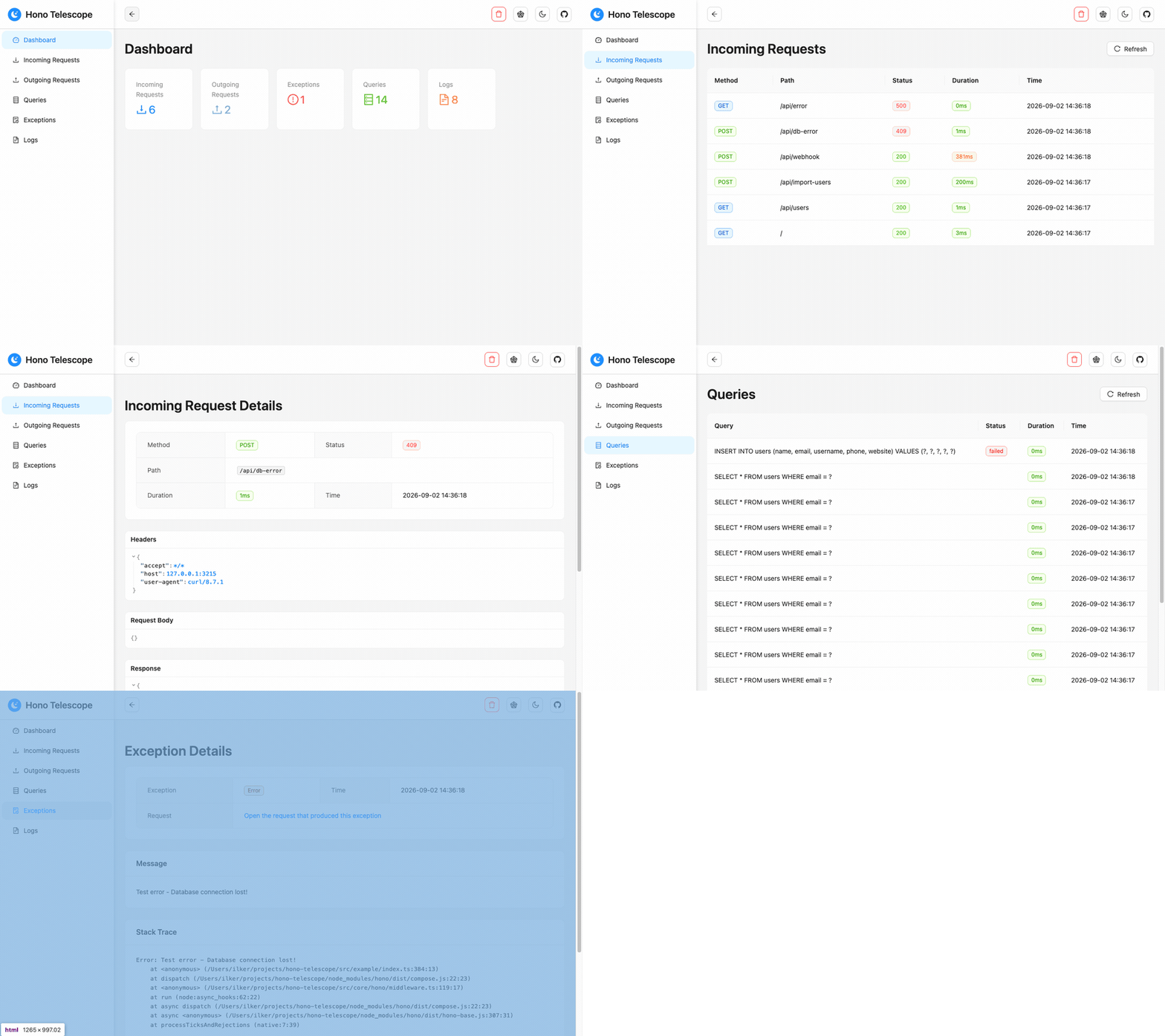
🌐 Live Demo
A hosted instance of the example app, running 1.0. No installation needed.
**📊 Open the dashboard** — API base: `https://hono-telescope.ilkerbalcilar.com`
Hit a few endpoints and watch the entries appear:
BASE=https://hono-telescope.ilkerbalcilar.com

curl $BASE/api/users                # incoming request + Bun SQLite queries
curl -X POST $BASE/api/import-users # outgoing fetch to JSONPlaceholder, plus inserts
curl -X POST $BASE/api/webhook      # outgoing POST whose payload is recorded, `token` redacted
curl -X POST $BASE/api/db-error     # UNIQUE violation, recorded as a failed query; 409, no exception
curl $BASE/api/mixed-clients-test   # the fetch call is captured, the axios call is not
curl $BASE/api/slow                 # 2s handler, to see the duration column
curl $BASE/api/error                # exception recorded as a child of its request
The demo runs with `memoryStorage({ maxEntries: 500 })` and no dashboard auth, so entries are
public, capped at 500 and gone on restart. Don't send anything you wouldn't publish.
✨ Features
Currently Available:
- 📡 MCP Server - The dashboard endpoint doubles as a Model Context Protocol server, so an AI agent can read live requests, exceptions and queries with five read-only tools
- 🔍 HTTP Request Monitoring - Track incoming requests with headers, payloads and response bodies, and outgoing `fetch` calls with headers, payloads and responses
- 🚨 Exception Tracking - Capture and monitor application errors with stack traces
- 📝 Log Monitoring - Monitor console logs with different severity levels
- 🗄️ Database Query Monitoring - Explicit per-client instrumentation for Prisma, Sequelize, MongoDB, and Bun SQLite with execution time
- 📊 Beautiful Dashboard - Modern React-based web interface with real-time updates
- 🎯 Zero Configuration - Works out of the box with sensible defaults
- 🏷️ Tagging System - Organize entries with custom tags and context
- 🔧 TypeScript Support - Full type definitions and type safety
- ⚡ High Performance - Minimal overhead with efficient memory management
- 🌐 Bun & Node.js - Works with both runtimes seamlessly
- 🗂️ Multiple Database Support - Integrates with popular database libraries
- ⚙️ Zero Runtime Dependencies - Depends only on Hono (peer dependency)
Planned Features (Roadmap):
- 💾 Data Export - Export monitored data in multiple formats (JSON, CSV)
- 🔔 Alerts & Notifications - Real-time alerts for errors and performance issues
- 📈 Analytics & Reporting - Advanced analytics and historical data analysis
- 🔐 Authentication & Authorization - Dashboard access control beyond basic auth
- 🌍 Multi-Tenancy Support - Support for multiple isolated projects
- 🧩 Plugin System - Extensible plugin architecture for custom integrations
- 🔄 Data Persistence - Optional database storage for long-term monitoring
📦 Installation
# Using npm
npm install hono-telescope

# Using yarn
yarn add hono-telescope

# Using pnpm
pnpm add hono-telescope

# Using bun
bun add hono-telescope
Quick Start
import { Hono } from 'hono';
import { createTelescope, memoryStorage } from 'hono-telescope';

const app = new Hono();
const telescope = createTelescope({ storage: memoryStorage({ maxEntries: 1000 }) });

app.use('*', telescope.middleware());
app.route('/telescope', telescope.dashboard());

export default app;
Visit `/telescope`. Telescope is on by default outside production and off inside it.
> 📋 Complete Example: See src/example/index.ts for a full working example with all Telescope features including database query monitoring, external request tracking, and error handling.
MCP Server
Telescope's dashboard doubles as an MCP server, so an AI
coding agent can read the running application's telemetry instead of being handed pasted stack
traces. There is nothing extra to mount — it is served from the dashboard you already mounted:
app.route('/telescope', telescope.dashboard()); // MCP is at /telescope/mcpclaude mcp add --transport http telescope http://localhost:3000/telescope/mcp| Tool | What it answers |
|---|---|
| `recent_exceptions` | What just failed — each exception with its request and that request's logs and queries |
| `recent_requests` | Which requests ran; filter by `minStatus`, `status`, `minDuration`, `uriContains` |
| `request_detail` | One request in full, untruncated, with every child entry |
| `slow_queries` | The slowest recent queries and which request each ran in |
| `stats` | How many entries of each type exist |
All five are read-only; there is no tool that clears or writes telemetry. `minStatus: 400` is
the one worth remembering — a handler that returns an error status without throwing records no
exception, so that filter is the only way to find those failures.
The transport is the current Streamable HTTP revision (`2026-07-28`), with `2025-11-25` still
accepted for older clients. `GET` and `DELETE` answer `405`: this revision has no SSE stream
and no sessions.
Clients that only speak stdio
Many editors cannot point an MCP client at a URL. The package ships a bridge for them: it reads
one JSON-RPC message per line on stdin, forwards it to the endpoint your app already serves, and
writes the reply back on stdout.
claude mcp add telescope -- npx -y hono-telescope mcp-stdio \
--url http://localhost:3000/telescope/mcp{
"mcpServers": {
"telescope": {
"command": "npx",
"args": ["-y", "hono-telescope", "mcp-stdio"],
"env": { "TELESCOPE_URL": "http://localhost:3000/telescope/mcp" }
}
}
}`--url` (or `TELESCOPE_URL`) is the only required option. For a dashboard behind
`dashboard.auth`, pass credentials as a header — `--header` is repeatable, and
`TELESCOPE_HEADER` takes one for clients that can only set environment variables:
npx -y hono-telescope mcp-stdio --url https://example.com/telescope/mcp \
  --header "Authorization: Basic $(printf 'user:pass' | base64)"
The bridge forwards; it does not implement the protocol a second time. Your app stays the only
place that answers MCP, so the bridge adds no tools, no session state and no new dependency —
and it needs the app to already be running.
> The MCP endpoint exposes exactly what the dashboard exposes — request and response
> bodies, headers and SQL — to whatever agent you connect. It is covered by `dashboard.auth`
> and by the same production refusal: with `enabled: true` under `NODE_ENV=production`,
> mounting without credentials throws.
Configuration
import { createTelescope, memoryStorage, alsContext, consoleCollector } from 'hono-telescope';

const telescope = createTelescope({
  enabled: process.env.NODE_ENV !== 'production',
  storage: memoryStorage({ maxEntries: 1000 }),
  context: alsContext(),
  collectors: [consoleCollector()],
  dashboardPath: '/telescope',
  ignorePaths: ['/health'],
  ignoreStaticAssets: true,
  capture: {
    requestBody: true,
    responseBody: true,
    maxBodySize: 65536,
  },
  redact: {
    headers: ['authorization', 'cookie', 'set-cookie', 'x-api-key', 'proxy-authorization'],
    bodyKeys: ['password', 'token', 'secret', 'apikey', 'authorization'],
  },
  dashboard: {
    auth: { username: 'admin', password: 'telescope' },
  },
});
All options are optional — `createTelescope()` works with the defaults.
| Key | Type | Default | Notes | |
|---|---|---|---|---|
| `enabled` | `boolean` | `NODE_ENV !== 'production'` | Disable in production by default | |
| `storage` | `StorageAdapter` | `memoryStorage({ maxEntries: 1000 })` | In-memory storage with 1000 entry limit | |
| `context` | `ContextStrategy` | `alsContext()` | AsyncLocalStorage-based request context tracking | |
| `collectors` | `Collector[]` | `[consoleCollector(), exceptionCollector(), fetchCollector()]` | Default collectors for console, exceptions, and fetch; pass `[]` to disable all | |
| `dashboardPath` | `string` | `'/telescope'` | Dashboard mount path; must match the path in `app.route()` | |
| `ignorePaths` | `string[]` | `['.well-known']` | Paths to exclude from monitoring | |
| `ignoreStaticAssets` | `boolean` | `true` | Skip monitoring requests for static files (.js, .css, .svg, etc.) | |
| `capture.requestBody` | `boolean` | `true` | Capture incoming request bodies | |
| `capture.responseBody` | `boolean` | `true` | Capture outgoing response bodies | |
| `capture.maxBodySize` | `number` | `65536` | Maximum bytes to capture per body (64 KB) | |
| `redact.headers` | `string[]` | `['authorization', 'cookie', 'set-cookie', 'x-api-key', 'proxy-authorization']` | Header names to redact | |
| `redact.bodyKeys` | `string[]` | `['password', 'token', 'secret', 'apikey', 'authorization']` | Object keys to redact in request/response bodies | |
| `dashboard.auth` | `DashboardAuth \ | false` | `undefined` | Optional basic auth for dashboard; required if `enabled: true` in production |
Mounting at a Custom Path
If you mount the dashboard at a path other than `/telescope`, you must set `dashboardPath` to the same value:
const telescope = createTelescope({ dashboardPath: '/admin/debug' });
app.route('/admin/debug', telescope.dashboard());
The middleware uses `dashboardPath` to avoid recording the dashboard's own traffic, and the dashboard uses it to construct its base URL.
Database Queries
Pass your database client to Telescope for query instrumentation. Prisma returns a new client—use the returned one:
import { createTelescope } from 'hono-telescope';
import { PrismaClient } from '@prisma/client';

const telescope = createTelescope();
const prisma = telescope.instrumentPrisma(new PrismaClient());
// Use the returned `prisma` client, not the original
Supported databases:
const prisma = telescope.instrumentPrisma(new PrismaClient());
telescope.instrumentSequelize(sequelize);
const mongoClient = new MongoClient(url, { monitorCommands: true });
telescope.instrumentMongo(mongoClient);
telescope.instrumentBunSqlite(db);
> Note: Automatic database interception was removed in 1.0 because it never worked under Node ESM and captured only raw SQL where it did run. Explicit per-client instrumentation is now required.
A query that fails is recorded too, marked `failed` with the client's own error message, so a
failed command is distinguishable from a slow one in the dashboard and over MCP. This covers
Prisma, MongoDB and Bun SQLite. Sequelize is the exception: it is instrumented through the
`afterQuery` hook, which does not appear to run when a query fails, so failed Sequelize queries
are currently not recorded at all. Fixing that needs verification against a real Sequelize.
Call each `instrument*` method once per client. Unlike the collectors, they are not
idempotent (only `instrumentBunSqlite` guards against double wrapping), so instrumenting the
same client twice records every query twice.
`instrumentBunSqlite` wraps the `query` and `prepare` statement factories, so statement calls
(`all`, `get`, `run`, `values`) are recorded. Queries issued directly on the database —
`db.exec`, `db.run`, `db.all`, `db.get` — are not captured.
Security
The dashboard exposes request and response bodies, headers, and SQL. Telescope is therefore disabled when `NODE_ENV === 'production'`. If you enable it there anyway, you must supply `dashboard.auth`; mounting without it throws.
You have two options for production:
1. Supply credentials to protect the dashboard with basic auth:
createTelescope({
  enabled: true,
  dashboard: { auth: { username: 'admin', password: 'secret' } },
});
2. Explicitly opt out of auth to acknowledge full exposure (no auth, dashboard fully open):
createTelescope({
  enabled: true,
  dashboard: { auth: false },
});
Sensitive headers (`authorization`, `cookie`, `set-cookie`, `x-api-key`, `proxy-authorization`) and body keys (`password`, `token`, `secret`, `apikey`, `authorization`) are redacted by default, at any nesting depth. Redaction is recursive through nested objects and arrays, case-insensitive, and replaces values with `[REDACTED]` rather than deleting them.
Limitations
- Outgoing request bodies are captured only when they are already in memory — a string,
a `URLSearchParams` or an `ArrayBuffer`. A `ReadableStream`, `FormData` or `Blob` body, and
the body of a `Request` object passed as the first argument to `fetch`, are skipped and the
payload stays empty. Reading those would either consume the body the caller is about to send
or force a `clone()` that can stall on Node.
- Streamed responses are not captured. Responses produced by Hono's `streamText` and
`streamSSE` are recorded without a body, so that recording never buffers or delays a stream.
Detection relies on the `Transfer-Encoding: chunked` header those helpers set (the bare
`stream()` helper sets no content-type, so it is skipped too); a hand-rolled
`new Response(readableStream, { headers: { 'content-type': 'text/plain' } })` sets neither
header, so it is read and buffered before being recorded. Set `Transfer-Encoding: chunked`
or a non-text content type on such a response to opt it out of capture.
- **Request and response bodies larger than `capture.maxBodySize` are recorded as metadata
only** (`{ truncated: true, size }`), and a non-JSON `text/*` request body is recorded as
`{ body: text }`. A JSON array body is wrapped so that a recorded body is always an object:
`{ body: [...] }` for requests, `{ response: [...] }` for responses. Redaction still reaches
inside the array.
Custom Storage Adapters
Implement `StorageAdapter` and verify it against the contract suite that ships with the
package:
import { runStorageContract } from 'hono-telescope/testing';
import { myStorage } from './my-storage';

runStorageContract('myStorage', () => myStorage());
The suite (a Vitest suite; run it with your own test runner installed) pins the two ordering
guarantees the dashboard relies on: `list` returns newest first, and `findByParent` returns
oldest first.
Upgrading from 0.x
The 1.0 release introduces a new API centered on `createTelescope()`:
0.x (Old API)
import { setupTelescope } from 'hono-telescope';

setupTelescope(app, {
  enabled: true,
  max_entries: 1000,
  sanitize_headers: ['authorization'],
});
1.0 (New API)
import { createTelescope, memoryStorage } from 'hono-telescope';

const telescope = createTelescope({
  storage: memoryStorage({ maxEntries: 1000 }),
  redact: { headers: ['authorization'] },
});
app.use('*', telescope.middleware());
app.route('/telescope', telescope.dashboard());
Key changes:
- `setupTelescope(app, config)` is replaced by `createTelescope(config)` with explicit middleware and dashboard mounting
- Configuration keys are now camelCase (e.g., `max_entries` → `maxEntries`, `sanitize_headers` → `redact.headers`)
- Database interception is now explicit per-client; automatic interception was removed
- Axios interception was removed (axios on Node does not use `fetch`)
- A request whose handler throws is recorded with the status your own `onError` returned, and the exception is recorded as a child entry of that request
Development
Getting Started
First, install dependencies:
bun installThen build the project for the first time:
bun run buildRunning in Development Mode
Start the TypeScript watcher and example app:
Terminal 1 - TypeScript Compilation (Watch Mode)
bun run devThis watches for TypeScript changes and compiles them to JavaScript.
Terminal 2 - Example Application
bun run dev:exampleThis starts the example Hono application with hot reload at `http://localhost:3000`
- Example API endpoints: `http://localhost:3000/api/...`
- Dashboard: `http://localhost:3000/telescope`
Test all endpoints at once with the test script:
bash src/example/test-all-endpoints.shThis will automatically test all endpoints and populate the dashboard with data.
License
Frequently asked questions
What is hono-telescope?
hono-telescope is Laravel Telescope-style debugging for Hono — plus an MCP server so your AI agent can read the app's live requests, exceptions and queries
How do I install hono-telescope?
Open the GitHub repository and follow its README. Most MCP servers are added to your client's MCP config, then called by your agent.
Is hono-telescope open source?
Yes — it is hosted on GitHub at https://github.com/Jubstaaa/hono-telescope and has 26 stars.
Related MCP tools
 wigolo
The go-to web for your AI coding agent — local-first search, fetch, crawl & research over MCP. No API keys, no cloud, $0/query. Public beta.
 gemini-mcp-tool
MCP server that enables AI assistants to interact with Google Gemini CLI, leveraging Gemini's massive token window for large file analysis and codebase understanding
 repomix
📦 Repomix is a powerful tool that packs your entire repository into a single, AI-friendly file. Perfect for when you need to feed your codebase to Large Lan...
 mastra
The TypeScript AI agent framework. ⚡ Assistants, RAG, observability. Supports any LLM: GPT-4, Claude, Gemini, Llama. Built for the Model Context Protocol to enh
 Figma-Context-MCP
MCP server to provide Figma layout information to AI coding agents like Cursor
 shadcn-ui-mcp-server
A mcp server to allow LLMS gain context about shadcn ui component structure,usage and installation,compaitable with react,svelte 5,vue & React Native
Run your own MCP server? See who uses it and what to fix.
Measure it with TrackMCP