
cie
The code graph that knows which tasks and tests implement your code — MCP server, CLI, and HTTP tool surface over a local SQLite or Neo4j graph. 9 languages, 135 LLM-callable tools, read-only by default.
Documentation
cie — the only code graph that knows which tasks and tests actually implement your code.
> **Where this is going: vision.md — the far shore.** The graph becomes the software; repositories become its cache. Software that can always explain itself. *A compass, not a claim.*
















*Code Insight Engine.* No other surveyed code-graph tool can answer
"which files implement this task, and are they tested?" as one query.
**Everything developer-facing lives in the
wiki** — architecture
written from the codebase, and a how-to for every workflow. This
README stays lean: the demo, the install, and how to help.
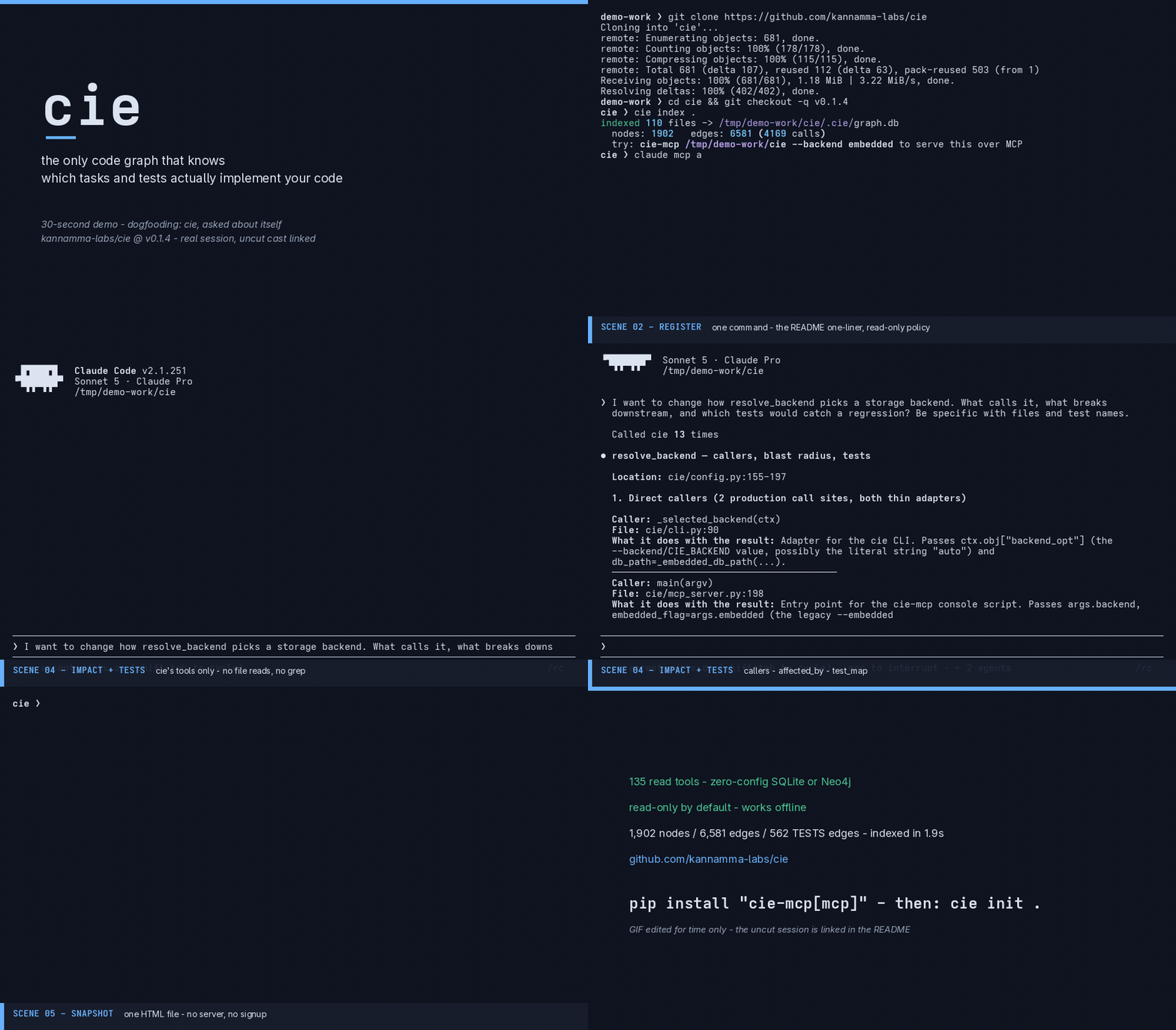
*Every second is a real recorded session, nothing staged: this repo
cloned from the public tag `v0.1.4`, `cie index .` in 1.9s (1,902
nodes · 6,581 edges · 4,169 calls), the README one-liner registering it
with Claude Code (`✔ Connected`), then ONE question in plain words —
about `resolve_backend`, the storage-selection rule — answered from
cie's tools alone (the agent's built-ins were disabled for the take:
`callers` → `affected_by` → `test_map` were its only path). The agent
returned the 7 pinning tests with line numbers, including the test
added for the explicit-`auto` bug fixed that same day. The GIF is
edited for time only — content is never edited; the uncut sessions
ship in the repo:
(the agent take) and
`setup-uncut.cast` (index → register →
connected). Full take/QC record:
`docs/demo/production-log.md`.*
Install
One-click, no clone, no Neo4j, no signup — install once from a release
tag, then one command per project indexes it, registers cie with your
MCP client (spawn-robust entry: absolute path, so GUI-launched clients
find it), and writes the agent context files:
# once per machine (latest tag):
uv tool install "cie-mcp[mcp] @ git+https://github.com/kannamma-labs/cie.git@v0.1.5"

# per project — from inside the project:
cie index .        # ~1.9s on a 110-file repo
cie init .         # registers the client, writes AGENTS.md/CLAUDE.md
Already installed and prefer the client-side route?
claude mcp add cie -- $(command -v cie-mcp) /path/to/your/project --backend embedded --policy readonlyPlain pip works too:
pip install "cie-mcp[mcp]"   # core + MCP server (cie-mcp) — what most people want
pip install "cie-mcp[http]"  # + the HTTP tool-mount (cie/routes.py)
> Package-name note (updated 2026-08-31, v0.1.1): the distribution
> ships as `cie-mcp` — the `cie` name on PyPI belongs to an unrelated
> project (`cluster311/cie10`, ICD-10 codes; `pip install cie` does NOT
> get you this tool — never did). Import package stays `cie`; console
> scripts stay `cie` and `cie-mcp`. GitHub installs are an equal
> alternative:
> `pip install "cie-mcp[mcp] @ git+https://github.com/kannamma-labs/cie.git@v0.1.5"`.
Core dependencies: Pydantic v2, tree-sitter (+ Python/JS/TS/Java/Go/
Rust/C/C++/C# grammars), watchdog, Click, Rich; the Neo4j driver only
when you use that backend. Python ≥ 3.10. Storage is auto-selected
(serve `.cie/graph.db` when you indexed, else Neo4j — stated on stderr
at startup, never silent).
More: serving to Cursor/Codex, multiple projects, Neo4j team mode,
semantic search, HTTP, policies, troubleshooting — every workflow has
a how-to in the wiki
(start with
Contributors wanted
cie is a small core with an outsized surface (135 tools, 9 languages,
two storage backends, three front-ends) and a culture you can see in
the commits: **DoD = verified against the real environment, never
written-only; misses get published, not hidden.** The demo above was
produced by dogfooding — and the dogfood measurement found (and fixed)
a real product bug the same day. That's the working style.
Ways in, easiest first:
- Use it and report — index your repo, ask it impact questions,
file what's wrong or what's missing. The
lists the known sharp edges honestly.
- A measured gap — the direct-calls TESTS heuristic shipped because
a dogfood measurement showed 1 edge in a 308-test suite. Find a
number like that, and the fix gets in.
- A first PR — start with the
label (each names a safe entry-point module and acceptance criteria)
or issues #17–#19.
- Docs — wiki how-tos count. If you wished a page existed, write
it; if the wiki and code disagree, the code wins and the wiki gets a
PR.
Dev setup is three commands (clone, `uv venv` + editable install,
`python -m pytest -q` — 312 passing): the details, the conformance
harness, and the honesty bar are in
CONTRIBUTING.md and the wiki's
CONTRIBUTING.md's "Becoming a second maintainer" section is the path
beyond a one-off PR.
License
cie is released under the MIT License.
By contributing, you agree your contributions are licensed under the
same terms.
Frequently asked questions
What is cie?
cie is The code graph that knows which tasks and tests implement your code — MCP server, CLI, and HTTP tool surface over a local SQLite or Neo4j graph. 9 languages, 135 LLM-callable tools, read-only by default.
How do I install cie?
Open the GitHub repository and follow its README. Most MCP servers are added to your client's MCP config, then called by your agent.
Is cie open source?
Yes — it is hosted on GitHub at https://github.com/kannamma-labs/cie.
Related MCP tools
 jcodemunch-mcp
Cut AI token costs 95%+ on code exploration. The leading MCP server for precise, symbol-level GitHub code retrieval via tree-sitter AST. Works with Claude Code, Cursor & any MCP client. 313B+ tokens saved.
 idea-reality-mcp
Pre-build reality check for AI coding agents. Scans GitHub, HN, npm, PyPI, Product Hunt. MCP server. 290+ stars.
 projectmem
Open-source coding agent memory. Records issues, attempts, fixes and decisions, then warns your agent before it repeats an approach that already failed. Native MCP server for Claude Code, Cursor, Antigravity and Codex. 100% local, no cloud, no telemetry. MIT.
 memora
Give your AI agents persistent, collective memory — with deduplicating absorb, supersession lineage, semantic search, and a graph UI. Speaks MCP.
 sem
semSemantic version control => entity-level diffs, blame, and impact analysis on top of git. 28 languages via tree-sitter. Built for coding agents.
 cognee
Cognee is the open-source AI memory platform for agents. Give your AI agents persistent long-term memory across sessions with a self-hosted knowledge graph engine.
Run your own MCP server? See who uses it and what to fix.
Measure it with TrackMCP