
stitch-mcp
Universal MCP Server for Google Stitch. Connect AI agents to your UI designs.
Documentation
Stitch MCP
Build amazing UI/UX designs instantly with AI. Works seamlessly with Cursor, Claude, Antigravity, and any MCP-compatible editor.
Created by Aakash Kargathara.
🚀 How It Works
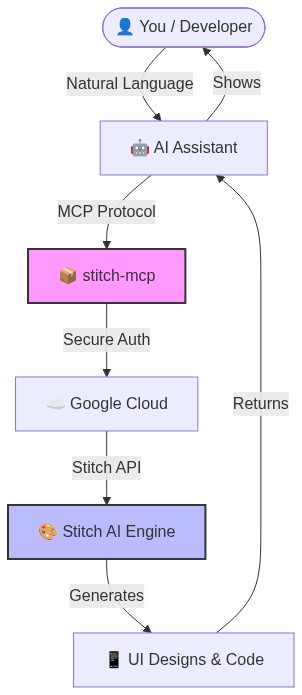
✨ Why this is cool
- Zero Config: Just login once and it works everywhere.
- Universal: Works on Windows, Mac, and Linux.
- Free: Google Stitch API is free to use.
�️ Quick Setup (2 Minutes)
1. Prerequisite: Google Cloud
You need a Google Cloud project with the Stitch API enabled.
# Login to your Google Cloud
gcloud auth login

# Set your project (replace with your actual project ID)
gcloud config set project YOUR_PROJECT_ID
gcloud auth application-default set-quota-project YOUR_PROJECT_ID

# Enable the magic
gcloud beta services mcp enable stitch.googleapis.com
2. Install the Credentials
This gives `stitch-mcp` permission to talk to Google on your behalf.
gcloud auth application-default login3. Add to Your AI Editor
Copy and paste this into your MCP config file:
For Claude Desktop:
`~/Library/Application Support/Claude/claude_desktop_config.json`
For Cursor:
Settings > MCP > Add New Server
{
  "mcpServers": {
    "stitch": {
      "command": "npx",
      "args": ["-y", "stitch-mcp"],
      "env": {
         "GOOGLE_CLOUD_PROJECT": "YOUR_PROJECT_ID"
      }
    }
  }
}
🛠️ Available Tools
| Tool Name | What it does |
|---|---|
| `extract_design_context` | 🧠 Scans a screen to extract "Design DNA" (Fonts, Colors, Layouts). Use this to keep style consistent. |
| `fetch_screen_code` | 💾 Downloads the raw HTML/Frontend code of a screen. |
| `fetch_screen_image` | 🖼️ Downloads the high-res screenshot of a screen. |
| `generate_screen_from_text` | ✨ Generates a NEW screen based on your prompt (and context). |
| `create_project` | 📁 Creates a new workspace/project folder. |
| `list_projects` | 📋 Lists all your available Stitch projects. |
| `list_screens` | 📱 Lists all screens within a specific project. |
| `get_project` | 🔍 Retrieves details of a specific project. |
| `get_screen` | ℹ️ Gets metadata for a specific screen. |
💡 Pro Tip: The "Designer Flow"
To generate consistent UI, use this 2-step flow:
1. Extract: "Get design context from the Home Screen..."
2. Generate: "Using that context, generate a Chat Screen..."
This ensures your new screen matches your existing design system perfectly.
📄 License
Apache 2.0 - Open source and free to use.
Star History
*Built with ❤️ by Aakash Kargathara*
Frequently asked questions
What is stitch-mcp?
stitch-mcp is Universal MCP Server for Google Stitch. Connect AI agents to your UI designs.
How do I install stitch-mcp?
Open the GitHub repository and follow its README. Most MCP servers are added to your client's MCP config, then called by your agent.
Is stitch-mcp open source?
Yes — it is hosted on GitHub at https://github.com/Kargatharaakash/stitch-mcp and has 122 stars.
Related MCP tools
 firecrawl-mcp-server
🔥 Official Firecrawl MCP Server - Adds powerful web scraping and search to Cursor, Claude and any other LLM clients.
 cursor-talk-to-figma-mcp
CTTF: MCP integration between Cursor and Figma, allowing Cursor Agentic AI to communicate with Figma for reading designs and modifying them programmatically.
 papersgpt-for-zotero
A powerful Zotero AI and MCP plugin with ChatGPT, Gemini 3.7, Claude Fable 5, Claude Opus 5, DeepSeek V4, Grok, OpenRouter, Kimi k3, GLM 5.3, SiliconFlow, GPT-oss, Gemma 4, Qwen 3.8
 opendia
Connect your browser to AI models. Just use Dia on Chrome, Arc or Firefox.
 12306-mcp
This is a 12306 ticket search server based on the Model Context Protocol (MCP).
 atlassian-mcp-server
Official remote MCP server for Atlassian. Securely connect Jira, Confluence, Jira Service Management, Bitbucket, and Compass to Claude, ChatGPT, Cursor, VS Code, and other AI tools using OAuth 2.1 or API tokens.
Run your own MCP server? See who uses it and what to fix.
Measure it with TrackMCP