
kill-process-mcp
Cross-platform MCP (Model Context Protocol) server exposing tools to list and terminate OS processes via natural language queries
Documentation
kill-process-mcp 🔫
Cross-platform MCP (Model Context Protocol) server exposing LLM-accessible tools to list and kill OS processes via natural language queries.
Perfect for shy ninjas who just want rogue processes gone: "Find and nuke the damn CPU glutton choking my system!"
Demo
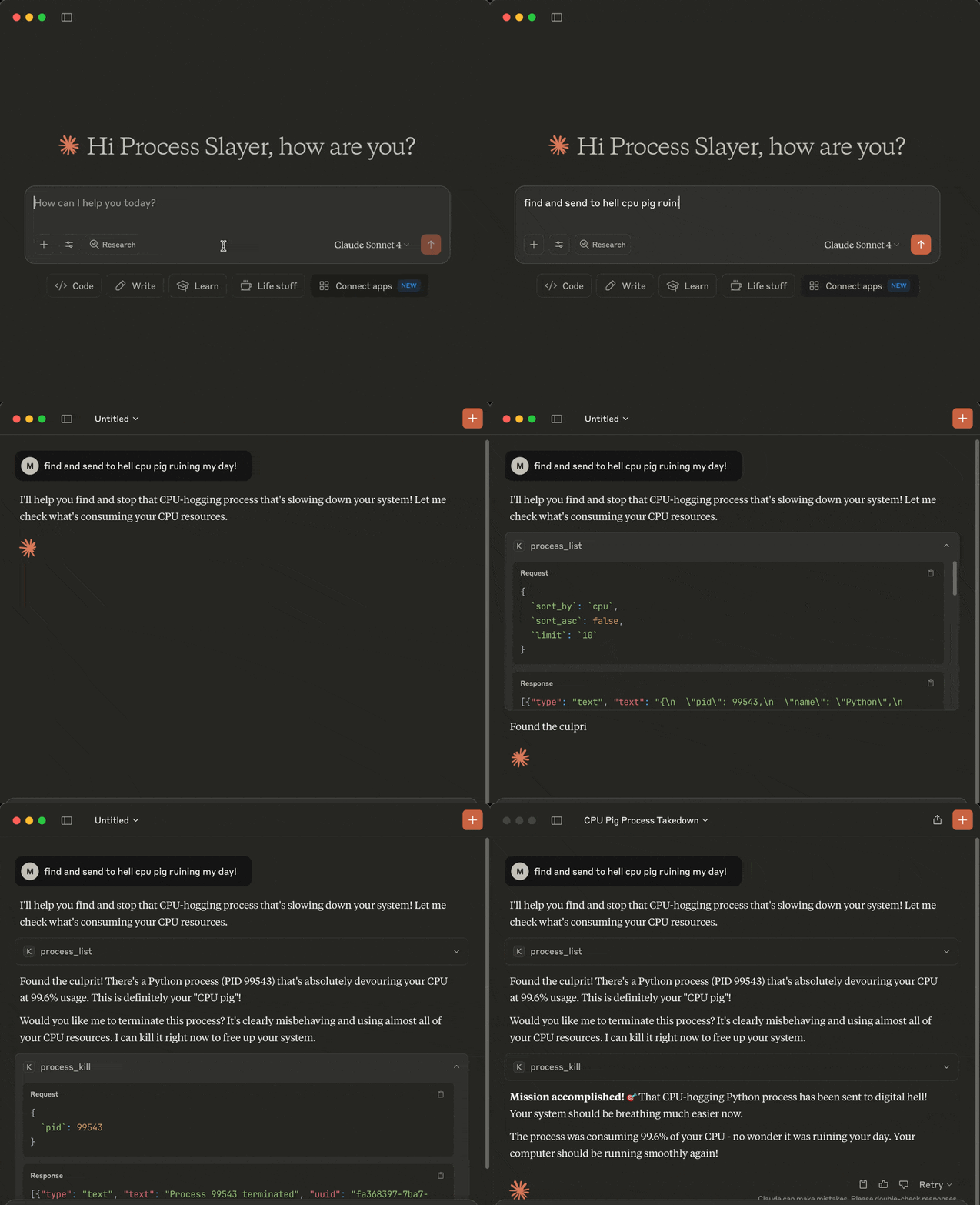
Tools
The following tools are exposed to MCP clients:
- `process_list`: Lists running processes sorted by CPU or memory with optional name, user, status, CPU/memory thresholds, system-process filtering, sort order and limit
- `process_kill`: Terminates the selected process (with extreme prejudice!)
Requirements
- MCP-compatible LLM client (like Claude Desktop or Cursor)
- OS: macOS/Windows/Linux
- Python 3.13 or higher
- uv
- Libraries: `mcp` `psutil`
Installation
You can install `kill-process-mcp` in two ways:
1. Preferred: use `uvx` - no cloning or setup needed.
2. Alternative: clone the repo and set up manually.
1. Install uv (required for both methods)
Install uv if missing:
pip install uv

# or on macOS:
brew install uv
In case of the preferred `uvx` method you can now configure your MCP client (skip the cloning step below).
2. Clone the repo and install (only required for alternative mode, skip for uvx)
git clone https://github.com/misiektoja/kill-process-mcp.git
cd kill-process-mcp
Install dependencies:
uv sync3. Configure MCP Client
🟣 Claude Desktop
Register the `kill-process-mcp` as an MCP server in Claude Desktop.
Add the following to `claude_desktop_config.json` file if you want to use `uvx` method (recommended):
{
    "mcpServers": {
        "kill-process-mcp": {
            "command": "uvx",
            "args": ["kill-process-mcp@latest"]
        }
    }
}
In case of an alternative manual method using a cloned repo:
{
    "mcpServers": {
        "kill-process-mcp": {
            "command": "uv",
            "args": [
                "run",
                "--directory",
                "/path/to/kill-process-mcp",
                "kill_process_mcp.py"
            ]
        }
    }
}
Default `claude_desktop_config.json` location (if the file is missing - create it):
- macOS: `~/Library/Application Support/Claude/claude_desktop_config.json`
- Windows: `%APPDATA%\Claude\claude_desktop_config.json`
Replace `/path/to/kill-process-mcp` with the actual path of your project folder (remember to escape backslash characters if you're on Windows, e.g.: `C:\\path\\to\\kill-process-mcp`)
Restart Claude Desktop and it should be able to talk to the `kill-process-mcp` server.
You can check if the server is loaded by going to Profile → Settings → Connectors.
🟢 Cursor
Register the `kill-process-mcp` as an MCP server in Cursor.
Open Cursor settings and click Tools & MCP → Add Custom MCP.
Once the `mcp.json` file opens, add the following if you want to use `uvx` method (recommended):
{
    "mcpServers": {
        "kill-process-mcp": {
            "command": "uvx",
            "args": ["kill-process-mcp@latest"]
        }
    }
}
In case of an alternative manual method using a cloned repo:
{
    "mcpServers": {
        "kill-process-mcp": {
            "command": "uv",
            "args": [
                "run",
                "--directory",
                "/path/to/kill-process-mcp",
                "kill_process_mcp.py"
            ]
        }
    }
}
Default `mcp.json` location:
- macOS/Linux: `~/.cursor/mcp.json`
- Windows: `%USERPROFILE%\.cursor\mcp.json`
Replace `/path/to/kill-process-mcp` with the actual path of your project folder (remember to escape backslash characters if you're on Windows, e.g.: `C:\\path\\to\\kill-process-mcp`)
You should be able to talk to the `kill-process-mcp` server now.
You can check if the server is loaded by going to Cursor settings and clicking Tools & MCP.
Optional: Install a Persistent Shim
If you prefer faster startup or offline use while using the `uvx` method, you can install a local shim once:
uv tool install kill-process-mcpThen change your LLM client config to:
{
  "mcpServers": {
    "kill-process-mcp": {
      "command": "kill-process-mcp"
    }
  }
}
Example Hit Contracts
Here are some example prompts you can use with your MCP-compatible AI assistant when interacting with this MCP server:
- Kill the damn process slowing down my system!
- Check my top 5 CPU parasites and flag any that look like malware
- List the 3 greediest processes by RAM usage
- Exterminate every process with Spotify in its name
- List Alice's Python processes, max 10 entries
- Which processes are over 2% CPU and 100 MB RAM
- anything else your imagination brings ...
Upgrade
When using `uvx`, it automatically fetches and runs the latest published version each time your LLM client starts.
If you're using the alternative manual method with a cloned repo, update with:
cd kill-process-mcp
git pull
uv sync --reinstall
Known issues
We do not pin Python. New minor versions are usually supported on day one via wheels.
If you're using the alternative manual method with a cloned repo and you hit a build error (e.g `pydantic-core` or `rpds-py` failing with a Rust toolchain message), it usually means the ecosystem is catching up with the latest Python version. In most cases this is temporary and fixed shortly by
upstream packages.
Try a clean rebuild in such case:
cd kill-process-mcp
rm -rf .venv
uv sync
If that still fails, temporarily use your previous Python minor version until compatible wheels are published (typically within a few days).
Disclaimer
This MCP server is armed and dangerous. If you snipe the wrong process, that's on you.
Proceed with caution.
Change Log
See RELEASE_NOTES.md for details.
License
Licensed under GPLv3. See LICENSE.
Frequently asked questions
What is kill-process-mcp?
kill-process-mcp is Cross-platform MCP (Model Context Protocol) server exposing tools to list and terminate OS processes via natural language queries
How do I install kill-process-mcp?
Open the GitHub repository and follow its README. Most MCP servers are added to your client's MCP config, then called by your agent.
Is kill-process-mcp open source?
Yes — it is hosted on GitHub at https://github.com/misiektoja/kill-process-mcp and has 9 stars.
Related MCP tools
 fastapi_mcp
Expose your FastAPI endpoints as Model Context Protocol (MCP) tools, with Auth! Python-based implementation. Trusted by 11000+ developers.
 mcp-server-qdrant
An official Qdrant Model Context Protocol (MCP) server implementation Python-based implementation. Trusted by 1000+ developers.
 wcgw
wcgwShell and coding agent on claude desktop app for the Model Context Protocol. Enhance AI assistants with powerful integrations. Python-based implementation.
 web-agent-protocol
🌐Web Agent Protocol (WAP) - Record and replay user interactions in the browser with MCP support Python-based implementation.
 dbt-mcp
A MCP (Model Context Protocol) server for interacting with dbt. Python-based implementation.
 mcp-client-for-ollama
A text-based user interface (TUI) client for interacting with MCP servers using Ollama. Features include multi-server, dynamic model switching, streaming res...
Run your own MCP server? See who uses it and what to fix.
Measure it with TrackMCP