
mcp-ai-server-visual-studio
MCP AI Server - Roslyn-powered MCP server for Visual Studio. 20 tools for AI assistants.
Documentation
MCP AI Server for Visual Studio
Other tools read your files. MCP AI Server understands your code.


The first and only Visual Studio extension that gives AI assistants access to the C# compiler (Roslyn) and the Visual Studio Debugger through the Model Context Protocol. 41 tools. 13 powered by Roslyn. 19 debugging tools (Preview). Semantic understanding, not text matching.
Install
**Install from Visual Studio Marketplace**
Or search for "MCP AI Server" in Visual Studio Extensions Manager.
See it in Action
*Click to watch on YouTube*
Why MCP AI Server?
AI coding tools (Claude Code, Codex CLI, Gemini CLI, OpenCode, Cursor, Copilot, Windsurf...) operate at the filesystem level — they read text, run grep, execute builds. They don't understand your code the way Visual Studio does.
MCP AI Server bridges this gap by exposing IntelliSense-level intelligence and the Visual Studio Debugger as MCP tools. Your AI assistant gets the same semantic understanding that powers F12 (Go to Definition), Shift+F12 (Find All References), safe refactoring — and now runtime debugging.
What becomes possible:
| You ask | Without MCP AI Server | With MCP AI Server |
|---|---|---|
| "Find WhisperFactory" | grep returns 47 matches | `Class, Whisper.net, line 16` — one exact answer |
| "Rename ProcessDocument" | sed breaks ProcessDocumentAsync | Roslyn renames 23 call sites safely |
| "What implements IDocumentService?" | Impossible via grep | Full inheritance tree with interfaces |
| "What calls AuthenticateUser?" | Text matches, can't tell direction | Precise call graph: callers + callees |
| "Why is ProcessOrder returning null?" | Reads code, guesses | Sets breakpoint, inspects actual runtime values |
22 Stable Tools
Semantic Navigation (Roslyn-powered)
| Tool | Description |
|---|---|
| `FindSymbols` | Find classes, methods, properties by name — semantic, not text |
| `FindSymbolDefinition` | Go to definition (F12 equivalent) |
| `FindSymbolUsages` | Find all references, compiler-verified (Shift+F12 equivalent) |
| `GetSymbolAtLocation` | Identify the symbol at a specific line and column |
| `GetDocumentOutline` | Semantic structure: classes, methods, properties, fields |
Code Understanding (Roslyn-powered)
| Tool | Description |
|---|---|
| `GetInheritance` | Full type hierarchy: base types, derived types, interfaces |
| `GetMethodCallers` | Which methods call this method (call graph UP) |
| `GetMethodCalls` | Which methods this method calls (call graph DOWN) |
Code Analysis (Roslyn-powered)
| Tool | Description |
|---|---|
| `GetDiagnostics` | Compiler errors & warnings without building — Roslyn background analysis |
Refactoring (Roslyn-powered)
| Tool | Description |
|---|---|
| `RenameSymbol` | Safe rename across the entire solution — compiler-verified |
| `FormatDocument` | Visual Studio's native code formatter |
Project & Build
| Tool | Description |
|---|---|
| `ExecuteCommand` | Build or clean solution/project with structured diagnostics |
| `ExecuteAsyncTest` | Run tests asynchronously with real-time status |
| `GetSolutionTree` | Solution and project structure |
| `GetProjectReferences` | Project dependency graph |
| `LoadSolution` | Open a .sln/.slnx file — server stays on the same port |
| `TranslatePath` | Convert paths between Windows and WSL formats |
Editor Integration
| Tool | Description |
|---|---|
| `GetActiveFile` | Current file and cursor position |
| `GetSelection` / `CheckSelection` | Read active text selection |
| `GetLoggingStatus` / `SetLogLevel` | Extension diagnostics |
19 Debugging Tools (Preview)
Your AI assistant can now debug your .NET code at runtime through the Visual Studio Debugger. Set breakpoints, step through code, inspect variables, attach to Docker containers and WSL processes.
Debug Control (10 tools)
| Tool | Description |
|---|---|
| `debug_start` | Start debugging (F5). Fire-and-forget |
| `debug_stop` | Stop debugging session |
| `debug_get_mode` | Current mode: Design, Running, or Break |
| `debug_break` | Pause the running application |
| `debug_continue` | Resume execution |
| `debug_step` | Step over/into/out |
| `immediate_execute` | Execute expression with side effects |
| `debug_list_transports` | List transports (Default, Docker, WSL, SSH...) |
| `debug_list_processes` | List processes on a transport |
| `debug_attach` | Attach to a running process |
Debug Inspection (5 tools)
| Tool | Description |
|---|---|
| `debug_get_callstack` | Call stack of current thread |
| `debug_get_locals` | Local variables (tree-navigable) |
| `debug_evaluate` | Evaluate expression / drill into variable tree |
| `output_read` | Read VS Output window (Build, Debug, Tests) |
| `error_list_get` | Errors and warnings from VS Error List |
Breakpoint Management (4 tools)
| Tool | Description |
|---|---|
| `breakpoint_set` | Set breakpoint by file+line or function name |
| `breakpoint_remove` | Remove breakpoint |
| `breakpoint_list` | List all breakpoints |
| `exception_settings_set` | Configure break-on-exception |
AI Debugging Guide
Complete reference for AI agents — all 19 tools, 10 workflows, Docker & WSL setup, polling patterns, and best practices.
**Download AI Debugging Guide (.md)** — add it to your AI's context for full debugging capabilities.
Compatible Clients
Works with any MCP-compatible AI tool:
CLI Agents:
- Claude Code — Anthropic's terminal AI coding agent
- Codex CLI — OpenAI's terminal coding agent
- Gemini CLI — Google's open-source terminal agent
- OpenCode — Open-source AI coding agent (45k+ GitHub stars)
- Goose — Block's open-source AI agent
- Aider — AI pair programming in terminal
Desktop & IDE:
- Claude Desktop — Anthropic's desktop app
- Cursor — AI-first code editor
- Windsurf — Codeium's AI IDE
- VS Code + Copilot — GitHub Copilot with MCP
- Cline — VS Code extension
- Continue — Open-source AI assistant
Any MCP client — open protocol, universal compatibility
Quick Start
1. **Install** from Visual Studio Marketplace
2. Open your .NET solution in Visual Studio
3. Configure port in MCP Server Settings (default: 3010)
4. Add to your MCP client:
"vs-mcp": {
  "type": "http",
  "url": "http://localhost:3010/sdk/"
}
5. Start asking your AI semantic questions about your code
MCP Client Configuration
| AI Tool | Type | Config File |
|---|---|---|
| **Claude Code** | CLI | `CLAUDE.md` |
| **Claude Desktop** | App | `claude_desktop_config.json` |
| **Cursor** | IDE | `.cursor/rules/*.mdc` or `.cursorrules` |
| **Windsurf** | IDE | `.windsurfrules` |
| **Cline** | VS Code Extension | `.clinerules/` directory |
| **VS Code + Copilot** | IDE | `.github/copilot-instructions.md` |
| **Continue** | IDE Extension | `.continue/config.json` |
| **Gemini CLI** | CLI | `GEMINI.md` |
| **OpenAI Codex CLI** | CLI | `AGENTS.md` |
| **Goose** | CLI | `.goose/config.yaml` |
Any tool supporting Model Context Protocol will work.
Configure AI Preferences (Recommended)
Add these instructions to your project's AI config file (see table above) to ensure your AI automatically prefers MCP tools:
## MCP Tools - ALWAYS PREFER

When `mcp__vs-mcp__*` tools are available, ALWAYS use them instead of Grep/Glob/LS:

| Instead of | Use |
|------------|-----|
| `Grep` for symbols | `FindSymbols`, `FindSymbolUsages` |
| `LS` to explore projects | `GetSolutionTree` |
| Reading files to find code | `FindSymbolDefinition` then `Read` |
| Searching for method calls | `GetMethodCallers`, `GetMethodCalls` |

**Why?** MCP tools use Roslyn semantic analysis - 10x faster, 90% fewer tokens.
Multi-Solution: Understand Your Dependencies
Need the AI to understand a library you depend on? Clone the source from GitHub, open it in a second Visual Studio — each instance runs its own MCP server on a configurable port.
Your project                          → port 3010
Library source (cloned from GitHub)   → port 3011
Framework source                      → port 3012
Your AI connects to all of them. It can trace calls, find usage patterns, and understand inheritance across your code and library code.
MCP client configuration — three options depending on your client:
Clients with native HTTP support (Claude Desktop, Claude Code):
{
  "mcpServers": {
    "vs-mcp": {
      "type": "http",
      "url": "http://localhost:3010/sdk/"
    },
    "vs-mcp-whisper": {
      "type": "http",
      "url": "http://localhost:3011/sdk/"
    }
  }
}
Clients without HTTP support (via mcp-remote proxy):
{
  "mcpServers": {
    "vs-mcp": {
      "command": "npx",
      "args": ["-y", "mcp-remote", "http://localhost:3010/sdk/"]
    },
    "vs-mcp-whisper": {
      "command": "npx",
      "args": ["-y", "mcp-remote", "http://localhost:3011/sdk/"]
    }
  }
}
Codex CLI (TOML):
[mcp_servers.vs-mcp]
type = "stdio"
command = "npx"
args = ["mcp-remote", "http://localhost:3010/sdk/"]

[mcp_servers.vs-mcp-whisper]
type = "stdio"
command = "npx"
args = ["mcp-remote", "http://localhost:3011/sdk/"]
Settings
Tools → MCP Server Settings
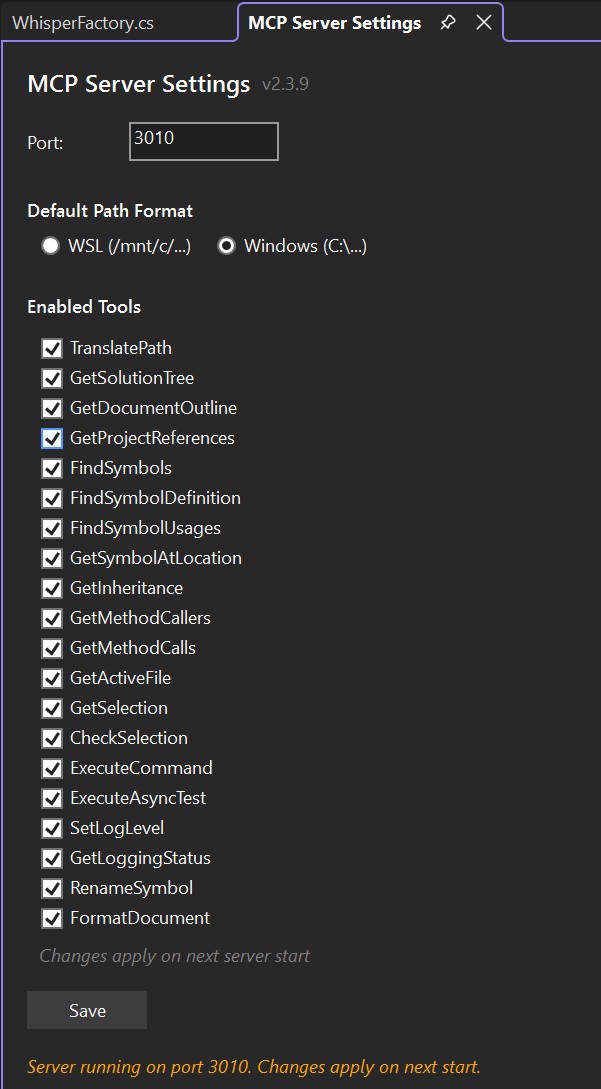
| Setting | Default | Description |
|---|---|---|
| Port | 3001 | Server port (configurable per VS instance) |
| Path Format | WSL | Output as `/mnt/c/...` or `C:\...` |
| Tools | All enabled | Enable/disable individual tool groups |
Changes apply on next server start.
vs. Other Approaches
| Approach | Symbol Search | Inheritance | Call Graph | Safe Rename | Debugging |
|---|---|---|---|---|---|
| MCP AI Server (Roslyn + Debugger) | Semantic | Full tree | Callers + Callees | Compiler-verified | Breakpoints + Step + Inspect |
| AI Agent (grep/fs) | Text match | No | No | Text replace | No |
| Other MCP servers | No | No | No | No | No |
Requirements
- Visual Studio 2022 (17.13+) or Visual Studio 2026
- Windows (amd64 or arm64)
- Any MCP-compatible AI tool
Issues & Feature Requests
Found a bug or have an idea? Open an issue!
About
**0ics srl** — Italian software company specializing in AI-powered development tools. Part of the example4.ai ecosystem.
Built by Ladislav Sopko — 30 years of software development, from assembler to enterprise .NET.
*MCP AI Server: Because your AI deserves the same intelligence as your IDE.*
Frequently asked questions
What is mcp-ai-server-visual-studio?
mcp-ai-server-visual-studio is MCP AI Server - Roslyn-powered MCP server for Visual Studio. 20 tools for AI assistants.
How do I install mcp-ai-server-visual-studio?
Open the GitHub repository and follow its README. Most MCP servers are added to your client's MCP config, then called by your agent.
Is mcp-ai-server-visual-studio open source?
Yes — it is hosted on GitHub at https://github.com/LadislavSopko/mcp-ai-server-visual-studio and has 47 stars.
Related MCP tools
 cua
cuaScale computer-use 2.0 with open-source drivers, cross-OS fleets, and benchmarks for training, evaluation, and data generation.
 douyin-mcp-server
提取抖音无水印视频链接,视频文案,douyin-mcp-server,mcp,claude skill,支持龙虾
 servers
Model Context Protocol Servers
 codegraph
Pre-indexed code knowledge graph, auto syncs on code changes, for Claude Code, Codex, Gemini, Cursor, OpenCode, AntiGravity, Kiro, CoPilot, and Hermes Agent — fewer tokens, fewer tool calls, 100% local
 goose
goosean open source, extensible AI agent that goes beyond code suggestions - install, execute, edit, and test with any LLM
 metabase
The easy-to-use open source Business Intelligence and Embedded Analytics tool that lets everyone work with data :bar_chart:
Run your own MCP server? See who uses it and what to fix.
Measure it with TrackMCP