
passbaton
Session continuity for AI coding agents — your agent picks up where it left off. Persistent memory for Claude Code, OpenAI Codex CLI & Google Gemini CLI, sharing one local db: auto context injection, compaction handover, semantic search (KO/EN/JA), error→solution recall. 100% local, zero config, zero API cost.
Documentation
passbaton
> Session continuity for AI coding agents. Your agent picks up where it left off — never re-explain your project again. Persistent memory for Claude Code, OpenAI Codex CLI & Google Gemini CLI, sharing one local db: auto context injection, compaction handover, semantic search, and error→solution recall. Zero config, zero API cost, 100% local.



⚡ One install → context auto-loads every session · 🧩 survives compaction (0 re-explaining) · 🔒 100% local, $0 API
> Renamed (v2.0.0): this project was previously `claude-session-continuity-mcp`. The old name suggested it was Claude-only — it never was. Claude Code, Codex CLI, and Gemini CLI are all first-class and share one local memory. Existing installs keep working: the old `claude-hook-*` commands still ship as aliases. See Migrating from v1.
The Problem
Every new session — whether you're in Claude Code, Codex CLI, or Gemini CLI:
"This is a Next.js 15 project with App Router..."
"We decided to use Server Actions because..."
"Last time we were working on the auth system..."
"The build command is pnpm build..."
5 minutes of context-setting. Every. Single. Time.
The Solution
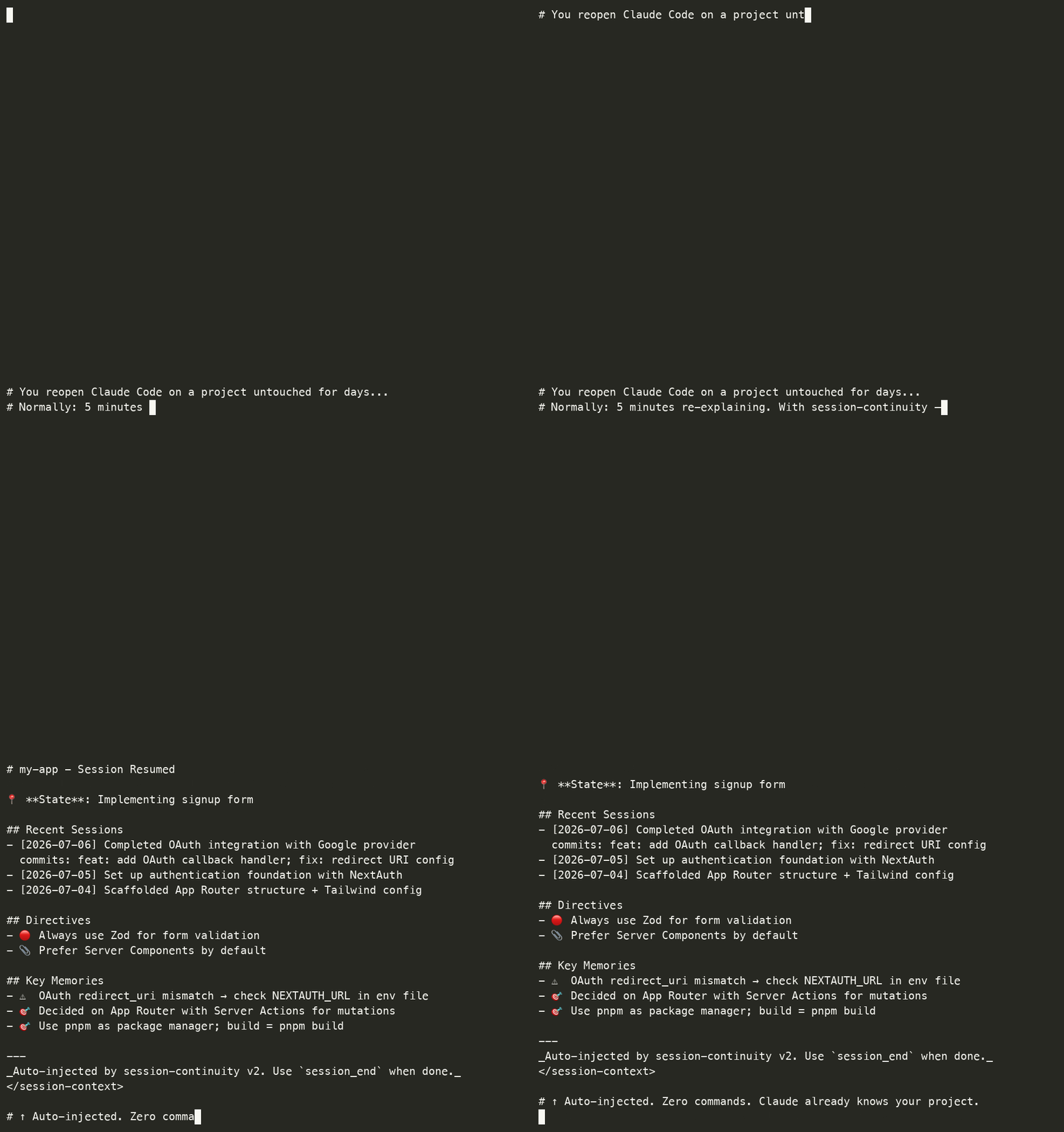
Fully automatic. Lifecycle hooks handle everything without manual calls — on Claude Code, OpenAI Codex CLI, and Google Gemini CLI, sharing one local memory so context carries across all three:
# Session start → Auto-loads relevant context + recent session history
# When asking → Auto-injects relevant memories/solutions
# During conversation → Tracks active files + auto-injects error solutions
# On compact → Structured handover context for continuity
# On exit → Extracts commits, decisions, error-fix pairs from transcript← Auto-output on session start:
# my-app - Session Resumed
📍 **State**: Implementing signup form
## Recent Sessions
### 2026-02-28
**Work**: Completed OAuth integration with Google provider
**Commits**: feat: add OAuth callback handler; fix: redirect URI config
**Decisions**: Use Server Actions instead of API routes
### 2026-02-27
**Work**: Set up authentication foundation
**Next**: Implement signup form validation
## Directives
- 🔴 Always use Zod for form validation
- 📎 Prefer Server Components by default
## Key Memories
- 🎯 Decided on App Router, using Server Actions
- ⚠️ OAuth redirect_uri mismatch → check env fileZero manual work. Context follows you.
Why this over other memory tools?
Most Claude memory tools rely on explicit tool calls ("remember this"), a cloud API, or a background AI worker. This one is deliberately different:
| passbaton | Typical cloud/AI-memory MCP | |
|---|---|---|
| Setup | `npm i -g` → hooks auto-install | Manual server + API key |
| Trigger | 5 automatic hooks (no commands) | You call a `remember` tool |
| Storage | 100% local SQLite | Cloud / external service |
| API cost | $0 — local embeddings | Per-token / subscription |
| Latency | Requires Node.js 22+. The native `better-sqlite3` dependency only ships |
> prebuilt binaries for Node 22, 24, and 26 (the currently supported lines —
> Node 18 and 20 are both end-of-life). On older Node it falls back to compiling
> from source, which fails without build tools. Node 22 and up install cleanly
> with no compiler needed.
Recommended: Global Installation
npm install -g passbatonThat's it! The postinstall script automatically:
1. Registers MCP server in `~/.claude.json`
2. Installs Claude Hooks in `~/.claude/settings.json`
Why Global (`-g`)?
This tool is designed to track all your Claude Code projects in a single unified database.
Global installation is strongly recommended because:
| Reason | Detail |
|---|---|
| Single source of truth | One binary serves every project — no version drift between projects |
| Hooks are user-scoped | `~/.claude/settings.json` lives in your home directory, not per-project |
| Cross-project context | Sessions from `app-a` and `app-b` share the same DB and search index |
| One update = everything refreshed | `npm install -g ` updates all projects at once; no per-project reinstall |
| `npm exec` resolves global first | Hooks call `npm exec -- passbaton-hook-*` which finds the global package reliably regardless of cwd |
Important: Even with global install, you can still disable the hook for specific projects (see below).
Global ≠ forced on every project.
Disabling Hooks for Specific Projects
Global install does not mean "always on everywhere". You have three layers of control:
| Layer | File | Scope |
|---|---|---|
| 1. Global ON (default) | `~/.claude/settings.json` | All projects |
| 2. Project-wide OFF | `/.claude/settings.json` | Whole team (committed) |
| 3. Personal-only OFF | `/.claude/settings.local.json` | Just you (gitignored) |
To disable hooks in a specific project, create the override file with empty hook arrays:
// /.claude/settings.json  (or settings.local.json for personal-only)
{
  "hooks": {
    "SessionStart": [],
    "UserPromptSubmit": [],
    "PostToolUse": [],
    "PreCompact": [],
    "Stop": []
  }
}
Empty arrays override the global setting → that project's sessions are no longer tracked.
Updating to a New Version
npm install -g passbaton@latestThat's the only step — all projects pick up the new binary on next Claude Code restart.
No need to reinstall in each project.
Alternative: Local Install (Not Recommended)
If you really want per-project install (e.g., locked version for one project):
cd && npm install passbatonDrawback: you must install separately in every project, and `npm exec` may not find the local copy reliably from hook context (cwd-dependent). Stick with `-g` unless you have a specific reason.
What Gets Installed
MCP Server (in `~/.claude.json`):
{
  "mcpServers": {
    "project-manager": {
      "command": "npx",
      "args": ["passbaton"]
    }
  }
}
Claude Hooks (in `~/.claude/settings.json`):
{
  "hooks": {
    "SessionStart": [{ "hooks": [{ "type": "command", "command": "npm exec -- passbaton-hook-session-start" }] }],
    "UserPromptSubmit": [{ "hooks": [{ "type": "command", "command": "npm exec -- passbaton-hook-user-prompt" }] }],
    "PostToolUse": [{ "matcher": "Edit", "hooks": [{ "type": "command", "command": "npm exec -- passbaton-hook-post-tool" }] }, { "matcher": "Write", "hooks": [{ "type": "command", "command": "npm exec -- passbaton-hook-post-tool" }] }],
    "PreCompact": [{ "hooks": [{ "type": "command", "command": "npm exec -- passbaton-hook-pre-compact" }] }],
    "Stop": [{ "hooks": [{ "type": "command", "command": "npm exec -- passbaton-hook-session-end" }] }]
  }
}
Note (v1.5.0+): Full lifecycle coverage with 5 hooks. Uses `npm exec --` which finds local `node_modules/.bin` first.
Installed Hooks (v1.5.0+)
| Hook | Command | Function |
|---|---|---|
| `SessionStart` | `passbaton-hook-session-start` | Auto-loads project context on session start |
| `UserPromptSubmit` | `passbaton-hook-user-prompt` | Auto-injects relevant memories + past reference search |
| `PostToolUse` | `passbaton-hook-post-tool` | Tracks active files (Edit, Write) + auto-injects error solutions (Bash) |
| `PreCompact` | `passbaton-hook-pre-compact` | Structured handover context before compression |
| `Stop` | `passbaton-hook-session-end` | Extracts commits, decisions, error-fix pairs from transcript |
Manual Hook Management
# Check hook status
npx passbaton-hooks status

# Reinstall hooks
npx passbaton-hooks install

# Remove hooks
npx passbaton-hooks uninstall
3. Restart Claude Code
After installation, restart Claude Code to activate the hooks.
Features
| Feature | Description |
|---|---|
| 🤖 Zero Manual Work | Claude Hooks automate all context capture/load |
| 🎯 Quality Memory Only | (v1.10.0) Only decisions, learnings, errors — no file-change noise |
| 🧠 Semantic Search | multilingual-e5-small embedding (94+ languages, 384d) |
| 🌍 Multilingual | Korean/English/Japanese + cross-language search (EN→KR, KR→EN) |
| 🔗 Git Integration | Commit messages auto-extracted from transcripts |
| 🕸️ Knowledge Graph | Memory relations (solves, causes, extends...) |
| 📊 Memory Classification | 5 types: observation, decision, learning, error, pattern |
| ✅ Integrated Verification | One-click build/test/lint execution |
| 📋 Task Management | Priority-based task management |
| 🔧 Auto Error→Solution | (v1.12.0) Bash errors auto-detect → inject past solutions; session-end auto-records error-fix pairs |
| 💰 Token Efficiency | (v1.11.0) Removed loadContext from UserPromptSubmit (saves 24-60K tokens/session) |
| 📑 Progressive Disclosure | (v1.11.0) memory_search returns index first, memory_get for full content |
| ⏳ Temporal Decay | (v1.11.0) Memory scoring with type-specific half-lives for relevance |
| 📝 Structured Handover | (v1.10.0) PreCompact saves work summary, active files, pending actions |
| 🚪 Smart Session End | (v1.10.0) Extracts commits, decisions, error-fix pairs from transcript |
| 🗑️ Auto Noise Cleanup | (v1.10.0) Auto-deletes stale observation memories (3d+) |
| 🔍 Past Reference Detection | (v1.8.0) "저번에 X 어떻게 했어?" auto-searches DB |
| 📝 User Directive Extraction | (v1.8.0) Auto-extracts "always/never" rules from prompts |
Feature toggles — everything is opt-in
(v2.1.0+) Five behaviours are individually toggleable; the rest are shown for
transparency but are always on (a hook's mere existence is controlled by your
`settings.json`, not by config) or not yet wired. Config lives in a plain,
hand-editable JSON file (`~/.claude/passbaton.config.json`) — separate from your data,
so it survives a db reset. No file = today's defaults (nothing changes for existing users).
passbaton config                            # grouped table; ●/○ = toggleable, · = always on
passbaton config set solutionCapture off    # flip a toggleable feature
passbaton config set strictSolutionGate on  # opt into the strict error→fix filter
passbaton config preset minimal             # minimal | default | everything
passbaton config reset                       # back to defaults
passbaton config path                        # print the active config file path
Trying to `set` an always-on / not-yet-wired feature is rejected with a clear message.
Each toggleable feature also has an env override for one-off/CI use:
`PASSBATON_=0` (e.g. `PASSBATON_SOLUTIONCAPTURE=0`) wins over the config file.
On-by-default rule: a feature ships on only if it's *silent, safe, and universally
useful*. Anything that speaks unprompted, guesses, or writes speculative rows ships off.
Legend: ●/○ = toggleable (on/off) · · = always on, not a config toggle · ⋯ = not yet wired.
Core (on by default)
| Feature | Key | Toggle | What it does |
|---|---|---|---|
| Session start injection | `sessionStart` | · always on | Restore prior context on start |
| Compaction handover+ | `compactionHandover` | ● toggleable | Before a compaction, carry over your working state plus hot files and last build status — the one gap platform auto-memory structurally can't cover |
| Session persist | `sessionEnd` | · always on | Save session state on exit |
| Auto memory surfacing | `autoInject` | · always on | Auto-surface relevant past memories on start |
| Task tracking | `taskTracking` | · always on | Read/write the task list via MCP + hooks |
| Hot-path pre-warm | `hotPathPrewarm` | ● toggleable | On start, surface the files you edit most in this project, ranked by real access count |
| Verification ledger | `verificationLedger` | ● toggleable | Warn on start if a recent session left the build red or issues open |
> `sessionStart`/`sessionEnd` are "always on" because a hook either runs or it doesn't —
> that's controlled by the hook registration in `~/.claude/settings.json`, not by config.
> To disable them, remove the hook there.
Cross-agent (on by default)
| Feature | Key | Toggle | What it does |
|---|---|---|---|
| Cross-agent share | `crossAgentSync` | · inherent | One local db shared across Claude Code / Codex / Gemini (not a toggle — it's how storage works) |
| Tool-use capture | `postToolCapture` | · always on | Observe tool use to build hot-paths (low-noise) |
| Solution capture | `solutionCapture` | ● toggleable | Auto-record error→fix pairs to a solution archive. Set off to skip it entirely (session save is unaffected) |
Experimental (off by default)
| Feature | Key | Toggle | What it does |
|---|---|---|---|
| Strict solution gate | `strictSolutionGate` | ○ opt-in | Stricter error→fix capture filter — fewer noise entries, but may drop some real ones |
| Trigger matching | `triggerMatching` | ⋯ not yet wired | (planned) Match prompt keywords to auto-inject solutions |
| Pattern mining | `patternMining` | ⋯ not yet wired | (planned) Mine work patterns and suggest workflows |
| Memory auto-store | `memoryAutoStore` | ⋯ not yet wired | (planned) Auto-write observation memories from prompts |
| Status line | `statusLineInject` | ⋯ not yet wired | (planned) Append a passbaton status line to session-start output |
The only genuinely user-flippable flags today are **`compactionHandover`, `hotPathPrewarm`,
`verificationLedger`, `solutionCapture` (on) and `strictSolutionGate`** (opt-in).
Claude Hooks - Auto Context System
How It Works
SessionStart Hook (`npx passbaton-hook-session-start`):
- Auto-detects project: monorepo (`apps/project-name/`) or single project (`package.json` root folder name)
- Loads context from `.claude/sessions.db`
- Injects: Current state, 3 recent sessions with commits/decisions, directives, pending tasks, filtered key memories
- Auto-cleans stale noise memories (3d+ auto-tracked, 14d+ auto-compact)
UserPromptSubmit Hook (`npx passbaton-hook-user-prompt`):
- Runs on every prompt submission
- (v1.11.0) No longer calls loadContext() — saves 24-60K tokens/session
- Injects relevant context (filtered: decisions, learnings, errors only)
PostToolUse Hook (`npx passbaton-hook-post-tool`):
- Tracks hot file paths and updates `active_context.recent_files`
- (v1.12.0) Auto-detects Bash errors → searches solutions DB → injects past solutions into context
- No longer creates observation memories (v1.10.0 — eliminates `[File Change]` noise)
PreCompact Hook (`npx passbaton-hook-pre-compact`):
- Builds structured handover context: work summary, active file, pending action, key facts, recent errors
- No longer stores auto-compact memories (v1.10.0)
Stop Hook (`npx passbaton-hook-session-end`):
- Extracts commit messages from JSONL transcript (`git commit -m` patterns)
- Extracts error-fix pairs (error → resolution within 3 messages)
- (v1.12.0) Auto-records error→fix pairs to solutions table for future reuse
- Extracts decisions ("because", "instead of", "chose" patterns)
- (v1.11.0) Single-pass transcript parsing (4 JSONL reads → 1)
- Stores structured metadata in `sessions.issues` column as JSON
Example Output (Session Start)
# my-app - Session Resumed

📍 **State**: Implementing signup form
🚧 **Blocker**: OAuth callback URL issue

## Recent Sessions
### 2026-02-28
**Work**: Completed OAuth integration
**Commits**: feat: add OAuth handler; fix: redirect config
**Decisions**: Use Server Actions over API routes
**Next**: Implement form validation

## Directives
- 🔴 Always use Zod for validation

## Pending Tasks
- 🔄 [P8] Implement form validation
- ⏳ [P5] Add error handling

## Key Memories
- 🎯 Decided on App Router, using Server Actions
- ⚠️ OAuth redirect_uri mismatch → check env file
Hook Management
# Check status
npx passbaton-hooks status

# Reinstall
npx passbaton-hooks install

# Remove
npx passbaton-hooks uninstall

# Temporarily disable
export MCP_HOOKS_DISABLED=true
Past Reference Detection (v1.8.0)
When you ask about past work, the `UserPromptSubmit` hook automatically searches the database:
You: "저번에 인앱결제 어떻게 했어?"
→ Hook detects "저번에" + extracts keyword "인앱결제"
→ Searches sessions, memories (FTS5), and solutions
→ Injects matching results into context automatically
Supported patterns (Korean & English):
| Pattern | Example |
|---|---|
| 저번에/전에/이전에 ... 어떻게 | "저번에 CORS 에러 어떻게 해결했지?" |
| ~했던/만들었던/해결했던 | "수정했던 로그인 로직" |
| 지난 세션/작업에서 | "지난 세션에서 결제 구현" |
| last time/before/previously | "How did we handle auth last time?" |
| did we/did I ... before | "Did we fix the database migration before?" |
| remember when/recall when | "Remember when we set up CI?" |
Output example:
## Related Past Work (auto-detected from your question)

### Sessions
- [2/14] 카카오 로그인 앱키 수정, 인앱결제 IAP 플로우 수정

### Memories
- 🎯 [decision] 테스트: 인앱결제 상품 등록 완료

### Solutions
- **IAP_BILLING_ERROR**: StoreKit 2 migration으로 해결
Why npm exec? (v1.4.3+)
Previous versions used absolute paths or `npx`:
// v1.3.x - absolute paths (broke on multi-project)
"command": "node \"/path/to/project-a/node_modules/.../session-start.js\""

// v1.4.0-1.4.2 - npx (required global install or hit npm registry)
"command": "npx passbaton-hook-session-start"
Now we use `npm exec --`:
"command": "npm exec -- passbaton-hook-session-start"`npm exec --` finds local `node_modules/.bin` first, then falls back to global. Works with both local and global installation without hitting npm registry.
Tools (v5 API) - 25 Focused Tools
1. Session Lifecycle (4) ⭐
// Start of session - auto-loads context
session_start({ project: "my-app", compact: true })

// End of session - auto-saves context
session_end({
  project: "my-app",
  summary: "Completed auth flow",
  modifiedFiles: ["src/auth.ts", "src/login/page.tsx"]
})

// View session history
session_history({ project: "my-app", limit: 5 })

// Semantic search past sessions
search_sessions({ query: "auth work", project: "my-app" })
2. Project Management (4)
// Get project status with task stats
project_status({ project: "my-app" })

// Initialize new project
project_init({ project: "my-app" })

// Analyze project tech stack
project_analyze({ project: "my-app" })

// List all projects
list_projects()
3. Task Management (4)
// Add a task
task_add({ project: "my-app", title: "Implement signup", priority: 8 })

// Update task status
task_update({ taskId: 1, status: "done" })

// List tasks
task_list({ project: "my-app", status: "pending" })

// Suggest tasks from TODO comments
task_suggest({ project: "my-app" })
4. Solution Archive (3)
// Record an error solution
solution_record({
  errorSignature: "TypeError: Cannot read property 'id'",
  solution: "Use optional chaining: user?.id"
})

// Find similar solutions (keyword or semantic)
solution_find({ query: "TypeError property", semantic: true })

// AI-powered solution suggestion
solution_suggest({ errorMessage: "Cannot read property 'email'" })
5. Verification (3)
// Run build
verify_build({ project: "my-app" })

// Run tests
verify_test({ project: "my-app" })

// Run all (build + test + lint)
verify_all({ project: "my-app" })
6. Memory System (5)
// Store a classified memory
memory_store({
  content: "State management with Riverpod makes testing easier",
  type: "learning",  // observation, decision, learning, error, pattern
  project: "my-app",
  tags: ["flutter", "state-management"],
  importance: 8,
  relatedTo: 23  // Connect to existing memory
})

// Search memories — returns index (id, type, tags, score) for token efficiency
memory_search({
  query: "state management test",
  type: "learning",
  semantic: true,  // Use embedding similarity
  limit: 10
})

// Get full memory content by ID (v1.11.0)
memory_get({ memoryId: 23 })

// Find related memories (graph + semantic)
memory_related({
  memoryId: 23,
  includeGraph: true,
  includeSemantic: true
})

// Get memory statistics
memory_stats({ project: "my-app" })
7. Knowledge Graph (2)
// Connect two memories with a typed relation
graph_connect({
  sourceId: 23,
  targetId: 25,
  relation: "solves",  // related_to, causes, solves, depends_on, contradicts, extends, example_of
  strength: 0.9
})

// Explore knowledge graph
graph_explore({
  memoryId: 23,
  depth: 2,
  relation: "all",  // or specific relation type
  direction: "both"  // outgoing, incoming, both
})
Memory Types
| Type | Description | Use Case |
|---|---|---|
| `observation` | Patterns, structures found in codebase | "All screens are separated in features/ folder" |
| `decision` | Architecture, library choices | "Decided to use SharedPreferences for caching" |
| `learning` | New knowledge, best practices | "Riverpod is better for testing" |
| `error` | Occurred errors and solutions | "Provider.read() doesn't rebuild → use watch()" |
| `pattern` | Recurring code patterns, conventions | "Avoid late keyword abuse" |
Relation Types
| Relation | Description | Example |
|---|---|---|
| `related_to` | General relation | A and B are related |
| `causes` | A causes B | Caching decision → folder structure change |
| `solves` | A solves B | Riverpod learning → Provider bug fix |
| `depends_on` | A depends on B | Folder structure → Caching decision |
| `contradicts` | A conflicts with B | Two design decisions conflict |
| `extends` | A extends B | late pattern → Extended to Riverpod learning |
| `example_of` | A is example of B | Specific code is example of pattern |
Data Storage
SQLite database at `~/.claude/sessions.db`:
| Table | Purpose |
|---|---|
| `memories` | Classified memories (observation, decision, learning, error, pattern) |
| `memories_fts` | Full-text search index (FTS5) |
| `memory_relations` | Knowledge graph relations |
| `embeddings_v4` | Semantic search vectors (multilingual-e5-small, 384d) |
| `project_context` | Fixed project info (tech stack, decisions) |
| `active_context` | Current work state |
| `tasks` | Task backlog |
| `solutions` | Error solution archive |
| `sessions` | Session history |
Environment Variables
| Variable | Default | Description |
|---|---|---|
| `WORKSPACE_ROOT` | - | Workspace root path (required) |
| `MCP_HOOKS_DISABLED` | `false` | Disable Claude Hooks |
| `LOG_LEVEL` | `info` | Log level (debug/info/warn/error) |
| `LOG_FILE` | - | Optional file logging path |
Development
# Clone
git clone https://github.com/leesgit/passbaton.git
cd passbaton

# Install
npm install

# Build
npm run build

# Test
npm test

# Test with coverage
npm run test:coverage
Performance
| Metric | Value |
|---|---|
| Context load (cached) | ** 1000 records) |
- [ ] Web dashboard
- [ ] Cloud sync option
Contributing
PRs welcome! Please:
1. Fork the repo
2. Create a feature branch
3. Add tests for new features
4. Ensure `npm test` passes
5. Submit PR
License
MIT © Byeongchang Lee
Acknowledgments
- Model Context Protocol by Anthropic
- Xenova Transformers for embeddings
Frequently asked questions
What is passbaton?
passbaton is Session continuity for AI coding agents — your agent picks up where it left off. Persistent memory for Claude Code, OpenAI Codex CLI & Google Gemini CLI, sharing one local db: auto context injection, compaction handover, semantic search (KO/EN/JA), error→solution recall. 100% local, zero config, zero API cost.
How do I install passbaton?
Open the GitHub repository and follow its README. Most MCP servers are added to your client's MCP config, then called by your agent.
Is passbaton open source?
Yes — it is hosted on GitHub at https://github.com/leesgit/passbaton and has 5 stars.
Related MCP tools
 memora
Give your AI agents persistent, collective memory — with deduplicating absorb, supersession lineage, semantic search, and a graph UI. Speaks MCP.
 memorix
Open-source cross-agent memory layer for coding agents via MCP. Compatible with Claude Code, Codex, Cursor, Windsurf, Gemini CLI, Antigravity, OpenClaw, Hermes Agent, Oh-my-Pi, Pi, Copilot, Kiro, OpenCode, and Trae.
 Unity-MCP
AI Skills, MCP Tools, and CLI for Unity Engine. Full AI develop and test loop. Use cli for quick setup. Efficient token usage, advanced tools. Any C# method may be turned into a tool by a single line. Works with Claude Code, Gemini, Copilot, Cursor and any other absolutely for free.
 projectmem
Open-source coding agent memory. Records issues, attempts, fixes and decisions, then warns your agent before it repeats an approach that already failed. Native MCP server for Claude Code, Cursor, Antigravity and Codex. 100% local, no cloud, no telemetry. MIT.
 wigolo
The go-to web for your AI coding agent — local-first search, fetch, crawl & research over MCP. No API keys, no cloud, $0/query. Public beta.
 librechat
Enhanced ChatGPT Clone: Features Agents, MCP, DeepSeek, Anthropic, AWS, OpenAI, Responses API, Azure, Groq, o1, GPT-5, Mistral, OpenRouter, Vertex AI, Gemini...
Run your own MCP server? See who uses it and what to fix.
Measure it with TrackMCP