
line-bot-mcp-server
MCP server that integrates the LINE Messaging API to connect an AI Agent to the LINE Official Account. TypeScript-based implementation.
Documentation
LINE Bot MCP Server

Model Context Protocol (MCP) server implementation that integrates the LINE Messaging API to connect an AI Agent to the LINE Official Account.
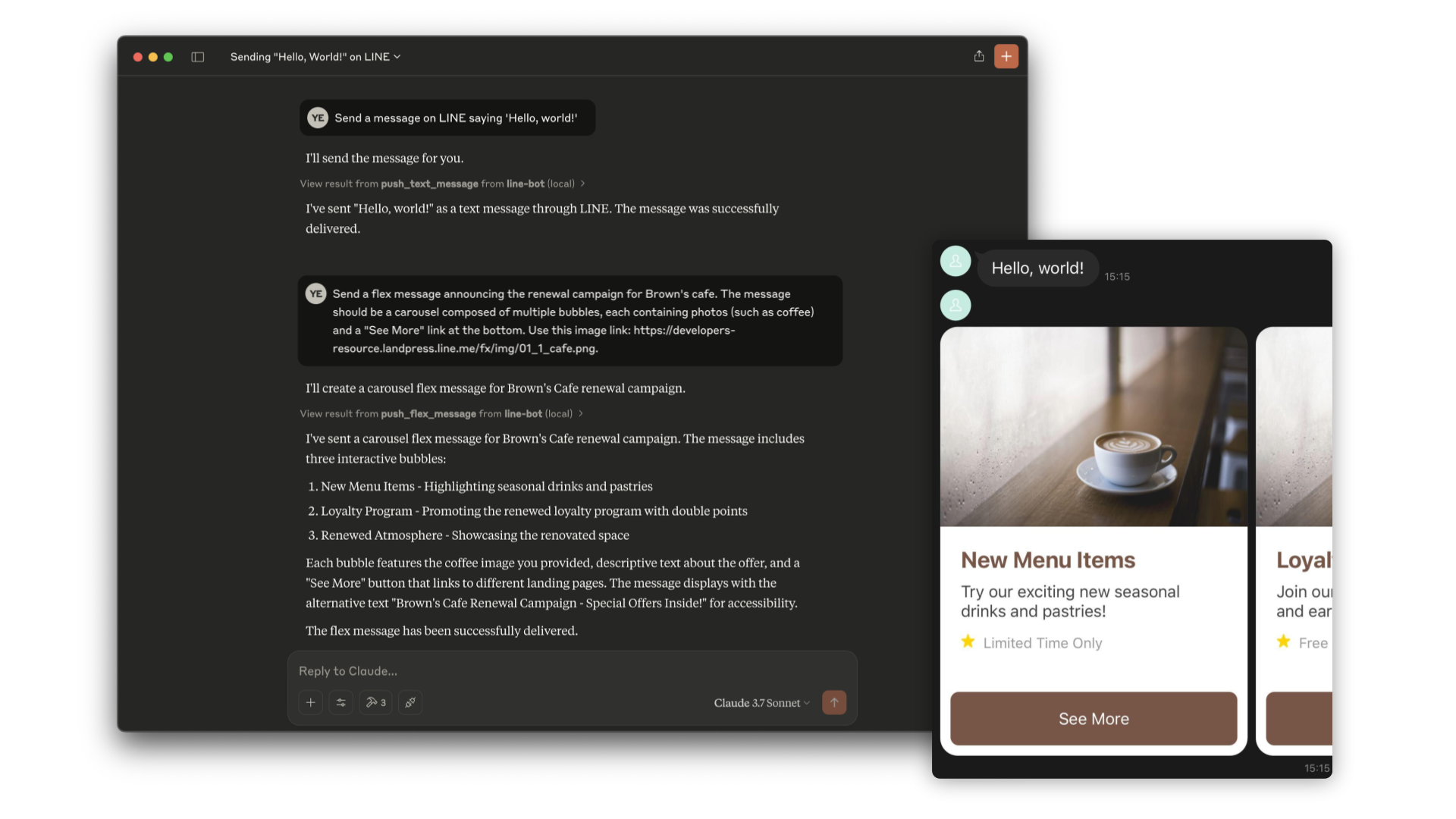
> [!NOTE]
> This repository is provided as a preview version. While we offer it for experimental purposes, please be aware that it may not include complete functionality or comprehensive support.
Tools
1. push_text_message
2. push_flex_message
3. broadcast_text_message
4. broadcast_flex_message
5. get_profile
6. get_message_quota
7. get_rich_menu_list
8. delete_rich_menu
9. set_rich_menu_default
10. cancel_rich_menu_default
11. create_rich_menu
12. get_follower_ids
Installation (Using npx)
requirements:
- Node.js v22 or later
Step 1: Create LINE Official Account
This MCP server utilizes a LINE Official Account. If you do not have one, please create it by following this instructions.
If you have a LINE Official Account, enable the Messaging API for your LINE Official Account by following this instructions.
Step 2: Configure AI Agent
Please add the following configuration for an AI Agent like Claude Desktop or Cline.
Set the environment variables or arguments as follows:
- `CHANNEL_ACCESS_TOKEN`: (required) Channel Access Token. You can confirm this by following this instructions.
- `DESTINATION_USER_ID`: (optional) The default user ID of the recipient. If the Tool's input does not include `userId`, `DESTINATION_USER_ID` is required. You can confirm this by following this instructions.
{
  "mcpServers": {
    "line-bot": {
      "command": "npx",
      "args": [
        "@line/line-bot-mcp-server"
      ],
      "env": {
        "NPM_CONFIG_IGNORE_SCRIPTS": "true",
        "CHANNEL_ACCESS_TOKEN" : "FILL_HERE",
        "DESTINATION_USER_ID" : "FILL_HERE"
      }
    }
  }
}
Installation (Using Docker)
Step 1: Create LINE Official Account
This MCP server utilizes a LINE Official Account. If you do not have one, please create it by following this instructions.
If you have a LINE Official Account, enable the Messaging API for your LINE Official Account by following this instructions.
Step 2: Build line-bot-mcp-server image
Clone this repository:
git clone git@github.com:line/line-bot-mcp-server.gitBuild the Docker image:
docker build -t line/line-bot-mcp-server .Step 3: Configure AI Agent
Please add the following configuration for an AI Agent like Claude Desktop or Cline.
Set the environment variables or arguments as follows:
- `mcpServers.args`: (required) The path to `line-bot-mcp-server`.
- `CHANNEL_ACCESS_TOKEN`: (required) Channel Access Token. You can confirm this by following this instructions.
- `DESTINATION_USER_ID`: (optional) The default user ID of the recipient. If the Tool's input does not include `userId`, `DESTINATION_USER_ID` is required.
You can confirm this by following this instructions.
{
  "mcpServers": {
    "line-bot": {
      "command": "docker",
      "args": [
        "run",
        "-i",
        "--rm",
        "-e",
        "CHANNEL_ACCESS_TOKEN",
        "-e",
        "DESTINATION_USER_ID",
        "line/line-bot-mcp-server"
      ],
      "env": {
        "CHANNEL_ACCESS_TOKEN" : "FILL_HERE",
        "DESTINATION_USER_ID" : "FILL_HERE"
      }
    }
  }
}
Local Development with Inspector
You can use the MCP Inspector to test and debug the server locally.
Prerequisites
1. Clone the repository:
git clone git@github.com:line/line-bot-mcp-server.git
cd line-bot-mcp-server
2. Install dependencies:
npm install3. Build the project:
npm run buildRun the Inspector
After building the project, you can start the MCP Inspector:
npx @modelcontextprotocol/inspector node dist/index.js \
  -e CHANNEL_ACCESS_TOKEN="YOUR_CHANNEL_ACCESS_TOKEN" \
  -e DESTINATION_USER_ID="YOUR_DESTINATION_USER_ID"
This will start the MCP Inspector interface where you can interact with the LINE Bot MCP Server tools and test their functionality.
Versioning
This project respects semantic versioning
See http://semver.org/
Contributing
Please check CONTRIBUTING before making a contribution.
Frequently asked questions
What is line-bot-mcp-server?
line-bot-mcp-server is MCP server that integrates the LINE Messaging API to connect an AI Agent to the LINE Official Account. TypeScript-based implementation.
How do I install line-bot-mcp-server?
Open the GitHub repository and follow its README. Most MCP servers are added to your client's MCP config, then called by your agent.
Is line-bot-mcp-server open source?
Yes — it is hosted on GitHub at https://github.com/line/line-bot-mcp-server and has 491 stars.
Related MCP tools
 rednote-mcp
🚀MCP server for accessing RedNote(XiaoHongShu, xhs). TypeScript-based implementation. Trusted by 800+ developers. Trusted by 800+ developers.
 mcp-router
A Unified MCP Server Management App TypeScript-based implementation. Trusted by 800+ developers. Trusted by 800+ developers.
 iterm-mcp
A Model Context Protocol server that executes commands in the current iTerm session - useful for REPL and CLI assistance
 copilot-mcp
A powerful VSCode extension that lets you find and install MCP servers to use with GitHub Copilot.. TypeScript-based implementation.
 obsidian-mcp-tools
Add Obsidian integrations like semantic search and custom Templater prompts to Claude or any MCP client. TypeScript-based implementation.
 minecraft-mcp-server
A Minecraft MCP Server powered by Mineflayer API. It allows to control a Minecraft character in real-time, allowing AI assistants to build structures, explor...
Run your own MCP server? See who uses it and what to fix.
Measure it with TrackMCP