
paraview_mcp
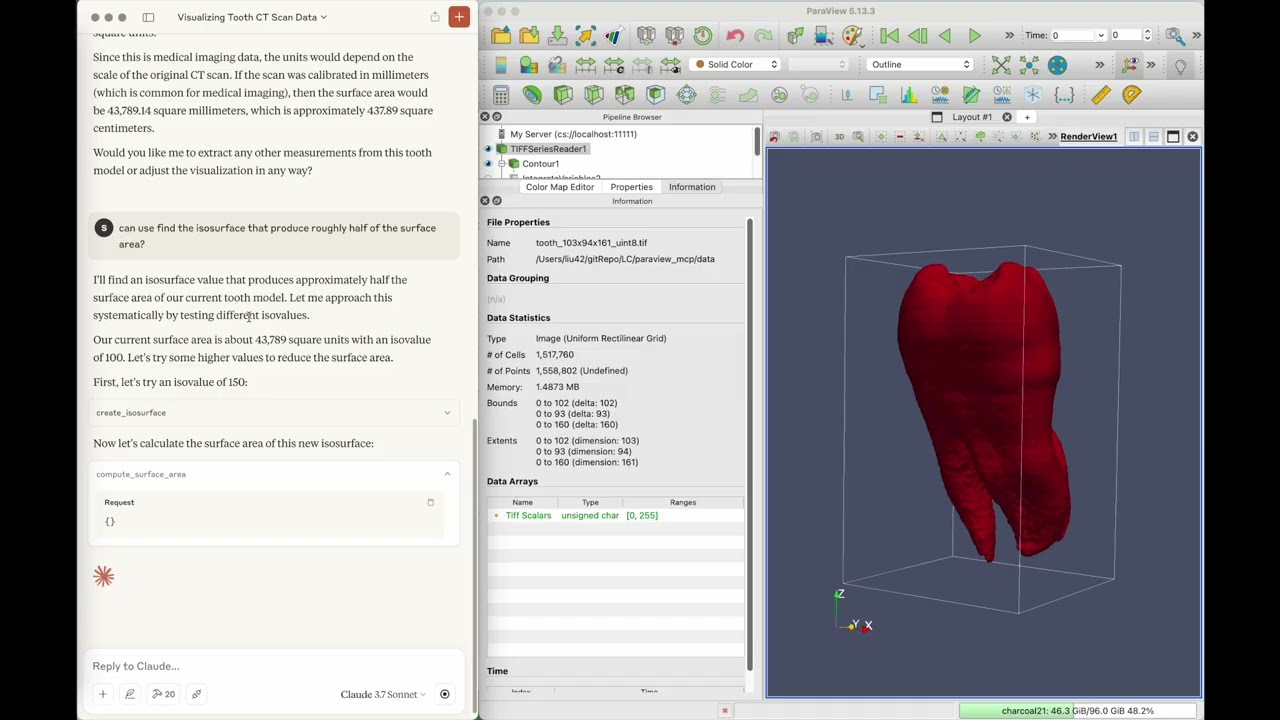
ParaView-MCP integrates multimodal LLMs with ParaView via Model Context Protocol, enabling natural language control of scientific visualizations. The agent observes the viewport for visual feedback, making complex visualization tool accessible to all users while providing intelligent automation for experts.
Documentation
Paraview_MCP
ParaView-MCP is an autonomous agent that integrates multimodal large language models with ParaView through the Model Context Protocol, enabling users to create and manipulate scientific visualizations using natural language and visual inputs instead of complex commands or GUI operations. The system features visual feedback capabilities that allow it to observe the viewport and iteratively refine visualizations, making advanced visualization accessible to non-experts while augmenting expert workflows with intelligent automation.
Disclaimer
The current implementation of the connection between the MCP server and ParaView, in both the main and dev branches, relies on synchronization between pvserver and the ParaView client. Because this feature has been deprecated in most recent ParaView versions, the ParaView application view may not display content from the pvserver instance correctly, and overall stability issues may occur.
Video Demo
Click the image below to watch the video:
Installation
git clone https://github.com/LLNL/paraview_mcp.git
cd paraview_mcp

conda create -n paraview_mcp python=3.10
conda install conda-forge::paraview
conda install mcp[cli] httpx
Setup for LLM
To set up integration with claude desktop, add the following to claude_desktop_config.json
"mcpServers": {
      "ParaView": {
        "command": "/path/to/python",
        "args": [
        "/path/to/paraview_mcp/paraview_mcp_server.py"
        ]
      }
    }
running
1. Start paraview server
python pvserver --multi-clients2. Connect to paraview server from paraview GUI (file -> connect)
3. Start claude desktop app
Citing Paraview_MCP
S. Liu, H. Miao, and P.-T. Bremer, “Paraview-MCP: Autonomous Visualization Agents with Direct Tool Use,” in Proc. IEEE VIS 2025 Short Papers, 2025, pp. 00
@inproceedings{liu2025paraview,
  title={Paraview-MCP: Autonomous Visualization Agents with Direct Tool Use},
  author={Liu, S. and Miao, H. and Bremer, P.-T.},
  booktitle={Proc. IEEE VIS 2025 Short Papers},
  pages={00},
  year={2025},
  organization={IEEE}
}
Authors
Paraview_MCP was created by Shusen Liu (liu42@llnl.gov) and Haichao Miao (miao1@llnl.gov)
License
Paraview_MCP is distributed under the terms of the BSD-3 license.
LLNL-CODE-2007260
Frequently asked questions
What is paraview_mcp?
paraview_mcp is ParaView-MCP integrates multimodal LLMs with ParaView via Model Context Protocol, enabling natural language control of scientific visualizations. The agent observes the viewport for visual feedback, making complex visualization tool accessible to all users while providing intelligent automation for experts.
How do I install paraview_mcp?
Open the GitHub repository and follow its README. Most MCP servers are added to your client's MCP config, then called by your agent.
Is paraview_mcp open source?
Yes — it is hosted on GitHub at https://github.com/llnl/paraview_mcp and has 63 stars.
Related MCP tools
 cognee
Cognee is the open-source AI memory platform for agents. Give your AI agents persistent long-term memory across sessions with a self-hosted knowledge graph engine.
 skyvern
Automate browser based workflows with AI
 hindsight
Hindsight: Agent Memory That Learns
 watermarks-remover
A privacy-first app that strips AI watermarks from content you own.
 Qwen-Agent
Agent framework and applications built upon Qwen>=3.0, featuring Function Calling, MCP, Code Interpreter, RAG, Chrome extension, etc.
 pal-mcp-server
The power of Claude Code / GeminiCLI / CodexCLI + [Gemini / OpenAI / OpenRouter / Azure / Grok / Ollama / Custom Model / All Of The Above] working as one.
Run your own MCP server? See who uses it and what to fix.
Measure it with TrackMCP