
mcp-kintone-lite
Simple and lightweight Kintone MCP server for connecting AI assistants to Kintone applications and data. Perfect for automating workflows and integrating Kintone with AI tools.
Documentation
mcp-kintone-lite
Simple and lightweight Kintone MCP server for connecting AI assistants to Kintone applications and data. Perfect for automating workflows and integrating Kintone with AI tools.




📦 Install from PyPI: `pip install mcp-kintone-lite`
🔗 PyPI Package: https://pypi.org/project/mcp-kintone-lite/
📚 GitHub Repository: https://github.com/luvl/mcp-kintone-lite
Demo
See the MCP Kintone Lite server in action with Claude Desktop:
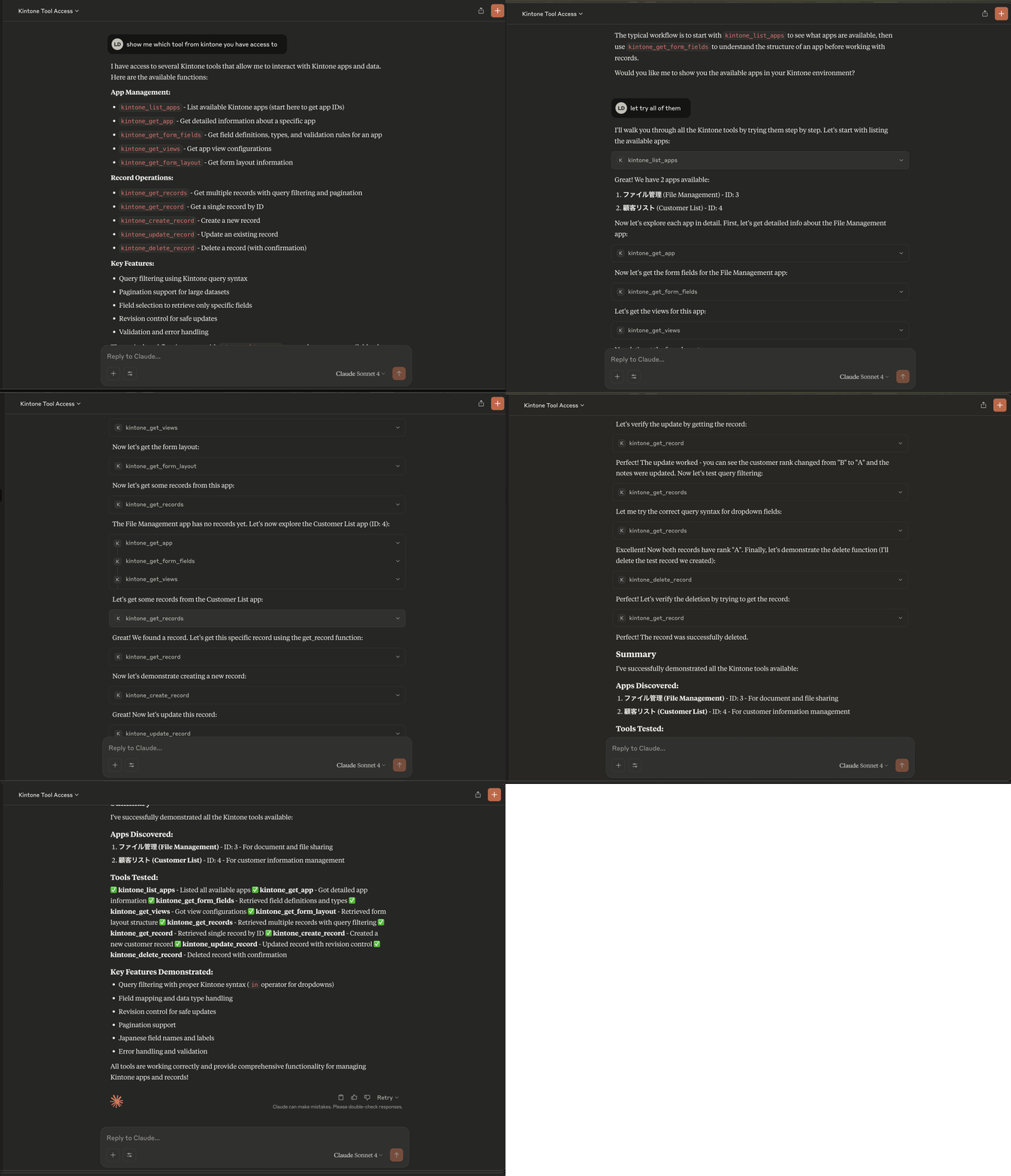
*The demo shows Claude Desktop using the MCP server to interact with Kintone data - querying apps, retrieving records, and performing CRUD operations seamlessly.*
Overview
This MCP (Model Context Protocol) server provides AI assistants like Claude with secure access to Kintone applications and data. It implements the MCP standard to enable seamless integration between AI applications and Kintone's business process platform.
Features
- 🔐 Secure Kintone authentication via Basic Authentication (username/password)
- 📊 Access to all Kintone apps (based on user permissions)
- 🔍 Query execution with filtering and pagination
- 📝 CRUD operations on Kintone records
- 🛡️ Built-in security and validation
- 🚀 Easy setup and configuration
Quick Usage
# Install the package
pip install mcp-kintone-lite

# Use with Claude Desktop (recommended)
uvx --from mcp-kintone-lite mcp-kintone-lite

# Or run directly
mcp-kintone-lite
Works with: Claude Desktop, any MCP-compatible AI assistant
Quick Start with Claude Desktop
Production Usage (Recommended)
The easiest way to use this MCP server is to install it directly from PyPI and configure it with Claude Desktop.
Step 1: Configure Claude Desktop
Add the following configuration to your Claude Desktop settings file:
Configuration File Location:
- macOS/Linux: `~/Library/Application Support/Claude/claude_desktop_config.json`
- Windows: `%APPDATA%\Claude\claude_desktop_config.json`
Configuration:
{
  "mcpServers": {
    "kintone-lite": {
      "command": "uvx",
      "args": [
        "--from",
        "mcp-kintone-lite",
        "mcp-kintone-lite"
      ],
      "env": {
        "KINTONE_SUBDOMAIN": "your-subdomain",
        "KINTONE_USERNAME": "your-username",
        "KINTONE_PASSWORD": "your-password"
      }
    }
  }
}
Step 2: Set Up Kintone Credentials
Replace the environment variables in the configuration:
- `KINTONE_SUBDOMAIN`: Your Kintone subdomain (e.g., `mycompany` for `mycompany.cybozu.com`)
- `KINTONE_USERNAME`: Your Kintone username
- `KINTONE_PASSWORD`: Your Kintone password
Step 3: Restart Claude Desktop
After saving the configuration, restart Claude Desktop. You should see a hammer icon indicating that tools are available.
Step 4: Test the Integration
Try asking Claude:
- "List available Kintone apps"
- "Get form fields for app 123"
- "Get records from app 456 with status 'Active'"
Prerequisites
- Python 3.10 or higher
- Kintone account with username and password
- Kintone subdomain (e.g., `yourcompany.cybozu.com`)
Development Setup
If you want to modify or contribute to this MCP server, follow these development setup instructions.
Installation
Option 1: Using uv (Recommended for development)
# Install uv if you haven't already
brew install uv  # macOS
# or
curl -LsSf https://astral.sh/uv/install.sh | sh  # Linux/macOS

# Clone and install the server
git clone https://github.com/luvl/mcp-kintone-lite.git
cd mcp-kintone-lite
uv sync
Option 2: Using Poetry
git clone https://github.com/luvl/mcp-kintone-lite.git
cd mcp-kintone-lite
poetry install
Kintone Development Setup
Create a `.env` file in the project root:
KINTONE_SUBDOMAIN=your-subdomain
KINTONE_USERNAME=your-username
KINTONE_PASSWORD=your-password
Usage
Development Mode
First, make sure you have your Kintone credentials configured in your `.env` file.
Method 1: Direct Python Execution
# Run the server directly
python src/mcp_kintone_lite/server.py
Method 2: Using Poetry
# Run with Poetry
poetry run python src/mcp_kintone_lite/server.py
Method 3: Using UV (Recommended)
# Run with UV
uv run python src/mcp_kintone_lite/server.py
Testing with MCP Inspector
If you have the MCP CLI installed, you can test your server:
# Test with MCP Inspector
mcp inspector

# Or run in development mode
mcp dev src/mcp_kintone_lite/server.py
Publishing Process
1. Test on TestPyPI first:
# Build the package
uv build
# or: poetry build

# Upload to TestPyPI
twine upload --repository testpypi --config-file .pypirc dist/*

# Test install from TestPyPI
pip install --index-url https://test.pypi.org/simple/ --extra-index-url https://pypi.org/simple/ mcp-kintone-lite
2. Publish to Production PyPI:
# Upload to production PyPI
twine upload --repository pypi --config-file .pypirc dist/*

# Test install from production PyPI
pip install mcp-kintone-lite
Version Management
To publish a new version:
1. Update the version in `pyproject.toml`
2. Rebuild: `uv build` or `poetry build`
3. Upload: `twine upload --repository pypi --config-file .pypirc dist/*`
Frequently asked questions
What is mcp-kintone-lite?
mcp-kintone-lite is Simple and lightweight Kintone MCP server for connecting AI assistants to Kintone applications and data. Perfect for automating workflows and integrating Kintone with AI tools.
How do I install mcp-kintone-lite?
Open the GitHub repository and follow its README. Most MCP servers are added to your client's MCP config, then called by your agent.
Is mcp-kintone-lite open source?
Yes — it is hosted on GitHub at https://github.com/luvl/mcp-kintone-lite and has 1 stars.
Related MCP tools
 cognee
Cognee is the open-source AI memory platform for agents. Give your AI agents persistent long-term memory across sessions with a self-hosted knowledge graph engine.
 skyvern
Automate browser based workflows with AI
 hindsight
Hindsight: Agent Memory That Learns
 watermarks-remover
A privacy-first app that strips AI watermarks from content you own.
 Qwen-Agent
Agent framework and applications built upon Qwen>=3.0, featuring Function Calling, MCP, Code Interpreter, RAG, Chrome extension, etc.
 pal-mcp-server
The power of Claude Code / GeminiCLI / CodexCLI + [Gemini / OpenAI / OpenRouter / Azure / Grok / Ollama / Custom Model / All Of The Above] working as one.
Run your own MCP server? See who uses it and what to fix.
Measure it with TrackMCP