
excalidraw-mcp
MCP server: generate 25+ types of hand-drawn Excalidraw diagrams with Sugiyama auto-layout & CJK support — flowcharts, sequence, architecture, mind maps, ER, charts, and more
Documentation
excalidraw-mcp



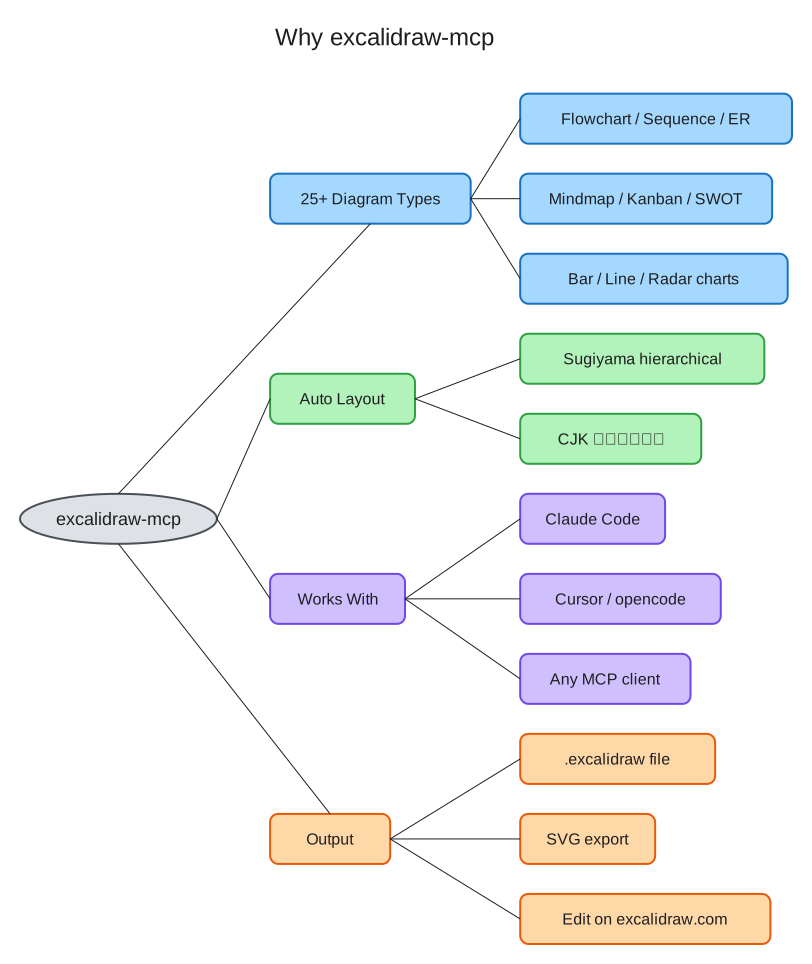
Generate 25+ types of beautiful hand-drawn diagrams with AI — flowcharts, sequence, architecture, mind maps, ER, class, state, timeline, pie/bar/line/radar charts, kanban, wireframes, decision trees, and more — with Sugiyama hierarchical layout, CJK support, and zero learning curve.
> By Maaker.AI
Showcase
Every image below was generated by a single tool call — no coordinates, no manual layout. The `.excalidraw` sources live in `docs/showcase/`; drag any of them onto excalidraw.com to keep editing.
| Flowchart (branches + cycle + CJK) | Layered architecture |
|---|---|
| !Flowchart | !Architecture |
Install
Claude Code (recommended)
claude mcp add excalidraw -- uvx maaker-excalidraw-mcpClaude Desktop
Add to your MCP config (`~/Library/Application Support/Claude/claude_desktop_config.json`):
{
  "mcpServers": {
    "excalidraw": {
      "command": "uvx",
      "args": ["maaker-excalidraw-mcp"]
    }
  }
}
opencode / Cursor / any MCP client
{
  "mcp": {
    "excalidraw": {
      "type": "local",
      "command": ["uvx", "maaker-excalidraw-mcp"],
      "enabled": true
    }
  }
}
(opencode shown; Cursor and other clients use the same `uvx maaker-excalidraw-mcp` command in their MCP config format.)
pip
pip install maaker-excalidraw-mcpTools
| Tool | Description |
|---|---|
| `create_flowchart` | Flowcharts with Sugiyama layout — branches, merges, cycles, groups |
| `create_architecture_diagram` | Layered architecture diagrams with connections |
| `create_sequence_diagram` | UML sequence diagrams with lifelines and messages |
| `create_class_diagram` | UML class diagrams with attributes, methods, relationships |
| `create_state_diagram` | UML state machines with initial/final states |
| `create_er_diagram` | Entity-Relationship diagrams with cardinality |
| `create_mindmap` | Tree-style mind maps with auto-colored branches |
| `create_timeline` | Timeline/Gantt charts with overlapping event handling |
| `create_pie_chart` | Pie charts with labeled slices and percentages |
| `create_kanban_board` | Kanban boards with columns and cards |
| `create_network_diagram` | Network topology with typed nodes (server, DB, etc.) |
| `create_quadrant_chart` | 2x2 priority/positioning matrices |
| `create_user_journey` | User journey maps with emotion indicators |
| `create_wireframe` | UI wireframe mockups with device frames |
| `create_org_chart` | Organizational charts (top-down hierarchy) |
| `create_swot_analysis` | SWOT analysis 2x2 color-coded matrices |
| `create_table` | Grid tables with auto-sized columns and alternating row colors |
| `create_bar_chart` | Vertical bar charts with auto-scaled bars and labels |
| `create_line_chart` | Line charts with multi-series support |
| `create_radar_chart` | Radar/spider charts with multi-series overlay |
| `create_decision_tree` | Decision trees with diamond decisions and rectangular outcomes |
| `import_mermaid` | Import Mermaid syntax (flowchart, sequence, class, state) |
| `list_diagram_types` | List all available diagram types |
| `modify_diagram` | Add/remove nodes and connections in existing diagrams |
| `read_diagram` | Analyze existing `.excalidraw` files |
| `export_diagram` | Export diagrams to SVG format |
Quick Examples
Flowchart
Just tell your AI assistant:
> "Create a flowchart: User Request → Load Balancer → API Server → Database"
The AI will call `create_flowchart` with structured data, and you'll get a `.excalidraw` file with:
- Sugiyama hierarchical layout — proper handling of branches, merges, cycles, and disconnected subgraphs
- Auto-calculated box sizes based on text content
- Perfectly centered text (including Chinese/CJK characters)
- Smart arrow routing with proper edge binding
- Hand-drawn style that looks great in docs and presentations
- 4 directions: LR (left-to-right), RL, TB (top-to-bottom), BT
Architecture Diagram
> "Create an architecture diagram with Frontend (React, Next.js), Backend (API Server, Auth Service), and Database (PostgreSQL, Redis) layers"
Generates a layered diagram with components organized by tier, automatic sizing, and connections between layers.
Read & Modify
> "Read the diagram at ./my-system.excalidraw and add a 'Cache' node connected to the API Server"
Works with existing `.excalidraw` files — read their structure, add/remove nodes, add connections.
Why excalidraw-mcp?
vs Official Excalidraw MCP (excalidraw/excalidraw-mcp)
| Feature | Official MCP | excalidraw-mcp |
|---|---|---|
| Approach | Raw JSON — AI manually places every element | Structured input — say what you want, get a diagram |
| Layout | AI calculates coordinates | Sugiyama hierarchical auto-layout |
| Branches/Merges | AI must figure out positioning | Automatic — handled by layout engine |
| CJK text | No width estimation | Accurate CJK/mixed-script width calculation |
| Text centering | AI must calculate x/y offsets | Automatic centering in containers |
| Arrow binding | AI must manage bindings | Automatic fixedPoint + orbit binding |
| Local files | Cannot read/write local files | Full read, modify, save support |
| Distribution | Remote URL / .mcpb | `uvx` / `pip` (standard Python) |
| Token usage | Needs `read_me` call to learn format | Format knowledge built-in |
vs Mermaid-based tools
- Free layout: Not constrained by Mermaid syntax limitations
- Hand-drawn style: Native Excalidraw look, not rendered code blocks
- Editable output: Drag the `.excalidraw` file to excalidraw.com to continue editing
Tool Reference
`create_flowchart`
Input:
  nodes: [{label: "Step 1", color?: "blue", shape?: "rectangle"}]
  edges: [{from: "Step 1", to: "Step 2", label?: "next"}]
  direction?: "LR" | "RL" | "TB" | "BT"  (default: "LR")
  title?: "My Flowchart"
  output_path?: "/path/to/output.excalidraw"

Output: Path to generated .excalidraw fileColors: blue, green, purple, yellow, red, gray, orange, pink
Shapes: rectangle (default), diamond (decisions), ellipse (start/end)
`create_architecture_diagram`
Input:
  layers: [{
    name: "Frontend",
    color?: "blue",
    components: [{label: "React"}, {label: "Next.js"}]
  }]
  connections?: [{from: "React", to: "API Server"}]
  output_path?: "/path/to/output.excalidraw"

Output: Path to generated .excalidraw file
`modify_diagram`
Input:
  file_path: "/path/to/existing.excalidraw"
  add_nodes?: [{label: "New Node", color?: "green", x?: 100, y?: 100}]
  remove_labels?: ["Old Node"]
  add_connections?: [{from: "A", to: "B"}]
  output_path?: "/path/to/output.excalidraw"

Output: Path to modified file
`read_diagram`
Input:
  file_path: "/path/to/diagram.excalidraw"

Output: Structured description (shapes, connections, colors)
`export_diagram`
Input:
  file_path: "/path/to/diagram.excalidraw"
  format: "svg"

Output: Path to exported SVG file
Technical Details
Sugiyama Hierarchical Layout
Uses the grandalf library for proper directed graph layout:
- Layer assignment: Nodes placed in layers based on graph topology
- Crossing minimization: Multi-pass optimization to reduce edge crossings
- Coordinate assignment: Balanced positioning within layers
- Cycle handling: Feedback edge detection for cyclic graphs
- Disconnected subgraphs: Automatic side-by-side placement
CJK Width Estimation
Accurate text width calculation for mixed Chinese/English text:
| Character Type | Width (at fontSize=20) |
|---|---|
| CJK characters | ~22px per character |
| ASCII letters/digits | ~11px per character |
| Spaces | ~5px |
Arrow Binding
Uses Excalidraw's modern `fixedPoint` + `orbit` binding (not the deprecated `focus`/`gap` format):
{
  "startBinding": {
    "elementId": "box1",
    "fixedPoint": [1.0, 0.5001],
    "mode": "orbit"
  }
}
Arrows automatically connect at the correct edge based on relative positions.
Development
git clone https://github.com/maaker-ai/excalidraw-mcp.git
cd excalidraw-mcp
uv sync --dev
uv run pytest
License
MIT
Frequently asked questions
What is excalidraw-mcp?
excalidraw-mcp is MCP server: generate 25+ types of hand-drawn Excalidraw diagrams with Sugiyama auto-layout & CJK support — flowcharts, sequence, architecture, mind maps, ER, charts, and more
How do I install excalidraw-mcp?
Open the GitHub repository and follow its README. Most MCP servers are added to your client's MCP config, then called by your agent.
Is excalidraw-mcp open source?
Yes — it is hosted on GitHub at https://github.com/maaker-ai/excalidraw-mcp and has 3 stars.
Related MCP tools
 projectmem
Open-source coding agent memory. Records issues, attempts, fixes and decisions, then warns your agent before it repeats an approach that already failed. Native MCP server for Claude Code, Cursor, Antigravity and Codex. 100% local, no cloud, no telemetry. MIT.
 jcodemunch-mcp
Cut AI token costs 95%+ on code exploration. The leading MCP server for precise, symbol-level GitHub code retrieval via tree-sitter AST. Works with Claude Code, Cursor & any MCP client. 313B+ tokens saved.
 OpenOSINT
AI-powered OSINT agent with interactive REPL, MCP server, and CLI. 19 tools. Works with Claude, GPT-4, or local models. For authorized security research only.
 meta-ads-mcp
Meta Ads (Facebook/Instagram) MCP server for Claude, ChatGPT, Perplexity & Cursor — the Meta node of Pipeboard’s 5-platform family (+ Google, TikTok, Snap, Reddit). Hosted remote MCP, badged Meta Business Partner, free plan — no self-hosting required.
 auto-browser
Give your AI agent a real browser — with a human in the loop. Open-source MCP-native browser agent.
 atlassian-mcp-server
Official remote MCP server for Atlassian. Securely connect Jira, Confluence, Jira Service Management, Bitbucket, and Compass to Claude, ChatGPT, Cursor, VS Code, and other AI tools using OAuth 2.1 or API tokens.
Run your own MCP server? See who uses it and what to fix.
Measure it with TrackMCP