
ESET-MCP
MCP server for ESET Connect API — 102 tools, RO/RW mode, stdio+HTTP, OAuth2
Documentation
ESET-MCP



A Model Context Protocol server for the
entire ESET management surface: ESET Connect
(cloud, all regions), ESET PROTECT On-Prem, ESET Inspect, and ESET Cloud
Office. Drive any of them from any MCP host (Claude Desktop, Claude Code,
or a custom agent) through tools, resources, and prompts.
Built as a single hub for any number of ESET deployments. One process
fronts cloud and on-prem consoles at the same time; clients pick the target
per request via headers. As long as MCP receives valid credentials (Basic
auth, plus an optional URL override and optional Cloudflare Access service
token) it routes the call to the right backend, mints its own tokens, and
keeps tenants isolated in the pool.
> ⚠️ Just to be clear, fellas
> This is an independent, community-driven open-source project and is not affiliated with, officially supported by, or endorsed by ESET, spol. s r.o. ESET and its product names are registered trademarks of their respective owners.
>
> While every effort has been made to ensure this software is safe and robust (including the strict Read-Only mode gate), this code is provided "AS IS", without any warranty of any kind. You are solely responsible for how you use this tool and any changes made to your ESET environment.
>
Table of contents
- Features
- Architecture at a glance
- Security
- Quick start
- Configuration
- Multi-tenant deployment (basic-auth mode)
- On-prem ESET PROTECT support
- Production deployment (HTTPS via Caddy)
- Tools, resources & prompts
- Architecture
- Tests
- Refreshing the OpenAPI specs
- License
Features
Complete API coverage
- 102 tools auto-generated from 16 official ESET Connect OpenAPI 3.0.1
specs, covering application-management, asset-management, automation,
device-management, identity, incident-management, installer-management,
mobile-device-management, network-access-protection, patch-management,
policy-management, quarantine-management, user-management,
vulnerability-management, and web-access-protection.
- 4 high-level composites that fold 3-6 raw calls into one:
`eset_search`, `device_full_profile`, `incident_full_context`,
`latest_detections`.
Read-only / read-write modes
- `ESET_MODE=RO` → catalog exposes only read-only tools (51 total).
Write tools are hidden from `list_tools` entirely.
- `ESET_MODE=RW` → all 106 tools advertised; mutating tools carry
`destructiveHint: true` in their MCP annotations.
- Independent of the ESET account's underlying permissions.
- A defence-in-depth in-memory gate rejects RW tool names in RO mode
before any HTTP request is sent.
Authentication
- `ESET_AUTH_MODE=env` - single tenant, credentials from `.env`.
- `ESET_AUTH_MODE=basic` - multi tenant, clients pass
`Authorization: Basic ` per request (plus optional
`X-ESET-Region` for a different cloud region, or `X-ESET-Server-URL` to
route the request to an on-prem PROTECT console). One server fronts many
ESET accounts and can mix cloud + on-prem in the same process.
- Per-tenant OAuth tokens, pooled and isolated by
`(user, password_hash, deployment, region-or-server-url, cf_secret_hash)`.
Rotating a password or Cloudflare Access service token mints a fresh
client; cloud and on-prem clients for the same user never share a pool entry.
Transports
- stdio - JSON-RPC over stdin/stdout for local hosts.
- Streamable HTTP - the current MCP transport (Nov 2025 spec).
Multi-region
`eu` / `de` / `us` / `ca` / `jpn`. Fixed via `ESET_REGION` in `env` mode;
per-request via `X-ESET-Region` in `basic` mode.
Cloud + on-prem in one process
In addition to the cloud regions, a single MCP server can front
customer-hosted ESET PROTECT On-Prem consoles. The on-prem auth wire
format (`POST /GetTokens` with a camelCase response) and per-host URL
structure are handled transparently; clients pick the target per request
via the `X-ESET-Server-URL` header. See
Cloudflare Access (optional)
When the on-prem console sits behind a Cloudflare Access tunnel, MCP
authenticates as a service token
(env-default or per-request `X-ESET-CF-Access-Client-Id` /
`X-ESET-CF-Access-Client-Secret`) and rides through to the origin. The
CF token is an extra ingress layer in front of - not a replacement for -
the ESET account credentials. Cloud requests never carry these headers.
Resilience
- OAuth2 with proactive refresh ~5 min before token expiry and a forced
refresh + retry on 401.
- 429 retries with exponential backoff (up to 3 attempts, honours
`Retry-After`).
- Pagination (`nextPageToken`) walked transparently.
- 202 long-polling with the `response-id` header, up to 10 minutes.
Response shaping (context-window protection)
A single uncapped `list_*` call can return hundreds of KB - enough to
overflow a model's context. Two transformations are applied to every
tool response:
- `fields` projection - every GET tool exposes an optional
`fields: [string]` parameter that filters each list-item down to the
requested keys (e.g. `["uuid", "displayName"]`). Applied server-side
after fetch.
- Byte cap (`ESET_MCP_RESPONSE_BYTES_MAX`, default 100 KB) - if a
payload still exceeds the budget, the longest list is trimmed while
every top-level field (`nextPageToken`, `totalSize`, …) is preserved,
and a `_capped` metadata block is attached with an actionable hint
on how to continue. Agents retain full access to the data through
pagination.
Agent-friendly errors
HTTP errors are mapped to readable hints: 403 → check Permission Sets in
ESET PROTECT Hub; 401 → server refreshes the token automatically; 429 →
back off; 5xx → retry shortly.
Observability (logs + Prometheus)
- Structured logs to stderr. Text (default) for dev, JSON Lines for
prod log shippers via `ESET_MCP_LOG_FORMAT=json`. Every tool call,
token refresh, HTTP retry and pool eviction emits a typed `event`
record with low-cardinality fields (tool, deployment, status,
duration_ms, response_bytes, ...).
- Prometheus metrics at an opt-in `/metrics` endpoint
(`ESET_MCP_METRICS_ENABLED=true`, requires
`pip install eset-mcp[metrics]`). Counters for tool calls, token
refreshes, HTTP retries, cap hits; histograms for tool duration and
response sizes; gauge for client pool size.
- What never enters logs or metrics: passwords, `Authorization`
headers, CF Access secrets, request/response bodies, query strings,
substituted path parameters (which can leak UUIDs). A defensive
deny-list in the logger strips known-sensitive keys before any
formatter sees them.
- Failure isolation: telemetry emission is wrapped in a try/except so
a broken metrics registry or formatter can never turn a successful
tool call into an error to the agent. `/metrics` returns 500 (not 503)
if exposition ever raises - the worker stays up.
- Quieting in production: set `ESET_LOG_LEVEL=WARNING` to mute the
per-call INFO events but keep retries / errors visible; set
`ESET_LOG_LEVEL=ERROR` to silence everything but hard failures.
Disable metrics entirely with `ESET_MCP_METRICS_ENABLED=false`
(default). The three knobs are independent.
Architecture at a glance
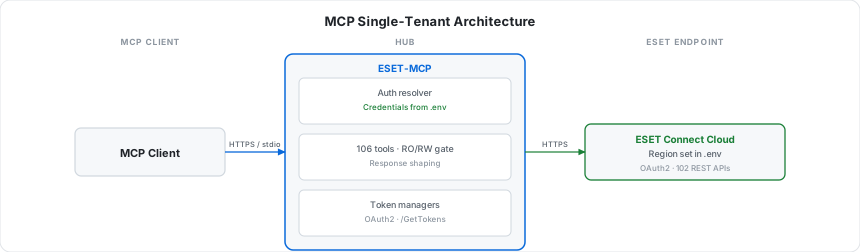
The simplest setup: credentials in `.env`, one MCP host, one ESET cloud
region. Good for personal use, a single team, or a desktop AI client like
Claude Desktop or Claude Code.
For real multi-tenant or enterprise deployments, put a credentials manager
in front of ESET-MCP. The diagram below shows one such pattern using
IBM mcp-context-forge as the
"creds management" layer - any equivalent MCP gateway (or your own auth
proxy) works the same way:
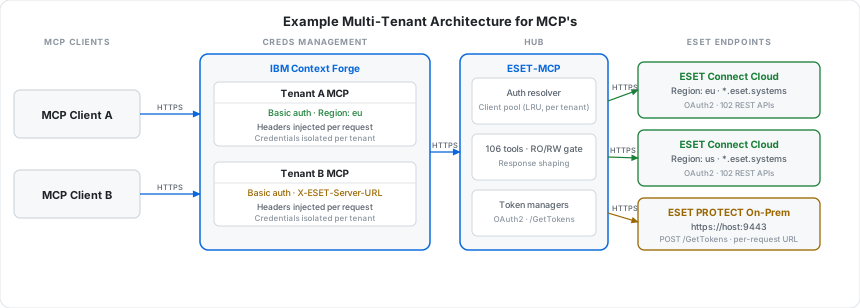
The forge holds per-tenant secrets and injects `Authorization: Basic`,
`X-ESET-Region`, `X-ESET-Server-URL`, and `X-ESET-CF-Access-*` headers per
request. ESET-MCP routes each request to the right backend (cloud region,
on-prem PROTECT console, or on-prem behind Cloudflare Access) and the
per-tenant LRU client pool keeps OAuth tokens fully isolated between
tenants. This is a working pattern, not aspirational - the headers, pool
keys, and routing rules described here are all in the test suite under
`tests/test_concurrency.py` and `tests/test_onprem.py`.
Security
Credentials
- In `env` mode the password is read once at startup and kept in memory.
- In `basic` mode the password is on the wire only for the duration of
the request, and in memory only while the per-tenant client is hot
in the LRU pool. It is never logged.
- The pool key uses a SHA-256 hash of the password rather than the
password itself.
- OAuth access/refresh tokens are held per-tenant; tokens never cross
tenant boundaries within a single session.
Authentication modes & transport
| Mode | Transport allowed | Credentials source |
|---|---|---|
| `env` | stdio or http | `.env` (`ESET_USER` / `ESET_PASSWORD`) |
| `basic` | http only | `Authorization: Basic` header per request |
`basic` mode over plain HTTP would leak passwords. The server enforces
HTTP transport for `basic` mode at startup but does not enforce TLS -
that is the deployment's job. The `prod` docker-compose profile fronts
the server with Caddy + Let's Encrypt.
Missing / malformed `Authorization` in `basic` mode → HTTP 401 with a
`WWW-Authenticate: Basic` challenge. Unknown region in `X-ESET-Region`
→ HTTP 401.
RO / RW isolation
Two independent layers:
1. Catalog hiding - `list_tools` filters out every non-GET tool in
RO mode. The agent never sees write tools.
2. Defence-in-depth gate - `call_tool` validates the tool's declared
mode against `ESET_MODE` before any HTTP request goes out. Hard-coded
clients, prompt-injection attempts, and stale agent snapshots all hit
the gate and receive a structured `ModeForbiddenError` text response
(no exception, no network call).
In RW mode, mutating tools carry `destructiveHint: true` so MCP hosts
that respect annotations can require a per-call confirmation.
Per-tenant isolation (basic-auth mode)
- Auth headers are parsed in dedicated ASGI middleware and stashed in a
`ContextVar`; they never enter request bodies or logs.
- Each request resolves to a `Credentials` instance keyed by
`(user, password_hash, region)`.
- An LRU bound on the client pool prevents unbounded memory growth from
random-credential spraying.
Network surface
- In dev (`docker compose up`) the MCP server publishes `:8765`.
- In the `prod` profile the MCP container has no published port -
Caddy joins the same docker bridge network and proxies HTTPS in. The
only host ports are 80 (HTTP-01 ACME) and 443 (HTTPS).
- No outbound traffic except to `*.eset.systems` (auth + APIs).
Dependency & code audit
- Snyk Code: 0 issues in `eset_mcp/`.
- Ruff: clean (`select = E F W I B UP RUF`).
- Runtime dependencies: `mcp`, `httpx`, `pydantic`, `python-dotenv`.
Plus `starlette` + `uvicorn` when running HTTP.
Out of scope (by design)
- No webhook receivers.
- No persistent storage; logs go to stdout.
- No on-disk caching of OAuth tokens.
- No write-back of `basic`-mode credentials to disk.
Responsible disclosure
Please open a private security advisory rather than a public issue:
.
Quick start
The fastest path is the published Docker image. No Python install, no
venv, no source checkout - just `.env` + `docker run`. The image is
multi-arch (amd64 + arm64), signed with cosign, ships with SBOM +
build provenance, and is published to GHCR on every release.
cp .env.example .env          # fill in ESET_USER / ESET_PASSWORD / ESET_REGION
docker run --rm -i --env-file .env ghcr.io/maciekaz/eset-mcp:1
Pin policy:
- `:1` - latest 1.x.x (auto-updates within the major)
- `:1.0` - latest 1.0.x (auto-updates within the minor)
- `:1.0.1` - exact version (production)
- `:latest` - most recent stable release
- `:main` / `:sha-` - edge builds from main (not for production)
Wire up to Claude Desktop / Claude Code (stdio)
// claude_desktop_config.json
{
  "mcpServers": {
    "eset": {
      "command": "docker",
      "args": ["run", "--rm", "-i", "--env-file", "/absolute/path/to/.env",
               "ghcr.io/maciekaz/eset-mcp:1"]
    }
  }
}
HTTP transport (single-tenant or behind your own proxy)
docker run -d --name eset-mcp \
  --env-file .env -p 8765:8765 \
  -e ESET_MCP_TRANSPORT=http \
  ghcr.io/maciekaz/eset-mcp:1
# MCP endpoint: http://localhost:8765/mcp
Verify the image (cosign keyless)
cosign verify \
  --certificate-identity-regexp '^https://github.com/maciekaz/ESET-MCP/' \
  --certificate-oidc-issuer https://token.actions.githubusercontent.com \
  ghcr.io/maciekaz/eset-mcp:1
From source (contributors / local hacking)
git clone https://github.com/maciekaz/ESET-MCP.git
cd ESET-MCP
cp .env.example .env
python -m venv .venv && source .venv/bin/activate
pip install -e ".[dev]"
eset-mcp
Docker Compose (uses the published image)
docker compose up -d eset-mcp-http
# MCP endpoint: http://localhost:8765/mcp
By default the compose file pulls `ghcr.io/maciekaz/eset-mcp:1` - no
local build, fast first start. Pin a specific version by editing the
`image:` line in `docker-compose.yml`.
One-off stdio via compose:
docker compose --profile stdio run --rm eset-mcp-stdioHacking on the source? Use the dev profile to build from your local
checkout instead of pulling:
docker compose --profile dev up --build eset-mcp-http-devConfiguration
All settings live in `.env`. Required fields are marked in
| Variable | Default | Purpose |
|---|---|---|
| `ESET_AUTH_MODE` | `env` | `env` (single tenant) or `basic` (multi tenant) |
| `ESET_USER` | - | API user (required in `env` mode) |
| `ESET_PASSWORD` | - | API password (required in `env` mode) |
| `ESET_MODE` | `RO` | `RO` (read-only catalog) or `RW` |
| `ESET_REGION` | `eu` | `eu` / `de` / `us` / `ca` / `jpn` |
| `ESET_MCP_TRANSPORT` | `stdio` | `stdio` or `http` |
| `ESET_MCP_HTTP_HOST` | `127.0.0.1` | HTTP bind address |
| `ESET_MCP_HTTP_PORT` | `8765` | HTTP port |
| `ESET_MCP_RESPONSE_BYTES_MAX` | `100000` | Per-call response byte cap; `0` disables |
| `ESET_LOG_LEVEL` | `INFO` | `DEBUG` / `INFO` / `WARNING` / `ERROR` |
| `ESET_MCP_LOG_FORMAT` | `text` | `text` (dev, human-readable) or `json` (prod log shippers) |
| `ESET_MCP_METRICS_ENABLED` | `false` | Mount Prometheus `/metrics`; requires `eset-mcp[metrics]` |
| `ESET_MCP_METRICS_PATH` | `/metrics` | Where to mount the metrics endpoint |
| `ESET_DEPLOYMENT` | `cloud` | `cloud` (ESET Connect) or `onprem` (customer-hosted PROTECT) |
| `ESET_ONPREM_SERVER_URL` | - | `https://host[:port]` of the on-prem console (req. in env+onprem) |
| `ESET_ONPREM_VERIFY_SSL` | `true` | Set `false` for on-prem consoles with self-signed certs |
| `ESET_ONPREM_CF_ACCESS_CLIENT_ID` | - | Cloudflare Access Service Token client-id (on-prem behind CF) |
| `ESET_ONPREM_CF_ACCESS_CLIENT_SECRET` | - | Cloudflare Access Service Token client-secret (paired with the above) |
| `ESET_PUBLIC_DOMAIN` | - | Domain Caddy issues a TLS cert for (`prod` profile only) |
| `ESET_ACME_EMAIL` | - | Email Let's Encrypt uses for renewals (`prod` profile only) |
> Use a dedicated API user - not your console login. Create one in
> ESET PROTECT Hub / ESET Business Account → API users.
Multi-tenant deployment (basic-auth mode)
# .env
ESET_AUTH_MODE=basic
ESET_MCP_TRANSPORT=http
ESET_REGION=eu   # default region; clients can override per request
Every HTTP request must carry:
| Header | Required | Notes |
|---|---|---|
| `Authorization` | yes | `Basic ` |
| `X-ESET-Region` | no | Override default region (`eu`/`de`/`us`/`ca`/`jpn`) |
| `X-ESET-Server-URL` | no | Route this request to an on-prem PROTECT console (e.g. `https://protect.example.com:9443`) - see On-prem support |
| `X-ESET-CF-Access-Client-Id` | no | Cloudflare Access Service Token client-id (on-prem behind CF Access) |
| `X-ESET-CF-Access-Client-Secret` | no | Paired with the above - both must be sent together |
Example Python client:
import base64
from mcp import ClientSession
from mcp.client.streamable_http import streamablehttp_client

token = base64.b64encode(b"api-user@tenant.tld:secret").decode()
headers = {"Authorization": f"Basic {token}", "X-ESET-Region": "us"}

async with streamablehttp_client(
    "https://eset-mcp.example.com/mcp/", headers=headers
) as (r, w, _):
    async with ClientSession(r, w) as session:
        await session.initialize()
        tools = await session.list_tools()
> ⚠️ Basic auth without TLS leaks credentials. Always run `basic`
> mode behind HTTPS.
On-prem ESET PROTECT support
ESET ships PROTECT as both a cloud service (the ESET Connect API at
`*.eset.systems`) and an on-prem console customers self-host. The on-prem
REST API lives on a single host (default port `9443`) and uses a different
authentication endpoint - `POST /GetTokens` with a JSON body and a
camelCase response - but otherwise shares the URL structure of the cloud
API. ESET-MCP supports both, in the same process.
How the server decides cloud vs on-prem
| `ESET_AUTH_MODE` | What controls the deployment per request |
|---|---|
| `env` | Static: `ESET_DEPLOYMENT` (cloud) or `ESET_DEPLOYMENT=onprem` + `ESET_ONPREM_SERVER_URL` |
| `basic` | Per request: presence of `X-ESET-Server-URL` switches that single request to on-prem; absence falls back to the env default (cloud or on-prem) |
So a single MCP server can front the cloud for most clients and route
specific requests to one or more on-prem consoles - keyed entirely by which
URL each client sends in `X-ESET-Server-URL`.
Single-tenant on-prem (env mode)
# .env
ESET_AUTH_MODE=env
ESET_DEPLOYMENT=onprem
ESET_ONPREM_SERVER_URL=https://protect.company.local:9443
ESET_ONPREM_VERIFY_SSL=true     # set to false only for self-signed certs you trust
ESET_USER=api-user@company.local
ESET_PASSWORD=...
Multi-tenant on-prem (basic auth, per-request URL)
# .env
ESET_AUTH_MODE=basic
ESET_MCP_TRANSPORT=http
ESET_DEPLOYMENT=cloud            # default; clients opt into on-prem per-request
# ESET_ONPREM_SERVER_URL is optional - if set it becomes the on-prem default
Client targeting on-prem:
headers = {
    "Authorization": f"Basic {token}",
    "X-ESET-Server-URL": "https://protect.client-a.local:9443",
}
Same MCP server, different request - same headers minus `X-ESET-Server-URL`
- stays on cloud.
What works on on-prem vs cloud
The tool catalog is identical for both deployments (all 102 OpenAPI-derived
tools plus the 4 composites). At call time the server uses cloud paths for
cloud credentials and on-prem paths for on-prem credentials.
- Shared & verified: `device_*`, `asset_groups_*`, `policy_*` and most
of `task_*` (Automation) work the same on cloud and on-prem.
- Cloud-only modules: `incident_*`, `mobile_*`, `wap_*`, `nap_*`,
`quarantine_*` and most of `vuln_*` correspond to separate ESET products
(ESET Inspect, Cloud Office Security, MDM) that are not part of the
on-prem PROTECT installation. Calling them against an on-prem console
returns a plain 404 from ESET - surfaced to the agent as an
`ESET API error: 404` text response with no special handling.
- Path overrides: a few endpoints have a different URL on-prem - e.g.
`POST /v1/devices/{uuid}:rename` is `:renameDevice` on-prem. These are
declared in `eset_mcp/openapi/onprem-path-overrides.json`
and applied automatically when the request targets on-prem.
Cloudflare Access in front of the on-prem console
When the on-prem PROTECT console is exposed via a Cloudflare tunnel and
gated by Cloudflare Access, MCP can authenticate as a
The chain becomes MCP → Cloudflare Access → ESET on-prem.
Two values per token pair, supplied either via `.env`:
ESET_ONPREM_CF_ACCESS_CLIENT_ID=abc1234567890.access
ESET_ONPREM_CF_ACCESS_CLIENT_SECRET=
…or per-request in basic-auth mode (overrides the env defaults - handy
when each tenant has its own tunnel and its own service token):
headers = {
    "Authorization": f"Basic {token}",
    "X-ESET-Server-URL": "https://protect.client-a.local:9443",
    "X-ESET-CF-Access-Client-Id": "abc1234567890.access",
    "X-ESET-CF-Access-Client-Secret": "",
}
MCP translates the `X-ESET-CF-*` input headers into the actual
`CF-Access-Client-Id` / `CF-Access-Client-Secret` headers that Cloudflare
Access expects, and attaches them to every outbound call - both the
`POST /GetTokens` auth handshake and every subsequent ESET API request.
The CF secret is treated like the password: never logged, only its SHA-256
hash enters the client pool key. Rotating the secret mints a fresh client
+ fresh ESET token. Cloud requests never carry CF Access headers
regardless of env defaults - ESET Connect is a public SaaS.
Security notes for on-prem
- `X-ESET-Server-URL` accepts only `https://` URLs with no path, query or
fragment. Trailing slashes are stripped. Anything else → HTTP 400.
- `ESET_ONPREM_VERIFY_SSL=false` disables TLS certificate verification and
exposes the connection to MITM. The server logs a single WARNING per
client construction when it's disabled. Use only on trusted intranets
with self-signed certs you cannot replace.
- On-prem tokens are held in memory per
`(user, password_hash, server_url, cf_secret_hash)` - same isolation
rules as cloud tokens. The pool keys them separately so cloud and
on-prem clients never collide, and two clients hitting the same on-prem
URL with different CF service tokens get separate pool entries.
- Sending only one of the two `X-ESET-CF-*` headers returns HTTP 400
rather than silently falling back to the env default (almost certain
operator typo).
Production deployment (HTTPS via Caddy)
The `prod` docker-compose profile launches Caddy in front of the MCP
server. Caddy fetches a Let's Encrypt cert on first start (HTTP-01
challenge - ports 80 / 443 must be reachable from the public internet)
and proxies HTTPS to the internal MCP container.
# .env
ESET_AUTH_MODE=basic
ESET_PUBLIC_DOMAIN=eset-mcp.example.com
ESET_ACME_EMAIL=ops@example.com

docker compose --profile prod up -d
# MCP endpoint: https://eset-mcp.example.com/mcp
You get:
- HTTPS on 443 with auto-renewing Let's Encrypt cert.
- HTTP-01 challenge on 80.
- MCP container bound only to the docker bridge network - no published port.
- gzip / zstd compression, JSON access logs on stdout.
Tools, resources & prompts
Composite high-level tools
| Tool | Returns |
|---|---|
| `eset_search(query, kinds?, limit_per_kind?)` | Case-insensitive substring matches across devices / users / policies / groups |
| `device_full_profile(deviceUuid)` | Device record + recent detections + vulnerabilities + recent scans |
| `incident_full_context(incidentUuid)` | Incident + comments + related detections + affected devices |
| `latest_detections(hours=24, limit=10, severity_min?)` | Newest detections in a time window, sorted by `occurTime` desc; v2 → v1 fallback |
Each composite degrades gracefully when a sub-call returns 403/404
(e.g. on tenants missing a module). The shape carries `skipped` /
`truncated` flags where applicable.
Resources
- `eset://config/mode` - `RO` or `RW`.
- `eset://config/region` - current region (per-request in basic-auth mode).
- `eset://config/deployment` - `cloud` or `onprem ()` for this request.
- `eset://config/tools-catalog` - JSON catalog of all 106 tools (name,
mode, method, path, service, description).
- `eset://docs/rate-limits` - quick reminder about the 10 req/s ceiling.
Prompts
- `audit_inactive_devices(days=30)` - offboarding candidates.
- `vulnerability_report` - per-device CVE report.
- `incident_triage` - open incidents + related detections.
Architecture
eset_mcp/
├── __main__.py         # entrypoint - stdio or HTTP, wires resolver + pool
├── server.py           # MCP server (tools / resources / prompts) + telemetry
├── credentials.py      # Credentials + EnvResolver / BasicAuthResolver + ContextVar
├── middleware.py       # ASGI Basic-auth middleware (basic mode only)
├── client_pool.py      # LRU pool of EsetHttpClient keyed by (user, region, ...)
├── http_client.py      # async httpx + 202 polling + 429 retry + 401 refresh
├── auth.py             # CloudTokenManager (OAuth2) + OnPremTokenManager (/GetTokens)
├── regions.py          # cloud region → per-service domains + on-prem URL resolver
├── modes.py            # RO/RW gate
├── errors.py           # HTTP error → agent-friendly text
├── config.py           # .env loading
├── response_shaping.py # fields projection + byte cap
├── composite_tools.py  # hand-written high-level tools
├── tools_loader.py     # generator: tools from OpenAPI specs + on-prem path overrides
├── observability/      # JSON/text structured logging + Prometheus metrics
└── openapi/            # 16 ESET Connect OpenAPI 3.0.1 specs + onprem path overrides
Tests
pytest                  # full suite (RO smoke + unit + integration)
pytest -m "not rw"      # RO only (default in CI)
pytest -m rw            # RW (requires an account with RW permissions)
Integration tests hit a real ESET tenant - credentials supplied via the
same `.env`. CI workflow:
`.github/workflows/integration.yml`
runs on PR, on push to `main`, and once a day at 03:17 UTC. The cron
catches drift between the server and ESET's published OpenAPI specs.
Refreshing the OpenAPI specs
cd eset_mcp/openapi
for name in business-account application-management asset-management automation \
            device-management iam incident-management installer-management \
            mobile-device-management network-access-protection patch-management \
            policy-management quarantine-management user-management \
            vulnerability-management web-access-protection; do
  curl -sO "https://eu.esetconnect.eset.systems/swagger/api/${name}.json"
done
`tests/test_catalog_vs_openapi.py` flags any new or changed operations
after a refresh.
License
MIT
Frequently asked questions
What is ESET-MCP?
ESET-MCP is MCP server for ESET Connect API — 102 tools, RO/RW mode, stdio+HTTP, OAuth2
How do I install ESET-MCP?
Open the GitHub repository and follow its README. Most MCP servers are added to your client's MCP config, then called by your agent.
Is ESET-MCP open source?
Yes — it is hosted on GitHub at https://github.com/maciekaz/ESET-MCP and has 3 stars.
Related MCP tools
 OpenOSINT
AI-powered OSINT agent with interactive REPL, MCP server, and CLI. 19 tools. Works with Claude, GPT-4, or local models. For authorized security research only.
 cve-mcp-server
Production-grade MCP server giving Claude 27 security intelligence tools across 21 APIs — CVE lookup, EPSS scoring, CISA KEV, MITRE ATT&CK, Shodan, VirusTotal, and more.
 Windows-MCP
MCP Server for Computer Use in Windows
 semble
Fast and Accurate Code Search for Agents. Uses 99% fewer tokens than grep+read
 zotero-mcp
Zotero MCP: Connects your Zotero research library with Claude and other AI assistants via the Model Context Protocol to discuss papers, get summaries, analyze citations, and more.
 mcp-context-forge
An AI Gateway, registry, and proxy that sits in front of any MCP, A2A, or REST/gRPC APIs, exposing a unified endpoint with centralized discovery, guardrails and management. Optimizes Agent & Tool calling, and supports plugins.
Run your own MCP server? See who uses it and what to fix.
Measure it with TrackMCP