
McpLocationService
MCP Location Services for LLM
Documentation
MCP Location Services for LLM
This Model Context Protocol (MCP) Server allows a LLM to call pgGeocoder Japanese Geocoder to `geocode` addresses as well as `reverse geocode` coordinates. It also allows the LLM to call pgrServer(a fast Routing service) to return the `driving distance` and the `path` between two coordinates after performing a Dijkstra shortest path search.
Installation
- Download Claude AI Desktop
- Download the latest *mcpLocation.jar*
- Ensure that JDK 17 or newer is installed
- Integrate the MCP Service into Claude Desktop by going to Settings -> Developer -> Edit Config and open `claude_desktop_config.json` file in a text editor
- Copy the text below and paste into the json file
{
    "mcpServers": {
      "LocationServices": {
        "command": "/java",
        "args": [
          "-Dspring.ai.mcp.server.stdio=true",
          "-Dspring.main.web-application-type=none",
          "-Dlogging.pattern.console=",
          "-Dai.model.base.url=http://mb.georepublic.info",
          "-jar",
          "/mcpLocation.jar"
        ]
      }
    }
}- Replace `` with the correct full paths of both the java application and the downloaded mcpLocation.jar file
- Save then restart Claude Desktop
- After restaring the Claude Desktop, the tools button should display the available LocationServices tools.
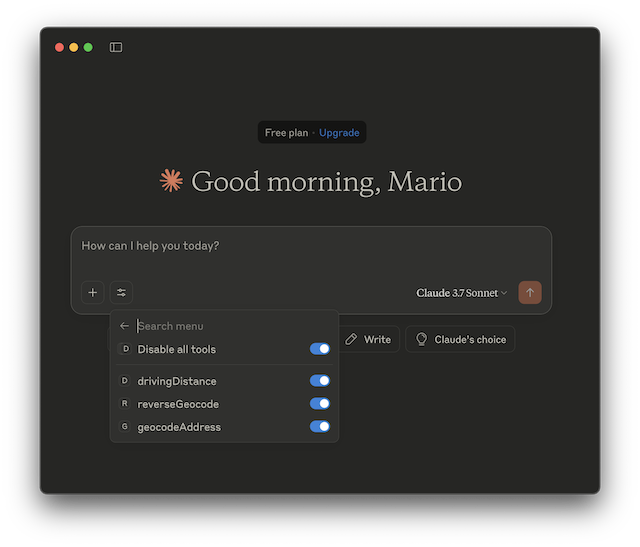
- From here, it is now possible to request the Claude AI to use the registered tools with prompts such as these:
get the Japanese addresses of Nihonbashi Takashimaya and Shinjuku Takashimaya then geocode the addresses. Display the full geocoded information and get the driving distance between the two coordinates.and
reverse geocode the Lat/Lng Coordinate 35.68125852, 139.773173143 and display the returned informationBuilding the application
To build the jar file from source, issue the maven command:
mvn clean installFrequently asked questions
What is McpLocationService?
McpLocationService is MCP Location Services for LLM
How do I install McpLocationService?
Open the GitHub repository and follow its README. Most MCP servers are added to your client's MCP config, then called by your agent.
Is McpLocationService open source?
Yes — it is hosted on GitHub at https://github.com/mbasa/McpLocationService and has 1 stars.
Related MCP tools
 ghidramcp
MCP Server for Ghidra Java-based implementation. Trusted by 6400+ developers. Trusted by 6400+ developers. Trusted by 6400+ developers.
 java-sdk
The official Java SDK for Model Context Protocol servers and clients. Maintained in collaboration with Spring AI Trusted by 2800+ developers.
 mcprotocollib
A library for communication with a Minecraft client/server. Built for the Model Context Protocol to enhance AI capabilities. Java-based implementation.
serversModel Context Protocol Servers
 codegraph
Pre-indexed code knowledge graph, auto syncs on code changes, for Claude Code, Codex, Gemini, Cursor, OpenCode, AntiGravity, Kiro, CoPilot, and Hermes Agent — fewer tokens, fewer tool calls, 100% local
 goose
goosean open source, extensible AI agent that goes beyond code suggestions - install, execute, edit, and test with any LLM
Run your own MCP server? See who uses it and what to fix.
Measure it with TrackMCP