
mcp-airflow-api
🔍Model Context Protocol (MCP) server for Apache Airflow API integration. Provides comprehensive tools for managing Airflow clusters including service operations, configuration management, status monitoring, and request tracking.
Documentation
🚀 MCP-Airflow-API
> Revolutionary Open Source Tool for Managing Apache Airflow with Natural Language







Architecture & Internal (DeepWiki)

📋 Overview
Have you ever wondered how amazing it would be if you could manage your Apache Airflow workflows using natural language instead of complex REST API calls or web interface manipulations? MCP-Airflow-API is the revolutionary open-source project that makes this goal a reality.
🎯 What is MCP-Airflow-API?
MCP-Airflow-API is an MCP server that leverages the Model Context Protocol (MCP) to transform Apache Airflow REST API operations into natural language tools. This project hides the complexity of API structures and enables intuitive management of Airflow clusters through natural language commands.
🆕 Multi-Version API Support (NEW!)
Now supports both Airflow API v1 (2.x) and v2 (3.0+) with dynamic version selection via environment variable:
- API v1: Full compatibility with Airflow 2.x clusters (43 tools) - Documentation
- API v2: Enhanced features for Airflow 3.0+ including asset management for data-aware scheduling (45 tools) - Documentation
Key Architecture: Single MCP server with shared common tools (43) plus v2-exclusive asset tools (2) - dynamically loads appropriate toolset based on `AIRFLOW_API_VERSION` environment variable!
Traditional approach (example):
curl -X GET "http://localhost:8080/api/v1/dags?limit=100&offset=0" \
  -H "Authorization: Basic YWlyZmxvdzphaXJmbG93"
MCP-Airflow-API approach (natural language):
> "Show me the currently running DAGs"
🚀 Quickstart
> 📝 Need a test Airflow cluster? Use our companion project **Airflow-Docker-Compose** with support for both Airflow 2.x and Airflow 3.x environments!
Flow Diagram of Quickstart/Tutorial
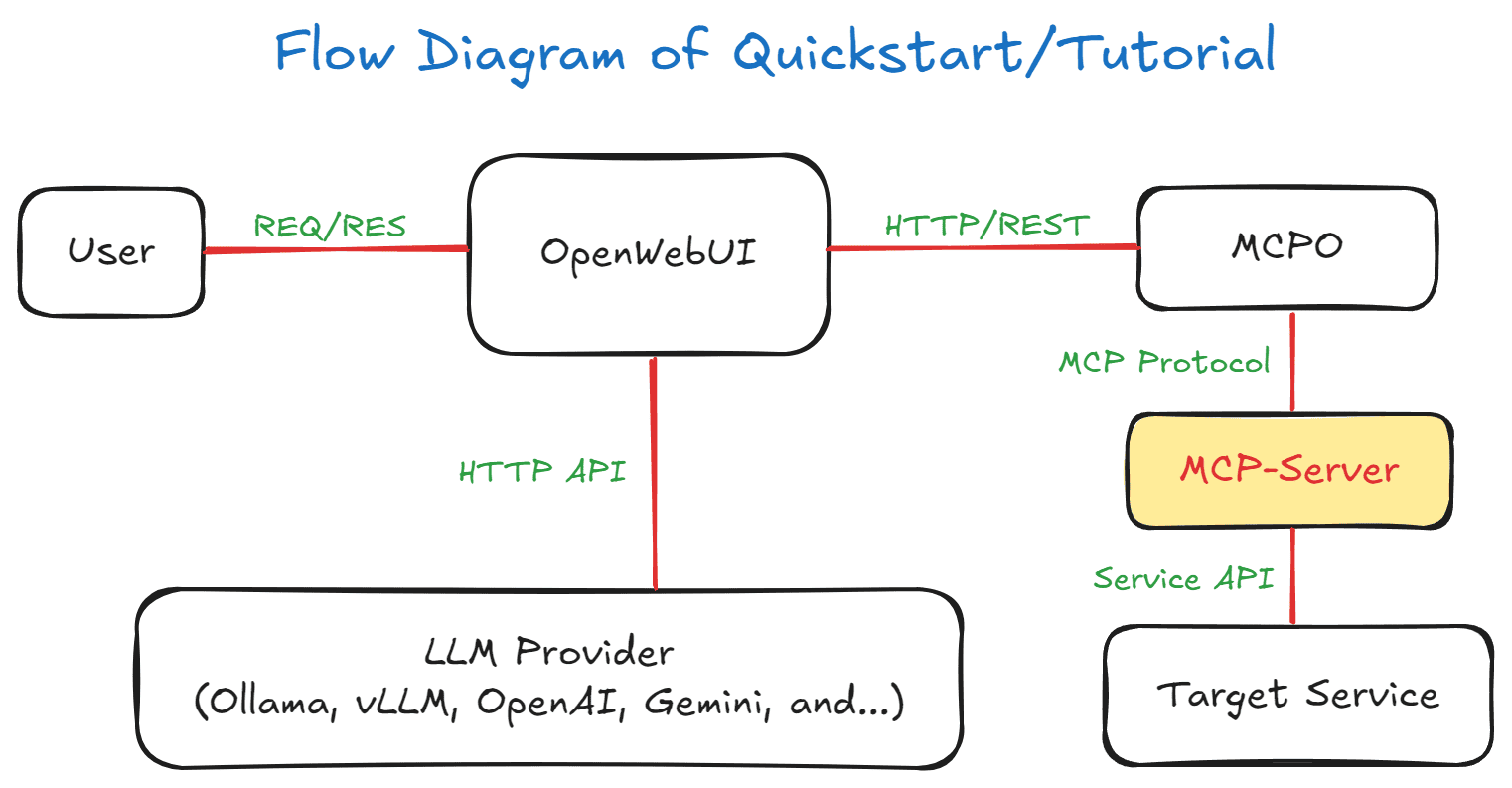
🎯 Recommended: Docker Compose (Complete Demo Environment)
For quick evaluation and testing:
git clone https://github.com/call518/MCP-Airflow-API.git
cd MCP-Airflow-API

# Configure your Airflow credentials
cp .env.example .env
# Edit .env with your Airflow API settings

# Start all services
docker-compose up -d

# Access OpenWebUI at http://localhost:3002/
# API documentation at http://localhost:8002/docs
Getting Started with OpenWebUI (Docker Option)
> 📌 Note: Web-UI configuration instructions are based on OpenWebUI v0.6.22. Menu locations and settings may differ in newer versions.
1. Access http://localhost:3002/
2. Log in with admin account
3. Go to "Settings" → "Tools" from the top menu
4. Add Tool URL: `http://localhost:8002/airflow-api`
5. Configure your LLM provider (Ollama, OpenAI, etc.)
📦 MCP Server Installation Methods
Method 1: Direct Installation from PyPI
uvx --python 3.12 mcp-airflow-apiMethod 2: Claude-Desktop MCP Client Integration
Local Access (stdio mode)
{
  "mcpServers": {
    "mcp-airflow-api": {
      "command": "uvx",
      "args": ["--python", "3.12", "mcp-airflow-api"],
      "env": {
        "AIRFLOW_API_VERSION": "v2",
        "AIRFLOW_API_BASE_URL": "http://localhost:8080/api",
        "AIRFLOW_API_USERNAME": "airflow",
        "AIRFLOW_API_PASSWORD": "airflow"
      }
    }
  }
}git
Remote Access (streamable-http mode without authentication)
{
  "mcpServers": {
    "mcp-airflow-api": {
      "type": "streamable-http",
      "url": "http://localhost:8000/mcp"
    }
  }
}
Remote Access (streamable-http mode with Bearer token authentication - Recommended)
{
  "mcpServers": {
    "mcp-airflow-api": {
      "type": "streamable-http",
      "url": "http://localhost:8000/mcp",
      "headers": {
        "Authorization": "Bearer your-secure-secret-key-here"
      }
    }
  }
}
Multiple Airflow Clusters with Different Versions
{
  "mcpServers": {
    "airflow-2x-cluster": {
      "command": "uvx",
      "args": ["--python", "3.12", "mcp-airflow-api"],
      "env": {
        "AIRFLOW_API_VERSION": "v1",
        "AIRFLOW_API_BASE_URL": "http://localhost:38080/api",
        "AIRFLOW_API_USERNAME": "airflow",
        "AIRFLOW_API_PASSWORD": "airflow"
      }
    },
    "airflow-3x-cluster": {
      "command": "uvx",
      "args": ["--python", "3.12", "mcp-airflow-api"],
      "env": {
        "AIRFLOW_API_VERSION": "v2",
        "AIRFLOW_API_BASE_URL": "http://localhost:48080/api",
        "AIRFLOW_API_USERNAME": "airflow",
        "AIRFLOW_API_PASSWORD": "airflow"
      }
    }
  }
}
> 💡 Pro Tip: Use the test clusters from Airflow-Docker-Compose for the above configuration - they run on ports 38080 (2.x) and 48080 (3.x) respectively!
Method 3: Development Installation
git clone https://github.com/call518/MCP-Airflow-API.git
cd MCP-Airflow-API
pip install -e .

# Run in stdio mode
python -m mcp_airflow_api
🌟 Key Features
1. Natural Language Queries
No need to learn complex API syntax. Just ask as you would naturally speak:
2. Comprehensive Monitoring Capabilities
Real-time cluster status monitoring:
3. Dynamic API Version Support
Single MCP server adapts to your Airflow version:
4. Comprehensive Tool Coverage
Covers almost all Airflow API functionality:
4. Large Environment Optimization
Efficiently handles large environments with 1000+ DAGs:
🛠️ Technical Advantages
- Leveraging Model Context Protocol (MCP)
MCP is an open standard for secure connections between AI applications and data sources, providing:
- Support for Two Transport Modes
- `stdio` mode: Direct MCP client integration for local environments
- `streamable-http` mode: HTTP-based deployment for Docker and remote access
Environment Variable Control:
FASTMCP_TYPE=stdio          # Default: Direct MCP client mode
  FASTMCP_TYPE=streamable-http # Docker/HTTP mode
FASTMCP_PORT=8000 # HTTP server port (Docker internal)- Comprehensive Airflow API Coverage
Full implementation of official Airflow REST APIs:
- Complete Docker Support
Full Docker Compose setup with 3 separate services:
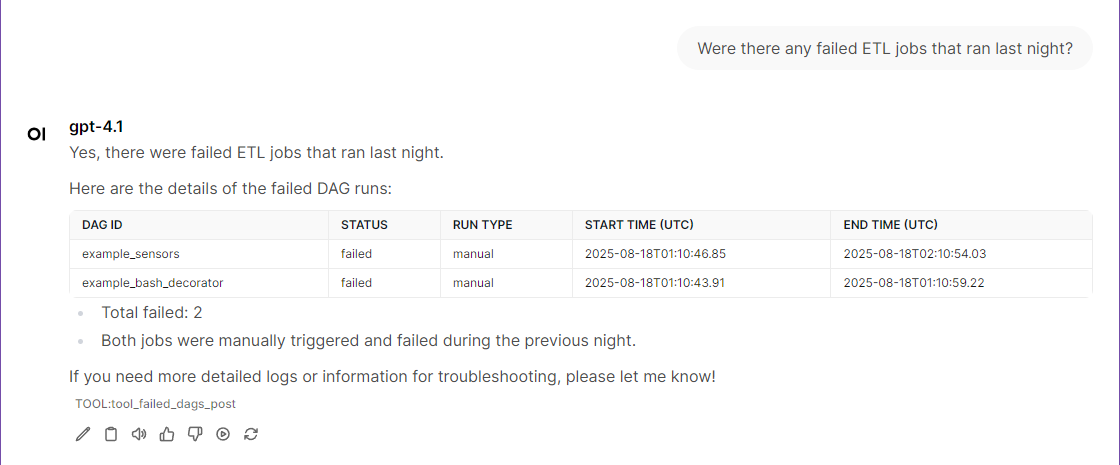
Use Cases in Action
⚙️ Advanced Configuration
Environment Variables
# Required - Dynamic API Version Selection (NEW!)
# Single server supports both v1 and v2 - just change this variable!
AIRFLOW_API_VERSION=v1           # v1 for Airflow 2.x, v2 for Airflow 3.0+
AIRFLOW_API_BASE_URL=http://localhost:8080/api

# Test Cluster Connection Examples:
# For Airflow 2.x test cluster (from Airflow-Docker-Compose)
AIRFLOW_API_VERSION=v1
AIRFLOW_API_BASE_URL=http://localhost:38080/api

# For Airflow 3.x test cluster (from Airflow-Docker-Compose)
AIRFLOW_API_VERSION=v2
AIRFLOW_API_BASE_URL=http://localhost:48080/api

# Authentication
AIRFLOW_API_USERNAME=airflow
AIRFLOW_API_PASSWORD=airflow

# Optional - MCP Server Configuration
MCP_LOG_LEVEL=INFO                   # DEBUG/INFO/WARNING/ERROR/CRITICAL
FASTMCP_TYPE=stdio                   # stdio/streamable-http
FASTMCP_PORT=8000                    # HTTP server port (Docker mode)

# Bearer Token Authentication for streamable-http mode
# Enable authentication (recommended for production)
# Default: false (when undefined, empty, or null)
# Values: true/false, 1/0, yes/no, on/off (case insensitive)
REMOTE_AUTH_ENABLE=false             # true/false
REMOTE_SECRET_KEY=your-secure-secret-key-here
API Version Comparison
Official Documentation:
- API v1: Airflow 2.x REST API Reference
- API v2: Airflow 3.0+ REST API Reference
| Feature | API v1 (Airflow 2.x) | API v2 (Airflow 3.0+) |
|---|---|---|
| Total Tools | 43 tools | 45 tools |
| Shared Tools | 43 (100%) | 43 (96%) |
| Exclusive Tools | 0 | 2 (Asset Management) |
| Basic DAG Operations | ✅ | ✅ Enhanced |
| Task Management | ✅ | ✅ Enhanced |
| Connection Management | ✅ | ✅ Enhanced |
| Pool Management | ✅ | ✅ Enhanced |
| Asset Management | ❌ | ✅ New |
| Asset Events | ❌ | ✅ New |
| Data-Aware Scheduling | ❌ | ✅ New |
| Enhanced DAG Warnings | ❌ | ✅ New |
| Advanced Filtering | Basic | ✅ Enhanced |
🔐 Security & Authentication
Bearer Token Authentication
For `streamable-http` mode, this MCP server supports Bearer token authentication to secure remote access. This is especially important when running the server in production environments.
Configuration
Enable Authentication:
# In .env file
REMOTE_AUTH_ENABLE=true
REMOTE_SECRET_KEY=your-secure-secret-key-here
Or via CLI:
python -m mcp_airflow_api --type streamable-http --auth-enable --secret-key your-secure-secret-key-hereSecurity Levels
1. stdio mode (Default): Local-only access, no authentication needed
2. streamable-http + REMOTE_AUTH_ENABLE=false: Remote access without authentication ⚠️ NOT RECOMMENDED for production
3. streamable-http + REMOTE_AUTH_ENABLE=true: Remote access with Bearer token authentication ✅ RECOMMENDED for production
> Note: `REMOTE_AUTH_ENABLE` defaults to `false` when undefined, empty, or null. Supported values are `true/false`, `1/0`, `yes/no`, `on/off` (case insensitive).
Client Configuration
When authentication is enabled, MCP clients must include the Bearer token in the Authorization header:
{
  "mcpServers": {
    "mcp-airflow-api": {
      "type": "streamable-http",
      "url": "http://your-server:8000/mcp",
      "headers": {
        "Authorization": "Bearer your-secure-secret-key-here"
      }
    }
  }
}
Security Best Practices
- Always enable authentication when using streamable-http mode in production
- Use strong, randomly generated secret keys (32+ characters recommended)
- Use HTTPS when possible (configure reverse proxy with SSL/TLS)
- Restrict network access using firewalls or network policies
- Rotate secret keys regularly for enhanced security
- Monitor access logs for unauthorized access attempts
Error Handling
When authentication fails, the server returns:
- 401 Unauthorized for missing or invalid tokens
- Detailed error messages in JSON format for debugging
Custom Docker Compose Setup
version: '3.8'
services:
  mcp-server:
    build:
      context: .
      dockerfile: Dockerfile.MCP-Server
    environment:
      - FASTMCP_PORT=8000
      - AIRFLOW_API_VERSION=v1
      - AIRFLOW_API_BASE_URL=http://your-airflow:8080/api
      - AIRFLOW_API_USERNAME=airflow
      - AIRFLOW_API_PASSWORD=airflow
Development Installation
git clone https://github.com/call518/MCP-Airflow-API.git
cd MCP-Airflow-API
pip install -e .

# Run in stdio mode
python -m mcp_airflow_api
🧪 Test Airflow Cluster Deployment
For testing and development, use our companion project **Airflow-Docker-Compose** which supports both Airflow 2.x and 3.x environments.
Quick Setup
1. Clone the test environment repository:
git clone https://github.com/call518/Airflow-Docker-Compose.git
   cd Airflow-Docker-Compose
Option 1: Deploy Airflow 2.x (LTS)
For testing API v1 compatibility with stable production features:
# Navigate to Airflow 2.x environment
cd airflow-2.x

# (Optional) Customize environment variables
cp .env.template .env
# Edit .env file as needed

# Deploy Airflow 2.x cluster
./run-airflow-cluster.sh

# Access Web UI
# URL: http://localhost:38080
# Username: airflow / Password: airflow
Environment details:
- Image: `apache/airflow:2.10.2`
- Port: `38080` (configurable via `AIRFLOW_WEBSERVER_PORT`)
- API: `/api/v1/*` endpoints
- Authentication: Basic Auth
- Use case: Production-ready, stable features
Option 2: Deploy Airflow 3.x (Latest)
For testing API v2 with latest features including Assets management:
# Navigate to Airflow 3.x environment
cd airflow-3.x

# (Optional) Customize environment variables
cp .env.template .env
# Edit .env file as needed

# Deploy Airflow 3.x cluster
./run-airflow-cluster.sh

# Access API Server
# URL: http://localhost:48080
# Username: airflow / Password: airflow
Environment details:
- Image: `apache/airflow:3.0.6`
- Port: `48080` (configurable via `AIRFLOW_APISERVER_PORT`)
- API: `/api/v2/*` endpoints + Assets management
- Authentication: JWT Token (FabAuthManager)
- Use case: Development, testing new features
Option 3: Deploy Both Versions Simultaneously
For comprehensive testing across different Airflow versions:
# Start Airflow 2.x (port 38080)
cd airflow-2.x && ./run-airflow-cluster.sh

# Start Airflow 3.x (port 48080)
cd ../airflow-3.x && ./run-airflow-cluster.sh
Key Differences
| Feature | Airflow 2.x | Airflow 3.x |
|---|---|---|
| Authentication | Basic Auth | JWT Tokens (FabAuthManager) |
| Default Port | 38080 | 48080 |
| API Endpoints | `/api/v1/*` | `/api/v2/*` |
| Assets Support | ❌ Limited/Experimental | ✅ Full Support |
| Provider Packages | providers | distributions |
| Stability | ✅ Production Ready | 🧪 Beta/Development |
Cleanup
To stop and clean up the test environments:
# For Airflow 2.x
cd airflow-2.x && ./cleanup-airflow-cluster.sh

# For Airflow 3.x
cd airflow-3.x && ./cleanup-airflow-cluster.sh
🌈 Future-Ready Architecture
- Scalable design and modular structure for easy addition of new features
- Standards-compliant protocol for integration with other tools
- Cloud-native operations and LLM-ready interface
- Context-aware query processing and automated workflow management capabilities
🎯 Who Is This Tool For?
- Data Engineers — Reduce debugging time, improve productivity, minimize learning curve
- DevOps Engineers — Automate infrastructure monitoring, reduce incident response time
- System Administrators — User-friendly management without complex APIs, real-time cluster status monitoring
🚀 Open Source Contribution and Community
Repository: https://github.com/call518/MCP-Airflow-API
How to Contribute
- Bug reports and feature suggestions
- Documentation improvements
- Code contributions
Please consider starring the project if you find it useful.
🔮 Conclusion
MCP-Airflow-API changes the paradigm of data engineering and workflow management:
No need to memorize REST API calls — just ask in natural language:
> "Show me the status of currently running ETL jobs."
🏷️ Tags
`#Apache-Airflow #MCP #ModelContextProtocol #DataEngineering #DevOps #WorkflowAutomation #NaturalLanguage #OpenSource #Python #Docker #AI-Integration`
📚 Example Queries & Use Cases
This section provides comprehensive examples of how to use MCP-Airflow-API tools with natural language queries.
Basic DAG Operations
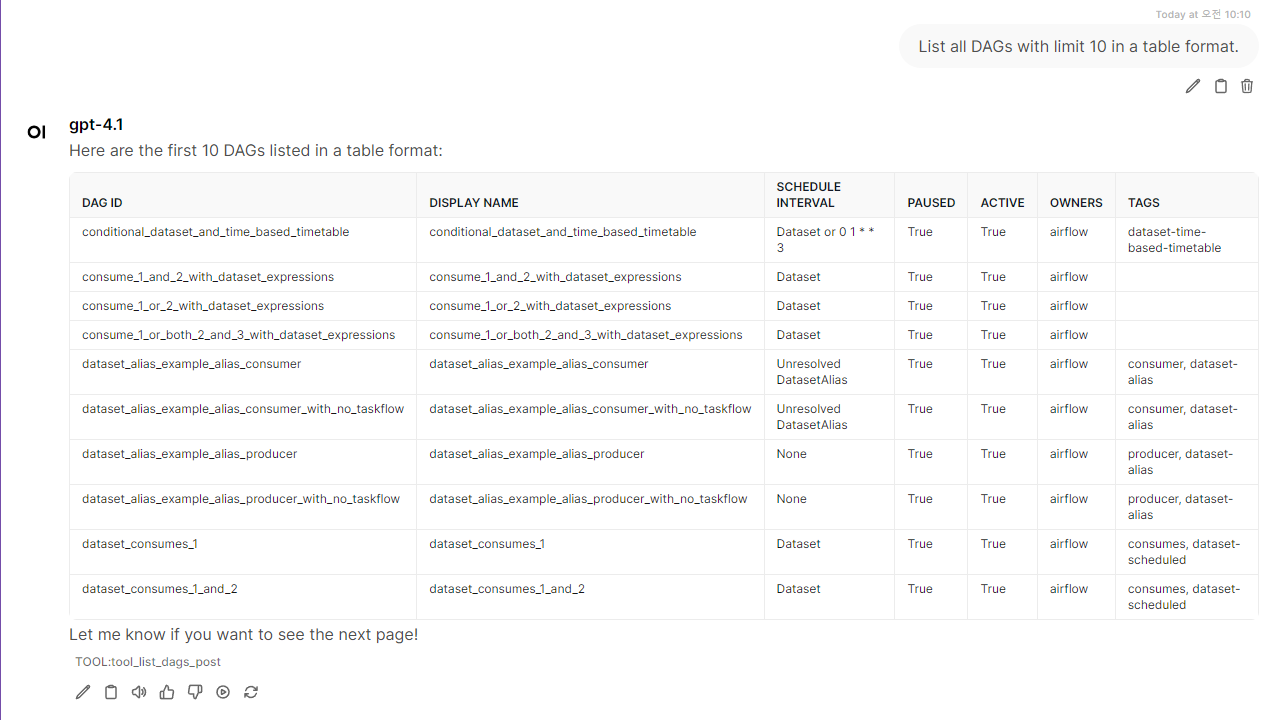
- list_dags: "List all DAGs with limit 10 in a table format." → Returns up to 10 DAGs
- list_dags: "List all DAGs a table format." → Returns up to All DAGs (WARN: Need High Tokens)
- list_dags: "Show next page of DAGs." → Use offset for pagination
- list_dags: "List DAGs 21-40." → `list_dags(limit=20, offset=20)`
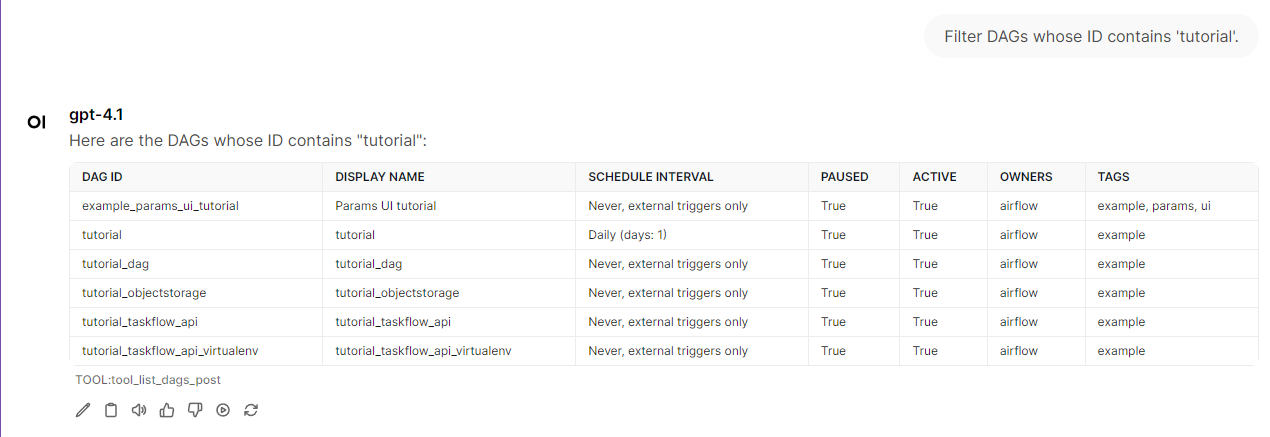
- list_dags: "Filter DAGs whose ID contains 'tutorial'." → `list_dags(id_contains="etl")`
- list_dags: "Filter DAGs whose display name contains 'tutorial'." → `list_dags(name_contains="daily")`
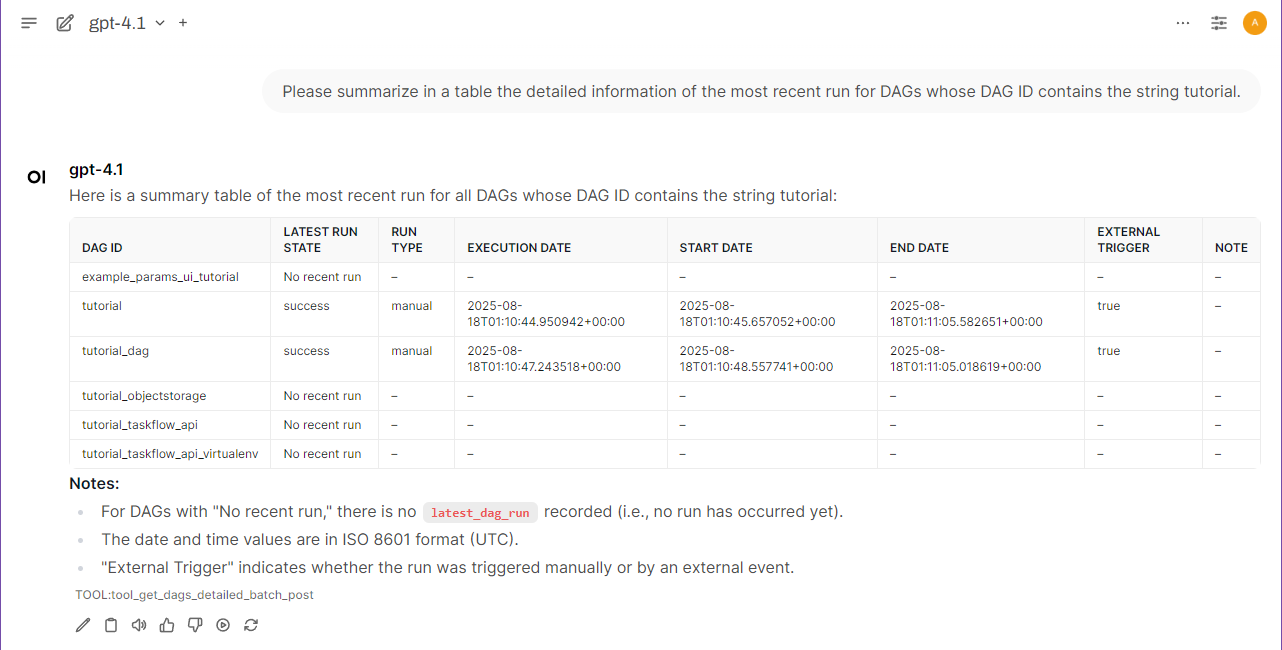
- get_dags_detailed_batch: "Get detailed information for all DAGs with execution status." → `get_dags_detailed_batch(fetch_all=True)`
- get_dags_detailed_batch: "Get details for active, unpaused DAGs with recent runs." → `get_dags_detailed_batch(is_active=True, is_paused=False)`
- get_dags_detailed_batch: "Get detailed info for DAGs containing 'example' with run history." → `get_dags_detailed_batch(id_contains="example", limit=50)`
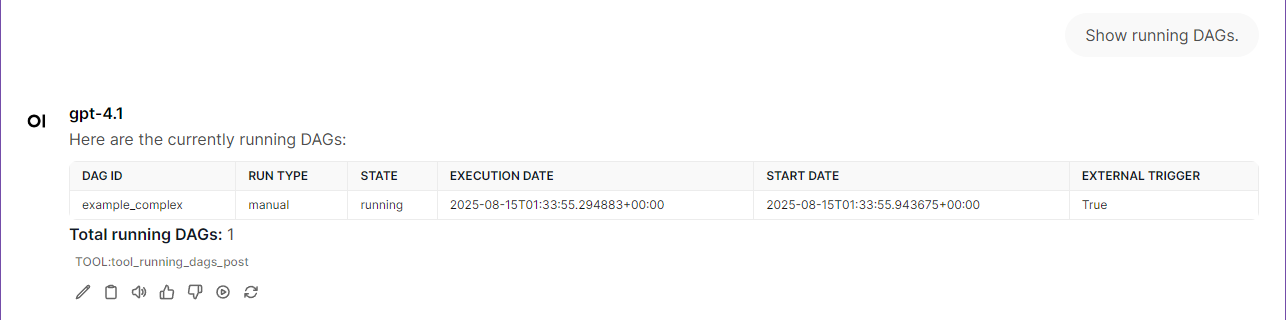
- running_dags: "Show running DAGs."
- failed_dags: "Show failed DAGs."
- trigger_dag: "Trigger DAG 'example_complex'."
- pause_dag: "Pause DAG 'example_complex' in a table format."
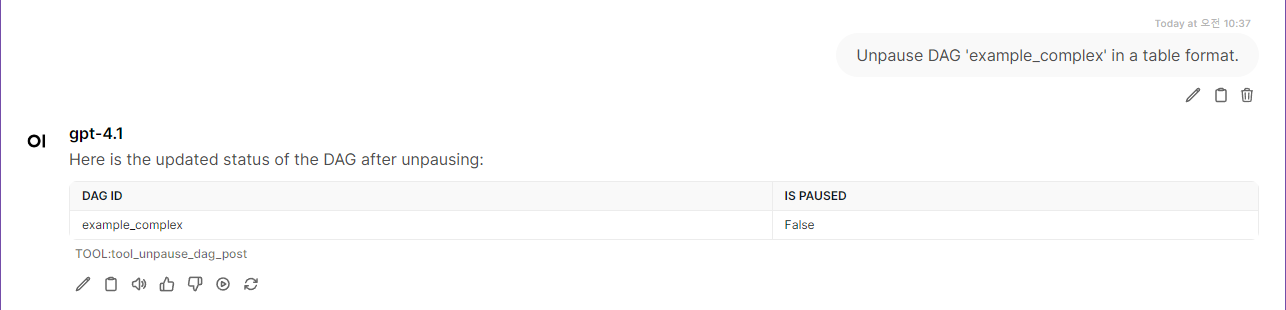
- unpause_dag: "Unpause DAG 'example_complex' in a table format."
Cluster Management & Health
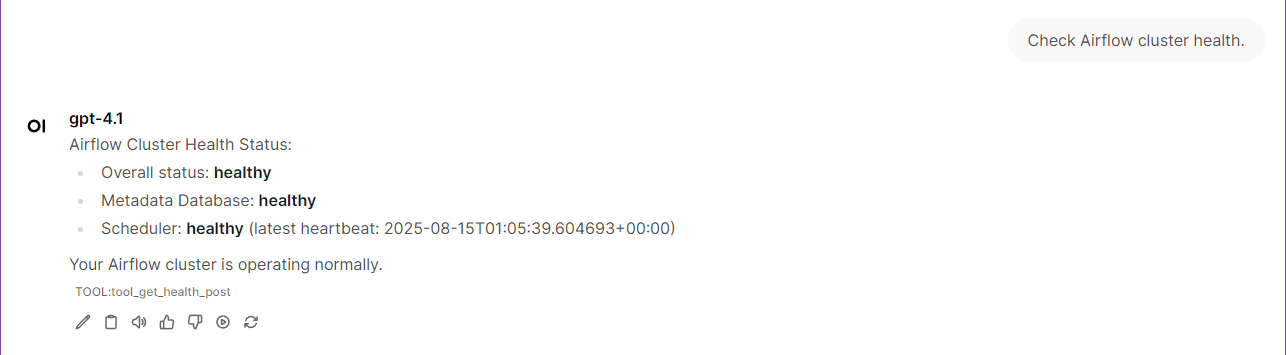
- get_health: "Check Airflow cluster health."
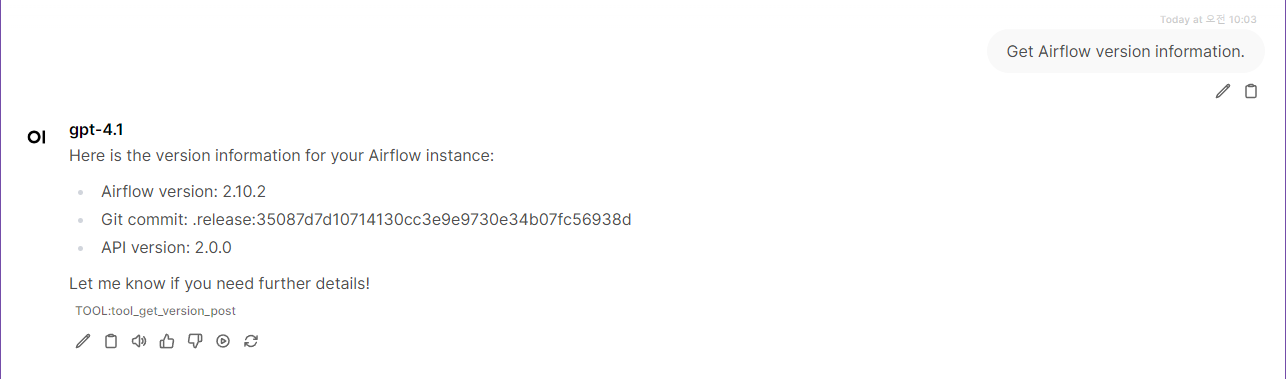
- get_version: "Get Airflow version information."
Pool Management
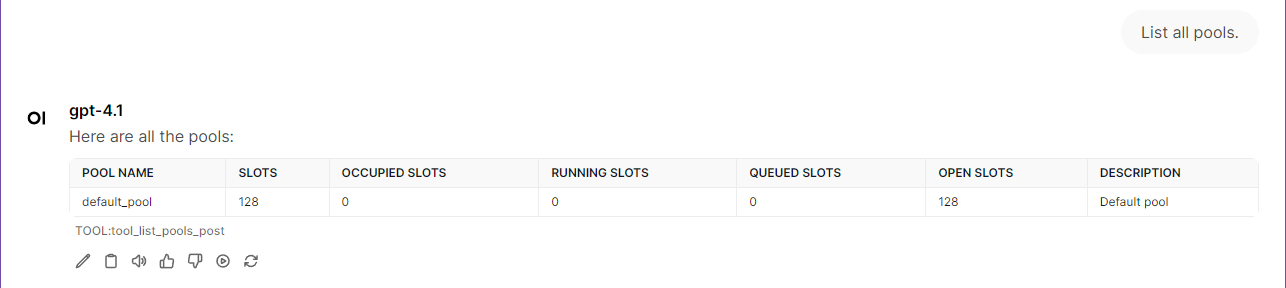
- list_pools: "List all pools."
- list_pools: "Show pool usage statistics."
- get_pool: "Get details for pool 'default_pool'."
- get_pool: "Check pool utilization."
Variable Management
- list_variables: "List all variables."
- list_variables: "Show all Airflow variables with their values."
- get_variable: "Get variable 'database_url'."
- get_variable: "Show the value of variable 'api_key'."
Task Instance Management
- list_task_instances_all: "List all task instances for DAG 'example_complex'."
- list_task_instances_all: "Show running task instances."
- list_task_instances_all: "Show task instances filtered by pool 'default_pool'."
- list_task_instances_all: "List task instances with duration greater than 300 seconds."
- list_task_instances_all: "Show failed task instances from last week."
- list_task_instances_all: "List failed task instances from yesterday."
- list_task_instances_all: "Show task instances that started after 9 AM today."
- list_task_instances_all: "List task instances from the last 3 days with state 'failed'."
- get_task_instance_details: "Get details for task 'data_processing' in DAG 'example_complex' run 'scheduled__xxxxx'."
- list_task_instances_batch: "List failed task instances from last month."
- list_task_instances_batch: "Show task instances in batch for multiple DAGs from this week."
- get_task_instance_extra_links: "Get extra links for task 'data_processing' in latest run."
- get_task_instance_logs: "Retrieve logs for task 'create_entry_gcs' try number 2 of DAG 'example_complex'."
XCom Management
- list_xcom_entries: "List XCom entries for task 'data_processing' in DAG 'example_complex' run 'scheduled__xxxxx'."
- list_xcom_entries: "Show all XCom entries for task 'data_processing' in latest run."
- get_xcom_entry: "Get XCom entry with key 'result' for task 'data_processing' in specific run."
- get_xcom_entry: "Retrieve XCom value for key 'processed_count' from task 'data_processing'."
Configuration Management
- get_config: "Show all Airflow configuration sections and options." → Returns complete config or 403 if expose_config=False
- list_config_sections: "List all configuration sections with summary information."
- get_config_section: "Get all settings in 'core' section." → `get_config_section("core")`
- get_config_section: "Show webserver configuration options." → `get_config_section("webserver")`
- search_config_options: "Find all database-related configuration options." → `search_config_options("database")`
- search_config_options: "Search for timeout settings in configuration." → `search_config_options("timeout")`
Important: Configuration tools require `expose_config = True` in airflow.cfg `[webserver]` section. Even admin users get 403 errors if this is disabled.
DAG Analysis & Monitoring
- get_dag: "Get details for DAG 'example_complex'."
- get_dags_detailed_batch: "Get comprehensive details for all DAGs with execution history." → `get_dags_detailed_batch(fetch_all=True)`
- get_dags_detailed_batch: "Get details for active DAGs with latest run information." → `get_dags_detailed_batch(is_active=True)`
- get_dags_detailed_batch: "Get detailed info for ETL DAGs with recent execution data." → `get_dags_detailed_batch(id_contains="etl")`
Note: `get_dags_detailed_batch` returns each DAG with both configuration details (from `get_dag()`) and a `latest_dag_run` field containing the most recent execution information (run_id, state, execution_date, start_date, end_date, etc.).
- dag_graph: "Show task graph for DAG 'example_complex'."
- list_tasks: "List all tasks in DAG 'example_complex'."
- dag_code: "Get source code for DAG 'example_complex'."
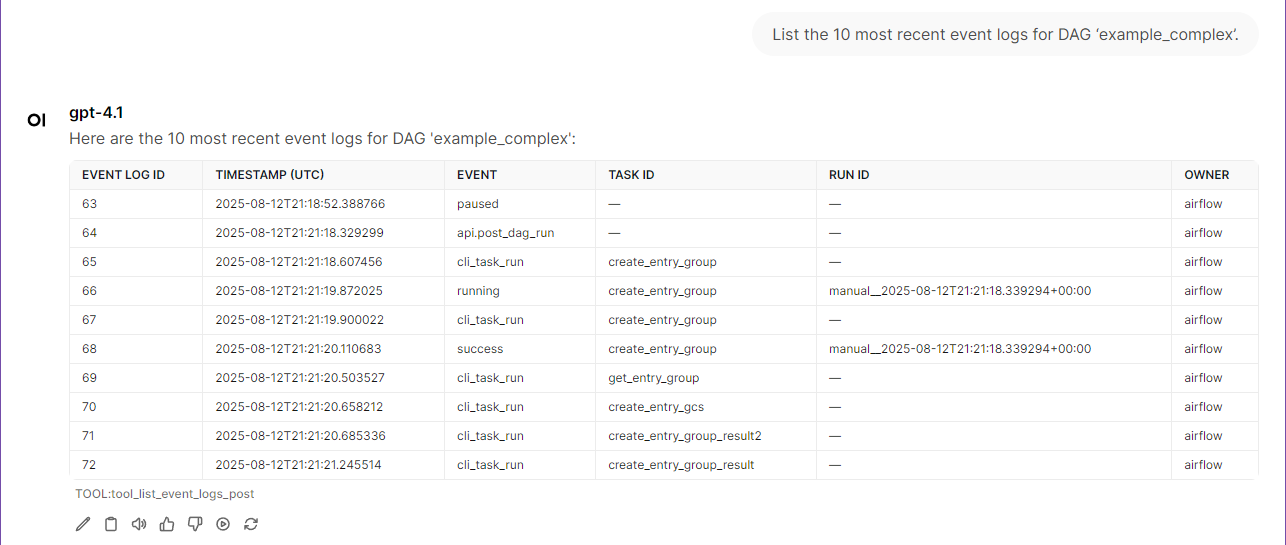
- list_event_logs: "List event logs for DAG 'example_complex'."
- list_event_logs: "Show event logs with ID from yesterday for all DAGs."
- get_event_log: "Get event log entry with ID 12345."
- all_dag_event_summary: "Show event count summary for all DAGs."
- list_import_errors: "List import errors with ID."
- get_import_error: "Get import error with ID 67890."
- all_dag_import_summary: "Show import error summary for all DAGs."
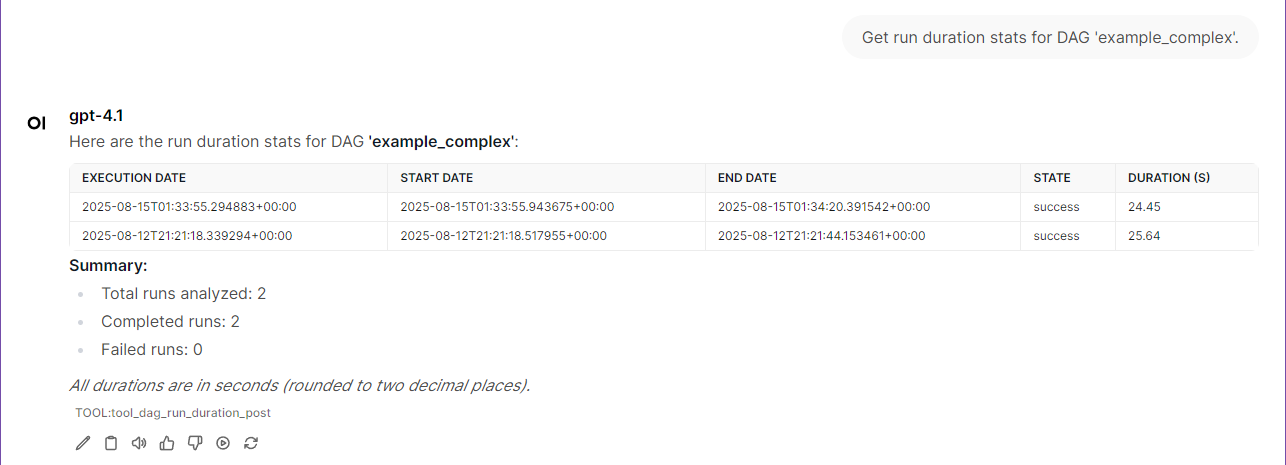
- dag_run_duration: "Get run duration stats for DAG 'example_complex'."
- dag_task_duration: "Show latest run of DAG 'example_complex'."
- dag_task_duration: "Show task durations for latest run of 'manual__xxxxx'."
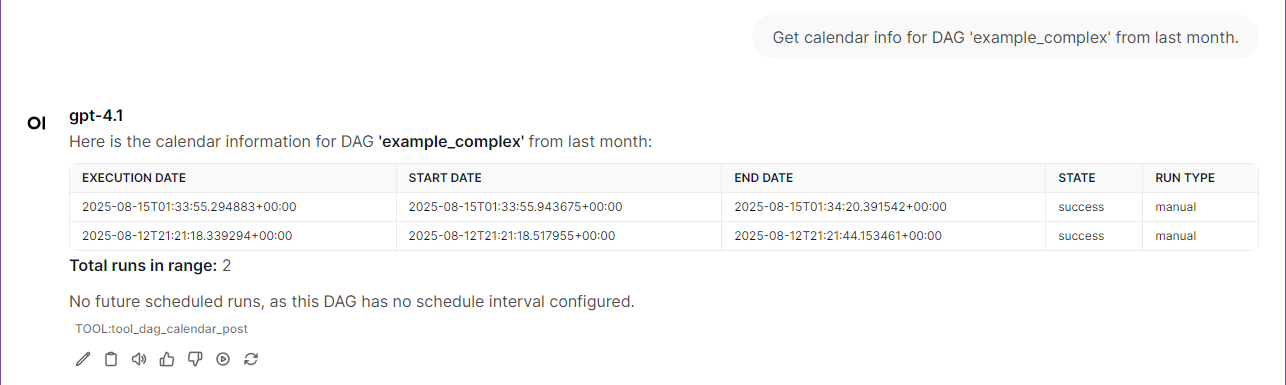
- dag_calendar: "Get calendar info for DAG 'example_complex' from last month."
- dag_calendar: "Show DAG schedule for 'example_complex' from this week."
Date Calculation Examples
Tools automatically base relative date calculations on the server's current date/time:
| User Input | Calculation Method | Example Format |
|---|---|---|
| "yesterday" | current_date - 1 day | YYYY-MM-DD (1 day before current) |
| "last week" | current_date - 7 days to current_date - 1 day | YYYY-MM-DD to YYYY-MM-DD (7 days range) |
| "last 3 days" | current_date - 3 days to current_date | YYYY-MM-DD to YYYY-MM-DD (3 days range) |
| "this morning" | current_date 00:00 to 12:00 | YYYY-MM-DDTHH:mm:ssZ format |
The server always uses its current date/time for these calculations.
Asset Management (API v2 Only)
Available only when `AIRFLOW_API_VERSION=v2` (Airflow 3.0+):
- list_assets: "Show all assets registered in the system." → Lists all data assets for data-aware scheduling
- list_assets: "Find assets with URI containing 's3://data-lake'." → `list_assets(uri_pattern="s3://data-lake")`
- list_asset_events: "Show recent asset events." → Lists when assets were created or updated
- list_asset_events: "Show asset events for specific URI." → `list_asset_events(asset_uri="s3://bucket/file.csv")`
- list_asset_events: "Find events produced by ETL DAGs." → `list_asset_events(source_dag_id="etl_pipeline")`
Data-Aware Scheduling Examples:
- "Show me which assets trigger the customer_analysis DAG."
- "List all assets created by the data_ingestion DAG this week."
- "Find assets that haven't been updated recently."
- "Show the data lineage for our ML training pipeline."
Contributing
🤝 Got ideas? Found bugs? Want to add cool features?
We're always excited to welcome new contributors! Whether you're fixing a typo, adding a new monitoring tool, or improving documentation - every contribution makes this project better.
Ways to contribute:
- 🐛 Report issues or bugs
- 💡 Suggest new Airflow monitoring features
- 📝 Improve documentation
- 🚀 Submit pull requests
- ⭐ Star the repo if you find it useful!
Pro tip: The codebase is designed to be super friendly for adding new tools. Check out the existing `@mcp.tool()` functions in `airflow_api.py`.
🛠️ Adding Custom Tools (Advanced)
This MCP server is designed for easy extensibility. After you have explored the main features and Quickstart, you can add your own custom tools as follows:
Step-by-Step Guide
1. Add Helper Functions (Optional)
Add reusable data functions to `src/mcp_airflow_api/functions.py`:
async def get_your_custom_data(target_resource: str = None) -> List[Dict[str, Any]]:
  """Your custom data retrieval function."""
  # Example implementation - adapt to your service
  data_source = await get_data_connection(target_resource)
  results = await fetch_data_from_source(
    source=data_source,
    filters=your_conditions,
    aggregations=["count", "sum", "avg"],
    sorting=["count DESC", "timestamp ASC"]
  )
  return results
2. Create Your MCP Tool
Add your tool function to `src/mcp_airflow_api/airflow_api.py`:
@mcp.tool()
async def get_your_custom_analysis(limit: int = 50, target_name: Optional[str] = None) -> str:
  """
  [Tool Purpose]: Brief description of what your tool does

  [Exact Functionality]:
  - Feature 1: Data aggregation and analysis
  - Feature 2: Resource monitoring and insights
  - Feature 3: Performance metrics and reporting

  [Required Use Cases]:
  - When user asks "your specific analysis request"
  - Your business-specific monitoring needs

  Args:
    limit: Maximum results (1-100)
    target_name: Target resource/service name

  Returns:
    Formatted analysis results
  """
  try:
    limit = max(1, min(limit, 100))  # Always validate input
    results = await get_your_custom_data(target_resource=target_name)
    if results:
      results = results[:limit]
    return format_table_data(results, f"Custom Analysis (Top {len(results)})")
  except Exception as e:
    logger.error(f"Failed to get custom analysis: {e}")
    return f"Error: {str(e)}"
3. Update Imports (If Needed)
Add your helper function to imports in `src/mcp_airflow_api/airflow_api.py`:
from .functions import (
  # ...existing imports...
  get_your_custom_data,  # Add your new function
)
4. Update Prompt Template (Recommended)
Add your tool description to `src/mcp_airflow_api/prompt_template.md` for better natural language recognition:
### **Your Custom Analysis Tool**

### X. **get_your_custom_analysis**
**Purpose**: Brief description of what your tool does
**Usage**: "Show me your custom analysis" or "Get custom analysis for database_name"
**Features**: Data aggregation, resource monitoring, performance metrics
**Required**: `target_name` parameter for specific resource analysis
5. Test Your Tool
# Local testing
./scripts/run-mcp-inspector-local.sh

# Or with Docker
docker-compose up -d
docker-compose logs -f mcp-server

# Test with natural language:
# "Show me your custom analysis"
# "Get custom analysis for target_name"
That's it! Your custom tool is ready to use with natural language queries.
License
Freely use, modify, and distribute under the MIT License.
Frequently asked questions
What is mcp-airflow-api?
mcp-airflow-api is 🔍Model Context Protocol (MCP) server for Apache Airflow API integration. Provides comprehensive tools for managing Airflow clusters including service operations, configuration management, status monitoring, and request tracking.
How do I install mcp-airflow-api?
Open the GitHub repository and follow its README. Most MCP servers are added to your client's MCP config, then called by your agent.
Is mcp-airflow-api open source?
Yes — it is hosted on GitHub at https://github.com/call518/MCP-Airflow-API and has 42 stars.
Related MCP tools
 mcp-agent
Build effective agents using Model Context Protocol and simple workflow patterns Python-based implementation. Trusted by 7600+ developers.
 mcp
mcpAWS MCP Servers — helping you get the most out of AWS, wherever you use MCP. Python-based implementation. Trusted by 6900+ developers.
 mcpo
mcpoA simple, secure MCP-to-OpenAPI proxy server Python-based implementation. Trusted by 3500+ developers. Trusted by 3500+ developers.
 minimax-mcp
Official MiniMax Model Context Protocol (MCP) server that enables interaction with powerful Text to Speech, image generation and video generation APIs.
 minima
On-premises conversational RAG with configurable containers for the Model Context Protocol. Enhance AI assistants with powerful integrations.
 mcp-bridge
A middleware to provide an openAI compatible endpoint that can call MCP tools Python-based implementation. Trusted by 800+ developers.
Run your own MCP server? See who uses it and what to fix.
Measure it with TrackMCP