
mcp-command-proxy
Documentation
MCP Command Proxy
An MCP (Model Context Protocol) server that acts as a proxy for CLI commands, specifically designed for Expo development but adaptable for any command-line application.
How to use in Cursor (Expo example)
1. Go to the directory of your Expo project
2. Run `npx mcp-command-proxy --prefix "ExpoServer" --command "expo start" --port 8383`
3. Go to Cursor settings -> MCP -> +Add new MCP server, like this:
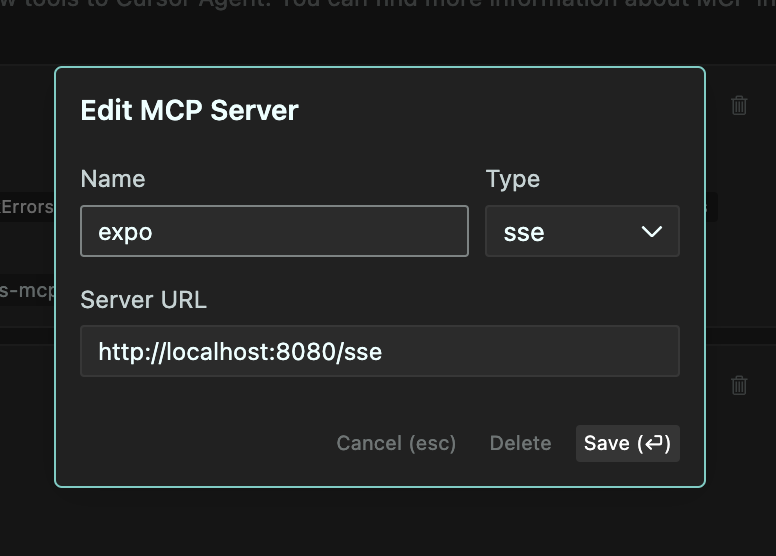
4. Set the name to "ExpoServer", Type to "SSE", URL to `http://localhost:8383/sse`
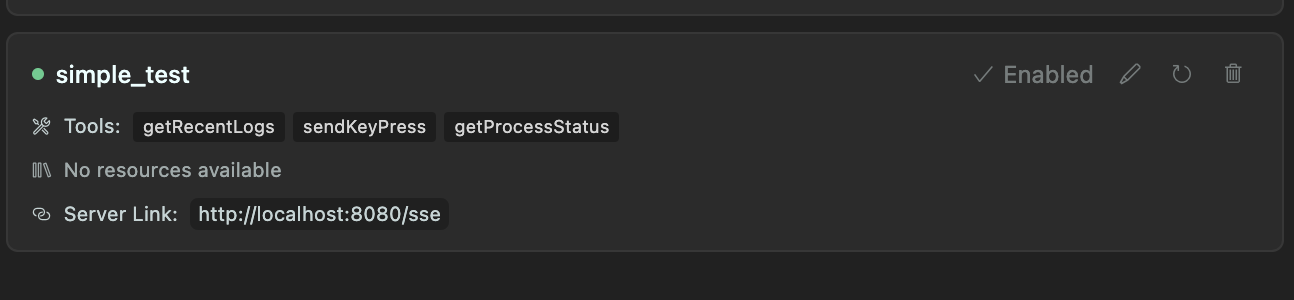
5. Click "Save" and you should now be able to use the MCP server in Cursor. Like this:
Recommended to use the `--port 8383` flag to avoid conflicts with other servers.
Also, you can add following instruction to .cursorrules file:
You can use MCP getRecentLogs tool to get the most recent logs from Expo server. And if needed, you can send key presses to the running process using sendKeyPress tool.Features
- Command Proxying: Run any CLI command through the MCP server
- Log Collection: Capture and store logs from running processes (configurable buffer size)
- Key Press Forwarding: Forward key presses from client to the running process
- Transparent Experience: The end user sees the command output exactly as if they ran it directly
- Interactive Commands: Works with interactive CLI tools like Expo
- MCP Integration: Built using the MCP SDK for easy integration with Claude and other MCP-enabled AI assistants
How It Works
1. The server starts a specified command in a pseudo-terminal (PTY)
2. All stdout/stderr output is:
3. Key presses from the client are forwarded to the running process
4. The server provides tools to:
Use Cases
- Expo Development: Run `expo start` and interact with it while collecting logs
- Build Processes: Monitor build processes and analyze logs
- Long-running Services: Monitor services and keep recent log history
- Remote Command Execution: Execute and monitor commands from remote clients
Requirements
- Node.js 18+
- TypeScript
- pnpm (recommended) or npm
Installation
# Install dependencies
pnpm install

# Build the project
pnpm build

# Run directly
pnpm start -- --prefix "MyServer" --command "expo start"

# Or install globally
pnpm install -g
mcp-command-proxy --prefix "MyServer" --command "expo start"
Usage
Basic Usage
# Using the CLI
mcp-command-proxy --prefix "ExpoServer" --command "expo start"

# Or programmatically
import { createServer } from 'mcp-command-proxy';

const server = await createServer({
  prefix: 'ExpoServer',
  command: 'expo start',
  bufferSize: 500,
  port: 8080
});

// To stop the server later
server.stop();
Options
- `--prefix, -p`: Name/prefix for the server (default: "CommandProxy")
- `--command, -c`: Command to run (required)
- `--buffer-size, -b`: Number of log lines to keep in memory (default: 300)
- `--port`: Port for HTTP server (default: 8080)
- `--help, -h`: Show help
MCP Integration
This server implements the following MCP tools:
1. `getRecentLogs`: Returns the most recent logs from the buffer
2. `sendKeyPress`: Sends a key press to the running process
3. `getProcessStatus`: Returns the current status of the process
Examples
Running Expo Start
mcp-command-proxy -p "ExpoServer" -c "expo start" -b 500Using with Claude
1. Configure Claude to connect to this MCP server (SSE endpoint: http://localhost:8080/sse)
2. Ask Claude to run Expo or other commands
3. Claude can analyze logs and help troubleshoot issues
Development
# Clone the repository
git clone https://github.com/hormold/mcp-command-proxy.git
cd mcp-command-proxy

# Install dependencies
pnpm install

# Build the project
pnpm build

# Run in development mode
pnpm dev
License
MIT
Frequently asked questions
What is mcp-command-proxy?
mcp-command-proxy is a Model Context Protocol (MCP) server listed in the TrackMCP directory.
How do I install mcp-command-proxy?
Open the GitHub repository and follow its README. Most MCP servers are added to your client's MCP config, then called by your agent.
Is mcp-command-proxy open source?
Yes — it is hosted on GitHub at https://github.com/hormold/mcp-command-proxy and has 10 stars.
Related MCP tools
 mcp-remote
Connect an MCP Client that only supports local (stdio) servers to a Remote MCP Server, with auth support: TypeScript-based implementation.
 mcp-get
- Discover available MCP servers from our curated registry TypeScript-based implementation.
 cherry-studio
🍒 Cherry Studio is a desktop client that supports for multiple LLM providers. Built for the Model Context Protocol to enhance AI capabilities.
 librechat
Enhanced ChatGPT Clone: Features Agents, MCP, DeepSeek, Anthropic, AWS, OpenAI, Responses API, Azure, Groq, o1, GPT-5, Mistral, OpenRouter, Vertex AI, Gemini...
 fastgpt
FastGPT is a knowledge-based platform built on the LLMs, offers a comprehensive suite of out-of-the-box capabilities such as data processing, RAG retrieval, ...
 composio
Composio equips your AI agents & LLMs with 100+ high-quality integrations via function calling for the Model Context Protocol. Enhance AI assistants with powerf
Run your own MCP server? See who uses it and what to fix.
Measure it with TrackMCP