
mcp-scholarly
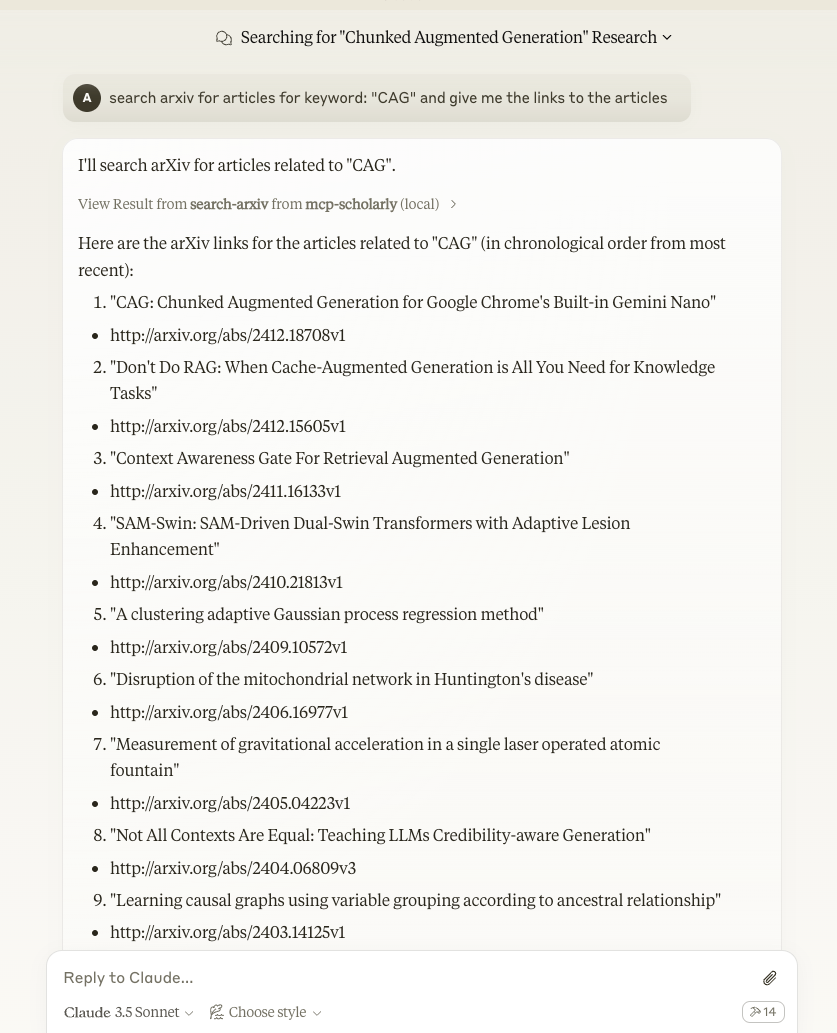
A MCP server to search for accurate academic articles. Python-based implementation.
Documentation

mcp-scholarly MCP server
A MCP server to search for accurate academic articles. More scholarly vendors will be added soon.
Search tools
- `search-arxiv` — arXiv search (no key needed)
- `search-google-scholar` — Google Scholar via the `scholarly` library (free proxy pool)
- `search-google-web` — Google web search via the SerpBase API. Optional; only registered when `SERPBASE_API_KEY` is set. Get a key at https://serpbase.dev/dashboard/api-keys (free tier available).
Components
Tools
The server implements one tool:
- search-arxiv: Search arxiv for articles related to the given keyword.
- Takes "keyword" as required string arguments
Quickstart
Install
Claude Desktop
On MacOS: `~/Library/Application\ Support/Claude/claude_desktop_config.json`
On Windows: `%APPDATA%/Claude/claude_desktop_config.json`
Development/Unpublished Servers Configuration
"mcpServers": {
    "mcp-scholarly": {
      "command": "uv",
      "args": [
        "--directory",
        "/Users/adityakarnam/PycharmProjects/mcp-scholarly/mcp-scholarly",
        "run",
        "mcp-scholarly"
      ]
    }
  }
Published Servers Configuration
"mcpServers": {
    "mcp-scholarly": {
      "command": "uvx",
      "args": [
        "mcp-scholarly"
      ]
    }
  }
or if you are using Docker
Published Docker Servers Configuration
"mcpServers": {
    "mcp-scholarly": {
      "command": "docker",
      "args": [
        "run", "--rm", "-i",
        "mcp/scholarly"
      ]
    }
  }
Installing via Smithery
To install mcp-scholarly for Claude Desktop automatically via Smithery:
npx -y @smithery/cli install mcp-scholarly --client claudeDevelopment
Building and Publishing
To prepare the package for distribution:
1. Sync dependencies and update lockfile:
uv sync2. Build package distributions:
uv buildThis will create source and wheel distributions in the `dist/` directory.
3. Publish to PyPI:
uv publishNote: You'll need to set PyPI credentials via environment variables or command flags:
- Token: `--token` or `UV_PUBLISH_TOKEN`
- Or username/password: `--username`/`UV_PUBLISH_USERNAME` and `--password`/`UV_PUBLISH_PASSWORD`
Debugging
Since MCP servers run over stdio, debugging can be challenging. For the best debugging
experience, we strongly recommend using the MCP Inspector.
You can launch the MCP Inspector via `npm` with this command:
npx @modelcontextprotocol/inspector uv --directory /Users/adityakarnam/PycharmProjects/mcp-scholarly/mcp-scholarly run mcp-scholarlyUpon launching, the Inspector will display a URL that you can access in your browser to begin debugging.
Using with zorp
zorp needs a search-capable MCP tool
before `validate` will run. This server satisfies that check, because zorp
matches on a search verb in the tool name and these tools are called
`search-arxiv` and `search-google-scholar`.
zorp-agent --yes \
  --mcp "stdio:scholarly:uv:run:mcp-scholarly" \
  validate ""
Or configure it once, so every run picks it up:
# .zorp/mcp.toml
[[server]]
name = "scholarly"
transport = "stdio"
command = "uv"
args = ["run", "mcp-scholarly"]
trust = "sandbox"
timeout_secs = 60
Notes measured against zorp's transport, not assumed:
- `search-arxiv` answers in about 1 second. zorp's default stdio read
budget is 30 seconds, so the default is comfortable. `timeout_secs = 60`
above is headroom for `search-google-scholar`, which goes through
`scholarly` and a free proxy pool and is far less predictable.
- Logging goes to stderr. Nothing but JSON-RPC reaches stdout, which is
what zorp's newline-delimited framing requires.
- An empty keyword comes back as an MCP tool error rather than an empty
result set. zorp cares about that distinction: a failed search that
looks like "no prior work" would put a wrong novelty score into an
evidence record.
- arxiv returns best-effort matches for any query, including nonsense, so
a non-empty result set is not by itself evidence that prior work exists.
The tool description says so, since that is the text the model reads.
Frequently asked questions
What is mcp-scholarly?
mcp-scholarly is A MCP server to search for accurate academic articles. Python-based implementation.
How do I install mcp-scholarly?
Open the GitHub repository and follow its README. Most MCP servers are added to your client's MCP config, then called by your agent.
Is mcp-scholarly open source?
Yes — it is hosted on GitHub at https://github.com/adityak74/mcp-scholarly and has 160 stars.
Related MCP tools
 damn-vulnerable-mcp-server
Damn Vulnerable MCP Server Python-based implementation. Trusted by 1200+ developers. Trusted by 1200+ developers. Trusted by 1200+ developers.
 mysql_mcp_server
A Model Context Protocol (MCP) server that enables secure interaction with MySQL databases Python-based implementation. Trusted by 900+ developers.
 supabase-mcp-server
Query MCP enables end-to-end management of Supabase via chat interface: read & write query executions, management API support, automatic migration versioning...
 mcp-neo4j
Model Context Protocol with Neo4j Python-based implementation. Trusted by 700+ developers. Trusted by 700+ developers. Trusted by 700+ developers.
 android-mcp-server
An MCP server that provides control over Android devices via adb Python-based implementation. Trusted by 500+ developers.
 pg-mcp-server
A Model Context Protocol (MCP) server for PostgreSQL databases with enhanced capabilities for AI agents. Python-based implementation.
Run your own MCP server? See who uses it and what to fix.
Measure it with TrackMCP