
mcp-sentry
A Model Context Protocol server for retrieving and analyzing issues from Sentry.io
Documentation
mcp-sentry: A Sentry MCP server
Overview
A Model Context Protocol server for retrieving and analyzing issues from Sentry.io. This server provides tools to inspect error reports, stacktraces, and other debugging information from your Sentry account.
Tools
1. `get_sentry_issue`
2. `get_list_issues`
Prompts
1. `sentry-issue`
Installation
Installing via Smithery
To install mcp-sentry for Claude Desktop automatically via Smithery:
npx -y @smithery/cli install @qianniuspace/mcp-sentry --client claudeUsing uv (recommended)
When using `uv` no specific installation is needed. We will
use `uvx` to directly run *mcp-sentry*.
Using PIP
Alternatively you can install `mcp-sentry` via pip:
pip install mcp-sentryor use uv
uv pip install -e .After installation, you can run it as a script using:
python -m mcp_sentryConfiguration
Usage with Claude Desktop
Add this to your `claude_desktop_config.json`:
Using uvx
"mcpServers": {
  "sentry": {
    "command": "uvx",
    "args": ["mcp-sentry", "--auth-token", "YOUR_SENTRY_TOKEN","--project-slug" ,"YOUR_PROJECT_SLUG", "--organization-slug","YOUR_ORGANIZATION_SLUG"]
  }
}
Using docker
"mcpServers": {
  "sentry": {
    "command": "docker",
    "args": ["run", "-i", "--rm", "mcp/sentry", "--auth-token", "YOUR_SENTRY_TOKEN","--project-slug" ,"YOUR_PROJECT_SLUG", "--organization-slug","YOUR_ORGANIZATION_SLUG"]
  }
}
Using pip installation
"mcpServers": {
  "sentry": {
    "command": "python",
    "args": ["-m", "mcp_sentry", "--auth-token", "YOUR_SENTRY_TOKEN","--project-slug" ,"YOUR_PROJECT_SLUG", "--organization-slug","YOUR_ORGANIZATION_SLUG"]
  }
}
Usage with Zed
Add to your Zed settings.json:
Using uvx
"context_servers": [
  "mcp-sentry": {
    "command": {
      "path": "uvx",
      "args": ["mcp-sentry", "--auth-token", "YOUR_SENTRY_TOKEN","--project-slug" ,"YOUR_PROJECT_SLUG", "--organization-slug","YOUR_ORGANIZATION_SLUG"]
    }
  }
],
Using pip installation
"context_servers": {
  "mcp-sentry": {
    "command": "python",
    "args": ["-m", "mcp_sentry", "--auth-token", "YOUR_SENTRY_TOKEN","--project-slug" ,"YOUR_PROJECT_SLUG", "--organization-slug","YOUR_ORGANIZATION_SLUG"]
  }
},
Using pip installation with custom path
"context_servers": {
  "sentry": {
      "command": "python",
      "args": [
        "-m",
        "mcp_sentry",
        "--auth-token",
        "YOUR_SENTRY_TOKEN",
        "--project-slug",
        "YOUR_PROJECT_SLUG",
        "--organization-slug",
        "YOUR_ORGANIZATION_SLUG"
      ],
      "env": {
        "PYTHONPATH": "path/to/mcp-sentry/src"
      }
    }
},
Debugging
You can use the MCP inspector to debug the server. For uvx installations:
npx @modelcontextprotocol/inspector uvx mcp-sentry --auth-token YOUR_SENTRY_TOKEN --project-slug YOUR_PROJECT_SLUG --organization-slug YOUR_ORGANIZATION_SLUGOr if you've installed the package in a specific directory or are developing on it:
cd path/to/servers/src/sentry
npx @modelcontextprotocol/inspector uv run mcp-sentry --auth-token YOUR_SENTRY_TOKEN --project-slug YOUR_PROJECT_SLUG --organization-slug YOUR_ORGANIZATION_SLUG
or in term
npx @modelcontextprotocol/inspector uv --directory /Volumes/ExtremeSSD/MCP/mcp-sentry/src run mcp_sentry --auth-token YOUR_SENTRY_TOKEN
--project-slug YOUR_PROJECT_SLUG --organization-slug YOUR_ORGANIZATION_SLUG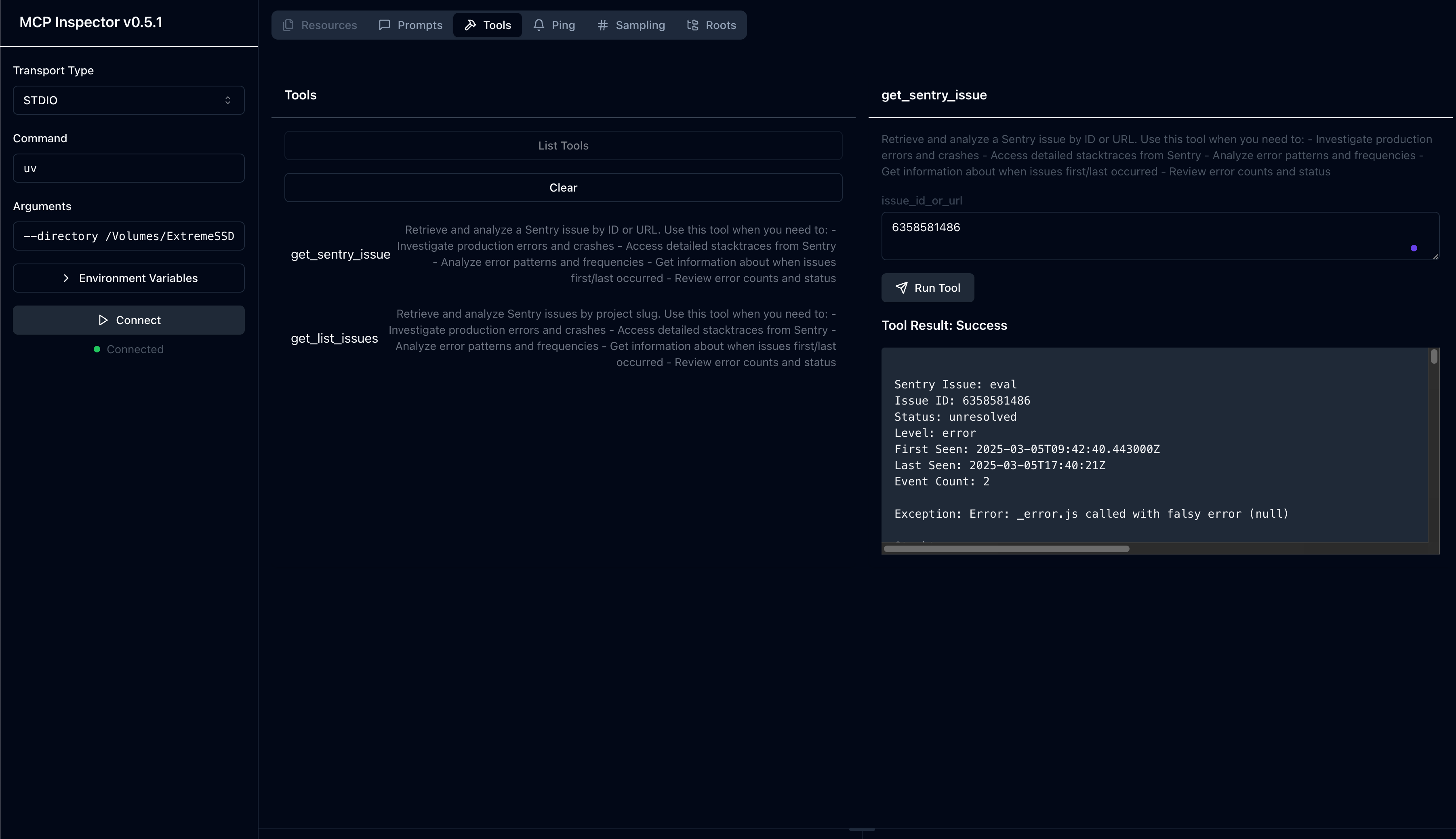
Fork From
License
This MCP server is licensed under the MIT License. This means you are free to use, modify, and distribute the software, subject to the terms and conditions of the MIT License. For more details, please see the LICENSE file in the project repository.
Frequently asked questions
What is mcp-sentry?
mcp-sentry is A Model Context Protocol server for retrieving and analyzing issues from Sentry.io
How do I install mcp-sentry?
Open the GitHub repository and follow its README. Most MCP servers are added to your client's MCP config, then called by your agent.
Is mcp-sentry open source?
Yes — it is hosted on GitHub at https://github.com/MCP-100/mcp-sentry and has 21 stars.
Related MCP tools
 gpt-researcher
An LLM agent that conducts deep research (local and web) on any given topic and generates a long report with citations. Built for the Model Context Protocol to
 web-agent-protocol
🌐Web Agent Protocol (WAP) - Record and replay user interactions in the browser with MCP support Python-based implementation.
 fastmcp
🚀 The fast, Pythonic way to build MCP servers and clients Trusted by 19900+ developers. Trusted by 19900+ developers. Trusted by 19900+ developers.
 fastapi_mcp
Expose your FastAPI endpoints as Model Context Protocol (MCP) tools, with Auth! Python-based implementation. Trusted by 11000+ developers.
 mcp-agent
Build effective agents using Model Context Protocol and simple workflow patterns Python-based implementation. Trusted by 7600+ developers.
 ida-pro-mcp
AI-powered reverse engineering assistant that bridges IDA Pro with language models through MCP. Python-based implementation. Trusted by 4100+ developers.
Run your own MCP server? See who uses it and what to fix.
Measure it with TrackMCP